
Categories
Salesforce

Agentforce for Sustainability: What It Automates, What It Costs, and Where It Stops

In today’s world, sustainability is no longer optional – it’s essential. From reducing emissions to achieving ESG (Environmental, Social, and Governance) targets, organizations are under increasing pressure to rethink their operations and environmental impact. Enter Agentforce, a revolutionary AI-driven framework integrated with Salesforce that empowers sustainability professionals with real-time insights, intelligent automation, and data-driven strategies for climate action.

This article explores how Agentforce transforms sustainability initiatives, its practical use cases, Salesforce’s own success with emissions insights, key considerations for organizations, and what the future holds. Let’s dive deep into how you can leverage Agentforce for a greener, smarter, and more sustainable future.

How Agentforce Empowers Sustainability Professionals

Agentforce is the intelligent AI layer of the Salesforce Platform that brings the power of autonomous digital workers to every corner of your business. Since August 2026, following the Claudeforce partnership, Claude is the default reasoning model behind that layer. These AI-driven assistants are perfect for handling time-consuming, data-heavy tasks, especially valuable for sustainability professionals who manage complex reports and large volumes of ESG data.

With Agentforce, you can streamline your workload, uncover valuable insights faster, and create more accurate, comprehensive sustainability reports with ease.

Hearst, a global leader in media and services, is already exploring how Agentforce can automate ESG tasks, enhance data accuracy, and strengthen its sustainability commitment. It’s not just about efficiency – it’s about transforming how sustainability goals are achieved.

Business Outcomes with Smart AI Integration

Because Agentforce works across all Salesforce applications, it connects ESG data with every part of your business, creating powerful opportunities to improve both performance and sustainability.

Cut Costs Efficiently

  • Smarter logistics: Reduce fuel and labor costs by optimizing truck routes through shared emissions data with Service Cloud. (Companies are already reducing truck rolls by up to 26%!)
  • Energy savings: Uncover decarbonization opportunities in water and energy usage.
  • Time savings: Automate data collection and reporting, freeing up employees for higher-value work.

Drive Revenue Growth

  • Eco-conscious selling: Deliver product-level emissions data directly to your Commerce, Sales, and Marketing teams enabling personalized ads, sustainability messaging, and higher engagement.
  • Success in action: Will Solutions, an environmental firm, is using Sales Cloud to drive 5X revenue growth through smart ESG integration.

Real-World Use Cases: How Agentforce Supercharges Sustainability Work

Agentforce isn’t just smart AI – it’s your new sustainability sidekick. From simplifying complex queries to automating repetitive tasks, Agentforce empowers ESG teams to do more, faster. Let’s explore how:

Get Instant Answers with a Simple Question

Sustainability teams are constantly fielding questions from leadership, stakeholders, and partners. With Agentforce, you don’t have to dig through spreadsheets or reports, just ask a question and get clear, accurate insights in seconds.

For example:
“Which office had the highest emissions per square foot in FY25?”
“How much renewable energy (in MWh) did we source last year through RECs and PPAs?”

Top Use Cases Where Agentforce Makes a Difference

Supplier Engagement Made Easy
Automatically respond to supplier questionnaires, boosting both engagement and data accuracy without the back-and-forth.

Simplify RFP Responses
Easily showcase your environmental and social impact to prospects, tailoring your responses to what matters most to them.

Faster Stakeholder Communication
Quickly answer ad hoc ESG questions from investors, customers, or internal leaders – with data-backed confidence.

Smarter Program Planning
Access past performance data instantly so program managers can make smarter, faster decisions for future initiatives.

Automate ESG Reports with Ease

As global ESG regulations become stricter, reporting isn’t just good practice – it’s a necessity. But the process doesn’t have to be overwhelming. Agentforce, the AI engine of Salesforce, streamlines your ESG reporting so you stay compliant and confident.

Smart Snippet Management
Whether it’s for voluntary disclosures or required filings like 10-Ks, Agentforce can build, update, and store ready-to-use content snippets aligned with key frameworks like ESRS, SASB, CDP, and GRI. All snippets are stored for future use, saving time and ensuring consistency year after year.

Automated Reporting Tasks
No more manual edits! Agentforce updates your ESG content automatically, adds the right documentation, and creates a clean audit trail. It’s faster, more accurate, and always ready for review.

Built-In AI Governance
Agentforce works within responsible AI governance frameworks, giving you peace of mind that your ESG data is handled ethically and securely.

How Salesforce uses Agentforce for emissions insights

At Salesforce, we’re the first customer, or “Customer Zero,” of Net Zero Cloud. Like many other organizations, our sustainability team needs to access critical ESG insights quickly. Our partners and customers frequently reach out with questions about our ESG metrics, and internal stakeholders need answers as well. Looking up the metrics, performing calculations, and responding to requestors require a large amount of time and resources. Agentforce presented an opportunity to transform how Salesforce’s sustainability team responded to these requests and managed data analysis.

The Salesforce sustainability team is using Agentforce to streamline emissions data retrieval and analysis, surfacing insights from the company’s own data in natural language. Trained on Salesforce’s environmental data and public documents, Agentforce delivers real-time, trusted insights, including historical emissions, energy consumption, and progress against climate targets via a conversational chat interface. Accurate data is essential for both ESG reporting and making informed decarbonization decisions. Now, Agentforce automates much of this data retrieval and analysis process, enabling instant access to insights while reducing manual effort. By automating these workflows, Agentforce is expected to save hundreds of hours annually, allowing the team to focus on more strategic and high-impact decarbonization efforts.

What organizations should consider before using Agentforce for sustainability?

To fully leverage the power of Agentforce, organizations should consider a few things.  Net Zero Cloud is an accelerator, thanks to its built-in data model and governance frameworks. And Salesforce puts trust and customer success at the center of everything it does. With that in mind, here’s what you should consider before getting started:

Data infrastructure: Net Zero Cloud is a single source of truth for all your ESG data, whether it comes from a structured or unstructured source. It’s important to ensure your data is clean and usable. Check out our guide to learn how Salesforce integrates ESG data with Net Zero Cloud.

Governance frameworks: Salesforce has developed an internal trust product framework, calling for model safety testing, human-at-the-helm product design, and in-app guidance to help Salesforce users interpret results. This framework extends to Net Zero Cloud and ensures the responsible use of AI, so you can maintain stakeholder trust.

Training and support: Both Net Zero Cloud and Agentforce are designed to be used by everyday employees. Customizing Agentforce for your company, however, will produce faster and better outcomes if done by a trained Salesforce admin. Because Net Zero Cloud is built on the Salesforce Platform and Agentforce is an agentic layer across all products, companies can use the same admin they use for all their other Salesforce products for custom agentic skills.

Step Into the Future of Sustainability with Agentforce

Gentforce is redefining what’s possible in sustainability. With its powerful AI-driven capabilities, it takes the complexity out of ESG management and empowers your team to focus on what really matters – making a meaningful impact.

By automating repetitive tasks, delivering accurate and timely insights, and boosting stakeholder confidence, Agentforce helps you reach your sustainability goals faster and more efficiently. It doesn’t just support your ESG efforts – it transforms them.

🌱 Why Agentforce Matters:

  • Automates manual work to save time and resources
  • Delivers reliable ESG insights to guide smarter decisions
  • Strengthens transparency and builds trust with stakeholders
  • Drives long-term value while accelerating sustainability impact

FAQs

1. What is AgentForce, and how does it support sustainability efforts?
Agentforce is the autonomous AI layer of the Salesforce platform, designed to automate data-intensive tasks, enhance ESG reporting, and provide real-time insights to help organizations make smarter sustainability decisions.

2. Can Agentforce integrate with existing Salesforce apps like Net Zero Cloud?
Yes! Agentforce seamlessly integrates across all Salesforce products, including Net Zero Cloud, enabling unified ESG data management and reporting.

3. How does Agentforce help in regulatory compliance for ESG?
Agentforce automates the creation of compliance-ready reports aligned with global ESG standards like ESRS, CDP, SASB, and GRI, while maintaining audit-ready documentation.

4. Is Agentforce suitable for small to medium-sized businesses?
Absolutely. AgentForce is scalable and customizable, making it ideal for organizations of any size looking to enhance their sustainability efforts.

5. How can Ashapura Softech help implement Agentforce?
Ashapura Softech offers end-to-end consulting, integration, and support services to help you deploy Agentforce effectively and maximize your ROI from sustainability transformation.

Conclusion

Agentforce is more than just an AI tool; it’s your strategic partner in driving real, measurable sustainability transformation. From automating ESG reporting to generating actionable insights and streamlining stakeholder communication, Agentforce empowers your organization to meet evolving sustainability goals with greater efficiency and confidence. At Ashapura Softech, we help businesses integrate Agentforce with Salesforce to unlock its full potential and accelerate their ESG impact. If you are still comparing vendors for that work, our guide to choosing an Agentforce implementation partner sets out what to ask before you sign. Ready to lead your organization into a smarter, more sustainable future? Contact us with our experts at [email protected] and discover how Agentforce can transform your sustainability journey.
Categories
CRM Salesforce Zoho

Zoho vs Salesforce CRM: Which Fits a US Mid-Market Team in 2026?

Last updated: 22 October 2026
Written by Ankur Pandey, Marketing Manager at Ashapura Softech, with input from our CRM delivery team.

Quick answer

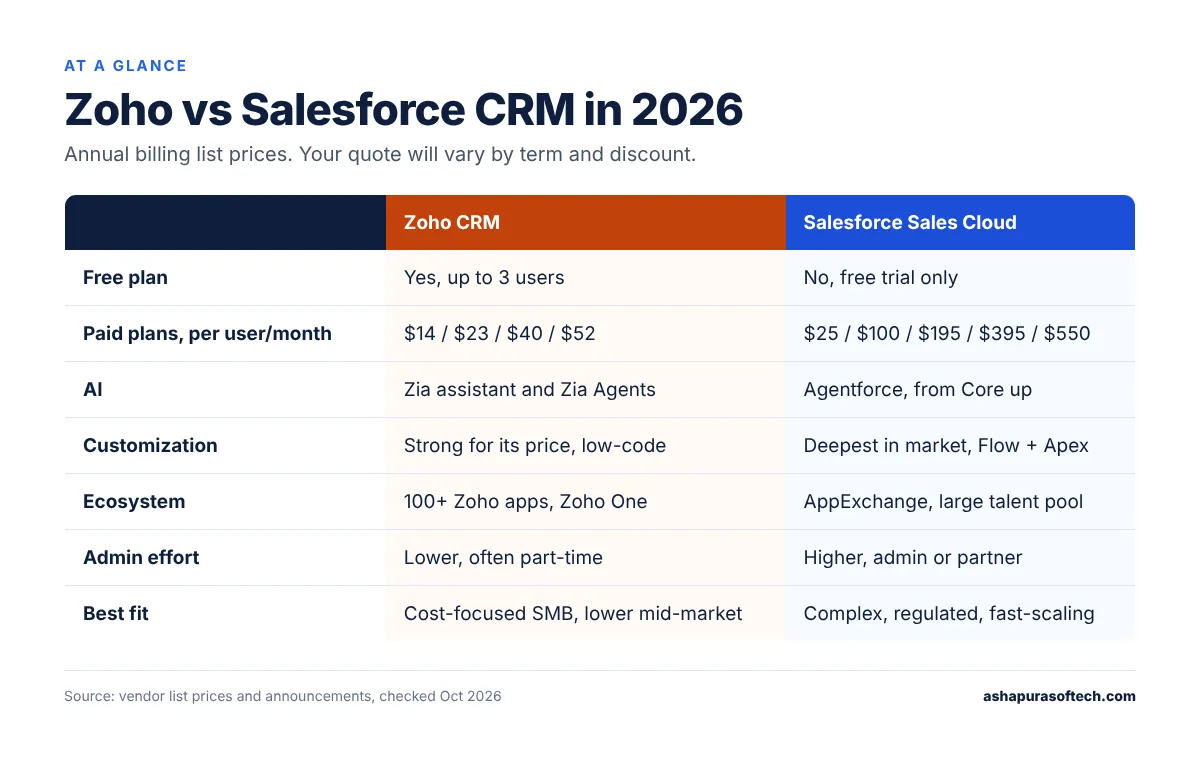
In the Zoho vs Salesforce CRM decision, Zoho CRM usually wins for teams that want a full CRM at a low per-user cost and can live within its customization limits. Paid Zoho CRM plans cost $14 to $52 per user per month on annual billing. Salesforce makes more sense when you need deep customization, complex approvals, a big partner ecosystem or AI agents at scale. Its Sales Cloud editions go from $25 (Starter Suite) to $550 (Max) per user per month. On a 25-user team, the license gap alone can run from about $5,000 to over $50,000 a year, so price out year three, not just year one.

Zoho vs Salesforce CRM at a glance

Zoho CRMSalesforce Sales Cloud
Free planYes, up to 3 usersNo (free trial only)
Paid plans (per user/month, annual)Standard $14, Professional $23, Enterprise $40, Ultimate $52Starter Suite $25, Pro Suite $100, Core $195, Advanced $395, Max $550
AIZia assistant and Zia AgentsAgentforce, included from Core up with Flex Credits
CustomizationStrong for its price, low-code with Zoho CreatorDeepest in the market, Flow plus Apex code
Ecosystem100+ Zoho apps, Zoho One suiteAppExchange, large partner and admin talent pool
Admin effortLower, often a part-time adminHigher, most mid-market orgs need an admin or partner
Best fitCost-focused SMB and lower mid-market teamsComplex sales processes, regulated or fast-scaling teams
Zoho vs Salesforce CRM at a glance comparison table for 2026
Zoho vs Salesforce CRM at a glance, using October 2026 list prices.

These are list prices, checked in October 2026 on each vendor’s pricing pages and recent pricing guides. Your quote will depend on region, contract length and discounts.

Zoho vs Salesforce CRM pricing in 2026

Zoho CRM

Zoho gives you a free edition for up to three users. After that you pick from four paid editions. On annual billing, Standard is $14, Professional $23, Enterprise $40 and Ultimate $52 per user per month. Paying month to month costs more ($20, $35 and $50 for the first three).

Once you have picked a platform, the next question is budget. Our guide to CRM implementation services for Salesforce or Zoho breaks down scope, cost and timeline.

There are two other ways to buy it. Bigin is a stripped-down pipeline tool for very small teams, from $7 a user. Zoho One bundles the CRM with dozens of other Zoho apps and is priced per employee. It’s worth pricing only if you’d actually use several of those apps; otherwise it’s a bundle you pay for and ignore.

Salesforce

Salesforce changed Sales Cloud in September 2026. Starter Suite ($25) and Pro Suite ($100) are still there at the bottom. Above them are three new editions: Core at $195, Advanced at $395 and Max at $550 per user per month, billed annually. All three include Agentforce plus a yearly pool of Flex Credits for AI work: 500,000 on Core, 1 million on Advanced and 2.75 million on Max. That pool is per org, not per seat.

Enterprise and Unlimited are now “legacy” editions. If you’re on one today, Salesforce says your current pricing stays the same. We cover the new tiers in more detail in our guide to Salesforce Core, Advanced and Max editions.

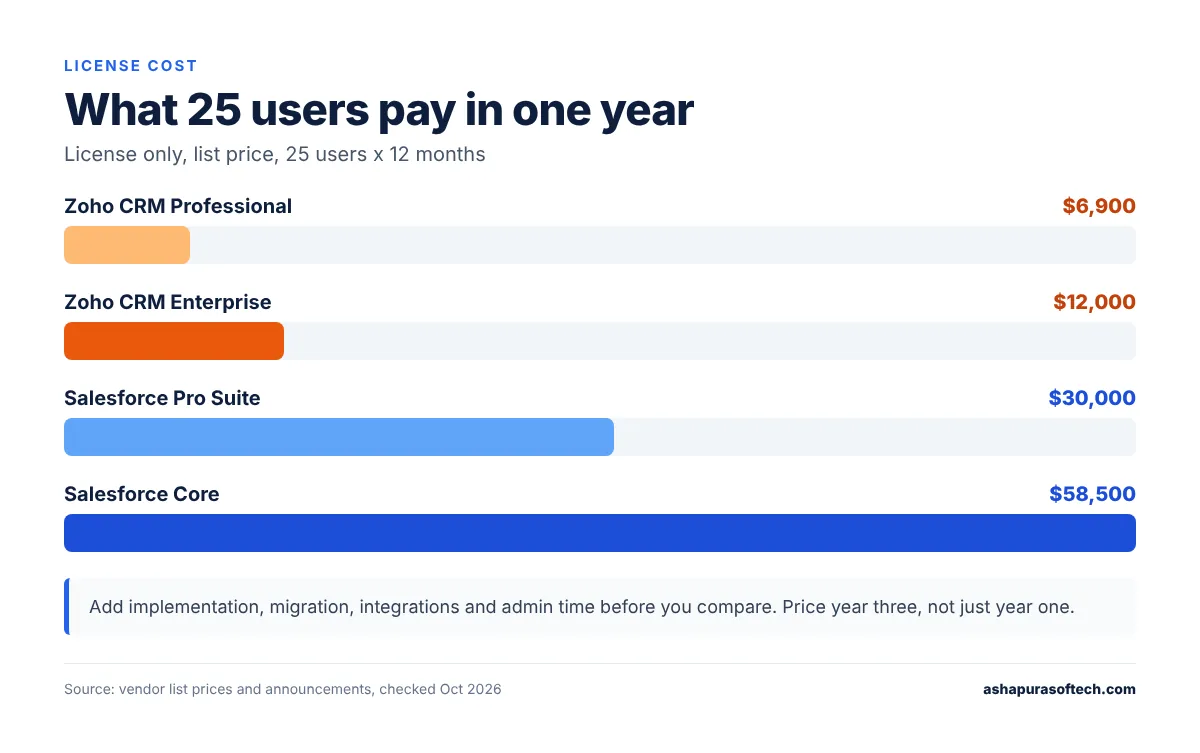
What 25 users pay for a year

License only, list price:

OptionPer user/month25 users, 12 months
Zoho CRM Professional$23$6,900
Zoho CRM Enterprise$40$12,000
Salesforce Pro Suite$100$30,000
Salesforce Core$195$58,500
Zoho vs Salesforce CRM yearly license cost for a 25-user sales team in 2026
Zoho vs Salesforce CRM license cost for 25 users over one year, list price only.

That’s the number most Zoho vs Salesforce CRM comparisons stop at. It shouldn’t be. Implementation, data migration, integrations and the person who keeps the system clean all cost money too. On Salesforce, admin time often ends up bigger than the license difference. On Zoho, the surprise usually shows up later, when the team starts adding Desk, Analytics and Campaigns one app at a time. Our Zoho CRM implementation cost guide has typical project ranges if you want the full picture.

Customization: the real dividing line

If you only read one section of this Zoho vs Salesforce CRM guide, read this one.

Zoho CRM handles more than people expect. You get custom modules and fields, Blueprint for guided sales steps, and Deluge scripting when point-and-click isn’t enough. Zoho Creator covers the odd internal app. For a standard B2B pipeline, that’s plenty.

Salesforce is in a different league. Flow takes care of most automation without code, Apex handles what’s left, and the data model, sharing rules and approval chains can bend to almost any process. That flexibility is exactly why large and regulated companies choose it. It’s also why so many Salesforce orgs turn messy after a few years when nobody really owns them.

Here’s a quick gut check. Can you sketch your sales process on one page, and does it change maybe once a year? Zoho will cover it. Do you have several product lines, regional approvals, partner deals or tricky quoting? That’s what Salesforce was built for.

Picture a 30-person distributor with one sales team and one price list. Zoho Enterprise handles that comfortably. Now give the same company a dealer channel, three levels of regional discount approval and quotes that pull live stock from an ERP. That’s usually the point where Zoho needs a lot of custom Deluge code, and Salesforce starts to look cheaper than the workarounds.

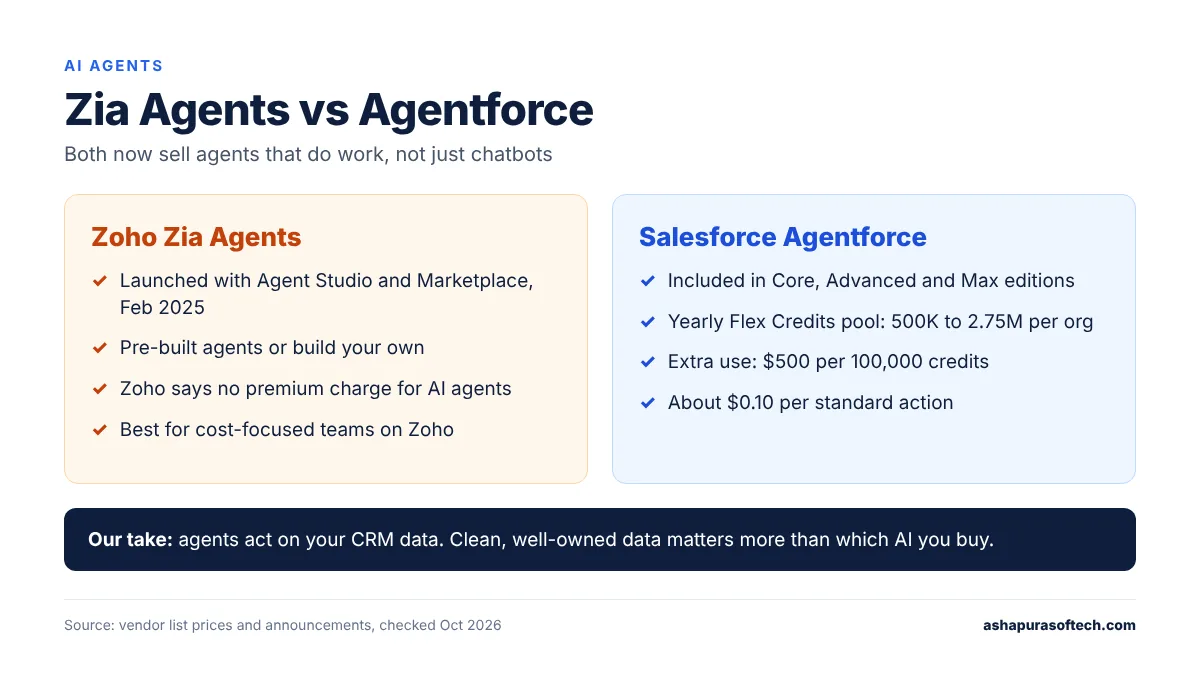
AI: Zia Agents vs Agentforce

AI is the newest front in the Zoho vs Salesforce CRM race. Both vendors now sell AI agents that do work, not just chatbots that answer questions.

Zoho launched Zia Agents, an Agent Studio and an Agent Marketplace in February 2025. You can use pre-built agents or build your own. Zoho has also said publicly that it doesn’t plan to charge a premium for AI agents, which matters if budget is the reason you’re looking at Zoho in the first place.

Agentforce is further along for large-scale use. It now comes bundled with Core, Advanced and Max, and anything beyond your included credits is billed in Flex Credits at $500 per 100,000. A standard agent action uses 20 credits, roughly ten cents. Well-designed agents stay cheap. Agents working on messy data take extra steps, and every step costs. Our Agentforce pricing and Flex Credits breakdown walks through real numbers.

Zoho Zia Agents vs Salesforce Agentforce AI agents compared
How AI agents compare in Zoho vs Salesforce CRM today.

Honestly, we wouldn’t let AI decide this on its own. Agents on either platform act on whatever is in your CRM. Clean, well-owned data will get you more from a cheaper AI tool than a messy org will get from an expensive one.

Integrations and ecosystem

Integrations are where a Zoho vs Salesforce CRM comparison often gets decided late. Zoho’s strength is its own suite. Already on Zoho Books, Desk, Campaigns or Analytics? The CRM plugs into them with almost no setup and your data stays in one place.

Salesforce’s strength is everything outside it. AppExchange has thousands of apps, most US SaaS vendors build their Salesforce connector first, and hiring a Salesforce admin or developer in the US is simply easier than finding a Zoho specialist. Both platforms have solid APIs for ERP, finance and data warehouse links, but Salesforce usually has more ready-made connectors. If you’re planning to connect Zoho to a lot of outside tools, our guide to Zoho integration with third-party apps covers what tends to work.

Day-to-day use and admin effort

Ask any sales team that has lived through a Zoho vs Salesforce CRM switch and they’ll mention the learning curve first. Most reps get comfortable in Zoho CRM within a day or two, and plenty of small teams run it with a part-time admin.

Salesforce takes longer to learn and needs someone who owns it. Lightning is a good interface once it’s set up properly. Set up badly, it confuses people fast. Either way, budget for training and for an admin, in-house or through a partner.

Reporting and forecasting

Both cover the basics: pipeline reports, dashboards, forecasts. Salesforce goes deeper with collaborative forecasting and territory views, and from Core up it includes Tableau Next. Zoho adds forecasting from Professional up, and Ultimate brings in Zoho Analytics for heavier BI. If your leadership team runs on dashboards, rebuild your three most important reports in each trial before you decide. It tells you more about the Zoho vs Salesforce CRM question than any feature grid.

Zoho vs Salesforce CRM: which one fits your team?

Zoho CRM is likely the better fit if:

  • You have fewer than about 50 sellers and a fairly standard sales process.
  • License cost is a deciding factor, and you’d like AI without a premium price tag.
  • You already use other Zoho apps, or Zoho One would replace tools you’re paying for today.
  • You don’t have, or don’t want, a full-time CRM admin.

Salesforce is likely the better fit if:

  • You deal with complex quoting, approvals, territories or partner channels.
  • You expect fast growth, acquisitions or a move into a regulated industry.
  • You need a wide integration ecosystem and an easy talent pool to hire from.
  • You plan to run AI agents across both sales and service.

Can Zoho replace Salesforce? For a lot of small and lower mid-market teams, yes. We see companies make the switch when they realise they’re paying for a big Salesforce org but using a small slice of it. It rarely makes sense if you depend on heavy customization, complex sharing rules or a stack of AppExchange apps.

Switching from one to the other

Whichever way your Zoho vs Salesforce CRM decision goes, moving between them is a data and process project, not an export button. Map your fields first. Clean up duplicates before the move, not after. Then run both systems side by side for one team before everyone cuts over. Our checklist on preparing Salesforce data for a Zoho CRM migration goes step by step, and our Zoho migration services page covers moves in both directions.

The mistake we’d warn you about first: moving records before you’ve agreed who owns each account. Duplicates and orphaned deals follow you into the new system, and cleaning them up afterwards takes far longer than doing it before the move.

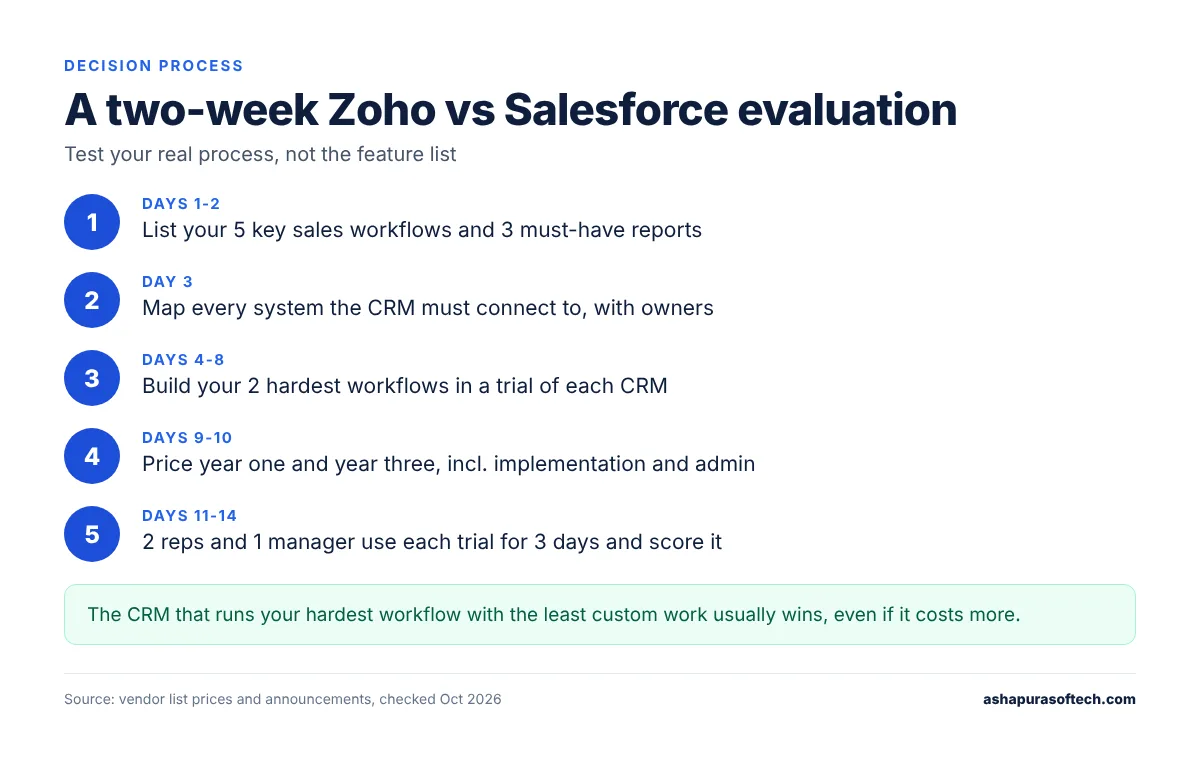
How we’d run a two-week Zoho vs Salesforce CRM evaluation

When clients ask us to compare the two, we skip the feature lists and test the real process:

Two-week Zoho vs Salesforce CRM evaluation process in five steps
A simple two-week plan to settle the Zoho vs Salesforce CRM choice.
  1. Write down your five most important sales workflows and the three reports you can’t live without.
  2. List every system the CRM has to connect to, and who owns each one.
  3. Build your two hardest workflows in a trial of each CRM.
  4. Price year one and year three for your real user count, including implementation, admin and add-ons.
  5. Hand each trial to two reps and one manager for three days, then ask them to score it.

In a Zoho vs Salesforce CRM trial, whichever CRM handles your hardest workflow with the least custom work is usually the right call, even when it isn’t the cheapest. If you’d like a second opinion on your shortlist, our team does CRM software development and implementation on both platforms.

Frequently asked questions

Is Zoho CRM cheaper than Salesforce?
Yes, by a wide margin at list price. Zoho CRM paid plans cost $14 to $52 per user per month on annual billing, while Salesforce Sales Cloud runs from $25 to $550. For a 25-user team, Zoho Enterprise costs about $12,000 a year in licenses, compared with $30,000 for Salesforce Pro Suite.

Can Zoho replace Salesforce?
For many small and lower mid-market teams, yes, especially if they use only basic Salesforce features. It is a poor swap for companies that depend on heavy customization, complex sharing rules or many AppExchange apps.

Which is better for a mid-market company, Zoho or Salesforce?
It depends on process complexity, not company size alone. A mid-market team with a standard sales process and tight budget often does well on Zoho CRM Enterprise. Teams with complex quoting, approvals or several sales channels usually get more from Salesforce.

Does Zoho CRM have AI agents like Agentforce?
Yes. Zoho launched Zia Agents, Agent Studio and an Agent Marketplace in 2025. Agentforce is more established for large-scale use and is included in Salesforce’s Core, Advanced and Max editions with a yearly Flex Credits allowance.

How long does it take to migrate from Salesforce to Zoho CRM?
A simple migration for a small team can take a few weeks. Larger orgs with custom objects, automation and integrations usually need two to three months, including testing and a period of running both systems.

About the author

Ankur Pandey is Marketing Manager at Ashapura Softech, a Salesforce and Odoo consulting partner based in Irving, Texas, that also builds on Zoho. He works with the delivery team on CRM selection, pricing and migration questions from US companies, and writes about what those projects teach, including the Zoho vs Salesforce CRM question US teams ask most often.

Sources

Categories
Salesforce

 Salesforce AppExchange: Must-Have Apps to Enhance Your Salesforce Experience

Salesforce has been one of the most dominating tools in business technology, from simple customer relationships to managing the full organizational workflow. In real innovation, though, there are the AppExchange Apps. Each one of these apps is designed to further tailor the experience you have with Salesforce by giving you more features and capabilities for your CRM platform. Whether it’s turbocharging your sales team’s productivity, improving customer service, or even automating complex business processes, there’s an app for that. This article discusses some of the indispensable apps out of the box on Salesforce AppExchange that should help redefine your overall experience with Salesforce itself.

Why Use AppExchange Given by Salesforce?

How well have you known AppExchange for Salesforce?

The Salesforce AppExchange is the world’s largest business app marketplace that features thousands of apps and components, which in turn extend the feature set provided by Salesforce itself. These apps are designed to help the SFDC integrate easily and also give you the extra tools or features that your business might require.

     Benefits of Using Salesforce AppExchange

  • Customization and Flexibility: You may use AppExchange apps to customize SFDC as per your business needs without going for mammoth coding or development work.
  • More Productive: Most regular tasks are automated, so time is available for the team to most strategically engage.
  • Best Customer Experience: Through apps, very valuable insights about customer behavior can be derived and have more effective interactions with customers.
  • Scalability: As your business grows, so do the AppExchange apps. Your Salesforce environment will remain efficient and effective.

Must-Have Apps on Salesforce AppExchange

Conga Composer

Overview of Conga Composer

The concept of Conga Composer is a solution for the creation of documents and distribution of robust, data-driven documents right from the Salesforce platform. Whether it is the preparation of invoices, whether it is the preparation of proposals, or making reports, all these tasks can be easily performed while consulting great convenience.

Key Features

  • Customizable Templates: Create and design the document templates as required, using your existing logos and formats.
  • Data Integration: Your documents will be auto-populated from data dynamically flowing in from Salesforce records.
  • Delivery Modes: Choose delivery modes such as email, e-signature, cloud storage capabilities

Benefits

Conga Composer automates the document creation process using Conga, reducing errors and pains from inconsistency. This automates how documents are generated and delivered to the store.

Document Sign for Salesforce

Overview of Document Sign

DocuSign is the world’s electronic signature solution designed to be fully integrated with Salesforce to allow you to prepare, send, sign, and manage documents inside your Salesforce environment.

Key Features

  • Electronic Signature Integration: Send and sign docs fast and easy right from inside Salesforce. Move that deal to close.
  • Workflow Automation: Automate the workflows associated with your agreements so the right documents get to the right people at the right time.
  • Compliance and Security: Security and Compliance is a trusted e-signature solution that meets the strictest security and legal requirements.

    Benefits

  • This speeds up transactions related to business and the determination of contract stipulations since you can manage your contracts efficiently, without using paper, with speed.
  • Closing deals soon enough will improve customer experience through the use of DocuSign and Salesforce.

Tableau CRM

Overview of Tableau

Tableau CRM, formerly known as Einstein Analytics, is a powerful analytics platform that provides actionable insights through advanced data visualization and business intelligence tools.

Key Features 

  • Data Integration: Brings together information from varied sources to visualize business data from one vantage point.
  • Advanced Analytics: Employs predictive and prescriptive analytics to influence business decisions.
  • Interactive Dashboards: Develop interactive dashboards having dynamic functionalities that fuel data exploration in real-time.

Benefits

Tableau CRM will put relevant data and business acumen into the hands of Field Service leaders to make smarter business decisions, stay ahead of customers’ needs and the market trend on time, and hence sustain a competitive lead through predictive analytics.

Field Service Lightning

Overview of Field Service Lightning

Field Service Lightning is an end-to-end field service management solution built on the Salesforce platform, enabling companies to deliver faster, smarter, and more personalized onsite service to customers.

Key Features

  • Scheduling and Dispatch: Optimize scheduling and dispatch of service appointments to ensure that the right technician gets the right job.
  • Mobile Workforce Management: Automatically link field technicians with customer data, work orders, and more through mobile applications.
  • Service Analytics: Obtain visibility into your service performance and across your customer base through powerful analytics and reporting tools.

Benefits

That takes your field service to the next level. Cut the cost up and cut the cost down, while increasing customer satisfaction at the same time. Arm your technicians to serve effectively and efficiently, on time, with tools, the process, and a better understanding of how to service.

Pardot

Overview of Pardot

Pardot is a leading B2B marketing automation platform that helps you engage with your audience, generate more leads, and drive sales.

Key Features

  • Lead Generation: Attract and manage leads through targeted marketing campaigns and automated workflows. 
  • Email Marketing: Design and send high-performing, engaging email marketing campaigns.
  • Marketing Analytics: Run, monitor, and optimize the performance of your marketing processes to know what works for you and what doesn’t. 

Benefits

Pardot enables you to automate and optimize your marketing efforts, ensuring that you reach the right audience with the right message at the right time. By leveraging Pardot’s analytics and insights, you can refine your marketing strategies and improve ROI.

How to Select the Right AppExchange Apps

Assess Your Business Needs

Before exploring AppExchange, it’s essential to understand your business needs and goals. Identify the areas where you need additional functionality or support, and prioritize the apps that address those needs.

Evaluate App Reviews and Ratings

AppExchange provides the details of each app and also the reviews and ratings of other users. Take time to go through the reviews and consider the like experiences from other businesses.

Consider Integration with Other Apps and Providers

Do they seamlessly work with your existing Salesforce environment or other business applications that you might have? Finally, do not forget to look into the support and training provided by the vendor.

Conclusion

You will find it hosting various apps of the Salesforce AppExchange kind that help enrich the experience in Salesforce and support the impetus for your business. It is here that you can generate documents, automate marketing, and also do various other tasks for smooth operation for maximum productivity and great customer experience. You learn more, and you shall indeed find many such powerful applications on the Salesforce AppExchange. If you are looking for an expert to pick up and implement the correct applications, Ashapura Softech is there to help. Our lead team of proficient Salesforce consultants will guide you in reaping the utmost value out of your Salesforce investment. Ready to elevate your business? Contact us today Ashapura Softech at [email protected] for tailored solutions today.

Categories
Salesforce

 Top 5 Salesforce Services to Boost Your Marketing Strategy

In this highly rapidly evolving digital arena of the present age, the services of Salesforce in businesses have turned into an asset to tune and innovate marketing strategies. With the help of such state-of-the-art tools and platforms offered by Salesforce, organizations can engage with customers, market to customers in a personal way, and drive superior sales results. This in-depth guide takes you through the top five Salesforce services, redefining your marketing strategy by bringing you closer to your audience and delivering phenomenal growth.

Why Choose Salesforce Services for Marketing?

These are Salesforce services that help businesses direct all the processes from customer relationship management to problem-oriented marketing campaigns in one place, in the cloud. When you combine data-based knowledge with one-to-one marketing, your company tempts fate: this will be your key to pervasive outreach, thus weaving this into the lives of your audience. With the choice of Salesforce services, organizations can better analyze customer behavior, predict future trends, and develop focused solutions around marketing.

Salesforce Marketing Cloud

Overview of Salesforce Marketing Cloud

This suite offered by Salesforce Marketing Cloud takes the lead in being able to bind and manage all of your marketing channels together. It is a cloud-based platform designed to drive customer journeys, campaign management, and data integration across many different touchpoints. Its flexibility and ability to scale qualify it for any size business looking to ramp up its marketing operations.

Key Features of Salesforce Marketing Cloud

  • Journey Builder: Design customer journeys that dynamically respond to your customers at each step of their journey so you can always provide a relevant and interesting experience.
  • Email Studio: Fast content creation, execution, and insights for email marketing campaigns. Leverage advanced segmentation tools to create message relevance for all audiences.
  • Social Studio: Manage all social media marketing activities from a single place. Track brand mentions, conduct conversations with customers, and carry out social media performance analyses simultaneously on various channels.
  • Advertising Studio: Connect your digital advertising to the Salesforce ecosystem. Personalize ads to your audience. Track performance and campaign effectiveness.

Benefits Of Using Salesforce Marketing Cloud

Salesforce Marketing Cloud enables the business to engage with one voice on every device. It provides deep insights into customer preferences and behaviors and, therefore, delivers the intelligence one needs to drive strategic decisions. This service will let you ensure your marketing goes not only far-reaching but also hones in on the target group, enlarging customer engagement and conversion rates.

Salesforce Sales Cloud

Overview of Salesforce Sales Cloud

As the name suggests, mainly Salesforce Sales Cloud is meant for sales purposes, but this is indeed a boon for the marketing team too. Being this feature provides full visibility about one’s customer, the marketer can match up the strategies with the sales plan thereby maintaining an integrated style of customer approach.

Key Concepts of Salesforce Sales Cloud

  • Lead Management: Keep an excellent track record in capturing leads. Deepen the actions, nurture the prospects, and ultimately turn into loyal customers.
  • Opportunity Management: Attain visibility to your sales pipeline to concentrate on high-potential opportunities and expedite closure time.
  • Sales Forecasting: Be able to accurately forecast sales trends and outcomes. The said insights will support you in adjusting marketing strategies and allocating resources effectively.

Benefits of Using Salesforce Sales Cloud

Salesforce Sales Cloud closes the loop between sales and marketing by having them be on the same page with shared goals. Within this very data and insight that is housed within the Sales Cloud, marketers can be empowered to design campaigns within the parameters of what the sales team wants and should be targeted around improved customer satisfaction and growing revenues.

Salesforce Service Cloud

Summary of Salesforce Service Cloud

It allows customer service operations, and for marketers, this is obligatory to engage. You would like to involve customer service in your marketing for the purpose of relevance and personalizing your outreach with content.

Key Features of Salesforce Service Cloud

  • Case Management: Handle and solve customer problems in a very timely manner. Insight from customer interactions can be applied to improve marketing messaging and strategies.
  • Knowledge Base: Let customers help themselves. Using the collected data, pinpoint the commonest pain points and tailor your marketing in response to these.
  • Omni-Channel Support: Offer the same high level of customer service irrespective of channel. Integrate customer service data and marketing campaigns to garner a holistic approach toward customer engagement.

Benefits of Using Salesforce Service Cloud

Salesforce Service Cloud can address the needs of customers proactively by aligning customer service data with marketing strategies, hence improving customer satisfaction and loyalty. This, in turn, boosts brand reputation and drives sales.

Salesforce Commerce Cloud

Overview of Salesforce Commerce Cloud

Salesforce Commerce Cloud is a one-stop, integrated platform for e-shopping experiences such as marketing, selling, and servicing in the life of retail and e-commerce businesses. In the cloud, this solution streamlines operations involved in marketing, selling, and customer service delivery.

Key Features of Salesforce Commerce Cloud

  • Personalization: Easily deliver condensed shopping experiences in print custom to the customers’ wishes and behavior. Easily design targeted marketing campaigns using insights from data in a jiffy.
  • Order management: Streamline order processing and fulfillment. Ensure that your marketing efforts align with inventory levels and customer demand.
  • AI-Powered Insights: Leverage artificial intelligence to gain insights into customer behavior, sales trends, and product performance.

Benefits of Using Salesforce Commerce Cloud

Salesforce Commerce Cloud helps a Business to create unified, engaging shopping Experiences. Commerce Cloud unites marketing, sales, and service operations so that businesses can pervasive and direct-to-the-point customer experience across all touchpoints.

Salesforce Analytics Cloud

Salesforce Analytics Cloud, a.k.a. Tableau CRM, facilitates organizations in the analysis of data from every channel to develop active and intelligent data. It benefits marketers in comprehending customer behavior, gauging the impact of campaigns, and optimizing marketing methods.

Key Salesforce Analytics Cloud Features

  • Data Visualization: Create agile, self-describing dashboards to discover the meaning and trends behind large amounts of data. Discover and visualize trends and patterns based on marketing decisions.
  • Predictive Analytics: Leverage machine learning algorithms to determine future results. Optimize marketing decisions using data-driven predictions.
  • Mobile Accessibility: Tap into insights from anywhere. Make on-the-spot informed decisions from your mobile device.

Benefits of Using Salesforce Analytics Cloud

Using the Salesforce Analytics Cloud, the marketer is seamlessly positioned to make a marketing-driven decision with all assurance that the marketing efforts are guided by the business goals. Analytics of customer behavior and preferences enable businesses to produce campaigns with targeting features that will resonate with their market, allowing them to engage that particular class of their audience.

Conclusion

The Salesforce services are potent and flexible, with a plethora of tools that can boost your marketing strategy. Combining data-driven insights, personalized customer journeys, and cross-channel efforts will provide maximum engagement and sales results. Indeed, never before have both small-scale businesses and large organizations had operational flexibility levels that would allow them to adjust to market dynamics, which are ever on the move in concert with the shifting expectations of their customers. For more information on how Ashapura Softech can help you leverage Salesforce services to boost your marketing strategy, contact us today. Reach out to Ashapura Softech today at [email protected] and let’s create something amazing together.

Categories
Salesforce

Salesforce Integration Guide (2026): Methods, Tools, Steps

Related: the 16 September 2026 Salesforce outage showed how integrations fail when Salesforce is down. See our Salesforce outage checklist for integrations and scheduled jobs.

Last updated: 15 October 2026

Quick answer

Salesforce integration means connecting Salesforce to your other systems, such as marketing tools, ERP, accounting, e-commerce and support software, so records sync automatically instead of being re-keyed. There are five main ways to do it: a ready-made AppExchange connector, a no-code or iPaaS tool, MuleSoft, direct Salesforce APIs (REST, Bulk, Pub/Sub), or Salesforce Connect and Data Cloud to view outside data without copying it. Pick the simplest route that handles your data volume, and plan for the 2026 and 2027 login and platform event changes before you build.

Introduction

In today’s fast-moving business world, multiple-tool integration is the key to attaining smooth, seamless operations and increasing productivity. One of the most popular customer relationship management systems is Salesforce, very rich in functionality and with huge integration potential. We are going to discover how the integration of Salesforce with other tools is going to revolutionize your business processes in terms of providing seamless operational experiences.

Understanding Salesforce Integrations

What is Salesforce Integration?

Salesforce integration is the process of aligning Salesforce CRM with other software applications to make data flow smoothly, improve operational efficiency, and also deliver one single view of the customer. This can be achieved through multiple methods, which include APIs, middleware solutions, or native integration tools.

Benefits of Integrating Salesforce

  1. Better Management of Data: This integration ensures consistency of data across different platforms. It limits manual data entry and associated errors.
  2. Improved Customer Experience: Due to a single view of all the activities of the customer, personalized and effective customer service can be offered.
  3. Increased Productivity: Automation of workflows and systems in sharing data facilitates operational smoothness; this allows employees more time to deal with strategic activities.
  4. Better Decision Making: Access to consolidated data from different sources enables better analysis for informed decision-making.

Salesforce integration methods compared

Most failed integration projects pick the wrong method, not the wrong tool. This table is the shortlist we use when scoping a Salesforce integration for a client.

Integrations are one of the biggest cost drivers. Our guide to CRM implementation services with integrations shows how they affect scope and timeline.

MethodHow it worksBest forWatch out for
AppExchange connectorA prebuilt app installed into your org and configured with field mappingPopular pairings such as HubSpot, QuickBooks, Slack, Shopify or DocuSignLimited control over sync rules and error handling
No-code or iPaaS toolTools such as Zapier, Workato, Boomi or Celigo trigger actions between appsWorkflows across three or more apps, moderate volumePer-task pricing and API limits at high volume
MuleSoftSalesforce’s own integration platform with reusable APIs and connectorsEnterprises connecting ERP, legacy and many systems at onceLicence cost and the need for specialist skills
Salesforce APIsCustom code using the REST or SOAP API, Bulk API 2.0 for large loads, and Pub/Sub API or Change Data Capture for eventsCustom or industry systems with no connector, near real-time syncYou own the code, monitoring and retries
Salesforce Connect and Data CloudShow external data inside Salesforce, or share it zero-copy with warehouses such as Snowflake, Databricks or BigQueryLarge datasets you need to see or segment, but not copyRead-heavy use cases, with extra licences

A simple rule of thumb: if an AppExchange connector covers your fields and volume, use it. Move to iPaaS when workflows span several tools, and only build on the APIs or MuleSoft when nothing off the shelf fits.

Key Tools to Integrate with Salesforce

Marketing Automation Tools

  • HubSpot: Since this will help you develop your marketing to a great extent, the integration of HubSpot with Salesforce is very important. It allows for a smooth flow between the marketing and sales teams regarding leads, hence ensuring that they are well taken care of and passed on to the sales team effectively.
  • Marketo: The robust marketing automation features of Marketo and the CRM capabilities of Salesforce combine to give a forceful tool for managing, analyzing, and optimizing marketing campaigns and lead behavior to improve marketing strategy.

Customer Support Tools

  • Zendesk: Integration of Zendesk with Salesforce will provide a 360-degree view of customer interactions, as it will connect support tickets with CRM data. It thus helps support teams present personalized and efficient service to customers.
  • ServiceNow: The integration of ServiceNow with Salesforce will ensure that customer service and IT service management are aligned as businesses create excellent experiences. With the integration of ServiceNow, businesses can efficiently manage incidents, problems, and changes while keeping the data of the customer in sync.

Collaboration Tools

  • Slack: Integrate Salesforce with Slack for easy team collaboration, as all information from Salesforce will be reflected in the Slack channels. This integration will support real-time communication by giving easy access to critical customer information.
  • Microsoft Teams: The Microsoft Teams integration with Salesforce brings CRM data into your collaboration environment so teams can view and update customer info without leaving Teams. It increases productivity, ensuring that everyone in the team is on the same page.

E-commerce Platforms

  • Shopify: Integrating Shopify with Salesforce helps e-commerce businesses manage their customer data, orders, and inventory more efficiently. This integration enables seamless data synchronization between the two platforms, ensuring a unified customer experience.
  •  Magento: Magento’s integration with Salesforce allows businesses to track and analyze customer behavior, manage sales and marketing activities, and provide personalized shopping experiences. This integration helps optimize e-commerce operations and drive sales growth.

Financial Tools

  • QuickBooks: Integrating QuickBooks with Salesforce streamlines accounting and financial management processes. This integration ensures that financial data is accurately synchronized, reducing manual data entry and errors.
  • Xero: Xero’s integration with Salesforce provides a comprehensive view of financial health, enabling businesses to manage their accounts, track expenses, and generate financial reports seamlessly.

Steps to Integrate Salesforce with Other Tools

Step 1: Identify the Needs for Integration

Identify the tools you want to integrate with the software and state what exactly is to be achieved concerning the integration. Be able to identify which data will be shared and which workflows are to be automated. If one of those tools is an ERP you plan to build rather than buy, read our custom ERP buyer guide before you scope the integration.

Step 2: Select Appropriate Integration Method

Based on technical experience and other requirements, select the proper way of integration

  • APIs: Integration with other tools through Salesforce APIs for real-time data exchange.
  • Middleware Solutions: Tools like MuleSoft or Zapier will make the integration process easier, with many built-in connectors.
  • Native Integrations: Integrations are natively provided by Salesforce or third-party tools that give native connectivity.

 Step 3: Configure Settings for Integration

Configure the setup through various settings options. These can include authentication, data mapping, and synchronization rules. Be sure to respect data privacy and security policies in your integration.

Step 4: Test the Integration

Thorough testing of the integration before going live may highlight issues for fix-up before finally going live. This includes data synchronization, workflow automation, and user access – all working as it should.

Step 5: Monitor and Optimize

Run the integration, but monitor the performance and make edits as needed. Gather user feedback and further optimize workflow and data accuracy levels.

Best Practices to Integrate with Success in Salesforce

  • Check the Quality of Your Data: The integration will only succeed if high-quality data is passed through. Poor quality data can lead to potential duplication, inaccuracies, and outdated information. Clean and update your data regularly.
  • Prioritize Security: Building strong security measures for the protection of sensitive customer data; ensuring all tools are integrated according to regulations for the protection of data, and having the best practices in authentication and authorization.
  • Train Your Team: Fully train your team on the use of the integrated tools. Ensure that they understand how the new workflows work and feel comfortable with access to and management of integrated data.

Common Challenges and How to Overcome Them

  • Use Analytics: Run analytics and reporting on how the integrated systems perform. Leverage those insights to make data-driven decisions that drive business process improvement.
  • Data Silos: Data silos occur when your data is locked in different systems that can’t give you a single view. Overcome this challenge by making sure proper data mapping and synchronization have been done between the integrated tools.
  • Integration Complexity: Hybrid integration can be quite challenging, especially with multiple systems. You can make things simpler by applying middleware solutions or seeking help from integration experts.
  • Performance Problems: The integration might further affect the performance of the system. Keep an eye on it and maintain the settings of the integration so that everything works smoothly but will not come at the cost of speed and reliability.

Free Salesforce implementation checklist

Plan scope, data migration, integrations, testing and go-live before you start. Use it to spot gaps in an integration project early.

Get the free Salesforce implementation checklist

Real-World Examples of Salesforce Integrations

Example 1: Marketing Automation

A B2B company integrated Salesforce with HubSpot to streamline its marketing and sales processes. The integration allowed the marketing team to track lead behavior, nurture leads effectively, and seamlessly hand off qualified leads to the sales team. As a result, the company saw a significant increase in lead conversion rates and overall sales performance.

Example 2: Customer Support

An e-commerce company integrated Salesforce with Zendesk to provide a unified view of customer interactions. The integration enabled the support team to access customer information directly from Salesforce while handling support tickets in Zendesk. This seamless data flow improved response times and customer satisfaction.

Example 3: Financial Management

A small business integrated Salesforce with QuickBooks to streamline its financial management processes. The integration ensured that sales data from Salesforce was automatically synced with QuickBooks, reducing manual data entry and errors. This automation saved time and provided accurate financial reports for better decision-making.

Future Trends in Salesforce Integration

  • Artificial Intelligence and Machine Learning: Integrating Salesforce with AI and ML tools can enhance predictive analytics, automate routine tasks, and provide personalized customer experiences. AI-driven insights can help businesses make smarter decisions and improve operational efficiency.
  • Internet of Things (IoT): IoT integration with Salesforce can provide real-time data from connected devices, enabling businesses to monitor and manage assets, predict maintenance needs, and enhance customer service with proactive solutions.
  • Blockchain Technology: Blockchain integration with Salesforce can enhance data security, provide transparent and tamper-proof records, and streamline processes like supply chain management, contract execution, and identity verification.

Salesforce integration changes to plan for in 2026 and 2027

Several platform changes will break older integrations if nobody acts. If you are planning a new Salesforce integration, build around them from day one.

  • SOAP login() needs a new API permission since the Winter ’27 release, and the SOAP login() call itself retires on 1 June 2027. See our Salesforce Winter ’27 release guide.
  • The OAuth username-password flow retires on 20 February 2027. Any integration that sends a username and password to get a token has to move to a supported OAuth flow.
  • Standard-volume platform events retire in Summer ’27. Event-based integrations must move to high-volume platform events.
  • AI agent calls get their own meter. Calls that registered AI agents make to Salesforce over MCP or the API will be billed as Headless Platform Interactions in Flex Credits, with Salesforce targeting November 2026. Ordinary integrations are not affected. Details are in our AIforce implementation guide.

Salesforce integration FAQs

What is Salesforce integration?

Salesforce integration is the process of connecting Salesforce with other business systems, such as ERP, accounting, marketing or e-commerce tools, so data moves between them automatically instead of being entered twice.

What are the main ways to integrate Salesforce?

The main options are AppExchange connectors, no-code or iPaaS tools such as Zapier or Workato, MuleSoft, custom code on the Salesforce REST, Bulk and Pub/Sub APIs, and Salesforce Connect or Data Cloud for viewing external data without copying it.

How long does a Salesforce integration take?

A standard connector can be live in days. An iPaaS workflow usually takes one to three weeks. A custom API or ERP integration typically takes four to twelve weeks, depending on data volume, the number of objects and how much error handling you need.

Do I need MuleSoft to integrate Salesforce?

No. MuleSoft suits enterprises connecting many systems. Most small and mid-sized businesses can integrate Salesforce with an AppExchange connector, an iPaaS tool or a small amount of custom API work.

Conclusion

In the case of proper integration with other tools, Salesforce can become a business game changer by giving better data management, customer experience, and productivity. Following the steps and best practices of integration outlined in this guide, you’ll head toward a smooth and effective integration driving business success. Ready to revolutionize your business operations? Contact Ashapura Softech today to learn how we can help you integrate Salesforce with your existing tools for a seamless and efficient workflow. Let’s make your business operations smoother and more effective together. Reach out to Ashapura Softech today at [email protected] and let’s create something amazing together.

Integrations like these usually need Apex, API and middleware skills your admins may not have. You can hire Salesforce developers for the build and keep ownership in-house afterwards.

Categories
Salesforce

Salesforce vs Odoo: Choosing the Best CRM for Your Business

Introduction –

In the rapidly evolving landscape of e-commerce, selecting the right Customer Relationship Management (CRM) platform is critical for businesses to effectively manage customer interactions, drive sales, and optimize operations. Salesforce and Odoo stand out as leading CRM solutions, each offering unique features and functionalities tailored to the diverse needs of Ecommerce Services.

This detailed comparison aims to provide e-commerce entrepreneurs with an exhaustive analysis of Salesforce and Odoo, enabling them to make well-informed decisions that align with their business objectives and growth strategies.

Understanding Salesforce Ecommerce Cloud Services –

Salesforce, a frontrunner in cloud-based CRM solutions, offers a comprehensive suite of ecommerce services through its renowned Commerce Cloud platform.Salesforce Ecommerce Services equips online retailers with advanced tools and capabilities to create personalized shopping experiences, optimize sales channels, and foster customer engagement. Key features of Salesforce Commerce Cloud include AI-powered personalization, predictive analytics, omnichannel commerce integration, and seamless scalability. The platform empowers ecommerce businesses to deliver tailored product recommendations, targeted promotions, and dynamic content across various digital touchpoints, thereby enhancing customer satisfaction and driving conversion rates.

Moreover, Salesforce ECommerce Cloud Services facilitates seamless integration with third-party ecommerce platforms and marketplaces, enabling businesses to expand their reach and maximize sales opportunities. With features such as predictive analytics, real-time inventory management, and omnichannel commerce integration, Salesforce Commerce Cloud provides ecommerce businesses with the agility and scalability needed to thrive in today’s competitive market landscape.

Exploring Odoo Ecommerce Services

Odoo, an all-in-one ERP and CRM platform, offers a flexible and customizable ecommerce solution tailored to the needs of small to medium-sized businesses. Odoo’s ecommerce module provides entrepreneurs with an intuitive platform to launch and manage online stores with ease.

Unlike traditional CRM platforms, Odoo’s modular architecture allows businesses to customize and extend the platform according to their specific requirements, ensuring a tailored solution that aligns with their unique business objectives.

From responsive website design to integrated payment gateways and multi-channel sales capabilities, Odoo’s ecommerce offering provides a comprehensive yet accessible platform for entrepreneurs looking to establish a strong online presence.

With its user-friendly interface and affordable pricing plans, Odoo’s ecommerce module is particularly well-suited for startups and SMBs seeking a cost-effective CRM solution without compromising on functionality or scalability.

Feature Comparison –

Conducting a thorough feature comparison between Salesforce and Odoo is essential to understand the strengths and weaknesses of each platform. Salesforce Commerce Cloud boasts advanced features such as AI-powered personalization, predictive analytics, and real-time inventory management, making it an ideal choice for medium to large-scale ecommerce businesses with complex requirements. On the other hand, Odoo’s ecommerce module stands out for its affordability, flexibility, and ease of use, catering to the needs of small to medium-sized retailers seeking a customizable yet accessible CRM solution.

By examining key features such as customization options, integration capabilities, and scalability, ecommerce entrepreneurs can determine which platform aligns best with their business objectives and growth aspirations.

Service and Price-wise Comparison –

Service and price are crucial factors for ecommerce businesses when choosing a CRM platform. Salesforce Commerce Cloud offers comprehensive services, including AI-driven personalization, predictive analytics, and omnichannel commerce integration, making it suitable for medium to large-scale enterprises. However, these advanced features come at a higher price point, with subscription fees and additional costs for customization and integrations. In contrast, Odoo’s ecommerce module provides a more affordable option for small to medium-sized businesses, offering customizable features, responsive website design, and integrated payment gateways. While Odoo may lack some of the advanced functionalities of Salesforce Commerce Cloud, its flexible pricing plans and open-source framework make it an attractive choice for budget-conscious entrepreneurs.

Benefits of Salesforce Ecommerce Services –

Salesforce Commerce Cloud Services offers a plethora of benefits for ecommerce businesses looking to elevate their online presence and drive revenue growth. The platform’s scalability and reliability ensure a seamless shopping experience for customers, even during peak traffic periods. By leveraging Salesforce’s AI-driven personalization capabilities, ecommerce businesses can deliver targeted product recommendations, promotions, and marketing campaigns, leading to increased conversion rates and customer satisfaction. Additionally, Salesforce Commerce Cloud’s seamless integration with other Salesforce products enables businesses to streamline operations, improve collaboration, and deliver consistent experiences across all digital channels.

With features such as predictive analytics, real-time inventory management, and omnichannel commerce integration, Salesforce Commerce Cloud empowers ecommerce businesses to stay ahead of the competition and achieve long-term success in today’s dynamic market landscape.

Benefits of Odoo Ecommerce Services –

Odoo’s ecommerce module offers several distinct advantages for small to medium-sized businesses seeking an affordable and customizable CRM solution. With its modular architecture and user-friendly interface, Odoo empowers entrepreneurs to launch and manage online stores with ease, without the need for extensive technical expertise or upfront investment. Additionally, Odoo’s flexible pricing plans and open-source framework provide businesses with the flexibility to scale their ecommerce operations according to their evolving needs and budget constraints.

By leveraging Odoo’s extensive suite of business management applications, ecommerce businesses can streamline operations, optimize workflows, and drive efficiency across the organization, ultimately enhancing productivity and driving growth in the competitive ecommerce landscape.

Support and Community –

Salesforce

Salesforce is known for its extensive support services, including extensive documentation, user forums, and professional support services. The Salesforce community, known as the Trailblazer Community, is very active and offers collaboration, networking, and learning resources. Salesforce also offers more structured support and training through its official channels.

Odoo

Odoo’s support structure comes largely from its active community. Because it’s open source, it has a large network of developers and users who contribute to forums, offer troubleshooting, and share custom modules. Official Odoo support is available but may vary by service plan.

Use Cases and Industry Verticals –

Salesforce Commerce Cloud and Odoo’s e-commerce module cater to a diverse range of industry verticals, each offering tailored solutions to meet the unique needs and challenges of ecommerce businesses. Salesforce Commerce Cloud is widely adopted across industries such as retail, consumer goods, fashion, electronics, and B2B commerce, thanks to its advanced features and scalability. Conversely, Odoo’s e-commerce module finds favor among startups, niche markets, and local businesses seeking an accessible and customizable CRM solution that aligns with their specific requirements and budget constraints.

By examining real-world use cases and industry-specific applications, ecommerce entrepreneurs can gain valuable insights into how Salesforce and Odoo can address their business needs and drive success in their respective markets.

Need help with this? Talk to our Salesforce development company team.

Conclusion –

In conclusion, the decision between Salesforce Commerce Cloud and Odoo’s ecommerce module requires careful consideration of various factors, including business size, budget, customization requirements, and growth objectives.

Salesforce Commerce Cloud excels in providing advanced features, scalability, and innovation, making it an ideal choice for medium to large-scale ecommerce businesses seeking to stay ahead of the competition. On the other hand, Odoo’s e-commerce module offers affordability, flexibility, and ease of use, making it particularly well-suited for small to medium-sized retailers seeking a customizable and accessible CRM solution.

By carefully evaluating these factors and considering real-world use cases, e-commerce entrepreneurs can select the CRM platform that best aligns with their business goals and positions them for success in the dynamic and competitive e-commerce landscape.

Reasons Businesses Are Transitioning to Salesforce in 2024 –

Businesses are increasingly considering a transition to Salesforce in 2024 for several key reasons.

1. Advanced Technology Integration:

Salesforce’s strong focus on integrating advanced technologies such as artificial intelligence and machine learning provides businesses with state-of-the-art tools for data analysis and customer relationship management.

2. Scalability:

Salesforce’s cloud-based infrastructure offers unparalleled scalability, making it suitable for businesses of all sizes and enabling seamless growth and expansion.

3. Comprehensive CRM Solutions:

Salesforce offers a more complete and integrated approach to CRM, with a wide range of features and tools designed to improve all aspects of customer relationship management.

4. Robust Ecosystem:

The Salesforce ecosystem, including its comprehensive AppExchange marketplace, provides businesses with a variety of applications and integrations that improve operational efficiency and connectivity.

5. Proactive Innovation:

Salesforce’s commitment to innovation and staying ahead of industry trends makes it the future choice for businesses looking to take advantage of the latest technology developments.

To know more about Salesforce and Odoo CRM contact Ashapura Softech Team via [email protected] our experts guide you through which is the best CRM for your business.

If you decide Odoo is the better fit, our Odoo implementation company team can scope the rollout, data migration and integrations for US businesses.

Categories
Salesforce

Salesforce Marketing Cloud: A Complete Guide Of Power Marketing Platform

Salesforce marketing cloud is a Customer Relationship Management (CRM) platform for marketers to build a single customer view platform to create and manage marketing relationships and run campaigns with customers.

Marketing Cloud Salesforce is a platform that covers all marketing activity in one single platform. marketer is learning Salesforce Cloud Marketing to run a business easily and grow their business.

Marketing Cloud in Salesforce is a professional online marketing to allows the brand to build customized relationships with customers, Marketing Cloud in Salesforce uses various communication channels and social networking throughout platforms & devices. Marketing Cloud Salesforce includes a predictive analytics marketing platform.

Salesforce Cloud Marketing allows marketers to create and manage marketing relationships and campaigns with customers. And built to identify leads and guide them toward your products and services.

Salesforce Marketing Cloud is a one-to-one customer journey, that sends personalized Mail, guides the exceptional social experience, Delivers personalized content, aligns advertising, automates content delivery, targets specific customers and specific segments, and Reach Customers Anytime and Anywhere. So, there are some features of Salesforce Marketing Cloud to attract marketers to the Marketing Cloud.

Salesforce Marketing Cloud is a Marketing Platform that integrates solutions for the customer Journey Management Builder, Mobile studio, E-mail studio, Social Media Studio, Web Personalization Studio, Advertising Studio, container creation, container management, Data Analysis, and Predictive Analytics.

Marketing Cloud Salesforce Make a strong connection with your customer from the start of the interaction. With the help of Marketing Cloud in Salesforce, you can interact with your customers in real time. Marketing Cloud Salesforce helps to Engage customers via E-Mail, Mobile Messages, and Social Media throw.

Here are some benefits that attract marketers and customers why they choose the Salesforce Marketing Cloud Platform. And how easily they run their marketing platform.

Benefits Of Salesforce Marketing Cloud :

1. Learn From A Customer View:

Always learn from your customers; they guide you for better future opportunities. Marketing Cloud salesforce is built to understand the importance of collecting customer data and presenting it in a meaningful and insightful way. It allows you to create more relevant and targeted content that speaks directly to their pain points and business points.

Significantly, Salesforce Cloud Marketing doesn’t just shaw your past target audience actions, performance & behaviors – it will show you what they do in future & prospects of customers.

2. Create Customers Personalised Experiences:

Marketers know that personalization is a strong key to performance. Gaining an improved understanding of the right customers means engaging them effectively. Marketing Cloud in Salesforce can be the driving force behind your personalization efforts. Salesforce Cloud Marketing is a driving force behind your personalization efforts.

Marketing Cloud Salesforce allows you to set up triggers for prospects that prompt an array of actions. Create a path to purchase – accompanied by tailored messaging & designed to guide Customers. For example, if a customer abandons their cart during the checkout process, opens an email, or downloads an E-book, the marketing team can automatically follow up with targeted messaging.

3. Use Customers Contentment To Guide Communication:

Personalization is not just an understanding of a goal; timing plays a big part too. It doesn’t matter how good your marketing communication is if you are delivering them at the wrong time. It is relevant when it comes to upselling & cross-selling for existing customers. Marketing Cloud in Salesforce has become a very easy factor tool when planning your late marketing activity.

Salesforce Marketing Cloud platform helps to plan your marketing activity with the help of customer satisfaction level. Marketing Cloud Platform automatically adjusts based on signals displayed by key accounts, pausing any communication to a specific customer until the issue they are encountering gets resolved.

4. Take Control Of Your Customer Experience:

With the help of Customer Experience, every marketer achieves their business goals. However, the whole process depends on customers’ previous actions and behaviors.

For instance, if a specific customer buys items that are on sale, wouldn’t make sense to ensure that they always receive updates for your late promotional moment. Salesforce Marketing Cloud helps with predictive analytics.

5. Build One Source Of Truth For Customer Data:

Marketing Cloud Salesforce Allows you to build one single customer view for all potential touchpoints. By Customer profiles, Privacy Management, Marketing journeys, and combining user data. A common single ID runs through your CRM & other data sources, that key can be matched up to a single customer. All the information is gathered together in one single platform, creating a single source of truth for customers. Removing confusion & ensuring that all the customers are on the same page.

Marketing Cloud in Salesforce helps to keep all single data secure in one single platform. And with the help of Marketing Cloud Salesforce reach every single customer individually & make a plan or strategy for that. Salesforce Marketing Cloud is built to manage all of this with great cleverness. And easily manage customer’s needs.

Conclusion

Salesforce Marketing Cloud is a powerful marketing platform that offers a comprehensive set of tools to help businesses connect with their customers in meaningful ways. From personalized email campaigns to data-driven insights and seamless customer journeys, this platform empowers you to maximize your marketing efforts and drive significant business growth. By fully leveraging the capabilities of Salesforce Marketing Cloud, you can elevate your marketing strategy, enhance customer engagement, and achieve better ROI. At Ashapura Softech, we’re dedicated to helping you harness the full potential of Salesforce Marketing Cloud. Whether you’re new to the platform or looking to optimize your current setup, our team of experts is here to guide you every step of the way. Contact us at [email protected] to learn how we can tailor solutions to meet your unique business needs.

Categories
Salesforce

What Is Salesforce Financial Services Cloud? Features, Use Cases and Implementation

What is the Salesforce Financial Service Cloud?

Purpose-built for financial services companies, Salesforce Financial Services Cloud is a customer relationship management (CRM) system that helps companies manage customer relationships more dexterously, grow faster, and unlock deep insight. of their customers.

It is an industry-specific Salesforce product with pre-built workflows and data models tailored for the financial services industry. It provides relevant information at every stage of a customer’s lifecycle. Insurance, banking, mortgages, wealth management, and other sectors of the financial industry widely use this Salesforce product.

Salesforce Financial Services Cloud Features

Financial Services Cloud is built on the Salesforce Customer Success Platform, has features specifically designed for customer engagement, and was designed with the needs of advisors in mind. One of the key benefits of the Financial Services Cloud is its ability to transform the way wealth and wealth management, finance and insurance companies interact with and serve their customers. Some other features include:

Complete customer and household views

Customer loyalty and productivity

Customer data management

Advantages Of Using Salesforce Financial Services Cloud

Financial Services Cloud enables employees and individuals to have deep and efficient conversations and workflows, reducing friction and increasing efficiency.

Intuitive customer service and relationship: The Financial Services Cloud can help your business in many ways when customers expect more from businesses, including helpful advice, quick responses, and 24/7 communication.

By matching customers to households, trusts, and business organizations, you can find high-quality customers and relationships.

Visualize and capitalize on new opportunities arising from layers of critical relationships and information already in place.

With Salesforce Financial Services Cloud, you can provide your customers with a seamless and intuitive experience.

Improved visibility into financial accounts and total: Salesforce Financial Services Cloud offers several financial accounts, including insurance policies, bank accounts, and investment accounts. The Financial Account object has predefined record types for various financial accounts. Financial goals help advisors formulate investment plans that meet their clients’ financial goals. This helps you get a complete overview of your client’s accounts and assets to provide the best product and service recommendations.

Transparent case notifications, tracking, and approvals: The Financial Services Cloud eliminates communication gaps between team members. To achieve specific goals, it automates key tasks that can be automatically assigned to the right team members based on their profiles. With the help of Lead Tracking Financial Services Cloud, you can closely monitor leads and referrals. Track your clients’ approval status with a personalized approval process, easy document capture, and the ability to link financial accounts, clients, and families to records.

Improved customer retention: Salesforce Financial Services Cloud improves engagement, whether with stakeholders, teams, or end users. It opens up a wealth of new perspectives and its powerful features provide businesses with exceptional digital engagement. Capture and illustrate your customers’ important life and professional milestones, such as introducing a new product or moving to a new place. Additionally, this platform provides reliable and trustworthy insights by leveraging AI, ultimately enabling businesses to make better decisions.

Intelligent routing of referrals: including routing, insights, and scoring, Financial Service Cloud allows you to prioritize customer relationships and work across multiple enterprise silos. AI-powered referral scoring and routing help you manage and prioritize relationships more effectively. You can create a smooth communication flow to track and convert referrals after developing a referral pipeline. Now that you have successfully converted these referrals, the system will automatically create an opportunity and account.

Business Intelligence and Advisor Analytics: Financial advisors can provide their clients with more informed decisions using the Salesforce Financial Services Cloud analytics dashboard and data, helping their growth and revenue. Pre-built templates tailored exclusively for the financial services industry provide instant information at your fingertips. This platform is more reliable and accurate for making smarter financial decisions because its analytics are powered by innovative artificial intelligence technology. That’s why the Salesforce Financial Services Cloud is a powerful tool for wealth managers, banking professionals, insurance consultants, and business and IT managers. It allows them to make faster, smarter decisions, increasing productivity. Insurance agents can offer any customer a customized product on a variety of devices using the Salesforce cloud for financial services. Your agents can gain in-depth knowledge of the entire pipeline, from streamlined service flows to the ability to track new opportunities. Financial Services Cloud has all the capabilities needed to provide customers with a satisfying customer experience and a smooth onboarding process. That said, it’s important to recognize that a tool is only effective if the user uses it. So finding the best professional help from Salesforce is just as important.

Who Financial Services Cloud is built for

Financial Services Cloud suits firms whose advisors, bankers or agents manage long-term client relationships rather than one-off sales. Typical users include wealth management and advisory firms, retail and commercial banks, mortgage lenders, and insurance carriers and brokerages. If your team needs to see a client together with their household, linked businesses, accounts and goals before every conversation, the industry data model saves a large amount of custom build work compared with a standard CRM.

Financial Services Cloud vs Sales Cloud

Sales Cloud is a general sales CRM: leads, opportunities, forecasts and pipeline. Financial Services Cloud runs on the same platform but adds objects and tools designed for financial relationships, such as financial accounts, financial goals, households and relationship groups, plus relationship views and action plans for repeatable client processes. Firms that only need a sales pipeline can stay on Sales Cloud. Firms that manage assets, policies or loans for clients over many years usually get more value from Financial Services Cloud.

How a Financial Services Cloud implementation usually runs

  1. Discovery: map how advisors, service teams and compliance work today, and agree which client processes move into Salesforce first.
  2. Data model design: decide how clients, households, businesses and financial accounts will be represented, because this choice shapes every report later.
  3. Integrations: connect core banking, portfolio, policy or loan systems so account data stays current without manual entry.
  4. Data migration: clean and load existing client records, relationships and account history from the old CRM or spreadsheets.
  5. Configuration and automation: set up page layouts, action plans, approvals and alerts for each role.
  6. Testing, training and rollout: run real scenarios with advisors, train each team on its own workflows, then go live in phases.

Our Salesforce implementation checklist covers the steps that apply to any Salesforce rollout, including Financial Services Cloud.

Need help with this? Talk to our Salesforce development company team.

Frequently asked questions

Is Financial Services Cloud a separate CRM from Sales Cloud?

No. Financial Services Cloud is an industry solution that runs on the core Salesforce platform. It adds a financial data model, relationship tools and industry workflows on top of the Sales Cloud and Service Cloud features your team already uses.

Which financial businesses use Financial Services Cloud?

It is used across wealth management, retail and commercial banking, mortgage lending and insurance. The common thread is a need to see each client together with their household, accounts, goals and relationships in one place.

How long does a Financial Services Cloud implementation take?

It depends on scope. A focused rollout for one line of business with a small number of integrations is usually measured in weeks, while multi-team programs with core banking or policy system integrations run for several months. Data migration and integration work are normally the biggest drivers of the timeline.

Do we need developers to set up Financial Services Cloud?

Much of the setup is configuration, such as record types, page layouts, households and action plans. Developers are needed for integrations with core systems, custom automation and data migration, which is where most projects need specialist help.

Conclusion

Salesforce Financial Services Cloud is a specialized platform designed to meet the unique needs of financial institutions. It offers a 360-degree view of clients, enabling personalized and proactive service that fosters trust and loyalty. With features like wealth management, insurance, and banking solutions, it empowers financial advisors to deliver exceptional client experiences and streamline operations. At Ashapura Softech, we specialize in implementing Salesforce Financial Services Cloud to help you drive growth and efficiency in your financial business. Whether you’re looking to enhance client relationships or improve operational workflows, our team is here to support you. Contact us at [email protected] to discover how we can tailor Salesforce solutions to fit your financial services needs.

If you need Financial Services Cloud expertise without adding headcount, you can hire certified Salesforce developers who have configured FSC data models and compliance settings before.

Categories
Salesforce

Salesforce Sales Cloud V/S Salesforce Marketing Cloud

Last updated: 26 October 2026

Salesforce Sales Cloud V/S Salesforce Marketing Cloud

Salesforce Sales Cloud and Salesforce Marketing Cloud are two different cloud computing platforms, both developed by Salesforce and each with its unique features. But what exactly does that mean? This article will help you better understand the differences between these two robust sales and marketing tools to choose the one that best fits your needs. Let’s start with the meaning of what is sales cloud and what is marketing cloud.

Sales Cloud vs Marketing Cloud: the short answer

Sales Cloud is where your sales team works. Marketing Cloud is where your marketing team works. They sit either side of the same customer, and the confusion usually starts because both of them touch leads and both of them send email.

Salesforce Sales CloudSalesforce Marketing Cloud
Who lives in itSales reps, sales managers, sales opsMarketers, campaign and lifecycle teams
Core jobMove a known opportunity through a pipeline to a closeReach an audience at scale and bring qualified demand in
Main recordsLeads, Accounts, Contacts, Opportunities, Cases via Service CloudContacts and Subscribers held in Data Extensions
How it talks to peopleOne to one: a rep sends the email or makes the callOne to many: journeys, segments, scheduled and triggered sends
Email built forA handful of personal emails a day per repMillions of sends, deliverability tooling, preference management
Reporting answersWhat is in the pipeline and will we hit the numberWhich campaign and channel produced the demand
Bought whenYour sales process lives in spreadsheets and inboxesYour marketing has outgrown a basic email tool

If you only need one of them, the honest test is which side of the funnel is actually leaking. A sales team losing track of open deals needs Sales Cloud. A marketing team that cannot segment, schedule or measure needs Marketing Cloud. Most companies buy Sales Cloud first, because pipeline visibility is easier to justify.

What Is Salesforce Sales Cloud?

Salesforce Sales Cloud was designed to interact with prospective and potential customers via sales forecasting as well as contact and management of opportunities. It is a compelling instrument to track and create revenue throughout the sales cycle, allowing customers to manage their customer relationships efficiently. Sales Cloud primarily focuses on the sales aspects of customer relationship management (CRM) and how users manage Leads, Contacts, Accounts, and Opportunities instead of providing customer support. Sales Cloud cuts down on time spent on administrative tasks by offering automated features so that Sales teams can concentrate on closing Opportunities!

What Is Salesforce Marketing Cloud

It is a single marketing platform that can understand consumers, connect with them, and tailor their experience. Marketing automation via email connects customers across any device or channel and integrates customer information and their behavior to send timely, relevant messages.

Marketing Cloud offers exciting services suitable for customers who are B2B (when customers are a different business) and B2C companies (when your product/service is direct to the finalcustomer or consumer). The real benefits are the unification of data sources and the ability to customize every channel, as well as the capability to engage with customers at any point in the customer-to-customer relationship and the measurement of the campaign’s results.

Which Salesforce Cloud Product Is Best For My Business?

Salesforce Cloud CRM Solution for Your Company’s Needs

Salesforce Sales Cloud: The primary goal is to increase the speed and quality of the funnel sales to make more sales and earn more revenue.

Salesforce Marketing Cloud: The primary goal is to reach the correct audience by delivering the correct message to the appropriate channels to identify trustworthy leads.

Salesforce Sales Cloud + Salesforce Marketing Cloud: Most importantly, they seek integrated software that provides greater control over the process of generating leads and negotiating deals.

Difference Between Salesforce Sales Cloud V/S Salesforce Marketing Cloud

General Differences:

The cloud sales force is focused on sales reps, while Marketing Cloud is focused on marketers.

It is built to manage and execute deals, while Marketing Cloud is built to build and nurture leads.

The core of the Sales Cloud is about CRM (Customer Relationship Management), while that of the Marketing Cloud is about marketing automation and analytics.

The Sales Cloud is a software-as-service (SaaS) solution, while the Marketing Cloud is an on-premises solution.

It is used to sell any product or service, while the marketing cloud is only for marketing campaigns and lead nurturing.

Difference in Features:

Salesforce Sales Cloud:

Salesforce Marketing Cloud:

Campaign Management

Journey Builder

Leads Management

Email Studio

Accounts Management

Data Studio

Contacts Management

Social Studio

Opportunities Management

Advertising Studio

Cases Management

Mobile Studio

Reports and Dashboards

Interaction Studio

Difference In Benefits Offered By These Two Salesforce Cloud Services

Benefits of Salesforce Sales Cloud

Sales Forecasting: The sales team can now easily forecast and predict how many deals they will close over a given time, which helps them plan their activities accordingly.

Increase your leads: The sales team can now track their lead sources and quickly identify new opportunities to increase their pipeline of deals.

Boost your productivity with AI: Artificial Intelligence (AI) can now be used to help sales reps find new opportunities, save time, and close more deals faster than ever before.

Increase your revenue by connecting to other cloud apps: The sales team can now connect their CRM data to other cloud apps they use, like Marketo or ServiceMax, to better understand their customers and prospects and increase their revenues.

Benefits of Salesforce Marketing Cloud

Create a customized and targeted customer journey: The marketing team can now create and manage personalized campaigns for each prospect, which will help them convert more leads into customers.

Deliver cross-channel and cross-functional marketing campaigns: The marketing team can now create multi-channel, multi-touchpoint campaigns orchestrated across all of their marketing channels, from email to social media to direct mail.

Impact analysis: The marketing team can now measure and analyze how their campaigns are performing and make changes to improve them over time.

Gain real-time insights into your customers: The marketing team can now gain real-time insight into their prospects and customers, including who they are, what they are interested in, and how to best engage with them.

Conclusion

The key takeaway to notice here is that there’s no hard and fast rule on which cloud to use in every situation. But if you follow and consider these guidelines, you should be able to figure out which tool is best for each scenario. The Sales Cloud is most useful when talking with prospective clients and during pipeline-building activities (i.e., prospecting and lead generation). At the same time, Marketing Cloud products are great for building relationships and generating buzz about your product with existing customers.Contact us at [email protected] to discover how we can help you maximize the potential of Salesforce for your business success.

Data Cloud vs Marketing Cloud: a different question entirely

This one comes up constantly and the two are not alternatives. Salesforce Data Cloud, now branded Salesforce Data 360, is not a marketing tool. It is the layer underneath that unifies customer data from every system you run, resolves it into a single profile per person, and then makes those profiles available to the tools that act on them, Marketing Cloud included.

Salesforce Data Cloud (Data 360)Salesforce Marketing Cloud
What it isA customer data platform that unifies and resolves recordsAn engagement platform that sends and orchestrates
What it holdsData from CRM, web, commerce, support, warehouses and filesSubscribers, content, journeys and send history
What it producesOne unified profile per person, plus calculated insights and segmentsEmails, SMS, push, ads and multi step journeys
Who uses itData and RevOps teams, plus anyone building segmentsMarketers running campaigns
Without the otherGreat profiles that nobody acts onCampaigns built on whatever data happens to be in the platform

So do you need Data Cloud as well?

Not always, and it is worth being blunt about that. Data Cloud earns its cost when customer data genuinely lives in several places at once, for example a CRM, an e-commerce platform, a support desk and a warehouse, and you cannot answer a simple question like how many distinct customers you have without exporting three files and matching them by hand. If everything already sits in one Salesforce org and the data is clean, Marketing Cloud alone will do the job.

How the three fit together

Data Cloud unifies the record. Marketing Cloud engages the person. Sales Cloud closes the deal and writes back what happened. Activity flows in both directions, so a purchase recorded in Sales Cloud can suppress someone from an acquisition journey in Marketing Cloud, and an engagement score built in Data Cloud can tell a rep which account to call first.

If unified profiles are the gap in your stack, our Salesforce Data Cloud consulting page covers how a Data 360 implementation is scoped, what drives consumption and how it feeds Salesforce Marketing Cloud segments.

Frequently asked questions

Can I use Marketing Cloud without Sales Cloud?

Yes. Marketing Cloud is a separate platform with its own data model and runs perfectly well on its own. What you lose is the closed loop, because without a CRM behind it you can see who engaged but not which of them turned into revenue.

Is Marketing Cloud Account Engagement the same as Marketing Cloud?

No, and this trips people up regularly. Marketing Cloud Account Engagement is the product formerly called Pardot, built for B2B lead nurture and tightly coupled to Sales Cloud. Marketing Cloud Engagement is the larger B2C platform for high volume multi channel journeys. B2B companies are usually pointed at Account Engagement.

Does Sales Cloud send marketing emails?

It can send email, but it is not a marketing email platform. There is no journey builder, no serious deliverability tooling and no subscription management. Using it for campaigns is how sending domains get reputations they cannot recover from.

Which costs more, Sales Cloud or Marketing Cloud?

Sales Cloud is priced per user per month, so its cost tracks headcount. Marketing Cloud is priced on contacts, sends and the components you switch on, so its cost tracks audience size. A twenty person sales team with a two million contact database will find Marketing Cloud the larger line item, and a hundred person sales team with a small list will find the opposite.

What is Salesforce Data 360?

It is the current name for Salesforce Data Cloud. The product is the same customer data platform, and older documentation and job posts still use the Data Cloud name, so you will see both in circulation.

What does the Braze acquisition mean for Marketing Cloud?

Salesforce has agreed to acquire Braze, a customer engagement platform, for about 5.66 billion dollars. If you are choosing between the clouds today, nothing changes yet: Marketing Cloud remains the marketing product Salesforce sells. Over time, expect Braze to shape where Salesforce takes customer engagement. We broke the deal down in our Braze acquisition analysis.

Conclusion

Sales Cloud and Marketing Cloud are not competitors, they are two halves of the same customer relationship, and the real decision is which half is costing you more right now. Data Cloud is a third question that only becomes urgent once your customer data is spread across systems that disagree with each other.

Ashapura Softech Inc. is a certified Salesforce implementation partner based in Irving, Texas. If you are weighing these platforms against each other, a scoping conversation before the licences are bought is worth more than any comparison table, this one included.