Categories
Salesforce Agentforce

Salesforce Winter ’27 Release: 15 Critical Changes to Test

The Salesforce Winter ’27 release goes generally available on October 12, 2026, and it is not a quiet one. Alongside the usual Flow and admin improvements, it carries security changes that can stop integrations from logging in, a platform events retirement with a real deadline, and a large set of Agentforce updates that change how agents are built and measured.

This guide lists the 15 Salesforce Winter ’27 release changes we think Salesforce admins, architects and IT leads should actually test, in order of risk. It is written for teams running a live production org who want to know what to check before their instance upgrades, not for people who want to read every line of the release notes. For each item you will find what changed, who it affects and the specific test to run.

We work on Salesforce orgs every week as an implementation partner, so the list leans towards what tends to break in real orgs rather than what looks best in a keynote.

Salesforce Winter ’27 release dates at a glance

Salesforce rolls a major release out in waves, so your production org may upgrade on a different weekend from someone else’s. The dates below are the ones that matter for planning. Always confirm your own maintenance window on the Salesforce Trust status site for your instance.
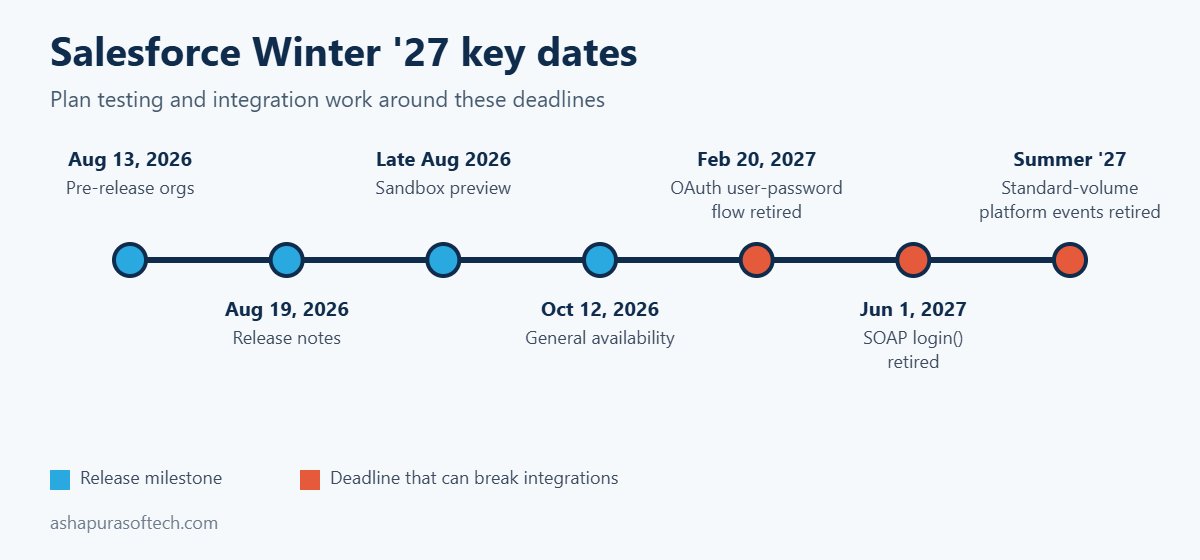
Salesforce Winter '27 release dates timeline with GA on October 12, 2026 and 2027 retirement deadlines
MilestoneDateWhat it means for you
Pre-release orgs openAugust 13, 2026Free trial orgs with Winter ’27 features, but none of your own configuration
Release notes publishedAugust 19, 2026Full list of features and release updates available to read
Sandbox previewLate August 2026Preview sandboxes upgraded early, the best place to test your own setup
Production upgradesWaves through early October 2026Your date depends on your instance, check Trust status
General availabilityOctober 12, 2026All production orgs on Winter ’27
OAuth username-password flow retiredFebruary 20, 2027Integrations using grant_type=password stop getting tokens
SOAP login() call retiredJune 1, 2027Integrations that log in through SOAP must move to OAuth
Standard-volume platform events retiredSummer ’27Events must be migrated to high-volume before then

How this Salesforce Winter ’27 release list is organised

The 15 Salesforce Winter ’27 release changes fall into three groups: five that can break things, five Flow and admin wins and five Agentforce updates. The first five can break something that works today, so they come first and deserve testing time before your upgrade weekend. The next five are Flow and admin improvements that are worth adopting because they save time or reduce risk. The last five are Agentforce and cloud updates that mostly affect planning and budgets rather than day to day stability.

If you only have one afternoon, test group one. If you have a week, work through all three.

Part 1: Five Salesforce Winter ’27 release changes that can break things

1. SOAP login() needs a new API permission

The Salesforce Winter ’27 release enforces a release update titled “Assign Use Any API Auth Permission for SOAP login()”. Users who authenticate through the SOAP API login() call now need that permission assigned, either through a profile or a permission set.

Who it affects: any integration user, middleware tool or older data loader setup that still logs in through SOAP rather than OAuth. These are often integrations nobody has looked at in years.

What to test: in your preview sandbox, list every integration user and check which ones authenticate through SOAP login(). Assign the permission through a permission set rather than editing profiles, then run each integration once end to end. Also note the bigger deadline behind this change: the SOAP login() call itself retires on June 1, 2027, so this is the moment to plan the move to OAuth rather than patching it twice.

2. Profile Filtering is switched on by default

With Profile Filtering enforced by the Salesforce Winter ’27 release, users without the View All Profiles permission can no longer see the names of profiles they are not assigned to. On its own this is a sensible security change. The problem is anything built on the assumption that profile names are visible.

Who it affects: flows, validation rules, formula fields, Apex and reports that read Profile.Name for users who do not hold View All Profiles, plus any custom user management screens.

What to test: search your metadata for references to Profile.Name, run the affected automation as a standard user in the sandbox and confirm it still behaves. Where logic depends on profile, consider switching it to a custom permission, which is the more durable pattern anyway.

3. The OAuth username-password flow is retired on February 20, 2027

This is the change most likely to cause a silent outage. Salesforce is retiring the OAuth 2.0 username-password flow for connected apps, where an integration sends a username, password and security token to get an access token. Enforcement is set for February 20, 2027. When it lands, those integrations simply stop getting tokens, and there is no warning screen for a user to notice.

Who it affects: existing orgs with server to server integrations still using grant_type=password. New orgs already have the flow blocked by default.

What to test: ask every integration owner which OAuth flow they use. Move nightly jobs and middleware to the client credentials flow running as a dedicated integration user, or to the JWT bearer flow for more sensitive connections. Store secrets in Named Credentials, not in code or config files. The Salesforce Winter ’27 release is the moment to do this, because February leaves little room once year end freezes are taken into account.

4. Standard-volume platform events retire in Summer ’27

You can no longer define new standard-volume custom platform events, and new platform events are high-volume by default. Existing standard-volume events are due to retire in Summer ’27, according to the Salesforce Platform Events Developer Guide.

Who it affects: orgs with older event-driven integrations, especially ones built several years ago when standard volume was the default.

What to test: list your custom platform events and check each one’s publish behaviour. For every standard-volume event, plan the migration to high-volume and retest the subscribers, including any Apex triggers, flows and external CometD clients. The migration is not hard, but it touches every subscriber, so it belongs in a planned release rather than a rushed fix.

5. Accessibility updates change layouts above 200% zoom

Three accessibility updates enforced by the Salesforce Winter ’27 release improve how cards, docked containers, menu lists, panels, date pickers, popovers, utility bars, record headers, page headers and modal windows behave at zoom levels above 200%.

Who it affects: most orgs will simply get a better experience. The risk sits with custom Lightning components and CSS overrides that assume a fixed layout.

What to test: open your most used record pages, custom components and utility bar items at 200% and 400% browser zoom in the sandbox. Look for clipped buttons, overlapping text and modals that cannot be closed. Fix those before users who rely on zoom run into them.

Part 2: Five Flow and admin changes in the Salesforce Winter ’27 release

6. Flow Test Mode (beta) replaces Debug Mode

In the Salesforce Winter ’27 release, Test Mode gives Flow Builder a dedicated place to test a flow, combining what debug and flow tests used to do separately. You can save test scenarios with mock inputs and assertions, rerun them after every change and track coverage.

Why it matters: most flow failures in production come from a change to one branch breaking another branch nobody retested. Saved, repeatable tests are the cheapest protection against that.

What to do: pick your three most important record-triggered flows and build saved tests for them in the sandbox. Because Test Mode is still beta, keep your existing testing process running alongside it for now.

7. Screen flows can run on many records at once

After the Salesforce Winter ’27 release, a screen flow can run as a mass quick action from a list view or a related list, receiving the selected records as a collection of IDs. Screen flow quick actions also get custom modal sizing.

Why it matters: bulk updates that used to need a data loader job, a custom Lightning component or a developer can now be built by an admin.

What to do: look for requests your team handles with spreadsheets and data loader, such as reassigning a batch of cases or updating stages on selected opportunities. Those are good first candidates.

8. Flow Builder catches more mistakes at save time

With the Salesforce Winter ’27 release, Flow Builder warns when a Create Records element is missing required field assignments and catches field length violations when you save, instead of failing at runtime. There is also a new run option that makes a flow respect the running user’s permissions, plus an edit history panel and better version comparison.

Why it matters: fewer broken flows reach production, and you can see who changed which element and restore an older version.

What to do: open your largest flows in the sandbox after the upgrade and fix any new warnings. Then review which flows run in system context by default and decide whether they should run in user context instead. For guidance on getting an org ready for automation at this level, our Agentforce readiness checklist covers the permission and data clean up that makes this safer.

9. Apex heap limits go up

The Salesforce Winter ’27 release raises the Apex heap size limit from 6MB to 10MB for synchronous transactions and from 12MB to 25MB for asynchronous transactions. Developers can also test External Services and HTTP callouts in Apex integration tests (developer preview), and a new Apex Symbol API (beta) exposes Apex type metadata.

Why it matters: heap limit errors are a common cause of failed batch jobs and integrations that process large payloads. Some of those will now simply work.

What to do: check your logs for recent heap limit exceptions. Rerun those jobs in the sandbox, but do not treat the higher limit as permission to skip optimisation. Code that barely fitted in 6MB will not stay comfortable for long.

10. Reports get record preview and a home on LWR sites

The Salesforce Winter ’27 release lets you preview records straight from Lightning reports without leaving the report (beta), and Lightning reports and dashboards can now be embedded in Lightning Web Runtime Experience Cloud sites (beta).

Why it matters: partners and customers on an LWR portal can finally see real reports and charts, and internal users lose fewer clicks moving between a report and the records behind it.

What to do: if you run a partner or customer portal, check which reports your external users currently receive by email or export. Those are candidates for embedding once the feature leaves beta.

Part 3: Five Agentforce updates in the Salesforce Winter ’27 release

11. Agent Skills and Plugins get a unified registry

Salesforce’s Winter ’27 announcement introduces a unified registry for Agent Skills and Plugins with more than 100 prebuilt skills. Developers can create reusable, governed capabilities that work across surfaces instead of rebuilding the same action for each agent.

Why it matters: the cost of an Agentforce rollout is often in building and maintaining actions. A shared, governed library changes that equation, and it follows the same direction as the seven Agentforce named agents announced in September.

What to plan: list the actions your agents use today and check which ones now exist as prebuilt skills. Retiring custom actions you no longer need is also a maintenance saving.

12. Custom Scorers (beta) for agent quality

The Salesforce Winter ’27 release adds Agentforce Custom Scorers in beta, letting you define your own evaluation logic for agent sessions on top of the built-in quality metrics.

Why it matters: a generic quality score cannot tell you whether an agent followed your refund policy or escalated at the right point. Custom scoring lets you measure the rules that matter to your business.

What to plan: write down three or four rules every agent conversation must follow, and turn those into scorers in a sandbox. This is also the evidence a steering committee will ask for before approving wider rollout.

13. Adaptive Experiences and Dynamic Plans in service

Adaptive Experiences and Dynamic Plans listen to service conversations in real time and generate and update a resolution plan as the issue evolves. Salesforce says four customers are live, including PowerSchool with more than 550 users.

Why it matters: this moves AI from summarising after the call to guiding the agent during it, which is where handle time actually drops.

What to plan: this depends heavily on clean case data and well structured knowledge. If your knowledge base is out of date, fix that first. For consumption-based costs, our explainer on Agentforce pricing and Flex Credits shows how usage is billed.

14. Agentforce Contact Center expands, with autonomous scheduling

In the Salesforce Winter ’27 release, Agentforce Contact Center expands to more than 30 countries, bringing voice, digital channels and CRM together. Autonomous scheduling with Agentforce Voice lets an agent check availability and book or dispatch technicians around the clock, turning a booking call that used to take around 15 minutes into seconds.

Why it matters: field service and appointment-heavy businesses get a practical use case with a clear return, rather than a general chatbot.

What to plan: map your current booking calls. If most follow the same pattern of checking availability and confirming a slot, they are good candidates. Check your edition too, because what is included changed with the new Salesforce Core, Advanced and Max editions.

15. Agentforce orchestrates third-party agents

With the Salesforce Winter ’27 release, Agentforce can orchestrate agents running on AWS, Azure and Google through A2A-compliant ecosystems. In other words, a Salesforce agent can hand work to an agent built elsewhere and receive the result back.

Why it matters: few large companies will run every agent on one platform. Orchestration across vendors is what keeps a multi-vendor setup from turning into disconnected bots.

What to plan: if you already run agents outside Salesforce, list them and the data each one needs. Governance, logging and permissions across vendors will need an owner before this goes live. If you are weighing Salesforce’s own agents against Claude inside Salesforce, our comparison of Claudeforce vs Agentforce covers the trade-offs.

Smaller Sales and Service changes in the Salesforce Winter ’27 release

A few smaller Salesforce Winter ’27 release updates will not break anything but are worth showing users. In Sales, Einstein Conversation Insights suggests follow-up actions after meetings, reps can capture voice notes after a meeting in the Salesforce mobile app, and Pipeline Forecasting shows deal risks, methodology scores and contact insights. In Service, agents can view original case attachments inline in case details, delete outdated milestones from the case timeline, and use a revamped Enhanced Case Merge interface (beta).

What was pulled from the Salesforce Winter ’27 release: Flow Tags

Flow Tags, which would have let admins label and group flows by category, was removed from the Winter ’27 release during the week of September 14, 2026. The release notes change log records the removal, and Salesforce said only that the feature is not quite ready yet.

The practical lesson is simple. Plan and budget on what is generally available, not on what appeared in a preview, a keynote or an early version of the release notes. Keep using naming conventions and descriptions to organise flows until Flow Tags returns.

Salesforce Winter ’27 release testing checklist

Every Salesforce Winter ’27 release test needs an owner: integration leads cover authentication, admins cover Flow and profiles, and developers cover Apex and platform events. The table maps each change to its test and usual owner.

#AreaWhat to testUsual owner
1SOAP login()Assign the new API auth permission, run each SOAP integration end to endIntegration lead
2Profile FilteringFind Profile.Name references, run them as a standard userAdmin
3OAuth flowsList integrations on grant_type=password, plan client credentials or JWTIntegration lead
4Platform eventsList standard-volume events, plan migration to high-volumeDeveloper
5AccessibilityCheck key pages and custom components at 200% and 400% zoomAdmin, UX
6Flow Test ModeBuild saved tests for the three most important flowsAdmin
7Bulk screen flowsReplace one data loader task with a mass quick actionAdmin
8Flow save checksOpen large flows, clear new warnings, review run contextAdmin
9Apex heapRerun jobs that hit heap limits recentlyDeveloper
10ReportsIdentify portal reports suited to LWR embeddingAdmin
11 to 15AgentforceMap actions to prebuilt skills, draft custom scorers, list external agentsProduct owner

How to run the Salesforce Winter ’27 release upgrade in your org

  1. Confirm your date. Look up your production instance on Salesforce Trust status and put the maintenance window in the team calendar.
  2. Test in a preview sandbox, not a pre-release org. Pre-release orgs have the new features but none of your configuration, so they cannot tell you what breaks.
  3. Start with the release updates. Open Setup, then Release Updates, and work through anything marked for enforcement before touching new features.
  4. Run your regression tests. Apex tests, key flows, integrations and the top ten record pages your users open every day.
  5. Tell users what changes for them. A short note on the few visible changes saves a week of support tickets.
  6. Book the follow-up work. The OAuth, SOAP and platform event deadlines fall in 2027, but the migrations need a slot in your plan now.

Teams without the capacity to test every release properly often hand this recurring work to Salesforce managed services.

Frequently asked questions about the Salesforce Winter ’27 release

When is the Salesforce Winter ’27 release date?

Salesforce announced general availability of the Salesforce Winter ’27 release on October 12, 2026. Production orgs upgrade in waves before that date, and the exact weekend depends on your instance, which you can check on Salesforce Trust status.

What breaks in Salesforce Winter ’27?

The Salesforce Winter ’27 release changes most likely to cause problems are the SOAP login() permission requirement, Profile Filtering being on by default and accessibility changes affecting custom components. Two later deadlines matter just as much: the OAuth username-password flow retires on February 20, 2027 and standard-volume platform events retire in Summer ’27.

Is Flow Test Mode generally available in Winter ’27?

No. Flow Test Mode is in beta in the Salesforce Winter ’27 release. It is safe to use in a sandbox for building saved flow tests, but keep your existing testing process alongside it until it reaches general availability.

Did Salesforce remove Flow Tags from Winter ’27?

Yes. Flow Tags was removed from the Salesforce Winter ’27 release in September 2026, with the change recorded in the release notes change log. Salesforce has not given a new date.

What should Salesforce admins test first in Winter ’27?

Test the enforced release updates first: SOAP login() authentication, Profile Filtering and the accessibility changes. Then check which integrations still use the OAuth username-password flow, because those will stop working on February 20, 2027.

Do Winter ’27 Agentforce features cost extra?

It depends on the feature and your edition. Check the availability section of each feature in the Salesforce Winter ’27 release notes before planning a rollout. Many Agentforce capabilities consume Flex Credits, and edition packaging changed in September 2026 with Core, Advanced and Max.

Getting help with the Salesforce Winter ’27 release

Ashapura Softech is a Salesforce implementation partner working with US businesses on Salesforce CRM development, Salesforce cloud services and CRM software development, and builds the custom middleware behind many Salesforce integrations through our enterprise software development team. If you want a second pair of eyes on your release updates, your integration authentication or an Agentforce rollout, we are happy to help, and you can see how we approach delivery in our Agentforce implementation partner guide.
Categories
Agentforce Salesforce

Agentforce Coworker: What It Does, What It Costs and How to Turn It On

Of everything Salesforce announced under AIforce at Dreamforce 2026, Agentforce Coworker is the piece most admins will meet first. It is not a pilot you apply for. In many orgs it is already switched on, because Salesforce began turning it on automatically from 10 August 2026. This guide explains what Agentforce Coworker is, what it can and cannot touch, what it costs, how to turn it on or keep it off, and how to fix the errors admins run into during setup.

Agentforce Coworker at a glance

QuestionShort answer
What it isAn AI assistant in the Salesforce search bar that answers questions in plain language and can act on CRM records
Where it worksSalesforce, Slack, Microsoft Teams, Claude, ChatGPT and mobile
What it readsSalesforce CRM, Slack and connected Data 360 sources
EditionsEnterprise, Unlimited and Agentforce 1
CostNo extra fee for CRM and Slack search on eligible Unmetered seats; Data 360 answers use credits
StatusAnnounced May 2026, automatic enablement from 10 August 2026, part of AIforce since 15 September 2026

What is Agentforce Coworker?

Agentforce Coworker is an AI assistant that sits in the Salesforce search bar inside Lightning. A user types a question in plain language, and instead of a list of matching records they get one written answer built from the data they are allowed to see. Salesforce’s own Coworker FAQ describes it as a teammate that can reason over complex requests, build a multi step plan and call backend tools to finish the task.

The simplest way to think about it: Coworker replaces “search, open five records, read, piece it together” with “ask once, get the summary”. It does not replace your agents, your flows or your reports. It sits in front of them and becomes the single entry point to them.

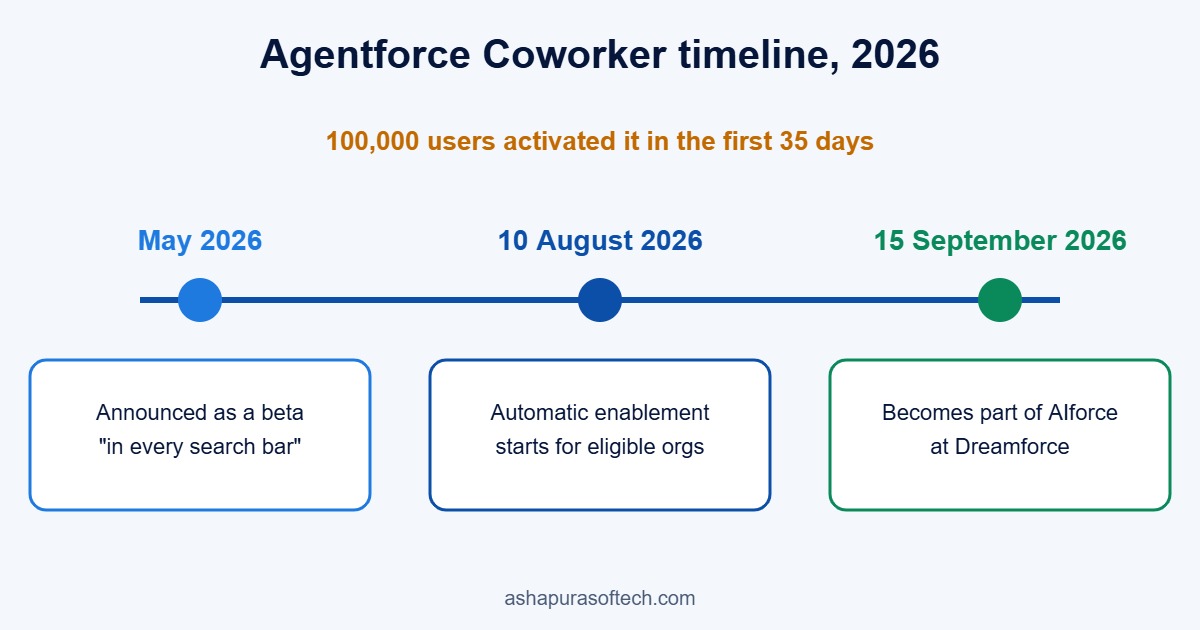
Agentforce Coworker timeline

  • May 2026: Marc Benioff announced Coworker as an AI teammate “inside every Salesforce search bar”, and it opened as a beta for Agentforce customers.
  • 10 August 2026: Salesforce started enabling it automatically for eligible orgs, on a rolling basis.
  • 15 September 2026: At Dreamforce it became one of the three products inside AIforce, next to Claudeforce and Slackforce. Salesforce said 100,000 users activated it in the first 35 days.
Agentforce Coworker timeline: beta in May 2026, automatic enablement from 10 August 2026, part of AIforce from 15 September 2026
Agentforce Coworker timeline in 2026.

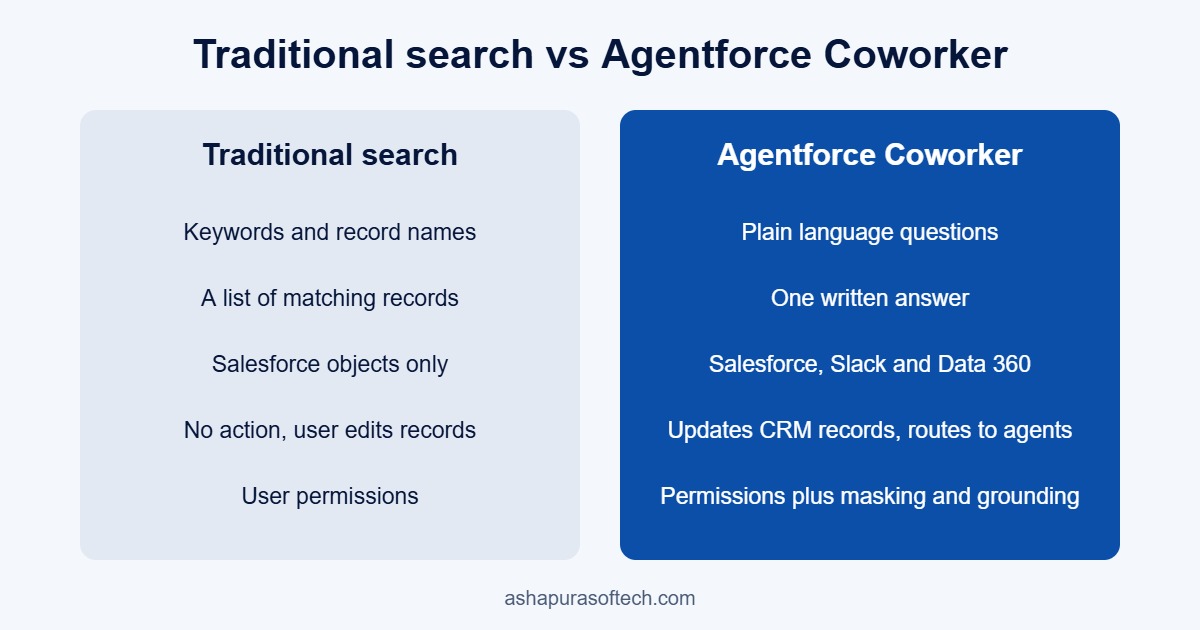
Agentforce Coworker vs traditional Salesforce search

Classic global search is good at one thing: finding a record when you already know roughly what it is called. Coworker is built for the questions that sit between records.

Traditional Salesforce searchAgentforce Coworker
InputKeywords and record namesPlain language questions
OutputA list of matching recordsOne written answer with the records behind it
SourcesSalesforce objectsSalesforce, Slack and Data 360 sources
ActionNone, the user opens and edits recordsCreates or updates CRM records after confirmation, routes work to agents
SecurityUser permissionsUser permissions plus Data 360 governance, masking and grounding
Agentforce Coworker vs traditional Salesforce search: input, output, sources, actions and security compared
Agentforce Coworker compared with traditional Salesforce search.

Where Agentforce Coworker works

The Lightning search bar is where most users first see it, but Salesforce’s Agentforce Coworker page lists more surfaces: Slack, Microsoft Teams, Claude, ChatGPT and mobile. The point is that the same assistant, with the same permissions, follows the user into whichever tool they already have open. That is the idea behind AIforce as a whole, and it is why Coworker pairs naturally with Claudeforce for teams that already work in Claude.

What Agentforce Coworker can search and do

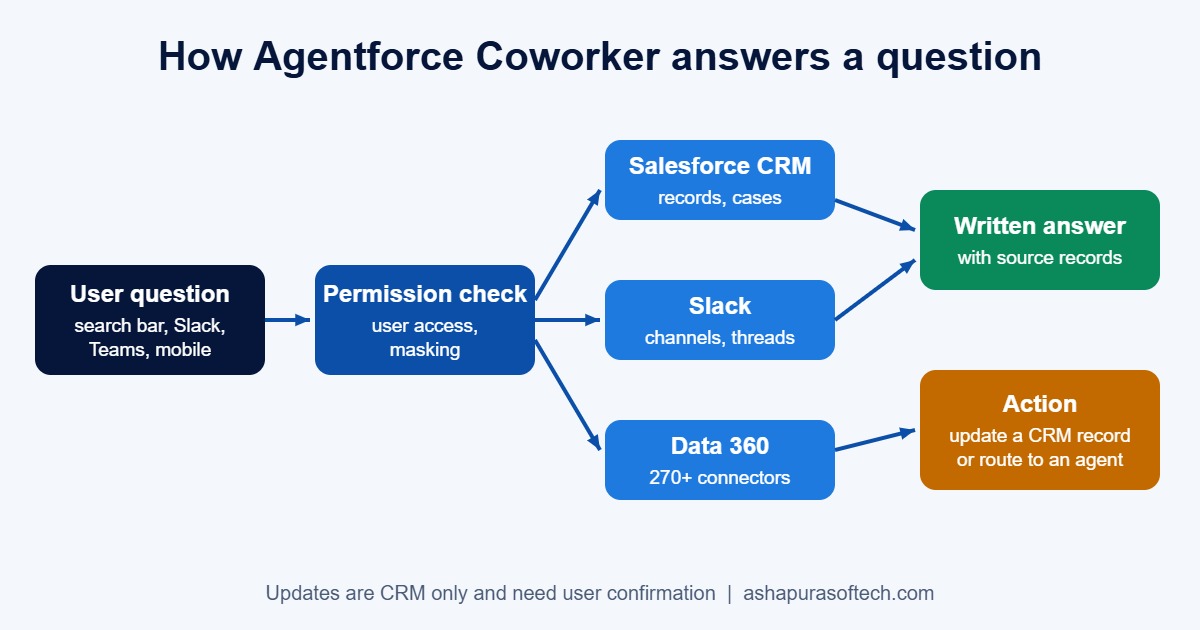
According to the Salesforce developer guide and the help FAQ, Coworker reads across three kinds of source:

  • Salesforce CRM data: accounts, contacts, opportunities, cases, custom objects, knowledge articles and past case history.
  • Slack: messages, channels and conversations the user can already access.
  • Data 360 sources: Salesforce says more than 270 external sources connect through Data 360 connectors, including data lakes, knowledge bases and enterprise apps such as Jira.

On top of search, it does three things that matter in daily work:

  • Create or update records. It checks permissions and validation first, and asks the user to confirm before it saves anything. Today this works only on Salesforce CRM records, not on Slack or external data.
  • Route the request. If a question belongs to a specialised agent, for example a service agent or one of the named agents like Casey or Piper, Coworker hands it over rather than guessing.
  • Summarise across sources. A sales rep can ask what is putting a deal at risk and get the open cases, the Slack thread about pricing and the stalled approval in one answer.
How Agentforce Coworker answers a question: user question, permission check, CRM, Slack and Data 360 sources, answer or action
How Agentforce Coworker turns one question into an answer or an action, inside the user’s own permissions.

Agentforce Coworker use cases and example prompts

The value shows up when people ask the questions they currently answer by opening several tabs. These are the kinds of prompts that fit each team.

Sales

  • “What should I know before my call with this account tomorrow?”
  • “Which of my opportunities closing this quarter have had no activity in two weeks?”
  • “Log a note on this opportunity: pricing approved, legal review next week.”

Service

  • “Has this customer reported this issue before, and how was it fixed?”
  • “Why are cases about login errors spiking this week?”
  • “Find the knowledge article that answers this case.”

Customer success and leadership

  • “Summarise open cases, renewal date and recent Slack discussion for this account.”
  • “Which strategic accounts have an open escalation and a renewal in the next 90 days?”

For the wider picture of where agents earn their keep, see our Agentforce use cases guide.

How it handles security and permissions

Salesforce says Coworker “fully honors the existing Salesforce access model”. It runs with the permissions of the person using it, so if a user cannot open a record, Coworker cannot read it for them. Behind that sit attribute based access control, PII masking, toxicity detection and result grounding through Data 360, and the AIforce announcement repeats the zero data retention model for the underlying language models.

External sources need more thought. Permission aware sources carry their access rules across automatically, and federated sources enforce permissions in real time at the source. For other connectors, an admin has to create governance policies in Data 360 by hand. Data from sources that are not zero copy is ingested and stored in Data 360, which matters for data residency reviews.

The practical catch is that “respects your permissions” is only as good as the permissions themselves. Many orgs have years of broad sharing rules, public read on objects that should be private, and profiles that were cloned instead of designed. Search used to hide that problem because nobody scrolled through everything. A good AI answer surfaces it in seconds. If you have not reviewed sharing in a while, do that before you roll Coworker out widely. Our Agentforce readiness checklist covers the same ground.

Automatic enablement: is Coworker already on in your org?

Salesforce’s automatic enablement FAQ says the rollout began on 10 August 2026 on a rolling basis. Your org is in scope if it has Unmetered User Based AI seats and Einstein is active.

Some orgs are left out of automatic enablement:

  • Orgs that have opted out of generative AI.
  • Multi dataspace or multi org setups.
  • HIPAA, health and life sciences, and government orgs.
  • Flex Foundation seats without Unmetered entitlements.

If your org is in scope and you would rather roll it out on your own schedule, there are two ways to opt out: the link in the notification email Salesforce sends, or Setup > Agentforce Coworker > Opt Out of Auto Activation. Users who gain an eligible seat after the automatic switch on still need an admin to give them access by hand.

Agentforce Coworker pricing: what does it cost?

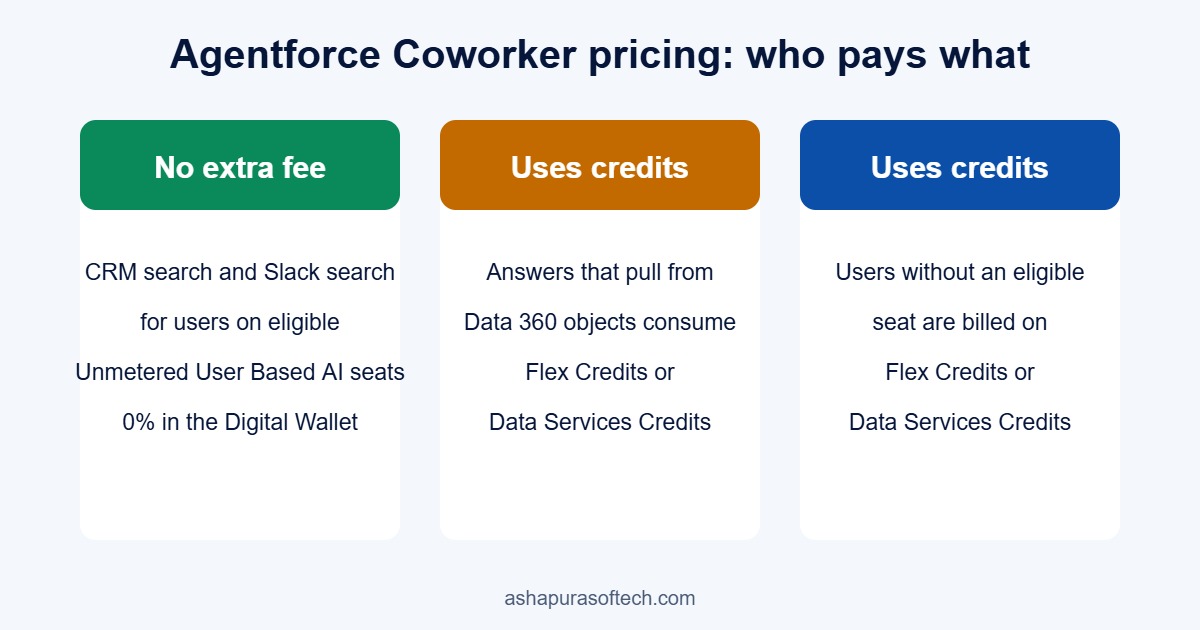
For most seat based customers, the search itself is included. Salesforce states that searching CRM data and Slack carries no extra fee for users on eligible Unmetered seats, and that their usage shows as zero consumption in the Digital Wallet.

Costs appear in two places:

  • Data 360 objects. Answers that pull from connected Data 360 objects consume Flex Credits or Data Services Credits.
  • Users without an eligible seat. Anyone who loses an Unmetered seat moves back to normal Flex Credit or Data Services Credit billing.

So the budget question is not “what does Coworker cost” but “which users are on metered seats, and how much Data 360 do we plan to expose”. If you are still working out how Flex Credits are counted, start with our Flex Credits explainer, and read the Core, Advanced and Max editions change alongside it, since the new editions bundle credits differently.

Agentforce Coworker pricing: no extra fee for CRM and Slack search on eligible seats, credits for Data 360 answers and metered users
Who pays what for Agentforce Coworker.

Requirements to turn on Agentforce Coworker

If your org was not switched on automatically, you can turn it on yourself. The setup guide and the help FAQ list these requirements.

RequirementWhat you need
EditionEnterprise, Unlimited or Agentforce 1
Usage based licensingData Cloud or Data 360, a Foundations or Flex Foundations licence, and Flex Credits
Seat based licensingData Cloud or Data 360, plus Agentforce 1 Edition or Agentforce for Sales, Service and Industries
Admin accessSalesforce admin role, the Agentforce Coworker Admin permission set and the AI Search Setup permission set licence
User accessThe Access_Ai_Search permission set group

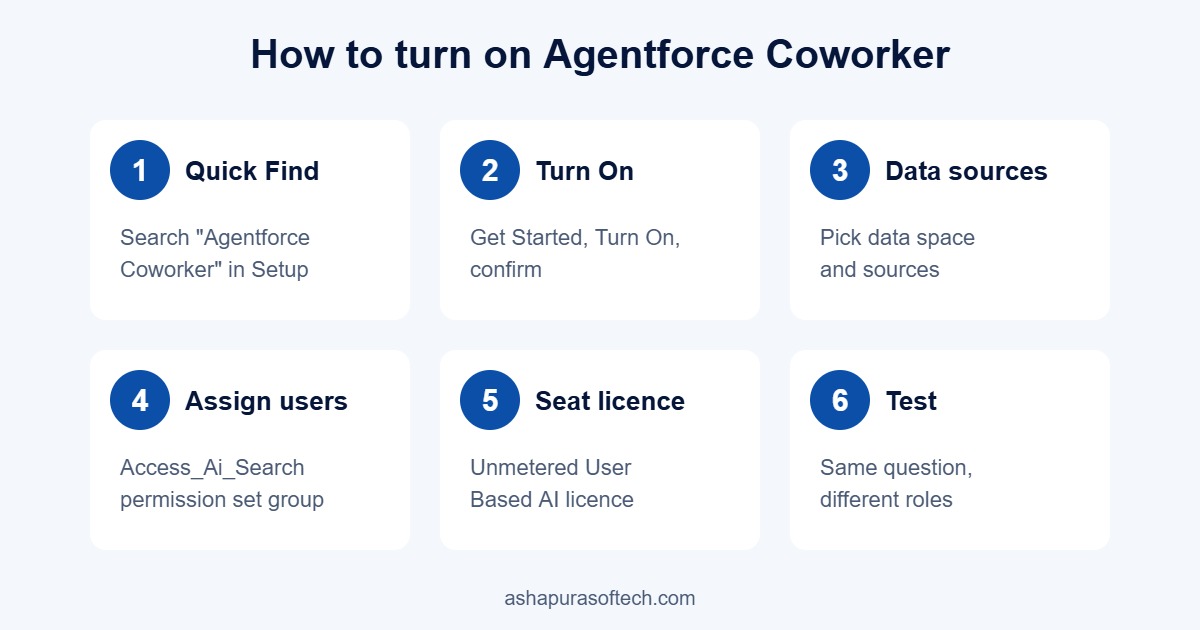
How to turn on Agentforce Coworker, step by step

  1. In Setup, type Agentforce Coworker in the Quick Find box.
  2. Select Get Started with Agentforce Coworker, click Turn On and confirm. Einstein turns on automatically at this point. Setup takes a few minutes, and Salesforce shows a warning if any prerequisite is missing.
  3. If your org has more than one data space, choose the data space, then select the data sources Coworker should use.
  4. In the Manage Users section, click Manage and assign the Access_Ai_Search permission set group to the users who should have it.
  5. For seat based access, open each user in Setup, go to Permission Set License Assignments, tick Unmetered User-Based AI and save.
  6. Test with two or three users from different roles before you widen access. Ask each the same question and check that the answers differ in the way their permissions say they should.
How to turn on Agentforce Coworker in six steps: Quick Find, Turn On, data sources, assign users, seat licence, test
The six steps to turn on Agentforce Coworker.

Troubleshooting common Agentforce Coworker errors

These are the errors Salesforce lists in its troubleshooting FAQ, with the fix for each.

ErrorLikely causeFix
Coworker does not appear, or “Not Enabled”User is missing the licence or the Access_Ai_Search groupCheck the permission set licence and group assignment for that user
401 UnauthorizedConnected App or OrgJWT set up incorrectlyConfirm the Connected App definitions and OrgJWT certificates match
400 Invalid IDAgent ID is truncated or in the wrong formatCopy the full 18 character Agent ID from the setup URL
500 Server Error or engine lookup failureBackend or model gateway interruptionHard refresh the browser, then turn Coworker off and on again
Invalid TokenThe session failed OAuth or JWT validationCheck client credentials and the gateway network path

Limits worth knowing before rollout

  • 30 language model calls per minute per user. Salesforce notes this is not technically enforced yet, but one question can trigger several calls, so heavy users will reach it sooner than the number suggests.
  • Record updates are CRM only. Coworker can read Slack and Data 360, but it can only write to Salesforce records.
  • Files over 75 MB are not indexed, so very large documents will never show up in answers.
  • English only during the beta. Salesforce says other languages follow at general availability.
  • Not yet available in GovCloud. It does work for authenticated Experience Cloud users.
  • Answers are only as good as the data. Duplicate accounts, empty close dates and stale opportunity stages all show up in the answer. An AI summary of messy data is still messy data, just faster.

A sensible Agentforce Coworker rollout plan for admins

Whether Coworker is already on or you are about to switch it on, the order of work is the same:

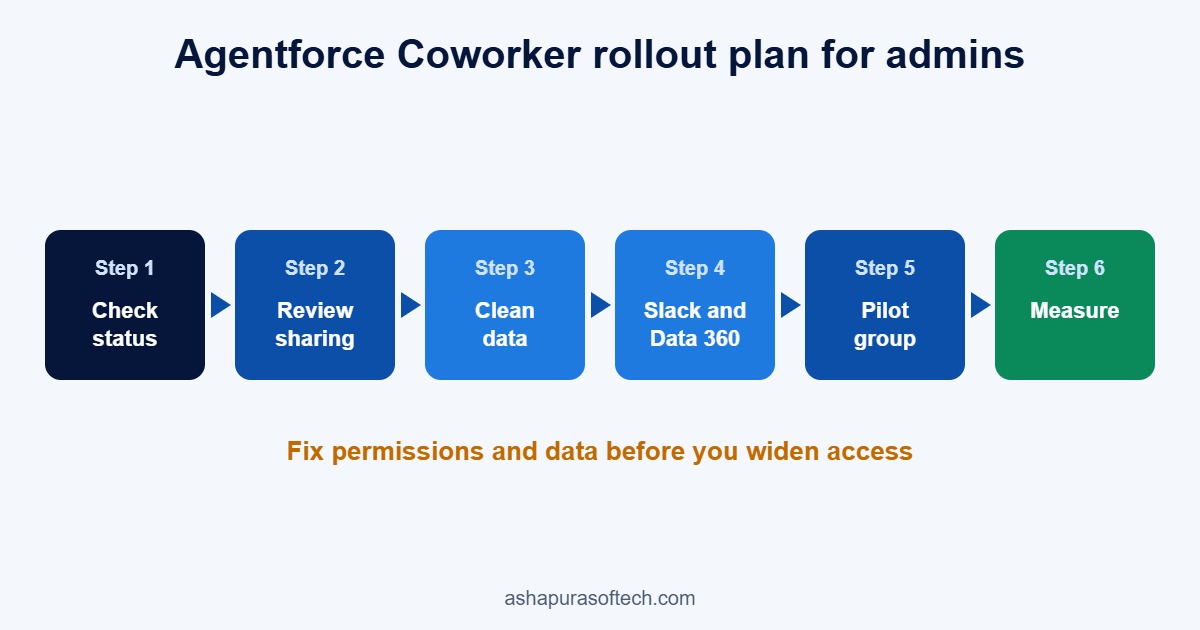
  1. Check the status. Open Setup and see whether Coworker is active and who has the Access_Ai_Search group.
  2. Review sharing. Look at organisation wide defaults, sharing rules and the objects with public read. Fix what you would not want a quick question to reveal.
  3. Clean the high use objects. Merge duplicate accounts and contacts and fill the fields reps rely on, such as stage, close date and next step.
  4. Decide on Slack and Data 360. Connect Slack if your teams live there. Connect Data 360 sources only where the value is clear, set governance policies for any source that is not permission aware, and remember those answers consume credits.
  5. Start with a pilot group. Pick one sales team and one service team, collect the questions they actually ask, and write short guidance on what Coworker is good at.
  6. Measure. Track adoption, the questions that return weak answers and credit consumption for the first month before you expand.
Agentforce Coworker rollout plan: check status, review sharing, clean data, connect Slack and Data 360, pilot group, measure
A six step Agentforce Coworker rollout plan for admins.

If you need help with the sharing review, the data clean up or the Data 360 connections, our Salesforce managed services and Data Cloud consulting teams work on exactly these steps.

Frequently asked questions about Agentforce Coworker

Is Agentforce Coworker part of AIforce?

Yes. At Dreamforce 2026 Salesforce grouped Agentforce Coworker, Claudeforce and Slackforce under AIforce, its new interface layer for reaching Salesforce data from any screen.

Is Agentforce Coworker free?

Searching CRM data and Slack carries no extra fee for users on eligible Unmetered User Based AI seats. Answers that use Data 360 objects consume Flex Credits or Data Services Credits, and users without an eligible seat are billed on credits.

Was Agentforce Coworker turned on automatically?

Possibly. Salesforce began automatic enablement on 10 August 2026 for orgs with Unmetered User Based AI seats and Einstein active. HIPAA, health, government and multi org setups were excluded.

How do I opt out of automatic activation?

Use the opt out link in the Salesforce notification email, or go to Setup, Agentforce Coworker, and turn on Opt Out of Auto Activation.

Can Agentforce Coworker see data a user cannot see?

No. It runs with the permissions of the person using it, so it can only read and change what that user can already read and change.

Does Agentforce Coworker work in Slack and Microsoft Teams?

Yes. Salesforce lists Slack, Microsoft Teams, Claude, ChatGPT and mobile as surfaces alongside the Salesforce search bar.

Which editions support Agentforce Coworker?

Enterprise, Unlimited and Agentforce 1 editions, with Data Cloud or Data 360 in place.

Why can’t I see Agentforce Coworker in my org?

Usually the user is missing the required permission set licence or the Access_Ai_Search permission set group. Check both in Setup before looking for anything else.

The bottom line

Agentforce Coworker is the most visible part of AIforce because it lives where every user already clicks: the search bar. It costs little or nothing for most seat based orgs, and it may already be running in yours. The real work is not switching it on. It is making sure your permissions and data are in a state where a fast, confident answer is also a correct one. Start there, pilot small, and expand once the answers hold up.

Categories
Agentforce Salesforce

Agentforce Named Agents: What Casey, Paige, Carter, Hunter, Marshall, Piper and Fin Actually Do

For two years Agentforce was something you built. You picked a topic, wrote instructions, wired up actions, tested it, and hoped the thing behaved in production. At Dreamforce in September 2026 Salesforce changed the starting point: seven named agents that arrive already configured for a specific job, six of them generally available on day one.

That shift is bigger than the names suggest. A prebuilt agent is an opinion about how a job should be done, baked into software. It will fit some orgs closely and fight others. This guide goes through all seven, what each one is actually scoped to do, which cloud it needs, what is shipping today versus later, and where we would not use it.

The seven Agentforce named agents at a glance

AgentJob it doesWhere it livesStatus
CaseyCustomer service resolution across voice, SMS, WhatsApp and web chatService CloudGA now
PaigeIT and HR service requests through Slack and employee portalsEmployee ExperienceGA now
CarterProduct discovery, comparison and checkout help for shoppersCommerce CloudGA now
PiperInbound lead engagement and qualification across web and emailSales and MarketingGA now
FinComplex customer experience workflows spanning channelsCustomer OperationsGA now
MarshallBack office process orchestration with deterministic executionBack OfficeGA now
HunterOutbound pipeline, from research through to outreachSales CloudPilot now, GA expected November 2026

1. Casey: the service agent that finally covers voice

Casey handles customer service issues end to end across voice, SMS, WhatsApp and web chat. The channel spread is the part worth noticing. Most deflection projects we see start and stop at web chat, because chat is where the transcript is clean and the integration is easy. Voice is where the volume and the cost actually sit, and voice is where a handover to a human has always been ugly.

What Casey is good at: repeat, policy driven questions where the answer exists in a knowledge article or a record. Order status, appointment changes, password and access issues, returns inside policy.

What it does not remove: the need for a clean knowledge base. An agent that reads bad articles gives confident bad answers faster than a human would. If your knowledge base has not been audited in a year, that audit is the first project, not the agent.

2. Paige: employee service, where the ROI case is easiest

Paige answers IT and HR service requests inside Slack and employee portals. Of the seven, this is the one with the least risk attached, because the audience is internal. A wrong answer to an employee costs a follow up ticket. A wrong answer to a customer costs the customer.

That makes Paige a sensible first deployment even for an organisation whose real target is customer facing automation. You get the operating experience, the prompt tuning habits and the escalation design without putting revenue on the line while you learn.

3. Carter: commerce assistance, not a storefront replacement

Carter works inside Commerce Cloud on product discovery, comparison and checkout assistance. It is the agent most often confused with something it is not. Carter does not replace your storefront, your catalogue structure or your merchandising rules. It sits on top of them, and it inherits their quality.

If product data is thin, if attributes are inconsistent between categories, or if the same item appears three times under different SKUs, Carter surfaces those problems to shoppers rather than hiding them. Catalogue hygiene is the prerequisite. We cover how that data flows in our guide to Salesforce ecommerce integrations.

4. Piper: inbound lead qualification

Piper engages and qualifies inbound leads across websites and email. The job is speed to lead and consistency of questioning, two things humans are reliably bad at on a Friday afternoon.

The caution here is qualification criteria. Piper applies whatever definition of a qualified lead you give it, at scale, without the quiet human correction that normally happens in the background. If your MQL definition has drifted from what sales will actually accept, an agent will expose that gap within a week. Fix the definition before you automate it.

5. Fin: the cross channel workflow agent

Fin is scoped to complex customer experience workflows that span channels, which is the vaguest brief of the seven and also the most interesting. Think of the cases that start in chat, move to email, require a back office action and end with an outbound confirmation. Those are the ones that fall through today, because no single team owns them end to end.

Fin is worth evaluating if your complaint volume is driven by process breakage rather than by product problems. It is not worth evaluating if your handoffs are undocumented, because there is nothing for it to follow.

6. Marshall: deterministic back office execution

Marshall orchestrates back office processes with what Salesforce calls deterministic execution. That word matters. Most of the anxiety around agents in finance and operations comes from non determinism: the same input producing a different sequence of steps on different days. Marshall is positioned as the answer to that, running defined processes in a defined order rather than reasoning its way to an outcome.

Where this fits: invoice handling, order processing, fulfilment exceptions, reconciliation steps that today sit in a spreadsheet and a person’s head. Where it does not: anything where the process itself is undefined. Marshall executes a process, it does not design one for you.

7. Hunter: outbound pipeline, and the one that is not GA yet

Hunter covers outbound sales pipeline from account research through to outreach, and it is the only one of the seven still in pilot, with general availability expected in November 2026. It is also the agent that debuts long horizon runtime, which is the genuinely new platform capability in this release.

Long horizon runtime means an agent can pursue a goal across days and weeks rather than inside a single session. It preserves memory between runs, survives interruption through durable execution, and can be steered mid flight without being restarted. For outbound that is the difference between a sequence and a campaign that adapts.

It is also the capability that deserves the most governance attention. An agent working a goal for three weeks accumulates three weeks of decisions nobody reviewed individually. Decide in advance what it is allowed to send, to whom, and what it must escalate.

What shipped alongside the agents

Three platform pieces came with the agent portfolio and change how the seven are used together.

Multi agent orchestration is generally available now, and routes work across the specialised agents so they operate as a team rather than seven separate deployments. This is what stops Casey and Fin from both claiming the same case.

AI Skills in Agentforce Coworker lets an employee teach a task once and have it reused across the workforce. It is in pilot now with general availability expected in October 2026.

Agent Optimizer covers building, refining, testing and analysing agent performance across the lifecycle, with general availability expected in October 2026. Until it lands, measurement of agent quality is still something you assemble yourself.

All of this sits inside the wider announcement Salesforce made at Dreamforce. If you want the commercial side, including which Flex Credit allowance comes with which tier, start with what AIforce actually changed and the Core, Advanced and Max editions.

When a named agent is the wrong answer

Four situations where we would tell a client to wait.

The underlying data is not trustworthy. Every one of these agents reads your records and your content. Duplicate accounts, stale knowledge articles and half migrated product data do not get smoothed over by an agent, they get amplified and put in front of a customer.

The process is undocumented. Marshall and Fin in particular assume a process exists. If the answer to “what happens next” depends on which person picks it up, an agent has nothing to follow.

Your volume is low. An agent earns its keep on repetition. A team handling forty cases a week will spend more effort tuning than it saves.

The job is judgement, not throughput. Complaint escalations that involve goodwill decisions, a renewal conversation with an unhappy account, anything with a legal or clinical dimension. Those stay human, with the agent doing preparation rather than resolution.

How to choose which one to turn on first

The order we recommend, and the reasoning behind it.

Start with Paige if you have an internal service desk. Lowest blast radius, fastest feedback loop, and the operating habits transfer directly to the customer facing agents afterwards.

Start with Casey if service cost is the board level number. It is the only one of the seven that touches voice, which is usually where the cost sits.

Start with Piper if speed to lead is the bottleneck. Measure current first response time before you deploy, because this is the one agent whose effect shows up in a single clean metric.

Wait on Hunter unless you are comfortable in a pilot. General availability is expected in November 2026, and long horizon runtime is new enough that early deployments are learning exercises as much as productivity ones.

Whichever you pick, scope one job, instrument it, and run it for a month before adding a second. Teams that switch on four agents at once cannot tell which one caused the change in their numbers.

What this means for existing Agentforce builds

If you already built custom agents, the named agents do not obsolete them, but they should prompt a review. Anything you built that maps closely to one of the seven jobs is now maintenance you may not need to carry. Anything you built that is specific to your business, your products or your regulatory position is exactly what should stay custom.

The practical exercise is to list your current agent topics against the seven and mark each as replace, keep or merge. Our Agentforce readiness checklist covers the questions to ask before either path, and the implementation partner guide covers how the delivery work is usually split.

The named agents are not the only way users reach Agentforce. Agentforce Coworker in the Lightning search bar routes a question to the right specialised agent on its own, and our Agentforce Coworker guide explains how that works and what it costs.

The named agents arrive alongside a busy platform release. See the Salesforce Winter ’27 release guide for the 15 changes to test in your org, including the new Agent Skills registry.

Frequently asked questions

Are all seven Agentforce named agents available now?

Six are generally available: Casey, Paige, Carter, Piper, Fin and Marshall. Hunter is in pilot, with general availability expected in November 2026.

Do the named agents replace custom built Agentforce agents?

No. They cover common, well defined jobs. Anything specific to your products, your industry rules or your internal processes still needs to be built, and the two run alongside each other under multi agent orchestration.

Which licences do the named agents need?

Each sits inside a product area, so Casey needs Service Cloud, Carter needs Commerce Cloud and so on. Consumption is drawn from the Flex Credit allowance that comes with your edition, which means two organisations on the same edition can see very different usage. Confirm current entitlements with Salesforce or your account executive before budgeting.

What is long horizon runtime?

It lets an agent pursue a goal across days and weeks instead of within one session, by preserving memory between runs, surviving interruptions and accepting steering mid task. Hunter is the first agent to use it.

Where do we start if we have never deployed an agent?

With an internal use case, a documented process and a single measurable metric. Paige on an IT or HR service desk is the usual low risk starting point.

Talk to us about which agent fits

Ashapura Softech is a certified Salesforce partner working with teams in the United States on Service Cloud, Sales Cloud, Commerce Cloud and Agentforce delivery. If you want a view on which of the seven fits your org, and what would have to be cleaned up first, get in touch.

Categories
Agentforce Salesforce

What Is AIforce? Salesforce’s Dreamforce 2026 Announcement Explained

On 15 September 2026, at Dreamforce in San Francisco, Salesforce announced AIforce. The framing Salesforce used for it is blunt: AI replaces the UI. Instead of asking people to open Salesforce to get work done, AIforce lets AI agents read and act on Salesforce data from wherever the person already is, whether that is Claude, Slack, Lightning or a tool your own team has built.

If you run a Salesforce org, this is the announcement from this Dreamforce that actually changes how your users will touch the system. Here is what was announced, what is available today, and what it is reasonable to do about it this quarter.

What is AIforce?

AIforce is a layer on top of Salesforce’s existing Agentic Enterprise architecture, not a replacement for Agentforce. It takes what already sits in your org, Customer 360 records, Data 360 context and the Agentforce agents you have configured, and exposes them to AI interfaces outside the Salesforce UI.

The practical effect is that a rep can update an opportunity, log a call, pull pipeline or ask for account research without opening a Salesforce tab. Marc Benioff described the idea as combining model intelligence with the context customers have already built inside Salesforce to create a composable system.

The word composable is doing real work in that sentence. AIforce is built on the Headless 360 toolkit Salesforce shipped in March 2026, which exposes platform capability through APIs, Model Context Protocol servers and developer tooling. Agents are assembled from those pieces rather than bought whole.

The three products inside AIforce

Claudeforce

Claudeforce is the extended Anthropic partnership. It puts Salesforce inside Claude, shipping with 37 prebuilt sales skills covering work like prospecting and pipeline management, with analytics and further skills for service, marketing, commerce and industries on the roadmap. There is also a Salesforce Development plug in for Claude Code carrying more than 40 skills for developers.

Salesforce in Claude is in beta and open to all customers now. If your team already uses Claude, this is the lowest friction way to see what the interface revolution actually feels like on your own data.

We covered the Salesforce and Anthropic partnership in detail in What is Claudeforce.

Slackforce

Slackforce brings Salesforce into Slack as an interactive surface rather than a notification feed. It includes a Slackbot assistant and Slack CRM, which lets a user create an account, log call notes and update records from a prompt without leaving the channel. Slack Code covers collaborative AI development in the same place.

For teams whose real working day happens in Slack, this closes the gap that CRM adoption programmes have been fighting for a decade. Data quality problems are usually a data entry friction problem, and this removes a large part of that friction.

Agentforce Coworker

Agentforce Coworker is an AI teammate inside the Lightning interface, working across devices and operating strictly inside your existing business rules, permissions and security model, with zero data retention. Salesforce has described it as instantly available to customers.

Coworker is the part of AIforce most admins will meet first, because Salesforce began switching it on automatically in August. We cover eligibility, cost, the opt out setting and the setup steps in our Agentforce Coworker guide.

Coworker is the one to test first if your objection to agents so far has been governance. It inherits the permission set of the person it is working for, so it cannot see what that person cannot see. Our guide to Agentforce use cases covers where agents have actually been shipped in practice.

The Headless Toolkit and AgentExchange

Underneath the three products sits the Headless Toolkit, which exposes platform elements through MCPs, APIs, plug ins and skills so you can build your own AI experience rather than take one off the shelf. AgentExchange is where partners publish integrations, with Anthropic, AWS, Google, OpenAI, DocuSign and Vercel already named in that ecosystem.

This matters for anyone with a non standard process. The interesting AIforce work in 2027 will not be turning on Coworker, it will be exposing your own objects, validation rules and approval flows as skills an agent can call safely.

Salesforce Core, Advanced and Max: the edition change to read alongside it

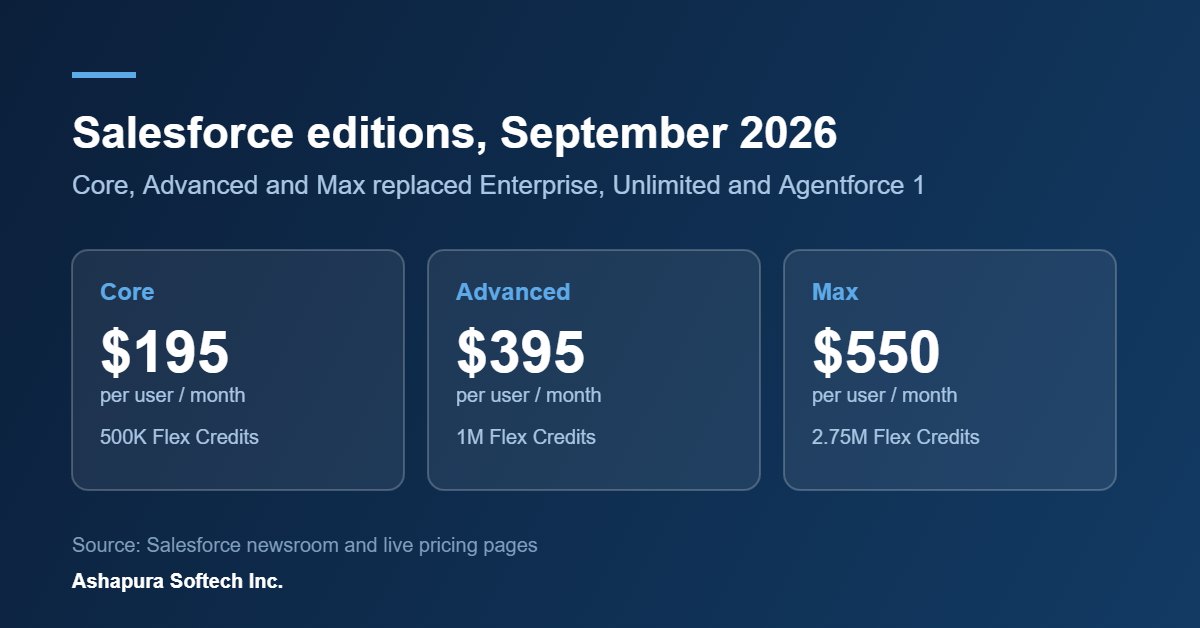
Salesforce also simplified its editions, effective September 2026, into Core, Advanced and Max across Agentforce Sales, Service and Industries. Every edition now bundles Agentforce capabilities such as Account Research and Service Rep Assistant, Slack and Slackbot, embedded agentic analytics powered by Tableau Next, enterprise grade data security and Premier Success Plans, along with Flex Credits: 500K on Core, 1M on Advanced and 2.75M on Max.

List pricing is 195 dollars per user per month for Core, 395 for Advanced and 550 for Max. Salesforce has said existing Agentforce 1 Edition customers can move to Max at no extra cost, legacy edition pricing is unchanged for current customers, and Industry Edition pricing is still to come this autumn.

Confirm your own numbers with your account executive before you budget against these. Published list pricing and what lands on a renewal quote are rarely the same thing, and consumption based Flex Credits change the shape of the bill.

What this actually changes for your org

Your interface strategy is now a real decision. Until this announcement, “where do users work” had one answer. Now there are four plausible answers and you should pick deliberately per team rather than let it happen by accident.

Permissions and sharing rules become the control surface. An agent that inherits a user’s permissions is only as safe as those permissions are tidy. If your profiles and permission sets have drifted over years of ad hoc requests, that debt is about to become visible in a new way.

Data quality gets more exposed, not less. An agent asked to research an account will answer from what is in your org. Duplicate accounts, stale contacts and half filled custom fields have been survivable while a human was reading the record and mentally correcting it. They are less survivable when the answer arrives as a confident sentence.

Automation you already have may be duplicated. Before you build an agent for a task, check whether a Flow already does it. Agents are the right tool for judgement and language, not for deterministic steps a Flow handles cheaply.

A sensible order of work

  1. Turn on Salesforce in Claude for a small group, in a sandbox or with a limited permission set, and watch what people actually ask it.
  2. Run a permissions audit before you widen access. Profiles, permission sets, field level security, sharing rules.
  3. Run a duplicate and data completeness pass on accounts and contacts, since that is what agent answers are built from.
  4. Pilot Agentforce Coworker with one team and one measurable task rather than across the org.
  5. Model your edition options against actual usage before renewal, including what Flex Credit consumption looks like at your volume.

Steps two and three are unglamorous and they are where most of the value is. Agent quality is downstream of org hygiene, which is the bulk of what our Salesforce managed services team spends its time on.

Frequently asked questions about AIforce

Is AIforce the same as Agentforce?

No. Agentforce is the agent platform inside Salesforce. AIforce is the layer that lets those agents and your Salesforce data be reached from outside the Salesforce interface, through Claude, Slack, Lightning or your own build.

Is AIforce available now?

Salesforce in Claude is in beta and open to all customers. Agentforce Coworker has been described as instantly available. Other components, including further Claudeforce skills for service, marketing, commerce and industries, are on the roadmap rather than shipped.

What does AIforce cost?

Salesforce has not published separate AIforce pricing. The related edition pricing effective September 2026 is 195, 395 and 550 dollars per user per month for Core, Advanced and Max respectively, with Flex Credits included at each tier. Check current pricing with Salesforce directly.

What are Salesforce Flex Credits?

Flex Credits are the consumption units bundled with the new editions, 500K with Core, 1M with Advanced and 2.75M with Max. Because agent usage draws on them, two orgs on the same edition can see very different bills depending on how heavily agents are used.

Do we need Data Cloud for this to work well?

You do not strictly need it, but the quality of agent answers depends on the context available to them. If your customer data is spread across systems Salesforce cannot see, that is the gap to close first. Our Salesforce Data Cloud and Data 360 consulting page covers what that work involves.

Where should a mid sized team start?

With one team, one task, and a permissions audit first. Agent quality follows org hygiene, so the groundwork matters more than the agent configuration.

Where AIforce lands

We are a certified Salesforce partner working with teams in the United States from Irving, Texas, with our development centre in Ahmedabad. The work we expect to matter most over the next two quarters is not agent configuration, it is the permission, data and automation groundwork that decides whether an agent gives a useful answer or a confidently wrong one.

If you want a second opinion on where your org stands before you widen agent access, get in touch.

Two pieces of this are worth reading on their own. The commercial change is covered in our guide to the Core, Advanced and Max editions, and the earlier question of how the two agent platforms differ is answered in Claudeforce vs Agentforce. If you are working out a credit budget, Flex Credits explained has the arithmetic.

The seven named agents announced alongside all this are covered one by one, with status and licence notes, in our guide to the Agentforce named agents.

Categories
Agentforce Salesforce

Salesforce Agentforce Use Cases: What Works in Sales, Service, Marketing and Commerce

This guide covers Salesforce Agentforce use cases that companies have actually put live, grouped by the team that owns them: sales, service, marketing, commerce and the contact center. Most Agentforce articles list twenty things an AI agent “could” do. This one sticks to live deployments and the results those companies have published. At the end you will find a simple way to choose your first use case and what a Salesforce AI implementation needs before an agent goes live.

What Agentforce is, in two sentences

Agentforce is Salesforce’s platform for building AI agents that read your CRM data, follow the rules you set, and take actions such as updating a case, booking a meeting or drafting a quote. Salesforce ships prebuilt agents for each cloud, and you can build your own in Agentforce Builder using Flows, Apex and prompt templates you already have.

If you are still comparing options, our Claudeforce vs Agentforce guide explains how the two fit together.

Agentforce for Service: the most proven use case

Service is where Agentforce has the most live deployments, because the work is repetitive, the answers already sit in knowledge articles, and success is easy to measure (deflection, resolution rate, handle time).

What the Service Agent does

  • Answers customer questions across chat, messaging and web, using your knowledge base and case history
  • Takes actions: checks an order, changes a booking, opens or updates a case
  • Hands off to a human rep with the full conversation and a summary when it cannot resolve the issue

Published Agentforce customer service results

CompanyWhat the agent handlesPublished result
OpenTableRestaurant web queries73% of queries handled after three weeks
Shoe CarnivalCustomer calls40% of call volume handled, escalations cut from 75% to 35%
AgibankBanking requests22,500 requests a month, 75% deflection
Fisher & PaykelAppliance supportSelf-service rose from 40% to 70%
1-800AccountantChat during tax week70% of chats resolved autonomously
FinnairCustomer service questionsAims to automate 80% of questions

Source: Salesforce customer stories. Figures are as published by Salesforce and its customers.

Where it works best: order status, booking changes, account questions, returns, appointment scheduling and FAQ-heavy support. Where to be careful: complaints, refunds above a set amount, and anything regulated. Keep a human approval step on those.

Salesforce Service Cloud is the base for all of this. See our Service Cloud services page.

Agentforce Contact Center and Agentforce Voice

This is the newest part of the story and the least crowded, which is why it deserves its own section.

Agentforce Contact Center became generally available on 10 March 2026. It brings voice, digital channels, routing, call recording, transcription and analytics into Salesforce itself, running on Hyperforce, instead of bolting a separate telephony system onto the CRM. Workforce engagement features (workforce and quality management) were added in June 2026.

Agentforce Voice is the voice side of the agent. It can hold a real-time conversation that the caller can interrupt, transcribe it live, update CRM records during the call, trigger workflows and hand the call to a person. It works with Amazon Connect, Five9, Genesys, NICE and Vonage, so you do not have to replace an existing telephony provider to use it.

Practical contact center use cases

  • After-hours voice line: the agent answers, verifies the caller, handles simple requests and books a callback for the rest
  • Call deflection for top intents: order status, balance checks, appointment changes
  • Live assist for human reps: real-time transcript, suggested answers and an automatic call summary into the case
  • Post-call work: wrap-up notes, disposition codes and follow-up tasks created without the rep typing them

A note on licensing: not every Contact Center or Voice capability is in the base Agentforce licence. Map the features you need to the right edition and add-ons before you budget. Our Agentforce pricing and Flex Credits guide covers how consumption is charged.

Agentforce for Sales

Sales use cases are growing fast because they remove the admin work reps dislike, without taking the relationship away from the rep. For the setup side, see agentic AI in Salesforce Sales Cloud.

Prebuilt sales agents

  • SDR Agent: engages inbound leads around the clock, answers product questions from your content, and books meetings
  • Lead nurturing: sends follow-ups to leads that are not ready to talk yet
  • Pipeline management: watches deal activity and suggests next steps so opportunities do not stall
  • Sales Coach: role-plays and reviews pitches so reps can practise before a real call
  • Quote creation: drafts a quote from a plain-language request and the customer’s record

Published Agentforce for sales results

  • Asymbl: coverage equal to a team five times larger, about 575,000 dollars saved a year, targeted engagement up 427%
  • Equipter: time to reach inbound leads cut from nearly a day to hours
  • Carnegie Learning: account research time cut by 92%, from up to an hour to 5-10 minutes
  • Trustpilot: win rates up 36%
  • Uber: email conversion up 60% and ad sales 83% faster

Where it works best: high inbound lead volume, long lists of small accounts, and teams where reps spend hours on research and CRM updates. If quoting is your bottleneck, pair this with our Salesforce CPQ work.

Agentforce for Marketing

The Campaign Agent in Marketing Cloud builds a campaign from a goal: it drafts the brief, suggests the audience segment, writes first-draft content and sets up the journey for review. Marketers approve, edit and launch.

Use cases we see make sense

  • Turning a one-line campaign goal into a brief and segment in minutes
  • Personalising email and SMS content by segment without writing every variant by hand
  • Answering questions from website visitors and passing qualified ones to sales
  • Suggesting changes to a live journey based on performance

Published results: 360 MMS reports campaign build time cut 16 times. Goodyear and Equinix both use Agentforce to scale targeted campaigns and lead generation.

Agents are only as good as the data behind them, so marketing use cases depend heavily on clean, unified profiles. That is the job of Data Cloud. See our Salesforce Data Cloud consulting page and our Marketing Cloud services.

Agentforce for Commerce

Commerce agents work on both sides of the store.

For shoppers

  • A shopping assistant on the storefront that answers product questions, compares items and recommends products based on what the customer says
  • Order tracking, returns and exchanges handled in chat or on WhatsApp
  • For B2B buyers, reordering and quick quotes from past orders

For merchants

  • Writing product descriptions and category copy
  • Setting up promotions from a plain-language instruction
  • Spotting stock or conversion problems and suggesting fixes

Published results: Grupo Falabella moved 71% of digital service interactions to WhatsApp within three weeks. Advanced Turf Solutions uses Agentforce to answer online product questions and send the right PDFs. Saks uses it for routine inquiries so staff can focus on personal service.

Commerce agents need clean product, order and inventory data. If your store runs on Shopify, Magento or BigCommerce rather than Commerce Cloud, that data must first flow into Salesforce. Our guide to Salesforce ecommerce integrations explains how. See our Salesforce Commerce Cloud page.

Agentforce use cases in other teams

  • HR and recruiting: Capita reports time-to-hire cut from months to as little as 24 hours; Adecco uses agents for resume screening and interview scheduling
  • Field service: agents prepare work briefs, schedule jobs and suggest fixes to technicians
  • Financial services: Hero FinCorp reports loan approval in 30 minutes with 75% straight-through processing
  • Healthcare: appointment booking, reminders and patient FAQs (Amplifon runs this across nearly 10,000 locations)
  • Nonprofit: Good360 matches donated goods to communities three times faster. See our Nonprofit Cloud page

How to choose your first Agentforce use case

Pick the first agent with four questions:

  1. Is the volume high? Hundreds of similar requests a week, not ten.
  2. Is the answer already written down? Knowledge articles, policies, product data.
  3. Can the action be done in Salesforce? A Flow or API already exists for it.
  4. Is the risk low if the agent gets it wrong? Start where a mistake is easy to fix.

For most companies this points to one of three starters: service FAQs and order status, inbound lead response, or after-hours voice.

Use caseTypical first winMain dependency
Service FAQs and order statusDeflection and faster repliesGood knowledge base
Inbound lead response (SDR)Faster speed to leadClean lead and product data
After-hours voiceCalls answered 24/7Telephony setup and call flows
Campaign buildingFaster launchUnified customer data
Commerce assistantHigher self-serviceProduct and order data in Salesforce

What a Salesforce AI implementation needs before go-live

  • Clean data: duplicates and missing fields lead straight to wrong answers
  • Permissions: the agent should only see and change what its role allows
  • Guardrails and topics: clear instructions on what the agent must and must not do
  • Testing: run real past conversations through the agent before customers see it
  • Handoff rules: when and how a human takes over
  • Measurement: agree the metric (deflection, resolution, speed to lead) before launch

Our Agentforce readiness checklist goes through each step in detail.

How Ashapura Softech helps

Ashapura Softech is a certified Salesforce partner (see our Salesforce cloud services). Our Salesforce AI services cover use-case selection, data cleanup, agent build in Agentforce Builder, Contact Center and Voice setup, testing and ongoing tuning. Read how to choose an Agentforce implementation partner, or contact us to talk through your first agent.

FAQs

What are the most common Salesforce Agentforce use cases?

Customer service self-service, inbound lead response, sales research and pipeline follow-up, campaign building, commerce shopping assistants and contact center voice.

Is Agentforce only for customer service?

No. Service has the most live deployments, but Salesforce ships agents for sales, marketing, commerce, field service and employee support.

What is Agentforce Contact Center?

Salesforce’s native contact center, generally available since March 2026, combining voice, digital channels, routing, recording, transcription and AI agents inside Salesforce.

Does Agentforce Voice replace my phone system?

Not necessarily. It works with Amazon Connect, Five9, Genesys, NICE and Vonage, so you can keep your existing telephony.

How long does a first Agentforce use case take?

It depends on data quality and scope. A focused service or lead-response agent on clean data is a much shorter project than a multi-channel contact center rollout.

Where does AIforce fit with these use cases?

AIforce, announced at Dreamforce on 15 September 2026, is the layer that lets these agents and your Salesforce data be reached from outside the Salesforce interface, through Claude, Slack or Lightning. The use cases above do not change, the surface the user works on does. See What is AIforce for the component breakdown and the new Core, Advanced and Max edition pricing.

Several of these use cases now have a prebuilt agent attached to them. The named agents guide maps Casey, Paige, Carter, Piper, Fin, Marshall and Hunter to the jobs they are scoped for.

Categories
eCommerce Salesforce

Salesforce Ecommerce Integrations: Shopify, Magento, BigCommerce, and Adobe Commerce

“Salesforce ecommerce integration” usually means connecting a separate storefront platform, Shopify, Magento/Adobe Commerce, or BigCommerce, to Salesforce CRM (or Salesforce Commerce Cloud, if that’s the storefront itself) so that order, customer and product data flow into the systems your sales, service and marketing teams actually work in.

Why Integrate a Storefront Platform With Salesforce

Most organizations running Shopify, Magento or BigCommerce aren’t looking to replace their storefront with Salesforce Commerce Cloud. They’re looking to stop re-keying order and customer data by hand between the storefront and Salesforce CRM (Sales Cloud, Service Cloud, or Marketing Cloud). Without integration, a support rep working a case in Service Cloud has no visibility into the customer’s order history sitting in Shopify. A sales rep can’t see ecommerce purchase behavior when working an account. Marketing can’t segment or trigger journeys off real purchase data without exporting and re-importing it manually.

The Four Integration Approaches

Pre-built connector apps. AppExchange listings (for example eShopSync and similar Shopify connectors, or Mageplaza/DCKAP-style apps for Magento and BigCommerce) sync core objects, orders, customers, products, inventory, out of the box with minimal setup. Fastest to deploy, least customizable. A reasonable fit when your data mapping needs are standard and you don’t need custom business logic in the sync itself.

Middleware / iPaaS platforms. Tools like MuleSoft (Salesforce’s own integration platform) or lighter options like Zapier sit between the storefront and Salesforce and let you define field mapping, filtering rules, and when syncs fire (real-time trigger vs scheduled batch). This is the middle ground: more flexible than a pre-built app, far less build effort than custom API work. MuleSoft is the standard choice once you’re connecting more than two systems or need enterprise-grade orchestration and error handling.

Custom API integration. Built directly against the storefront’s REST/GraphQL API (Shopify, Magento, BigCommerce all expose one) and Salesforce’s REST API. Maximum control over exactly what syncs, when, and how conflicts are resolved, but it’s a real engineering commitment to build and maintain, not a weekend project.

Low-code/no-code platforms. Zapier and similar tools work for simple, low-volume automations, a new order creates a lead, a new customer creates a contact, but tend to get expensive and brittle at real ecommerce volume or when the logic gets more complex than a single trigger-action pair.

What Actually Syncs

Regardless of method, the data that typically flows between a storefront and Salesforce includes: customer profiles and contact details, order details (line items, totals, payment and fulfillment status), product catalog and inventory levels, returns/refunds and shipping tracking, and abandoned cart data for marketing follow-up. Where each of these lands in Salesforce depends on your object model, orders might map to Opportunities, to a custom Order object, or to Service Cloud cases for support context, and getting that mapping right up front is most of the actual integration work.

Platform-Specific Notes

Shopify. Shopify’s REST and GraphQL APIs are well documented and widely supported by both AppExchange connectors and MuleSoft connectors, making it generally the most straightforward of the three to integrate.

Magento / Adobe Commerce. As a self-hosted or cloud-hosted platform with deep customization potential, Magento integrations are more often custom or semi-custom, especially where the storefront itself has been heavily modified. Budget more discovery time here to map what’s actually been built on top of the base platform.

BigCommerce. Positioned similarly to Shopify as a SaaS platform with a documented API, BigCommerce integrations follow the same connector-or-middleware pattern, with the specific app ecosystem being smaller than Shopify’s.

Where Integrations Commonly Go Wrong

The recurring failure pattern isn’t the initial sync, it’s what happens after: no clear ownership of which system is the source of truth for a given field, sync errors that fail silently instead of alerting anyone, and object mapping decisions made without input from the teams (sales, service, marketing) who’ll actually use the resulting data. Getting the data model and error-handling plan right before building beats getting the connector working fast.

Salesforce Magento (Adobe Commerce) Integration

Magento, now branded Adobe Commerce, is the most common storefront to find heavily customized in the wild. Because it’s self-hosted (or Adobe Commerce Cloud-hosted) and open at the code level, organizations tend to have built custom modules, non-standard checkout flows, and bespoke product attribute sets on top of the base platform over several years. That has one direct consequence for a Salesforce integration: discovery takes longer here than on Shopify or BigCommerce, because “what does this store actually do” isn’t fully answered by reading Magento’s standard documentation.

Technically, Magento exposes both a REST and a GraphQL API, and the integration methods are the same four covered above, pre-built connectors (Mageplaza and similar are common names in this space), MuleSoft or another middleware layer, or a custom build against the API. For a heavily customized Magento instance, a semi-custom approach, middleware plus some custom mapping logic, is usually the realistic middle ground: a pure pre-built connector often can’t account for custom attributes or a non-standard checkout, and a fully custom build is more engineering than most catalogs justify.

What to check before scoping a Magento-Salesforce integration: which Magento version (the API surface and supported connectors differ between Magento 1 legacy installs, which are end-of-life, and Magento 2/Adobe Commerce), whether the storefront is self-hosted or Adobe-hosted, and an honest inventory of custom modules touching order, customer or product data.

Salesforce BigCommerce Integration

BigCommerce sits closer to Shopify than to Magento in how a Salesforce integration typically plays out: it’s a SaaS platform with a documented, well-maintained REST API, so most integrations don’t need to reverse-engineer custom store logic the way a heavily modified Magento build does. The gap versus Shopify is ecosystem size, BigCommerce’s pre-built connector and app marketplace for Salesforce specifically is smaller, so a standard mapping (orders, customers, inventory, products) is more likely to need a middleware layer like MuleSoft or a thin custom build rather than a single-click AppExchange install.

BigCommerce’s multi-storefront capability (one catalog serving several branded storefronts) is worth flagging early if it applies, since it changes how order and customer data should map into Salesforce: decide up front whether each storefront maps to a separate business unit or account segment in Salesforce, or whether they roll up into one view, before building the sync, not after.

Salesforce for Retail and Ecommerce: Where This Fits

“Salesforce for ecommerce” covers more ground than just connecting a storefront. For a retail or DTC brand, Salesforce usually shows up in one of three shapes: Salesforce Commerce Cloud as the storefront itself (a replacement for Shopify/Magento/BigCommerce, not an integration with them), Salesforce CRM (Sales Cloud, Service Cloud, Marketing Cloud) connected to an existing storefront (the integration work this page covers), or a hybrid where Commerce Cloud runs alongside CRM for a unified retail stack.

Which shape makes sense depends mostly on where the pain actually is. If the storefront itself is working fine but customer service, sales visibility, or marketing segmentation are the gap, integrating your existing Shopify/Magento/BigCommerce store with Salesforce CRM (as covered above) solves that without a storefront migration. If the storefront platform itself is the limiting factor, headless commerce needs, complex B2B/B2C hybrid catalogs, deep personalization, that’s a Salesforce Commerce Cloud conversation, and a materially bigger project than an integration.

How Ashapura Softech Helps With Salesforce Ecommerce Integration

Ashapura Softech is a certified Salesforce partner with a team that builds both the storefront and the CRM side. Depending on where you are starting, we can help with:

For further reading, see what AI commerce agents need from your ERP and CRM, how the Salesforce editions compare, how shipment tracking improves the customer experience, starting an ecommerce business and choosing a Salesforce managed services provider.

If you plan to add AI agents to your store later, our guide to Agentforce use cases covers shopping assistants, order tracking and merchant agents.

FAQs

Do I need Salesforce Commerce Cloud to integrate Shopify or Magento with Salesforce?

No. Salesforce Commerce Cloud is a separate, competing storefront product. Shopify, Magento and BigCommerce all integrate with Salesforce CRM (Sales Cloud, Service Cloud, Marketing Cloud) independently of Commerce Cloud.

What’s the fastest way to get started?

A pre-built AppExchange connector for your specific storefront platform, if your data mapping needs are standard. Move to middleware (MuleSoft) or custom API work only once you hit a mapping or logic requirement the connector app can’t handle.

Is real-time sync necessary?

Depends on the use case. Order and inventory data usually benefits from real-time or near-real-time sync to avoid overselling and give support reps current information. Less time-sensitive data (historical reporting, batch segment updates) can run on a scheduled sync without issue.

Categories
Microsoft

13 Salesforce Managed Services Providers, Verified (2026)

Salesforce managed services means paying a partner a recurring fee to run your org: fixing what breaks, building small enhancements, watching security and releases, and owning the backlog. It sits between hiring an admin and commissioning a new implementation. This guide compares 13 providers serving the US market, using Salesforce’s own verified certification counts rather than the numbers each firm advertises.

How this list was put together

Most “top providers” lists repeat whatever each firm says about itself. That is how you end up reading that a company has 600 certifications when Salesforce’s own records show something different.

Every firm below was checked twice: once on its own website, and once on its AppExchange consulting listing, which is maintained by Salesforce and reports how many people at that firm actually hold qualifying certifications. Where the two disagree, both numbers appear.

Six checks were applied:

  1. Verified certifications, not claimed ones. The AppExchange count is people holding current certifications. Website counts are usually total certifications, which is a bigger number because one person can hold six.
  2. A real managed services page. If a firm cannot describe the service on its own site, the scope will be argued about later.
  3. Published plan structure. Named tiers, an hours model or a stated commercial shape. Five of the thirteen publish this. It matters more than partner tier.
  4. Where the work is actually done. Onshore, nearshore, offshore or a blend. This drives both cost and how much timezone overlap you get.
  5. Industry depth. A firm that has run forty healthcare orgs will handle your EHR interface conversation differently from one that has run none.
  6. Salesforce partner tier where it is stated. Several strong firms state no tier at all, so this is a signal, not a filter.

No provider paid for a position, and the list is alphabetical within each delivery model group rather than ranked, because “best” depends entirely on which of the six checks matters most to you.

Comparison table: 13 Salesforce managed services providers

ProviderHQCertified people (AppExchange verified)Delivery modelIndustry focusPublished plan tiers
Ad Victoriam SolutionsAlpharetta, GA117Onshore USRetail, manufacturing, high tech, healthcareNo
AppShark SoftwarePlano, TX60Hybrid US and IndiaRetail and CPG, financial services, manufacturing, insuranceYes, commercial models
Craftsman Technology GroupBoston, MA65Onshore USNonprofit, community development, energy and climate, public sectorNo
CUBE84Alexandria, VA83Hybrid US and IndiaNonprofit, higher education, financial services, manufacturingYes, three tiers
CyntexaSan Francisco, CA243Offshore led, India deliveryBroad, finance originNo, service categories only
ForteNextBoca Raton, FL32Hybrid, LatAm and Europe deliveryManufacturing, healthcare, distribution, retail, fintechYes, four plans
Mphasis SilverlineNew York, NY517Hybrid, US, El Salvador, IndiaFinancial services, healthcare and life sciences, mediaNo
OktanaMontevideo, Uruguay215Nearshore led, LatAmHealth tech and fintechNo
OSF DigitalQuebec City, Canada1,129Global hybridRetail, commerce, automotive, utilities, insuranceNo, per plan SLAs
PenrodMilwaukee, WI56Not statedHealthcare and life sciences onlyNo
Royal CyberNaperville, IL52Onsite and offshoreAutomotive, banking, healthcare, insurance, supply chainNo
VRP ConsultingSan Francisco, CA264Nearshore and offshore delivery centresNonprofit, financial services, healthcare, recruitmentYes, five tiers
ZennifySacramento and Boise80Onshore, nearshore and offshore optionsFinancial services, banking, credit unions, insuranceYes, named tiers with entry pricing

What the certification numbers do and do not tell you

The gap between advertised and verified numbers is worth understanding before you use either.

Cyntexa’s site says more than 350 certified Salesforce professionals; its AppExchange listing reports 243 employees holding qualifying certifications. Zennify advertises 600 plus certifications across Salesforce, Databricks, Twilio and nCino; the listing reports 80 certified experts. Craftsman Technology Group states 300 plus active certifications; the listing reports 204 certifications held by 65 people. VRP states 1,100 plus certifications; the listing reports 264 certified employees.

None of these are lies. A site counting certifications will always produce a larger number than Salesforce counting people, and site pages go stale. The reason to prefer the verified figure is simply that it is measured the same way for everyone, which is the only way a comparison table means anything.

What the number does not tell you: whether those certified people will be on your account. A firm with 1,100 certified staff can still put two juniors on your org. Ask who is named in the contract.

The 13 providers

Onshore US delivery

Ad Victoriam Solutions, Alpharetta GA, 117 certified people. Its AppExchange listing states a fully US based consulting team, which is unusual at this size and matters if your security review restricts offshore access. The managed services program is branded THRIVE and covers both Salesforce and MuleSoft, positioned as an alternative to hiring an in-house admin. Founded 2014, B Corp certified. No tiers or response times published.

Craftsman Technology Group, Boston MA with a Denver office, 65 certified people, 204 certifications. Crest tier, with Salesforce Expert designations including one in Managed Services. Works exclusively with mission driven clients: affordable housing, lending funds, foundations, food security, public sector. States that all staff are salaried employees rather than subcontractors, and the firm has been employee owned since 2022. If you are a nonprofit, this shortlist is short and this firm is on it.

Nearshore and Latin America delivery

Oktana, Montevideo Uruguay with a San Francisco office, 215 certified experts, 891 certifications, Summit tier. States that 90% of its team is in Latin America and bilingual, with heavy overlap on US working hours, and that onshore resources are available where compliance requires them. Says 87% of its projects over five years were in health tech and fintech. The managed services offer is oriented around continuing support for work it built itself, so it is a stronger fit if Oktana also does your build.

VRP Consulting, listed as San Francisco on AppExchange while the site presents an EMEA footprint, 264 certified employees, 1,100 plus certifications claimed, Summit tier and PDO Expert Navigator. Delivery centres in Poland, Colombia and the Philippines give genuine follow the sun coverage. It publishes the clearest commercial ladder of any firm here: Bronze, Silver, Gold, Platinum and Custom, with fixed monthly pricing, hour allocation reporting and a named service delivery manager. Round the clock coverage is limited to the top two tiers, which is worth reading carefully.

Hybrid US and offshore delivery

AppShark Software, Plano TX, 60 certified experts, 191 certifications, Crest tier, part of Cambridge Technology Enterprises. Delivery blends North America based and offshore roles across Plano, New Jersey, Toronto and Hyderabad. Publishes its commercial structures openly: time and materials, block of hours, and shared versus dedicated resources. No SLA or support hours stated.

CUBE84, Alexandria VA, 83 certified people, 275 certifications, Crest partner, ISO 27001 and SOC 2 Type II. Operations in the USA and India. Publishes three named tiers, Standard, Growth and Enterprise, with the top tier stated to include round the clock monitoring, dedicated team coverage and quarterly roadmap reviews, and an onboarding window of two to three weeks. Strong on nonprofit and higher education.

Cyntexa, San Francisco with delivery in Jaipur, Gurugram and Bangalore, 243 certified employees, Summit Consulting Partner and certified Agentforce partner. The offer is framed as elastic access to a bench of administrators with round the clock administration and service categories chosen individually rather than fixed packages. Best read as scalable capacity rather than a governed managed service.

ForteNext, Boca Raton FL, 32 certified experts, 150 plus certifications, no tier stated. Delivery centres across Latin America and Europe. Publishes four plans, Support, Individual, Growth and Custom, with round the clock coverage as a paid add on, a stated two to four week org takeover period and a stated 91% client retention rate. Note that fortegrp.com, Forte Group, is a separate and much larger firm in the same city that names ForteNext as its managed services delivery brand; neither site explains the relationship, so confirm which entity is signing your contract.

Mphasis Silverline, New York NY, 517 certified professionals, 375 verified projects, with 80 plus staff stated as dedicated to managed services. Offices in New York, Austin, Toronto, San Salvador and Bengaluru. The offer is advisory led rather than ticket led, bundling business process review, centre of excellence build out and quarterly business reviews into the retainer. Support hours and SLAs are not published. Deep in financial services and healthcare.

Royal Cyber, Naperville IL, 52 certified people, 144 certifications, Summit tier: the highest formal Salesforce tier on this list held on one of the smallest certified bases. Around 300 employees worldwide across ten countries. Salesforce sits inside a wider multi vendor practice covering IBM, SAP, Microsoft, ServiceNow and AWS, delivered through an explicitly stated onsite and offshore model, with a free two week discovery phase. There is no dedicated Salesforce platform managed services page, only a Commerce Cloud one, so scope needs pinning down in writing.

Global and enterprise scale

OSF Digital, Quebec City Canada, 1,129 certified experts, 934 verified projects, Summit Consulting Partner, founded 2003. Capability centres across North America, Latin America, EMEA and Asia Pacific, presence in 40 countries. Publishes round the clock coverage with severity based response commitments agreed per service plan, and covers the full estate including Commerce Cloud. The largest verified certified base here by a wide margin. Specific delivery cities are not named, so ask where your team will sit.

Single industry specialists

Penrod, Milwaukee WI, 56 certified experts, 455 verified projects, founded 2011. Healthcare and life sciences only: providers, medical device, pharmaceuticals, payers and laboratories. Holds Salesforce Expert Navigator designations in Health and Life Sciences and in Managed Services, and states the managed services designation is held by fewer than 1% of AppExchange consultants offering the service. HIPAA, ISO 27001 and SOC 2 stated. Delivery locations are not stated on its site.

Zennify, Sacramento and Boise, 80 certified experts, 600 plus certifications claimed across four platforms, 700 plus financial services projects, founded 2013. Describes itself as strategically distributed, with people in the US, Canada, Germany, India and Costa Rica, and offers onshore, nearshore and offshore options explicitly. The only firm here publishing entry pricing: a Responsive Admin plan from 32,000 dollars on a six month minimum, an Expert in the Room plan on a three month minimum, and custom program services. States that it measures against client KPIs rather than support ticket metrics. Financial services, credit unions, mortgage and insurance are its core.

Managed services, staff augmentation and implementation are three different purchases

Buyers conflate these constantly and then feel misled. The differences are structural.

DimensionManaged servicesStaff augmentationImplementation project
LengthRolling, usually 6 or 12 monthsAs long as you keep paying the seatFixed, until go live
Who directs the workThe partner, against agreed prioritiesYou do, dailyA joint project plan
Who owns the outcomeThe partnerYou doShared, then handed over
Commercial shapeMonthly retainer or hours poolHourly or monthly per personFixed price or time and materials
Best whenThe org works but nobody owns itYou have a plan and lack handsYou are building something new

If your team already knows what to build and only lacks hands, Salesforce staff augmentation is usually the cheaper fit. If nobody owns the org day to day, managed services is.

The practical test: if you can write next quarter’s Salesforce backlog yourself, you probably want staff augmentation, which is cheaper. If you cannot, you want managed services, because deciding what to build is most of the value.

When you should not hire a managed services provider

Four situations where signing a retainer will waste money, and any honest partner will say so.

Nobody internally owns Salesforce. A managed services provider needs one person on your side who can make decisions and approve releases. Without that, tickets sit unanswered from your end and you pay for capacity you never direct.

The real problem is adoption, not the platform. If your sales team is not entering data, no amount of configuration fixes it. That is a management and training problem, and a retainer will not touch it.

You are about to re implement. If the org is being rebuilt in the next two quarters, paying to maintain what is being replaced is money spent twice. Wait, then buy managed services to protect the new build.

Your volume genuinely fits one part time admin. Under roughly ten small changes a month, a fractional admin or a block of hours is cheaper than a retainer. Retainers pay off when the backlog is continuous and someone has to own the roadmap.

Frequently asked questions

What does Salesforce managed services cost?

Only one firm on this list publishes an entry price: Zennify, from 32,000 dollars for its Responsive Admin plan on a six month minimum. Everyone else quotes on scope. That is normal in this market and not evasion, because cost is driven by which clouds are in play, how much custom code exists, integration count and whether you need coverage outside business hours. Get any quote broken into hours included, hours carried over, response commitments and what counts as out of scope.

Do I need a Summit tier partner?

Not necessarily. Summit is the top Salesforce partner tier and reflects revenue, certifications and customer satisfaction at firm level. It tells you nothing about who staffs your account. Two of the strongest specialists here, Penrod and Craftsman, state Expert Navigator designations in Managed Services specifically, which is more relevant to this purchase than tier. Several firms state no tier at all.

What response times should I expect?

Very few providers publish them. Where SLAs are named on this list they are severity based and agreed per plan rather than fixed publicly, as with OSF Digital, and round the clock coverage is usually a higher tier or a paid add on, as with VRP and ForteNext. Ask for the response and resolution targets in writing per severity level before signing, and ask what happens when a target is missed, because a target with no consequence is a marketing line.

How long does onboarding take?

Where it is stated, two to four weeks: CUBE84 states two to three weeks, ForteNext states two to four weeks for an org takeover. Expect the first weeks to be documentation and access rather than delivery. A provider that promises to start fixing things on day one has not read your org.

Onshore, nearshore or offshore?

Onshore costs most and gives full timezone overlap and the simplest security review. Nearshore, in practice Latin America, gives most of the overlap at lower cost, which is why Oktana and VRP build their offers around it. Offshore is cheapest and works well for defined backlog work, less well for anything needing same day back and forth with your business users. Several firms here blend all three deliberately, and Zennify states all three as options.

How do I verify what a provider claims?

Open their AppExchange consulting listing. It shows certified people, verified project count, industries and reviews, maintained by Salesforce rather than by the firm’s marketing team. Compare it to their website. Where the two disagree, ask which is current. Every number in the table above came from that comparison.

Disclosure

This list was compiled by Ashapura Softech Inc., a certified Salesforce, Zoho, Microsoft and Odoo implementation partner based in Irving, Texas, working since 2012. We deliberately left ourselves out of the comparison table. Our AppExchange listing shows two certified people, and a table built on verified certification counts is not a table we belong in on that measure. We would rather publish the honest version.

What we do run is CRM and ERP implementation, migration and integration work, with ongoing support attached to the systems we build. If that is the shape of what you need, our Salesforce cloud services page covers it, and the firms above are a fair place to start if you need a large certified bench instead.

If you want the delivery side in detail, our Salesforce managed services page sets out the SLA tiers and what each coverage level includes.

Categories
Agentforce

Salesforce Core, Advanced and Max Editions: What Replaced Enterprise and Unlimited

Quick answer

Salesforce Core, Advanced and Max are the editions that now replace Enterprise, Unlimited and Agentforce 1, announced on 3 September 2026. The useful question is not what changed in the names, it is which tier your org actually needs and what forces an upgrade. The comparison below covers what each tier includes, where the limits sit, and the triggers that decide the answer.

Salesforce Core, Advanced and Max editions are the packages that now replace Enterprise, Unlimited and Agentforce 1. Salesforce announced them on 3 September 2026, and they apply across Agentforce Sales, Agentforce Service and Agentforce Industries. If you are mid way through a Salesforce evaluation, or you renew in the next two quarters, this changes the quote in front of you.

This article covers what each edition costs, what moved into the bundle, what happens to existing contracts, and the questions Salesforce has not answered yet. Every figure here comes from Salesforce’s own announcement and its live pricing pages, both linked at the end.

Salesforce Core, Advanced and Max editions pricing at 195, 395 and 550 dollars per user per month with Flex Credit allocations

The three new Salesforce editions at a glance

The old ladder of Essentials, Professional, Enterprise and Unlimited is gone at the top end. What remains is Starter Suite and Pro Suite for small teams, and then three agentic editions above them.

EditionPrice per user per monthFlex Credits includedWho it fits
Core$195500,000Teams moving off legacy Enterprise who want AI included rather than bolted on
Advanced$3951,000,000Organisations that need stronger security, structured sales programs and autonomous service agents
Max$5502,750,000Businesses running agents across sales and service at scale, including workforce engagement and IT service

Two details matter more than the headline numbers. Core and Advanced carry new pricing, because Salesforce has moved a lot of separately sold products inside them. Max costs the same as Agentforce 1 did, so for anyone already on that SKU the packaging changed and the invoice did not.

What replaced what

This is the question most buyers are actually asking, so here it is plainly.

Legacy editionNew equivalentWhat Salesforce claims
Enterprise EditionCore70% more value than legacy Enterprise
Unlimited EditionAdvancedMore than 50% more value than legacy Unlimited
Agentforce 1 EditionMaxNearly 60% more value, with no price change

Treat the value percentages as vendor framing, not as a measurement. What is verifiable is the list of products that used to be separate line items and now sit inside the edition. That list is where the real comparison lives, and it is the next section.

What is now bundled that you used to buy separately

Every one of the three tiers now includes five things that were previously priced or contracted on their own:

  • Agentforce, with capabilities such as Account Research, Service Rep Assistant and Agentforce Coworker built into the daily flow of work rather than sold as an add on.
  • Slack and Slackbot, so deal and case work happens in one conversational surface alongside agents.
  • Embedded agentic analytics, delivered through prebuilt apps and semantic models rather than a separate analytics purchase.
  • Data security, covering sensitive data protection and permission change management as the AI footprint grows.
  • Premier Success Plan, which on the old ladder was an extra percentage on top of the licence bill for most editions.

If your current budget already carries lines for Slack, an analytics product, Premier Support and Agentforce credits, compare the total of those lines against the new edition price before you conclude that Salesforce got more expensive. For some accounts it is a repackaging of spend that already existed. For others, particularly teams that never bought Slack or Premier, it is a genuine increase.

What differs between the tiers

The tier specific features are where the $195 to $550 gap gets decided:

CapabilityCoreAdvancedMax
Momentum, automatic CRM record captureYesYesYes
Sales programs, repeatable playbooks and incentivesNoYesYes
Agentforce Help Agent, autonomous customer resolutionNoYesYes
Service Rep Assistant with unmetered Coworker accessNoNoYes
Workforce Engagement, AI workforce management and coachingNoNoYes
Agentforce IT Service, employee request automationNoNoYes

One pricing mechanic inside this table is worth pausing on. Agentforce Help Agent carries outcome based pricing, which means the charge lands when an issue is actually resolved rather than per conversation. That is a different budgeting model from per user licensing and it needs its own forecast.

If you are already on Enterprise, Unlimited or Agentforce 1

Salesforce has been explicit that existing customer pricing on legacy editions remains unchanged. Nobody is being repriced mid contract.

Agentforce 1 customers get the clearest deal: an upgrade to Max at no extra cost, which Salesforce describes as up to $500 in added value. If you hold that SKU, this is a call worth booking rather than waiting for renewal.

For Enterprise and Unlimited customers the practical consequence is quieter. Your current agreement holds, but new purchases, added seats and renewals will be quoted on the new structure. So the planning question is not whether your bill changed today. It is what your renewal looks like at $195 or $395 per seat, and whether the bundled products replace things you are already paying for elsewhere.

If you are buying Salesforce for the first time

Start by separating what you need from what is included. Core at $195 already carries AI, Slack, analytics, security and Premier Success, which is a wide floor. The honest test for moving up a tier is whether you will use the tier specific features within the first year.

Advanced earns its price when two conditions are true together: you run a service operation with enough volume that autonomous resolution changes headcount maths, and your sales motion is repeatable enough that structured programs are worth configuring. One of the two on its own rarely justifies the jump.

Max earns its price when agents are the operating model rather than an experiment, and when workforce management and IT service are problems you were going to solve with other software anyway.

What none of this decides is implementation. Licensing is a subscription. Configuration, data migration, integration and training are a separate project with a separate budget, and a bundled edition does not reduce that work. If anything, more included capability means more decisions to make during configuration.

The Flex Credits question

Each edition ships with Flex Credits: 500,000 on Core, 1 million on Advanced, 2.75 million on Max. Credits are the consumption currency behind agent actions, so the allocation is what lets a team experiment without a second purchase order.

The mistake we see teams make is treating the included allocation as a capacity plan. It is a starting balance. What consumes it is the number of agent actions your workflows trigger, and that number is decided by design choices made during implementation, not by the edition you bought. A chatty agent placed in a high volume workflow will burn through an allocation that a carefully scoped one would not touch.

Before signing, ask for a consumption estimate tied to your actual use cases. If nobody can produce one, the honest position is that the first year is a measurement exercise, and the budget should say so.

What Salesforce has not answered yet

Three things are genuinely open, and it is better to name them than to guess:

  • Industry Editions pricing. Salesforce has said new pricing for Agentforce Industry Editions takes effect later this fall. Anyone in financial services, healthcare or public sector planning a purchase this quarter is quoting against a moving target.
  • Headless 360 capacity. Salesforce says Max editions will include an allocation in the future. Future is not a date, so it should not appear in a business case today.
  • Migration mechanics for large estates. The announcement covers packaging and price. It does not describe what a multi org, multi cloud customer does at renewal, and that is where the real work sits.

What the new editions change about an implementation project

A licensing change is usually invisible to a delivery team. This one is not, for three reasons.

First, scope grows quietly. When Slack, analytics and agent capability arrive inside the edition, stakeholders assume they are in scope for the rollout. Somebody has to decide whether Slack workflows and agentic analytics belong in phase one or phase two, and that decision belongs in the project plan before kickoff, not in week six.

Second, agent design becomes part of configuration. On the old ladder, buying Salesforce and deploying agents were two projects separated by months. With Agentforce inside every tier, teams reasonably expect at least one working agent at go live. That means agent scoping, guardrails and testing sit next to the usual object model and automation work. Our Agentforce readiness checklist covers what has to be true before an agent is worth deploying at all.

Third, consumption needs an owner. Credits are a shared resource that any automation can spend. Someone has to watch the balance and know which workflow is consuming it, the same way someone watches API limits and storage. We wrote about how the credit model behaves in practice in our guide to Agentforce pricing and Flex Credits.

Seven checks to run before you sign

These are the questions we put to clients evaluating a quote on the new structure. None of them require a partner to answer, so run them yourself first.

  1. List what you already pay for separately. Slack, an analytics tool, Premier Support, any Agentforce credits. Total those lines, then compare against the edition price. That comparison, not the sticker, tells you whether your cost went up.
  2. Name the tier specific feature you will actually use. If you cannot name a use case for sales programs or Help Agent, Advanced is not yet justified.
  3. Ask for a credit consumption estimate against your workflows. Not an industry average. Your cases, your volumes.
  4. Check whether outcome based pricing applies. Help Agent charges on resolution, which behaves differently in a budget than per seat licensing does.
  5. Confirm what happens at renewal, in writing. Legacy pricing holds today. Get the renewal position stated rather than assumed.
  6. Separate licence budget from implementation budget. They are different money with different approval paths, and mixing them is how projects stall at month three.
  7. If you are on Agentforce 1, ask about the Max upgrade now. It is offered at no extra cost, so there is no reason to wait for a renewal cycle to have that conversation.

How this fits with the rest of the Salesforce AI stack

The editions change is packaging. It sits alongside two other moves worth understanding together, because buyers keep conflating them.

Agentforce is the agent platform, and it is now inside every tier rather than an add on. Claudeforce is the separate arrangement bringing Anthropic’s models into Salesforce, which we compared against Agentforce in Claudeforce vs Agentforce. Headless 360 is the route for using Salesforce capability outside the Salesforce interface, and Max editions are due an allocation of it at a date Salesforce has not named.

Three different things, three different decisions. An edition upgrade does not settle which models you use, and a model choice does not settle how agents reach your other applications. If you are choosing an implementation partner for any of this, our guide to picking an Agentforce implementation partner sets out what to ask.
If Salesforce pricing is the sticking point, compare it with Zoho in our Zoho vs Salesforce breakdown.
If you are planning an edition change, also check the Salesforce Winter ’27 release changes, which go live on October 12, 2026 and include security updates that can affect integrations.

Frequently asked questions

Did Core replace Enterprise Edition?

Yes. Core is the replacement tier for legacy Enterprise Edition, priced at $195 per user per month, with Agentforce, Slack, analytics, data security and Premier Success included.

What do the new Salesforce editions cost?

Core is $195 per user per month, Advanced is $395 and Max is $550. Starter Suite at $25 and Pro Suite at $100 remain below them for smaller teams.

What happens to my Agentforce 1 Edition?

Agentforce 1 customers can move to Max at no extra cost. Salesforce puts the added value at up to $500, and the price of Max matches what Agentforce 1 cost.

Will my existing Salesforce pricing change?

No. Salesforce has stated that existing customer pricing on legacy editions remains unchanged. The new structure applies to new purchases and, in practice, to what gets quoted at renewal.

How many Flex Credits come with each edition?

Core includes 500,000, Advanced includes 1 million and Max includes 2.75 million. Consumption depends on how many agent actions your workflows trigger, so the allocation is a starting balance rather than a capacity plan.

When did the new editions take effect?

Salesforce announced them on 3 September 2026. Pricing for Agentforce Industry Editions is scheduled for later this fall, and availability can vary by region.

Where this leaves a buying decision

The packaging is simpler than what it replaced, and that is a real improvement for anyone who has ever assembled a Salesforce quote out of six SKUs. The cost question is less tidy. Whether Core at $195 is more expensive than Enterprise was depends entirely on what you were already buying alongside Enterprise.

The work that decides your total spend has not changed. It is scope, data quality, integrations and adoption. A bundle does not configure itself, and credits do not spend themselves carefully.

Ashapura Softech Inc. is a certified Salesforce implementation partner based in Irving, Texas, delivering Salesforce cloud services and Salesforce CRM development for US teams. If you are working out which edition your requirements actually need, we will walk the requirement list with you before anyone talks about a quote.

Sources

Salesforce’s announcement of the new editions is published on its newsroom as Salesforce Simplifies Editions, dated 3 September 2026. Per user prices were verified against the live Sales pricing page and Service pricing page. Salesforce notes that pricing and packaging are subject to change and availability varies by region.

Related reading: on the commerce side, the systems requirement is separate from the licence question. See what your ERP and CRM have to give a Claude commerce agent.

These three editions were not announced on their own. They arrived as the commercial half of AIforce, alongside the prebuilt sales skills and the Headless Toolkit. Read what else shipped with them before you settle on a tier.

Many teams on Core or Advanced have no full-time admin to adopt what each release adds. Managed Salesforce services cover release updates, user support and small enhancements on a fixed monthly plan.

Categories
Agentforce

Claude Commerce Agents: ERP and CRM Readiness Checklist

Update (14 Sep 2026): On 11 Sep 2026 Salesforce announced a new portfolio of named, job-ready Agentforce agents built for specific high-value work: Casey (customer service), Paige (IT and HR service), Carter (shopper agent for e-commerce), Marshall (supply chain orchestration), Piper (inbound lead generation) and Fin (complex customer experience), all generally available now, plus Hunter (outbound sales), in pilot with general availability expected November 2026. The release also adds long-horizon runtime so agents can pursue goals over days or weeks rather than single interactions, AI Skills for teaching agents new tasks (pilot now, GA October 2026), multi-agent orchestration across workflows, and an Agent Optimizer for continuous performance tuning (GA October 2026). This sits on top of the Core, Advanced and Max editions Salesforce introduced in early September.

Claude Commerce Agents is the open blueprint Anthropic released on 2 September 2026: a working shopping agent and a working merchant agent, forkable, Apache 2.0. Almost every write up since has covered the storefront half. This article covers the half the blueprint deliberately leaves to you, which is what your ERP, your CRM and your permission model actually have to provide before either agent can answer a real customer question.

If your commerce runs on a CRM, an ERP and a warehouse system that disagree with each other on a good day, this is the work that decides whether a Claude Commerce Agents project ships or stalls. What follows is the requirement list we walk clients through, in the order it tends to bite.

There’s a specific moment in these projects that I’ve come to expect.

You demo the agent to the client. It’s fast, it understands a messy question, it builds a sensible cart, everyone in the room is pleased. Then somebody from operations asks what happens when a customer asks about an order that was partially returned, and the room goes quiet, because the answer is that nobody has decided which of the three systems holding pieces of that order is allowed to be the one the agent believes.

That question has nothing to do with the AI. It’s an integration question, and it was there before anyone mentioned agents.

Almost all the coverage in the days since has been about the storefront: what the agent can do for a shopper, what it means for product data, how it fits Shopify. Reasonable, as far as it goes. But it skips the part that decides whether the thing works, which is what happens behind the tool call.

What Anthropic released, briefly

Claude Commerce Agents is an Apache 2.0 reference blueprint, published 2 September 2026. Two agents. The shopping agent lives in your app or storefront and handles search, comparison, multi-item requests, cart building, and customer-service questions like order status and returns. The merchant agent faces your own staff and covers sales analysis, inventory monitoring, pricing and promotion recommendations, and campaign drafting.

Four runnable examples ship with it (retail, travel, telecom and ticketing) plus a Claude Code plugin that will scaffold an agent against your systems or review one you’ve already built.

The line I’d point any client to isn’t on the announcement page, though. It’s at the bottom of the repository README, where Anthropic states plainly that this is a reference implementation, that it is not maintained, and that it does not accept contributions.

That’s not a criticism. It’s a scoping fact, and it’s the most important one in the whole release. You are not adopting a product with a roadmap. You are forking a set of patterns that become your code, your maintenance burden and your security surface from the moment you clone it. Budget accordingly, and don’t let anyone put “Anthropic supports it” in a slide deck.

The blueprint deliberately stops at your systems

Here’s the part I think most readers have glossed over.

The repository ships no MCP connectors. If you have been following the agentic CRM architecture debate, this is the same boundary we described in What Is Salesforce Headless 360. None. Both agents reach the outside world through two Python interfaces, StorefrontBackend on the shopping side and MerchantBackend on the merchant side. Every method on those interfaces is a function your team writes, calling your service, server-side, with a credential your host application holds for the session. The model never sees the credential. It only sees what your method returns.

That design decision carries a commercial consequence that is easy to read past: every capability the agent appears to have is a method your team has to build, own and maintain.

The agent needs, at minimum: catalog search, product detail, cart operations, order lookup, returns and policy answers, customer preferences, sales analytics, inventory positions, pricing rules, promotion state and campaign data. On a mid-market stack, look at where those actually live. Order history is in the CRM. Inventory and cost are in the ERP. Contract pricing is in the ERP or a CPQ layer. Campaign state is in the marketing platform. Product attributes are wherever your PIM is, assuming you have one, which about half the businesses we talk to don’t.

Almost none of it is in the storefront.

So the honest name for a commerce agent project is systems integration project with a conversational front end. That’s a different budget line, a different team and a different risk register than “add an AI assistant to the website,” and if the proposal your client is looking at doesn’t say so, the proposal is wrong.

Claude Commerce Agents shopping agent answering a product question on a storefront with add to cart

The ERP and CRM readiness checklist for Claude Commerce Agents

Before any of the agent code matters, twelve things have to be true of your systems. Nine of the twelve are data and process questions that have nothing to do with AI. This is the list we work through with a client before we quote anything.

What your CRM has to give it

  • Session identity resolved by your host application. The agent inherits an authenticated shopper; it never decides who the user is. Guest checkout, duplicate email addresses on one account and B2B users buying for several ship-to locations all have to resolve to one answer.
  • Order and returns state readable live. Not last night’s extract. Partial returns, exchanges and in-flight refunds included, because those are the questions customers actually ask.
  • Account and contract pricing resolvable per customer. If the agent can only see list price, it will quote list price to a customer on a negotiated rate.
  • Memory scoped, with a written retention rule. What the agent is allowed to remember between sessions, for how long, and how a customer gets it deleted.

What your ERP has to give it

  • Revenue, margin and returns defined the same way everywhere. Two systems that disagree on margin will produce an agent that confidently reports the wrong number.
  • On-hand and committed stock, current. Committed matters as much as on-hand; an agent that only sees on-hand will promise stock that is already allocated.
  • Cost data to reason against, and price floors it cannot cross. The floor belongs in your system, enforced server-side, not in a prompt.
  • Product attributes as structured fields. Size, material, compatibility and voltage as fields, not buried in a paragraph of marketing prose.
  • A campaign calendar queryable by product. Otherwise the agent will recommend a discount on something already promoted.

What has to be true across both

  • Every merchant write staged for human approval. The blueprint is built this way; keep it that way when you extend it.
  • Credentials held server-side in the host application. The agent calls your backend methods, it does not hold keys to your ERP.
  • A test set of real edge cases before pilot. Partial returns, price exceptions, shared logins, discontinued SKUs. This is the part that gets cut, and it is the part that decides whether the pilot survives.

If you cannot tick nine of these twelve today, the honest answer is that the first phase of a Claude Commerce Agents project is a data and integration project, not an AI project.

Which ERPs and CRMs best connect with Claude in 2026

The readiness checklist above assumes a connection exists. That assumption is worth testing, because the connector estate is uneven, and the gaps are not where most buyers expect them. We checked Anthropic’s own connector directory on 10 September 2026, which lists 796 connectors in total. Here is what it actually holds for the systems commerce teams run.

SystemIn Anthropic’s connector directoryWhat that means in practice
SalesforceYes, listed as Salesforce, BetaFirst party listing, still marked beta, so treat scope and limits as moving
ZohoYes, the widest coverage of any vendor with nine listings including Zoho CRM, Books, Desk, Projects and AnalyticsThe most complete suite level coverage on the directory today
HubSpotYes, one listingStraightforward CRM connection
Oracle NetSuiteYes, one listingThe only mainstream ERP with a first party listing
MicrosoftMicrosoft 365 and Microsoft Dataverse are listed, Dynamics 365 is not listed by nameDynamics data is reachable through Dataverse rather than a Dynamics connector
ShopifyYesStorefront and order data on the commerce side
QuickBooksYes, two listingsCovers the finance side for smaller operations
SAPFour listings, but all four are developer tooling for SAPUI5, Fiori, MDK and CAPNothing here reads business data. An SAP commerce agent needs a custom MCP server or middleware
OdooNo listingCustom MCP server, community module or middleware
Sage, Acumatica, PipedriveNo listingMiddleware or custom build

Two things in that table are easy to misread, so we will say them plainly.

The SAP row is the one that trips people. Search the directory for SAP and four results come back, which looks like coverage. Open them and they are tooling for people building SAP front ends, not connectors that read orders, stock or pricing. If your commerce data lives in SAP, budget for a custom MCP server or an integration layer, and do not let a screenshot of four search results become a line in a project plan.

The Zoho row is the surprise in the other direction. Nine listings across CRM, Books, Desk, Projects and Analytics is broader than any other vendor on the directory, including Salesforce. For a mid market retailer already on Zoho One, that is a shorter path to a working agent than the platform’s reputation would suggest.

A missing listing is not a blocker either. The Model Context Protocol is open, so any system with a decent API can be exposed to Claude through a custom MCP server. It is a build, not a purchase, and it belongs in the project estimate as one.

What we would check before trusting any connector

A listing tells you a connection exists. It does not tell you the connection is enough for a commerce agent. Four questions settle that:

  • Read or write. A read only connector supports a shopping agent answering questions. A merchant agent that updates orders or stock needs write access, and write access needs a permission model behind it.
  • Which objects. Access to accounts and contacts is not access to orders, entitlements, price books and stock positions. Ask for the object list before the demo.
  • Rate limits. An agent asks more questions than a human does. Connector limits that never mattered for reporting start mattering here.
  • Beta status. The Salesforce listing is marked beta. Beta is fine for a pilot and a poor foundation for a customer facing commitment.

What each agent needs, by system

The two agents in the blueprint pull on different systems. Splitting the requirement this way makes the scoping conversation faster.

RequirementShopping agentMerchant agent
Primary systemCRM and catalogueERP and order management
Access neededMostly readRead and write
Data that decides successProduct attributes, availability, customer historyStock positions, order status, pricing rules, fulfilment
The usual blockerCatalogue attributes are marketing copy, not structured dataNobody owns the rule for when the agent may change an order
Cheapest honest startRead only answers on a narrow product setDraft actions that a human approves before they commit

What the Claude shopping agent wants from your CRM

Four things. Most mid-market CRMs supply two of them cleanly and struggle with the other two.

Identity, resolved per session. Before the agent can say anything account-specific it has to know who’s asking. Your host application authenticates the shopper and the agent inherits that context; it doesn’t get to decide who the user is. Straightforward in principle, and in practice this is where guest checkout, multiple email addresses on one account, and B2B users buying on behalf of three different ship-to locations all come and find you.

Order and returns state. Anthropic’s shopping agent is designed to answer service questions inside the same conversation as shopping ones (where the order is, how to return something, what the refund policy actually says) rather than dumping the customer on a support page. That’s genuinely the best feature in the release, and it’s also the one that exposes your data model fastest. Full orders are easy. Partial returns, split shipments, exchanges against a replacement SKU, and anything involving a third-party fulfilment partner are where teams discover their order record was never designed to answer a question in natural language.

Account and contract pricing. The repository’s guidance is that the price quoted is the session account’s price. If you sell B2B at all, that single sentence routes your pricing call out of the catalog and into the ERP or CPQ system, and it has to return within a latency budget a person will tolerate mid-conversation.

Memory that survives the session, and doesn’t become a liability. The agent is designed to remember what a customer tells it. Anthropic’s engineering guide treats this as a data-handling problem rather than a storage one, and the recommendations are worth reading in full, but the four that matter: decide up front which categories of fact you’re willing to hold and enforce that with a validator on the write path rather than an instruction in the prompt; give users a way to see, correct and delete what’s stored; wire that deletion into your existing account-deletion and data-request flows; and set a retention period, because a preference from two years ago is probably wrong now.

There’s a fifth recommendation in there that I’d have missed if I hadn’t read the guide carefully, and it applies to the merchant side. Merchant logins get shared between operators constantly: one account, four people on the floor. So memory should be keyed to the person, not the login, and reads have to respect that person’s permissions. A store manager’s agent shouldn’t be able to recall something a district manager said. That’s a small design decision that becomes an expensive retrofit.

Claude Commerce Agent reading customer data and order history from CRM and inventory and pricing from ERP

What the Claude merchant agent wants from your ERP

The merchant agent’s capabilities ship as five named skills: performance-insights, catalog-listings, inventory-operations, pricing-promotions and marketing-campaigns. Each maps onto a back-office system, and each has a precondition that isn’t about AI at all.

CapabilitySystem that answersWhat has to be true
Sales performance questionsERP or warehouseRevenue, margin and returns defined the same way everywhere
Inventory alertsERP or WMSOn-hand and committed stock, current, not last night’s extract
Pricing and promotion recommendationsERP, CPQ or pricing engineCost data to reason against and floors it cannot cross
Campaign draftingMarketing platformCampaign calendar queryable by product
Listing maintenancePIM or catalogAttributes as structured fields, not prose

Now the design detail that has the biggest operational consequence, and I don’t think anyone has written about it yet.

No merchant write goes live directly in the reference implementation. Every write produces a staged change with a server-generated ID, and applying it requires that ID to have been approved through a real surface, a button in the operator’s portal, a confirmation in the CLI. Fine, that’s the sensible pattern. But the guardrails are re-checked at apply time, against the limits in force then, not the limits that applied when the change was staged.

Think about what that requires of your ERP. Not “can you produce a report.” It’s: can you answer what is true right now, on demand, in the second the approver clicks the button. If your inventory or pricing data lands in the reporting layer on a nightly batch, you cannot support that, and closing the gap is your first sprint, before a single prompt gets written.

I’d rate that as the most common blocker we’ll see in mid-market Odoo and Dynamics estates over the next year. It isn’t glamorous and it doesn’t demo well, but it’s the thing.

The failure nobody plans for

This one I’d put money on.

The shopping agent reads availability from the storefront. The merchant agent reads availability from the ERP. A customer is told an item is in stock. The operations team, looking at the same SKU, sees that stock committed against a wholesale order. Both agents are behaving correctly. They’re reading two systems that have never agreed on what “available” means, and nobody noticed, because until now no two consumers of that number were ever quoted in the same conversation.

The agent didn’t create that contradiction. It made it legible.

That’s why I’d argue hard against building both agents at once, even when the budget exists and the client is enthusiastic. Two conversational surfaces reading through separate data logic will contradict each other in front of a customer within weeks, and when they do, the blame lands on “the AI” rather than on a definition mismatch that predates it by five years. The project gets cancelled for the wrong reason.

Before funding both, five things need one owner and one definition each: product and catalog data, customer identity, commercial rules, action authority, and how you’ll evaluate correctness. If your team can’t name the system of record for all five inside an hour, that reconciliation is the project. The agent comes after.

A trap for integrators specifically

There’s a warning in Anthropic’s engineering guide that I think is aimed squarely at people who do the kind of work we do, and it’s easy to walk straight into.

The rule is that the agent’s tools should call the systems you already run, not reimplement their logic. Your search ranking, your promotion engine, your inventory allocation, those encode years of tuning and see signals a model never will. The tool is where their logic ends and the model’s judgment starts. When the agent calls search_products, results should arrive already ranked; the agent’s job is deciding which of them serve the goal and how to present them.

Where it goes wrong is subtle. The guide describes an availability check that calls the catalog for the SKU, then the inventory service per store, then fulfilment for cutoffs, then applies substitution rules and pickup eligibility, all inside the tool’s own code. Every one of those steps looks reasonable while you’re writing it. What you’ve actually built is a tool carrying domain knowledge that belongs upstream, which will drift out of correctness the moment the business changes a rule, and which nobody will think to update because it doesn’t look like a business system.

The fix is boring and correct: one backend endpoint that answers the question, called by one agent tool.

I’m flagging this because the pressure to stitch missing logic into the tool layer is enormous on integration projects. It’s always the fastest path in the sprint you’re in. It’s also how you end up owning a shadow pricing engine written in a tool wrapper.

A related, smaller point from the same guide: tool results are context, so return the fields the model reasons with and drop the rest. Image URLs on every search row are named as the usual offender. That’s a token cost on every single turn for data the model does nothing with.

Claude Commerce Agents, Agentforce, Claudeforce

Clients ask this as though it’s a choice between three products. It mostly isn’t, and framing it that way leads to bad scoping.

Agentforce is native. Agents run inside Salesforce, on Salesforce data, under Salesforce permissions and governance, and the readiness questions there are different again, which we set out in our guide to choosing an Agentforce implementation partner. If your commerce operation genuinely lives in Salesforce Commerce Cloud end to end, most of the integration work described in this article is already done for you, and the trade is that you work within that ecosystem’s boundaries and its pricing model.

Claudeforce, the expanded Salesforce, Anthropic partnership announced in August 2026, is a different shape again: Claude supplies reasoning, Salesforce supplies the business context and governs the action. We wrote about the distinction separately in Claudeforce vs Agentforce, and it’s worth reading before you assume one replaces the other, because they don’t.

Claude Commerce Agents sits at the far end of that spectrum. You get the harness, the prompts, the skills, the tool contracts and the safety gates; you supply every connection to every system. Maximum control, maximum integration work, no platform lock-in. The same code runs on the Claude API, Amazon Bedrock, Microsoft Foundry or Google Cloud Vertex AI, which matters more than it sounds if you have a cloud commitment or a data-residency requirement.

My honest read: if you’re Salesforce end-to-end, look hard at the native options first and only fork the blueprint if you hit a wall. If you’re running Odoo for ERP and Zoho for CRM behind a custom storefront, which describes a lot of the North American mid-market we work with, there is no native path, and the backend-interface model is genuinely the shorter route, not just the more flexible one.

Where the safety design actually is

Worth understanding before you promise a client this is safe, because the guarantees are real but specific.

Enforcement lives in the harness, in code, not in the prompt. Anthropic’s reasoning is that in commerce the failures are financial and often irreversible, and a prompt rule is one injection away from being skipped. Three mechanisms do most of the work:

Server-issued IDs only. The harness keeps a per-session record of every ID it has handed the model, and that record is the only key any write or render will accept. The cart takes only product IDs the server returned in this session. An ID that arrived any other way, hallucinated, pasted in by a user, planted inside a product review, is refused before your backend ever sees it.

Caps enforced on the resulting state. Limits are checked against what the state would be after the write, so a shopper saying “add two more” three times can’t stack past a per-customer cap, and cart writes within a session are serialised so parallel tool calls can’t combine to exceed it. Merchant changes are checked the same way against caps on price movement, discount depth, restock size and campaign budget, plus a list of protected fields that no change may touch.

Third-party text is sanitised and fenced. In commerce most of your context is written by people who aren’t you, sellers, reviewers, competitors. Every backend read authored by a third party goes through one sanitiser before the model sees it, wrapped in a fence with a fixed label, with control and bidirectional characters stripped and anything imitating a conversation turn or a tool call defused. The prompt carries the other half of the contract: fenced text is material to report on, never to act on.

If you’re presenting this internally to a security or risk function, those three are the answer to “what stops the AI from doing something stupid with money.” The answer is that structurally it can’t, because the checkout interface has no charge method and the write path only accepts approved IDs.

What Claude Commerce Agents cost to run

The code is free. The inference isn’t, and it’s billed however you access Claude. If you are comparing this against a Salesforce-native route, the Agentforce Flex Credits pricing model works on a completely different unit and the two numbers are not directly comparable.

Two things from Anthropic’s engineering guidance belong in front of whoever signs the budget.

First: prompt caching is the dominant cost variable, not model choice. The guide reports that the strongest commerce deployments run at 90, 99% cache hit rates and that this is the range to design for from the start. Cached input reads cost roughly a tenth of fresh ones; cache writes carry about a 1.25x premium, so a cached prefix pays for itself on its second use.

Caching is prefix-based, which means order matters as much as content. Structure the request in three segments by how often they change: global (system prompt, tool definitions, identical every session, your warmest cache), then session (user context and conversation history), then volatile (current time, current page) at the very end. The most common mistake named in the guide is putting a timestamp or the current page at the top of the system prompt, which silently breaks the cache on every single request.

That is a fifteen-minute architecture decision in week one with an order-of-magnitude cost consequence in month six. It’s also invisible in testing, because with low volume nobody looks at the bill.

Second: measure cost per completed task, not per model call. A cheaper model that needs more turns, or fails more often, isn’t cheaper. Anthropic’s starting point is Opus-class for merchant agents, where the work is analysis-heavy, and Sonnet-class for consumer-facing agents, where latency weighs more, then run your eval suite across every model and effort level you’d consider and let the numbers decide. Current rates are at claude.com/pricing.

Testing Claude Commerce Agents, the part that gets cut

Every agent project I’ve seen under time pressure cuts evaluation first, and it’s the wrong cut.

The useful shift in Anthropic’s approach is to evaluate snapshots, not conversations. The API is stateless, so any state a conversation can reach can be constructed directly: build the test state, append the test message, let the agent run, then grade the final state and the rendered response, including the arguments of the last write. They explicitly recommend against grading the path the agent took, because those tests are brittle and over-constraining.

Two things I’d hold teams to:

Most suites are far too heavy on clean-state cases. If a bug only appears after a busy first turn or a contradiction earlier in the session, a test starting from a blank state will pass on every configuration and tell you nothing. Some meaningful share of your cases should start from long, messy, contradictory histories.

And write the negative for every positive. A “should refuse” for every “should serve,” a “should just do it” for every “should ask.” Missing negatives are named as the most common gap in real suites, and it matches what we see, teams test that the agent does the thing, never that it declines to do the thing it shouldn’t.

Fifty to a hundred cases per user flow is the suggested starting point. That sounds like a lot until the first regression ships.

Building the agent takes days while integrating your ERP and CRM data takes weeks

How I’d actually start

Read-only, one workflow, one real system boundary.

The repository supports this directly and it’s the most underrated thing in it. A shopping pilot can implement search and product detail and stub everything else, a stubbed method returns unavailable and changes no prompt bytes. A merchant pilot can implement the read methods and have every write refuse, so digests and analysis run with no write path in existence. And any capability your business simply doesn’t have gets switched off through an enable_* flag, which strips its tools, prompt lines and grounding rules rather than leaving the agent to reason about a system you don’t operate.

That’s enough to answer the only question a first pilot needs to answer, which is whether your data, permissions and definitions can support the workflow at all.


Questions we’re getting

Which ERPs and CRMs connect to Claude today?

On Anthropic’s connector directory, checked 10 September 2026, Salesforce (beta), HubSpot, Oracle NetSuite, Shopify, QuickBooks, Microsoft 365 and Microsoft Dataverse are listed, and Zoho has the widest coverage with nine listings. Dynamics 365 is not listed by name and is reached through Dataverse. Odoo, Sage, Acumatica and Pipedrive have no first party listing, so they need a custom MCP server or middleware.

Does SAP work with Claude Commerce Agents?

Not through the directory as it stands. Searching SAP returns four listings and all four are developer tooling for SAPUI5, Fiori, MDK and CAP rather than connectors that read orders, stock or pricing. An SAP based commerce agent needs a custom MCP server or an integration layer, and that is a build to budget for.

Can I connect a system that has no Claude connector?

Yes. The Model Context Protocol is open, so any system with a usable API can be exposed to Claude through a custom MCP server. Treat it as development work with its own scope, security review and maintenance, not as configuration.

Is it free?

The repository is, under Apache 2.0. Running the agents consumes Claude model usage, billed through whichever platform you access Claude on, the Claude API, Amazon Bedrock, Microsoft Foundry or Google Cloud Vertex AI. Free code, metered inference.

Does it work with Salesforce Commerce Cloud?

Yes, but not out of the box, no platform connectors ship. Commerce Cloud connects through the backend interfaces the same way any other catalog, order or pricing system does, with credentials held server-side by your host application.

Can the agent place an order or charge a card?

No, and not by policy, by structure. In the reference implementation the checkout tool renders the cart for your own checkout to complete, and the backend interface the agent calls has no charge method at all. Every merchant write is staged until a person approves it. Payment is left entirely to your existing checkout or an agentic payments provider.

Do we need Shopify?

No. Shopify announced a reference storefront connecting the blueprint to Shopify stores through Catalog, the Universal Commerce Protocol and Shop Sign-in, but the blueprint itself is platform-agnostic.

Odoo, Zoho, Dynamics?

No prebuilt connector for any of them, and none needed. Each backend method is code your team writes that calls your service server-side, so they integrate exactly like any other system of record.

How long does it take?

The demo runs in an afternoon. A narrow read-only pilot against real systems is weeks, and the timeline is set almost entirely by the state of your product, inventory and customer data, not by the agent code. I’d be sceptical of any estimate that doesn’t start with a data assessment.

What about the results Anthropic published?

Anthropic reports that retailers running shopping agents on Claude have seen carts up to 35% larger and shoppers 60% more likely to complete a purchase. Those are Anthropic’s own figures. The announcement doesn’t publish sample size, test design, retailer mix or attribution method, so treat them as directional vendor evidence and build your own baseline before you commit to a number internally.


Ashapura Softech is a certified Salesforce, Zoho, Microsoft and Odoo implementation partner, based in Irving, Texas with a development centre in Ahmedabad. We’ve been doing CRM and ERP integration work for North American businesses since 2012. If you’re scoping a commerce agent and want a straight answer on whether your data is ready for one, talk to us, the assessment is usually a short conversation.

For a wider view beyond commerce, see our Salesforce Agentforce use cases guide and our post on Salesforce ecommerce integrations.