Categories
Zoho Zoho CRM

Salesforce to Zoho Migration Tool: Move Your Org in 3 Stages

Last updated: 9 October 2026

Ashapura Softech has built Salesforce to Zoho Migration, a platform that moves a complete Salesforce org into Zoho CRM: the structure, the users and the data. It is made for companies already using Salesforce that want to move to Zoho CRM without losing records, links or owners on the way.

You can run it yourself from one workspace, or have our team run it with you. This post shows what the product does and how it works.

3 guided stages

Structure, users, then data

Nothing lost

Lookups and owners kept intact

Self-serve

Run it yourself or with our team

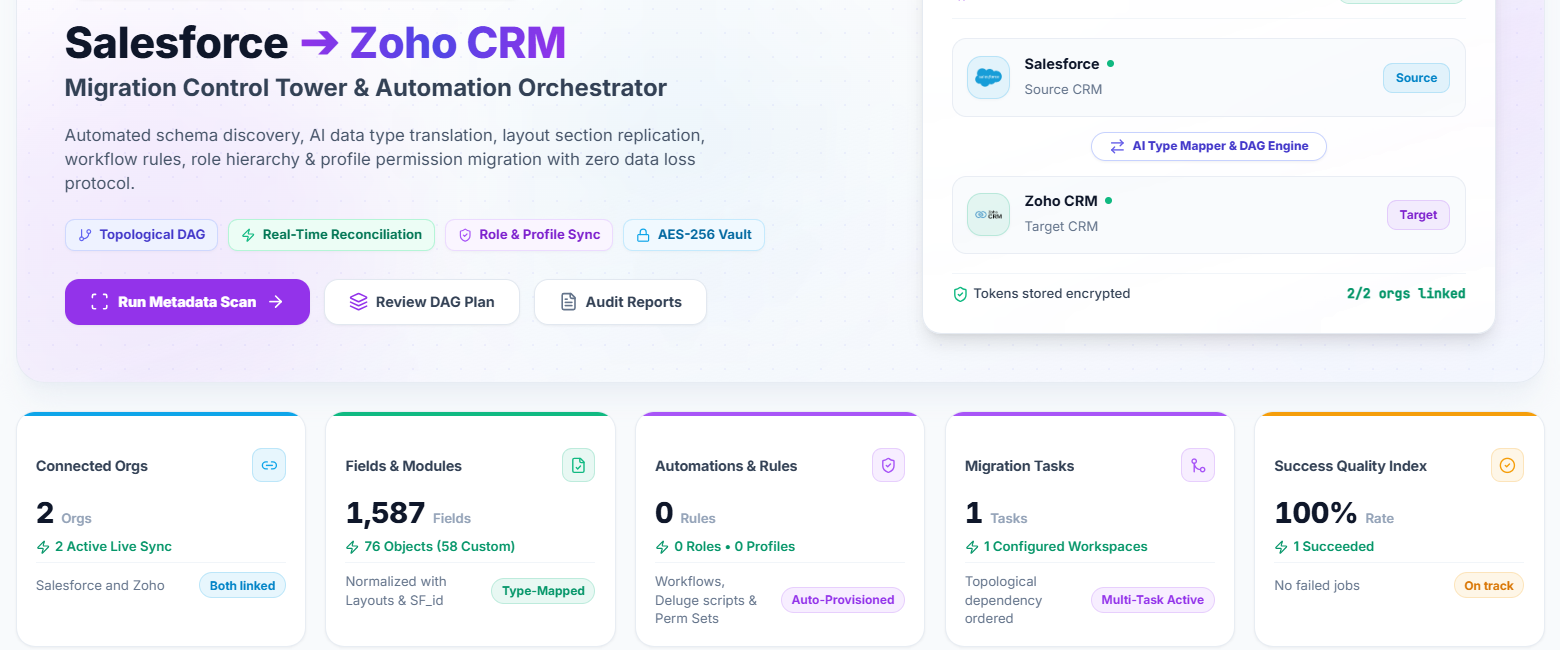
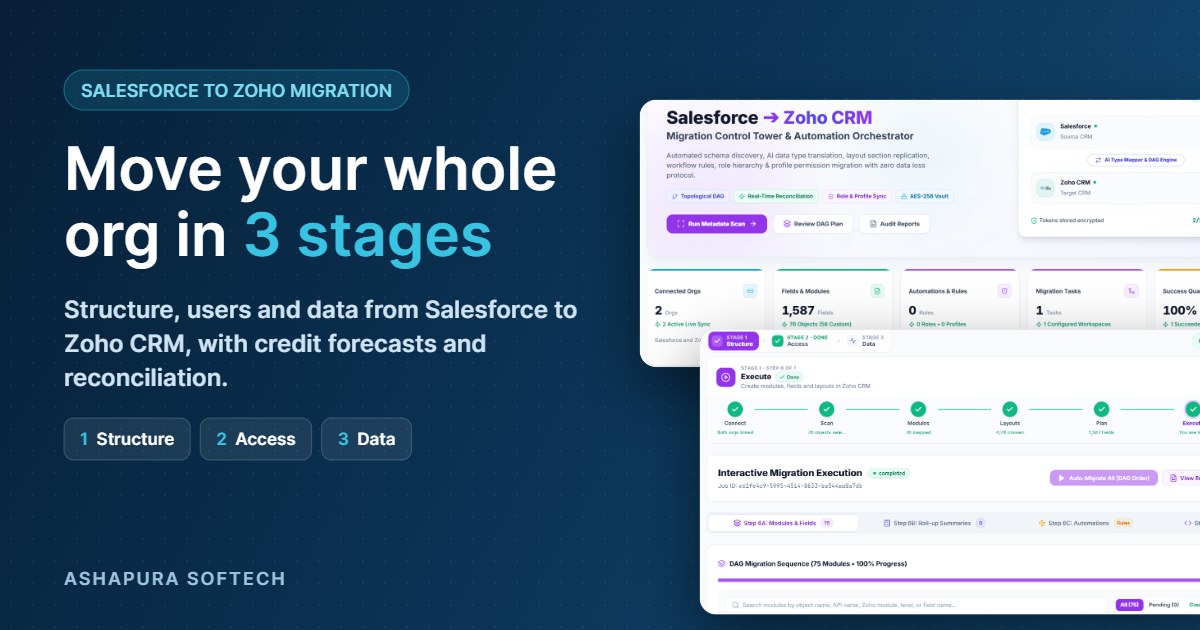
Salesforce to Zoho Migration dashboard showing both orgs linked, 1,587 fields across 76 objects and encrypted token storage
The Salesforce to Zoho Migration dashboard: both orgs linked, fields and objects scanned, tokens stored encrypted.

What Salesforce to Zoho Migration does

Moving from Salesforce to Zoho CRM by hand means rebuilding modules and fields, re-creating roles and users, and importing records in the right order so nothing breaks. Salesforce to Zoho Migration does that work for you:

✓

Rebuilds your structure

Objects, fields, picklists and layouts are created in Zoho CRM automatically.

✓

Carries over your team

Roles, profiles and users move across, so records keep their real owners.

✓

Moves data safely

Parent records load before child records, so links between records stay intact.

✓

Respects Zoho API limits

It forecasts the API credits you need and never runs your org out of budget.

✓

Proves the result

Record counts are reconciled for every object, and every action is logged.

✓

You stay in control

Every change to Zoho has a review step first, so nothing happens without your sign off.

Who it is for

Salesforce to Zoho Migration is for companies that are already using Salesforce and want to move to Zoho CRM. If your team works in Salesforce today, the platform takes everything you have built there, your objects, fields, users and records, and sets it up in Zoho CRM so your team can carry on working in Zoho without starting from scratch.

For example, say your sales team has worked in Salesforce for years. Every account, contact, deal and note they rely on lives there, and now the company wants to shift to Zoho CRM. Instead of rebuilding all of that by hand, you connect both systems, review the plan and let the platform move it across, with each deal still linked to the right account and owned by the right person.

How Salesforce to Zoho Migration works: three simple stages

You connect your Salesforce org and your Zoho CRM org in one workspace. The platform then guides you through three stages, in order.

1

Stage 1: Structure

The platform scans your Salesforce org and reads its objects, fields, picklists, layouts, validation rules and Apex code. It then suggests a Zoho module for every object (Account to Accounts, Opportunity to Deals, custom objects to new custom modules) and a Zoho field type for every field. You review the plan, skip what you do not need, and run it. Modules are created in the right order, parents before children, and nothing is ever created twice.

It can also migrate workflow rules and roll-up summaries, and draft Zoho Deluge scripts from your Apex code for your developers to review.

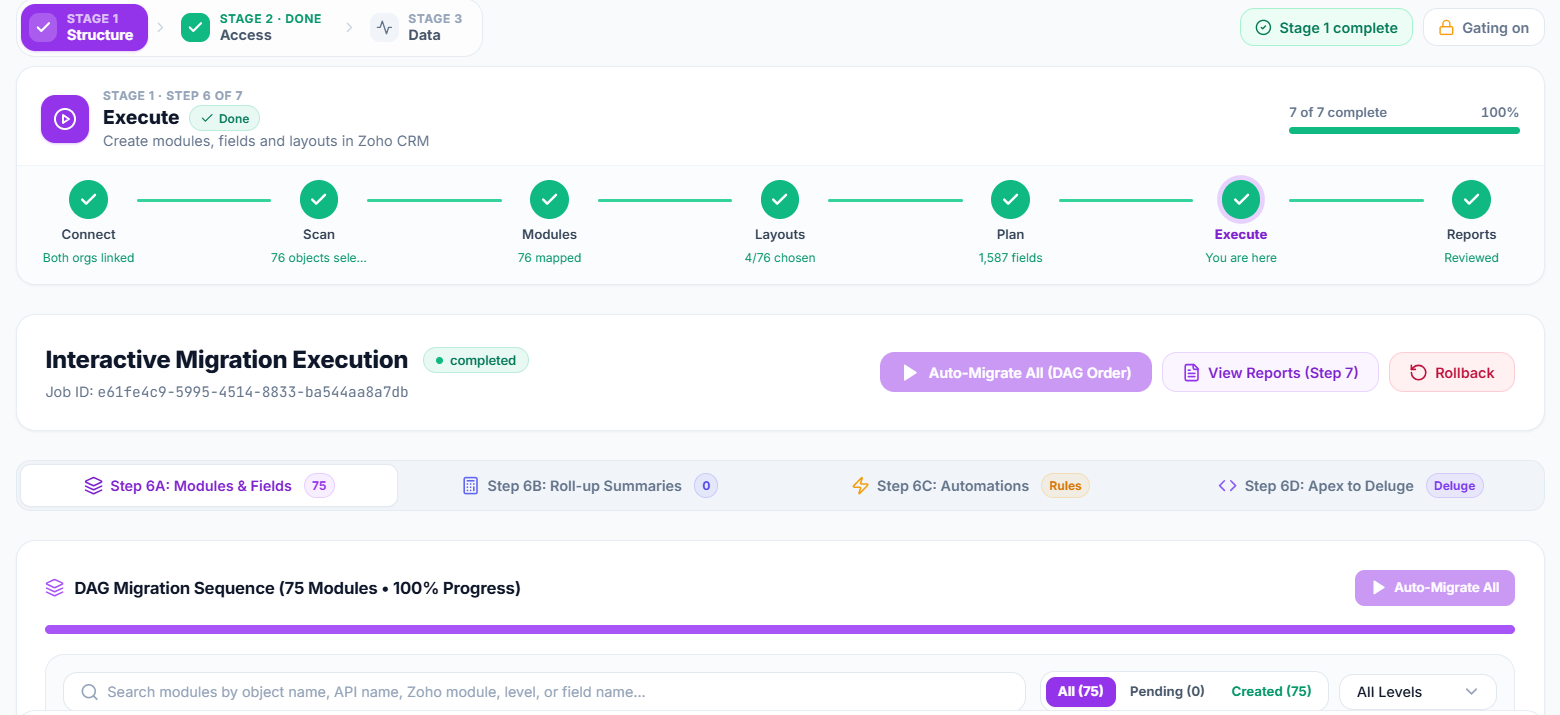
Stage 1 structure execution in Salesforce to Zoho Migration: connect, scan, modules, layouts, plan, execute and reports
Stage 1 runs as seven guided steps, from connecting the orgs to reviewing the reports.
2

Stage 2: Access and users

Salesforce roles are recreated in Zoho with the same reporting hierarchy, and Salesforce profiles become Zoho profiles, with a preview of the permissions before anything is written. Users are matched automatically by email, username or name. Anyone without a match can be created in Zoho or mapped by hand, so every record lands with the right owner.

3

Stage 3: Data

Records are pulled from Salesforce into a staging area, mapped to Zoho fields and loaded into Zoho CRM. Auto-match fills in the obvious field pairs, and simple clean-up rules (trim spaces, change case, default if blank, find and replace) tidy the data on the way. You can do a dry run first, then start, pause, resume or stop the import at any time.

When the load finishes, failed records are listed with the reason Zoho gave, so you can fix them and retry only those. Reconciliation then compares Salesforce records with records created and updated in Zoho, object by object.

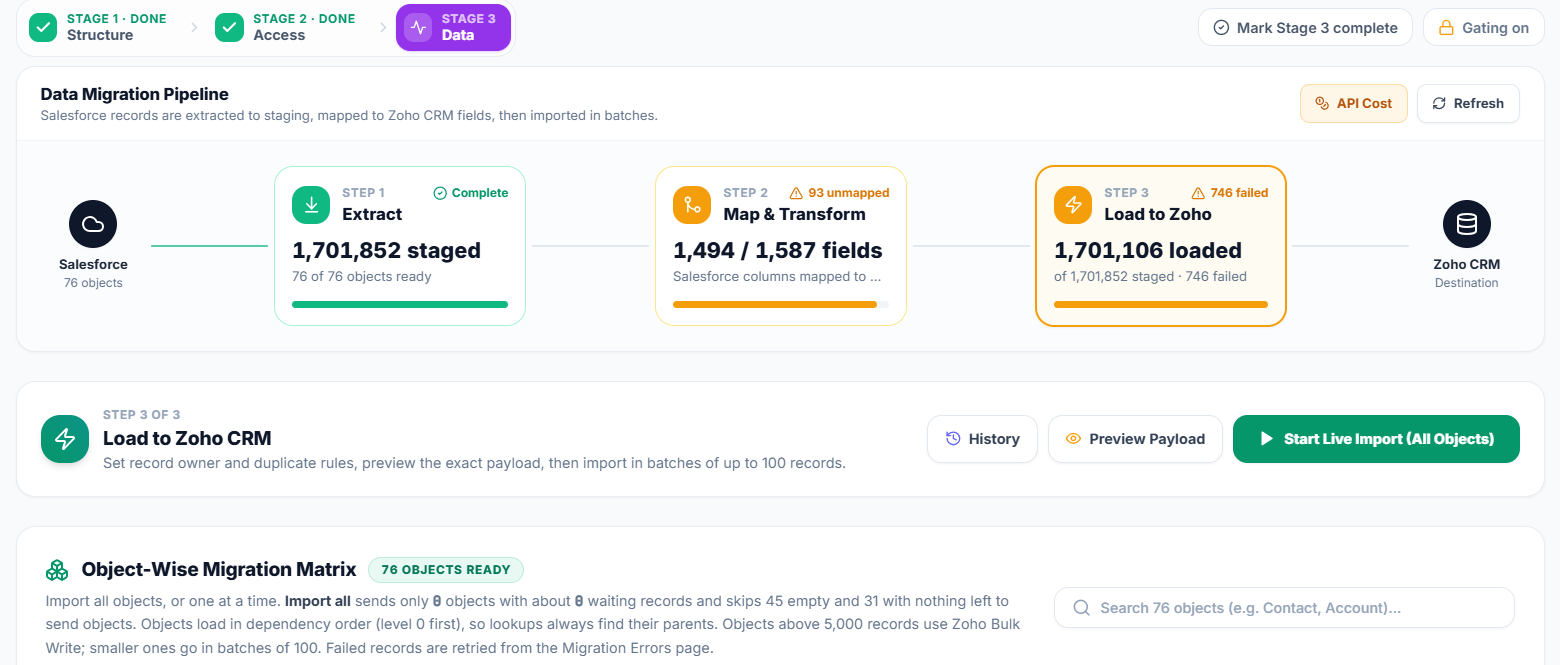
Stage 3 data migration pipeline: extract to staging, map and transform fields, then load records into Zoho CRM
The data pipeline shows extract, map and load progress, including unmapped fields and failed records.
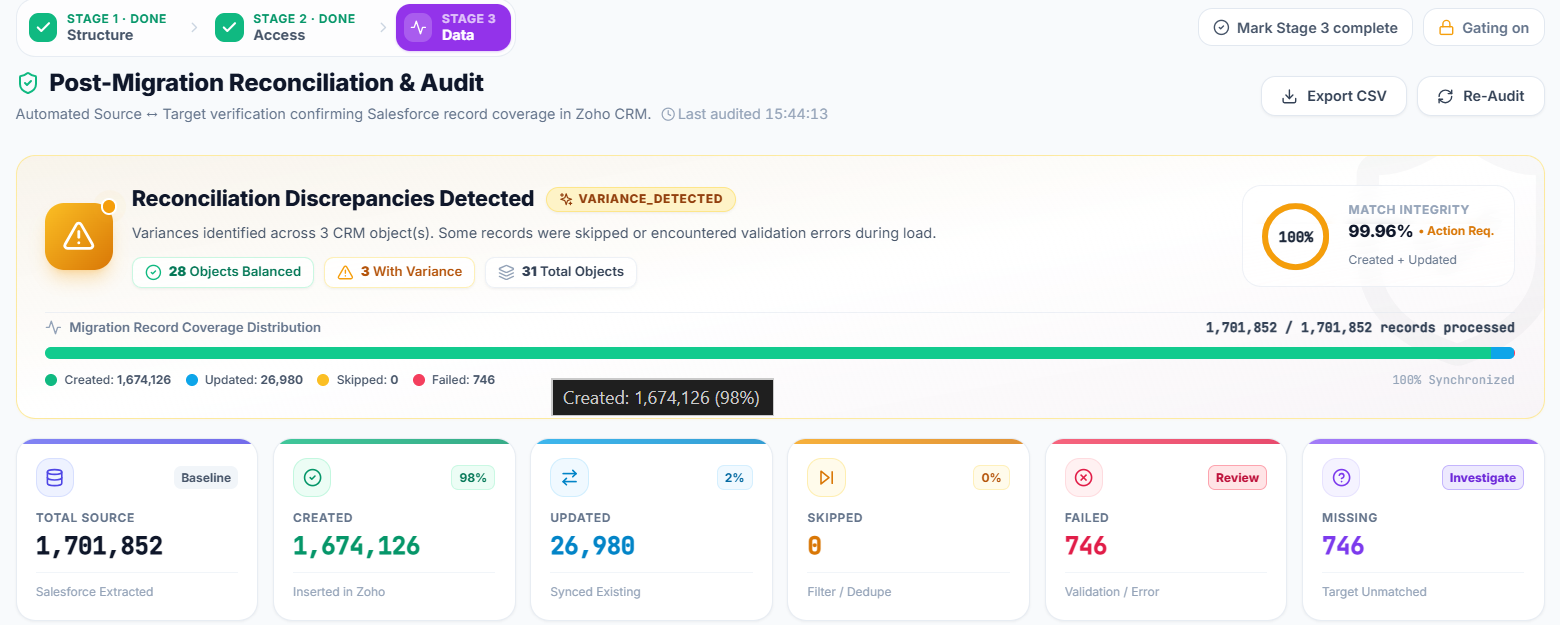
Post-migration reconciliation and audit screen comparing Salesforce source records with records created and updated in Zoho CRM
Reconciliation compares Salesforce source records with records created, updated, skipped and failed in Zoho.

See it on your own Salesforce org

Book a free demo and we will scan your org and show you the module plan and credit forecast before anything is written to Zoho.

Book a free demo

Key features of Salesforce to Zoho Migration

Beyond the three stages, these features keep the migration safe, predictable and within your Zoho API budget.

Zoho API credit forecast

Zoho gives every org a limited number of API credits per day. The platform shows how many credits each stage will need before you start, based on your real record counts, and only counts the work that is still left.

Smart loading with Bulk Write

Large batches of new records go through Zoho’s Bulk Write, which costs far fewer credits. In a worked example of about 460,000 records, that meant about 9,500 credits instead of about 46,000.

Quota guard

A running import checks the remaining credit budget and stops cleanly before it runs out, so your live Zoho integrations keep working. The next run continues exactly where it stopped.

Safe re-runs

The Salesforce record id is kept on every Zoho record, so running the import again updates existing records instead of creating duplicates.

Security and audit log

Salesforce and Zoho tokens are stored encrypted, data only travels between the platform, Salesforce and Zoho, and every mapping change, job and API call is written to a searchable audit log.

Dry run, pause and resume

Preview the load with a dry run first, then start, pause, resume or stop the import whenever you need to.

Use it yourself or with our team

You can run Salesforce to Zoho Migration on your own or with Ashapura Softech, whichever suits your team.

Run it yourself

Salesforce to Zoho Migration is guided, so your own admin can run it end to end, with a review step before every change to Zoho.

Run it with our team

Prefer experts to handle it? Our team can run the migration with you as part of our Zoho migration services.

See the features, screenshots and a free demo form on the Salesforce to Zoho Migration product page.

Frequently asked questions

Quick answers to the questions Salesforce users ask most before moving to Zoho CRM.

What is Salesforce to Zoho Migration?

It is a migration platform built by Ashapura Softech that moves a Salesforce org into Zoho CRM in three stages: structure, access and users, then data.

Can I use it myself?

Yes. The stages are guided and every change to Zoho has a review step first. You can also have our team run it with you.

Will I lose data or record owners?

No. Structure is built before data, users are matched before records load, and parents load before children. Record counts are reconciled for every object at the end.

Can I move only some objects?

Yes. You can skip any object and choose which layouts and fields to carry over.

Is there anything I still do by hand?

A few things: setting mandatory flags and default values in Zoho Setup, re-running workflows on bulk-loaded records, and reviewing the Deluge scripts drafted from Apex. The platform lists these for you.

Moving from Salesforce to Zoho CRM?

Book a free demo of Salesforce to Zoho Migration and see your own org’s migration plan before you commit to anything.

Book a free demo

More guides from our team on moving to Zoho CRM.

How to prepare Salesforce data for a Zoho CRM migration →A complete guide to Zoho migration services →Zoho CRM implementation cost and timeline →
Categories
Zoho CRM Zoho

Zoho CRM Implementation Cost and Timeline for US Businesses (2026)

Last updated: 8 October 2026

Quick answer

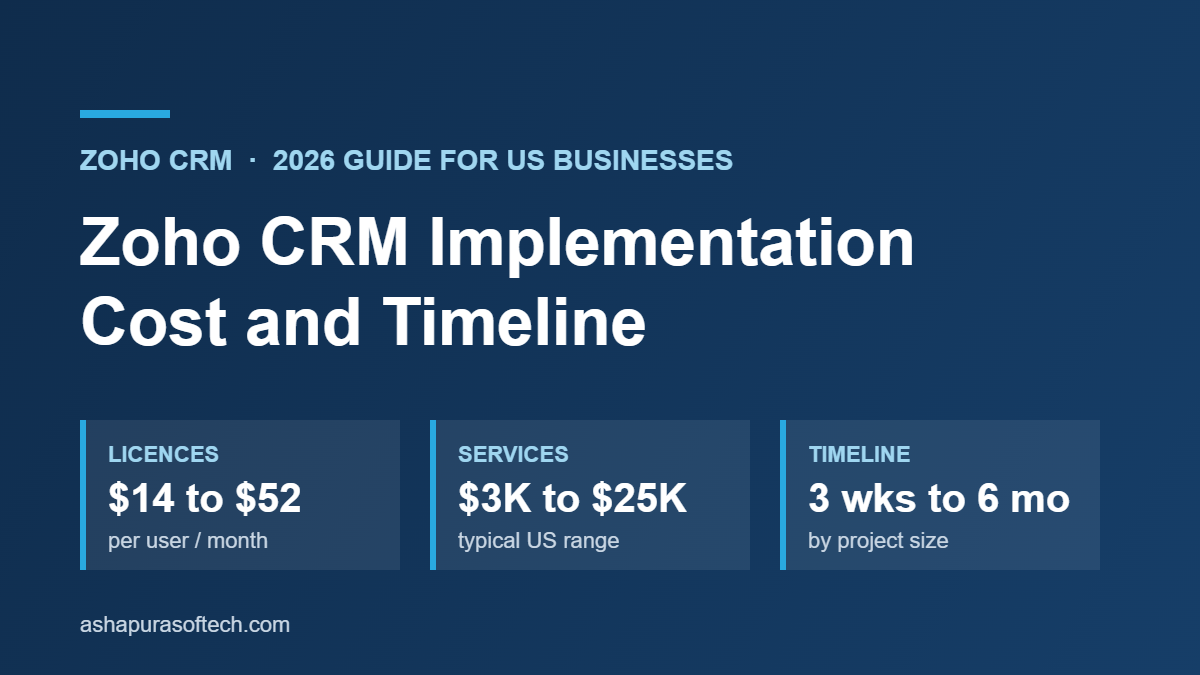
Zoho CRM implementation cost for a US business usually falls between $3,000 and $25,000 in services, on top of licences that run $14 to $52 per user per month on annual billing. A small team with clean data can go live in 3 to 6 weeks. A mid-size rollout with migration and integrations takes 2 to 4 months, and enterprise projects take 4 to 6 months or more. Data migration, integrations and custom development are what push a project from the low end to the high end.

Need a fixed-scope estimate for your team? Book a free 30-minute consultation with our Zoho team.

Zoho CRM implementation cost is the question most US buyers ask after they see the licence price, because the licence is rarely the biggest number. This guide covers what a Zoho CRM rollout actually costs in 2026, how long each phase takes, and which decisions move the budget. It is written for owners, sales leaders and operations managers at small and mid-size US businesses who are comparing a do-it-yourself setup with hiring a Zoho partner.

All licence prices below are Zoho’s published US list prices, and all service ranges come from published partner and pricing research, linked in the sources section. We have not invented a single “average”, because there is no honest average across a 5-user team and a 200-user one.

What you are actually paying for

A Zoho CRM project has two separate bills, and most budgets go wrong because they only plan for the first one.

1. Licences (recurring). You pay Zoho per user, per month, for the edition you choose. This is predictable and easy to model.

2. Implementation services (mostly one-time). Somebody has to design the pipeline, configure modules and fields, move your data, connect your other tools, and train your team. That is either your own staff’s time, a partner’s fees, or a mix of both.

A third, smaller bill comes after go-live: ongoing admin, change requests and support. Plan for it now, because a CRM that nobody maintains decays within a year.

Already on Salesforce? Our Salesforce to Zoho Migration platform moves your existing Salesforce structure, users and data into Zoho CRM in three guided stages, with a forecast of the Zoho API credits the move will need.

Zoho CRM licence cost in 2026

Zoho lists five Zoho CRM editions. Annual billing is noticeably cheaper than paying month to month.

EditionAnnual billing (per user / month)Monthly billing (per user / month)Typical fit
Free$0$0Up to 3 users, testing the basics
Standard$14$20Small sales teams with a simple pipeline
Professional$23$35Growing teams that need blueprints, inventory and more automation
Enterprise$40$50Multiple teams, territories, advanced customisation
Ultimate$52$65Enterprise plus built-in BI and higher limits

Some quick arithmetic shows why the edition choice matters more than people expect:

  • 10 users on Professional, billed annually: 10 × $23 × 12 = $2,760 a year.
  • The same 10 users billed monthly: 10 × $35 × 12 = $4,200 a year.
  • 25 users on Enterprise, billed annually: 25 × $40 × 12 = $12,000 a year.

Prices exclude sales tax, and Zoho can change list prices, so confirm the current figure on Zoho’s pricing page before you sign. If you already use several Zoho apps, also price Zoho One or CRM Plus, because a bundle can cost less than separate CRM plus helpdesk plus marketing licences.

Zoho CRM implementation cost by approach

There are three common ways to implement Zoho CRM. The ranges below are drawn from published 2025 and 2026 partner research for US projects.

ApproachTypical services costTypical time to a working CRMBest for
Do it yourselfAbout $3,000 to $5,000 in internal staff time (60 to 100 hours)8 to 16 weeks, often longerUnder 10 users, clean data, no integrations
Hybrid (you configure, a partner handles migration and integrations)$3,000 to $10,0004 to 8 weeksSmall teams with one or two systems to connect
Full partner implementation, mid-market$5,000 to $25,0002 to 4 months30 to 100 users, several integrations, migrated history
Full partner implementation, enterprise$25,000 to $75,000 or more4 to 6 months or moreMultiple divisions, custom development, complex data

For small US businesses with 5 to 20 users, published partner pricing puts a standard professional rollout at roughly $3,000 to $7,000. US Zoho consultants commonly bill $150 to $250 an hour, so a fixed-scope quote is usually easier to compare than an hourly estimate.

The do-it-yourself route looks cheapest on paper, but it is not free. The hours come out of a sales manager’s or an operations lead’s week, and a rushed self-build is the most common reason companies pay a partner later to redo the setup.

Zoho CRM implementation timeline, phase by phase

Every serious Zoho rollout goes through the same phases. They overlap, so the total is shorter than the sum of the column.

PhaseWhat happensTypical duration (mid-size project)
DiscoveryMap your sales process, roles, reports and the systems the CRM must talk to1 to 2 weeks
Design and configurationModules, fields, layouts, pipelines, blueprints, roles and permissions2 to 4 weeks
Custom developmentDeluge functions, custom modules, widgets, client scripts2 to 8 weeks, driven entirely by scope
Data migrationClean, deduplicate, map and import accounts, contacts, deals and history1 to 3 weeks
IntegrationsEmail, calendar, accounting, ecommerce, telephony, forms, marketing tools1 to 3 weeks
Testing and trainingUser acceptance testing, role-based training, admin handover1 to 2 weeks
Go-live and hypercareCutover, fixing what real users find, early adoption tracking1 to 2 weeks, with the first 2 to 4 weeks after launch being the critical window

In practice this gives three realistic timelines:

  • Simple, single-app setup with clean data: 3 to 6 weeks.
  • Mid-size rollout (roughly 30 to 100 users) with migration and integrations: 2 to 4 months.
  • Enterprise or multi-app rollout with custom development: 4 to 6 months, and up to 9 months when several Zoho apps go live together.

The five things that move your budget

1. The state of your data

Migration is where estimates break. Duplicate contacts, free-text fields that should be picklists, and spreadsheets with no consistent owner field all have to be fixed before import, not after. If you are coming from another CRM, read our guide on preparing Salesforce data for a Zoho CRM migration, because the same cleanup rules apply to most source systems.

2. How many systems need to connect

Each integration adds design, build and testing time. Native connectors such as Zoho Books or Google Workspace are quick. A two-way sync with an ERP, an ecommerce store or a custom database is a project in its own right. Our Zoho integration readiness checklist helps you count what you really need before you request quotes.

3. Customisation versus configuration

Configuration (fields, layouts, workflows, blueprints) is fast and cheap to change later. Custom code is slower and has to be maintained. A good rule is to configure first and only write Deluge or build widgets where configuration genuinely cannot do the job.

4. The edition you choose

Some limits, such as the number of custom modules, workflow rules or blueprint transitions, differ by edition. Choosing an edition that is too low forces workarounds that cost more in services than the licence upgrade would have.

5. Adoption and training

A CRM nobody updates is the most expensive outcome of all. Budget time for role-based training and for a named internal owner who keeps the system tidy after the partner leaves.

Worked example: a 15-user US sales team

To make the numbers concrete, here is a planning example built only from the published ranges above. It is an illustration, not a quote.

Cost lineAssumptionFirst-year cost
Licences15 users on Professional, annual billing ($23 × 15 × 12)$4,140
Implementation servicesPartner-led small business rollout with one migration and two integrations$5,000 to $10,000
Internal timeProcess owner and sales manager during discovery, testing and training40 to 60 staff hours
Total cash cost, year oneAbout $9,140 to $14,140

From year two, the cash cost drops to the licences plus whatever ongoing admin support you choose.

Want these numbers for your own rollout?

Tell us your user count, current system and the tools you need connected, and we will map scope, timeline and a fixed price range in one call.

Book a free 30-minute consultation

Costs that continue after go-live

Implementation is mostly a one-time cost, but a healthy CRM needs some ongoing spend. Budget for these lines from the start so year two does not come as a surprise:

  • Admin time. Someone has to add fields, fix reports, manage users and answer “why can’t I see this record” questions. In a small team this is a few hours a week from an internal owner. In a larger one it is a part-time or full-time admin.
  • Change requests. New products, a new sales team or a new approval step all mean configuration work. Many US businesses keep a small monthly support retainer with their partner for this.
  • Add-ons and extra apps. Extra storage, telephony, advanced analytics or additional Zoho apps are billed separately. If you expect to use several Zoho apps, compare the cost of Zoho One or CRM Plus against separate licences before you renew.
  • Edition upgrades. Teams often outgrow Standard within a year once they want blueprints, more automation or inventory. Price the next edition up now so the jump is planned rather than forced.

Questions to ask before you sign a Zoho implementation quote

Two quotes for the “same” Zoho CRM project can differ by 3 times, usually because they assume different scope. These questions expose the difference quickly:

Question to askWhat a good answer looks like
What exactly is in scope?A written list of modules, pipelines, automations, reports and integrations, not “full CRM setup”
How many records are you migrating, and from where?A record count per object and a named source system, plus who cleans the data
Which integrations are native and which are custom?Each integration named, with the method (native connector, Zoho Flow, or custom API) and who maintains it
How are change requests priced?A clear rate or change process, agreed before work starts
What training and handover is included?Role-based sessions, admin documentation and a defined support window after go-live
Who owns the configuration after launch?Your team does, with admin access and documentation, not only the partner

If a partner cannot answer these in writing, the quote is not comparable to the others yet, however low it looks.

How to keep a Zoho CRM project on budget

  • Write down the process before anyone opens Zoho. Stages, handoffs and required fields decided on paper cost nothing to change.
  • Clean data before migration, not after. Deduplicate and standardise in the source system or in a spreadsheet first.
  • Launch in phases. Get the sales pipeline live first, then add quotes, service or marketing modules.
  • Ask for a fixed-scope quote with a change process. It is far easier to compare partners on scope than on hourly rates.
  • Name an internal CRM owner. One person accountable for fields, reports and user requests keeps the system usable.

If your project includes a move from another platform, see our Zoho migration guide and how to choose the right Zoho migration partner. For a quick view of what Zoho CRM does well for small teams, read the benefits of Zoho CRM development for US small businesses.

If you are still choosing between platforms, our Zoho vs Salesforce CRM guide compares license costs for a 25-user team side by side.

Zoho CRM implementation cost FAQs

How much does Zoho CRM implementation cost?

For most US small and mid-size businesses, implementation services cost $3,000 to $25,000, separate from licences. Small teams with clean data are at the low end. Projects with data migration, several integrations or custom code move toward the high end, and enterprise rollouts can pass $75,000.

How long does it take to implement Zoho CRM?

A simple setup with clean data can be live in 3 to 6 weeks. A mid-size rollout with migration and integrations usually takes 2 to 4 months. Enterprise and multi-app projects take 4 to 6 months or more.

Can I implement Zoho CRM myself?

Yes, if you have fewer than about 10 users, clean data and no integrations. Expect 60 to 100 hours of internal time. Most teams bring in a partner for data migration and integrations even when they do the basic configuration themselves.

Is Zoho CRM cheaper than Salesforce to implement?

Usually, yes. Zoho’s licences are lower and its configuration tools are simpler, so comparable projects tend to need fewer services hours. The gap narrows when either platform needs heavy custom development or complex integrations.

What is the biggest hidden cost in a Zoho CRM project?

Data cleanup and migration. Duplicate and inconsistent records take longer to fix than most teams expect, and importing them unchanged undermines reporting from day one.

Does Zoho charge a setup fee?

Zoho does not charge a separate setup fee for Zoho CRM licences. Implementation costs come from your own staff time or from the partner you hire.

Related: integrations are often the biggest variable in a Zoho budget. See our Zoho integration guide for the four connection routes, or talk to us about Zoho development services if you want a fixed-scope estimate.

If AI features are part of your budget conversation, our post on how Zoho CRM uses Zia and OpenAI explains what those features do in day to day selling.

Sources

Ashapura Softech is a certified Salesforce and Odoo partner that also implements Zoho for US businesses. If you want a fixed-scope estimate for your rollout, see our Zoho CRM implementation and development services, or start with a free CRM health check template to see where your current setup stands.

About the author

Ankur Pandey is Marketing Manager at Ashapura Softech Inc., where he works with the Zoho and Salesforce delivery teams on implementation guides for US businesses. He writes about CRM costs, migrations and platform choices on the Ashapura Softech blog.

Categories
Zoho CRM

Top Benefits of Zoho CRM Development for Small Businesses in the USA

Introduction

Running a small business in the USA comes with unique challenges. From managing leads and customer communications to overseeing daily operations, small business owners and startup founders often juggle multiple tasks at once. Many rely on spreadsheets, emails, and disconnected tools to track prospects and sales, which can lead to missed opportunities, inefficient workflows, and frustrated teams.

This is where Zoho CRM development for small businesses in the USA becomes a game-changer. Unlike off-the-shelf CRM software, custom Zoho CRM solutions are tailored to meet the specific needs of your business, whether you’re in retail, real estate, education, professional services, or a tech startup. By implementing a customized Zoho CRM system, small businesses can centralize customer data, automate repetitive tasks, and gain real-time insights into sales and marketing performance.

Custom development often goes hand in hand with integrations; see how that works in our Zoho integration guide.

Investing in Zoho CRM development allows businesses to streamline lead management, track customer interactions efficiently, and enhance team collaboration. With features like workflow automation, custom dashboards, and seamless integration with popular tools like QuickBooks, Shopify, and Mailchimp, Zoho CRM helps small businesses not only save time but also improve customer experience and retention.

Moreover, a tailored Zoho CRM ensures scalability, meaning your system can grow with your business – adding users, automating complex processes, and adapting to new sales strategies without disrupting daily operations. For small businesses looking to compete in the competitive U.S. market, the ROI from Zoho CRM customization can be substantial, including increased conversions, higher revenue, and more informed decision-making.

In this article, we’ll explore the top benefits of Zoho CRM development for small businesses in the USA, industry-specific use cases, and actionable insights on how implementing a custom CRM can transform your business operations and accelerate growth.

Why Small Businesses in the USA Need a Custom CRM

Small businesses in the USA often face challenges that slow growth and reduce operational efficiency. Many rely on manual processes, like tracking leads and customer interactions in spreadsheets or emails, which can be time-consuming and prone to errors. These inefficiencies can lead to missed opportunities, delayed follow-ups, and ultimately, lost revenue.

Decision-makers also face limited visibility into team performance, sales pipelines, and customer trends. Without accurate, real-time insights, strategic decisions can become guesswork rather than data-driven actions. While several off-the-shelf CRMs exist, they often fail to meet the specific needs of small businesses, leaving workflows disjointed and teams frustrated.

This is where Zoho CRM customization becomes essential. By tailoring workflows, dashboards, and modules to your unique business requirements, a custom Zoho CRM streamlines operations, enhances productivity, and ensures that your CRM grows with your business.

Common Challenges for SMBs
  • Lead Management Issues: Leads scattered across spreadsheets or emails often result in missed opportunities.
  • Collaboration Gaps: Teams working in silos struggle to stay aligned, affecting productivity and customer experience.
  • Reporting Inefficiencies: Without accurate reports, decision-making becomes reactive rather than strategic.

Investing in custom Zoho CRM development addresses these challenges by centralizing data, automating repetitive tasks, and providing real-time reporting. For small businesses in the USA, a tailored CRM not only boosts sales efficiency and customer retention but also provides measurable ROI, enabling smarter business growth.

What is Zoho CRM Development?

For small businesses in the USA, Zoho CRM development goes far beyond simply installing software. It involves customizing and optimizing the CRM to fit your business’s unique workflows, sales processes, and operational needs. Instead of a generic, one-size-fits-all solution, custom Zoho CRM development creates a system that aligns perfectly with your goals, team structure, and industry requirements.

A well-developed Zoho CRM allows businesses to centralize customer data, track leads and opportunities in real time, and automate repetitive tasks like follow-ups, email reminders, and reporting. This not only saves valuable time but also reduces human error, ensuring your team can focus on strategic initiatives rather than administrative work.

Key Features of Custom Zoho CRM
  • Workflow Automation: Automatically assign leads, send reminders, and trigger alerts for important tasks.
  • Custom Dashboards & Reports: Visualize KPIs, track team performance, and make informed decisions with real-time insights.
  • Third-Party Integrations: Seamlessly connect Zoho CRM with tools like QuickBooks, Shopify, and Mailchimp to unify your operations.
  • Scalability: Add new users, modules, and automation rules as your business grows without disrupting workflows.

Unlike off-the-shelf CRMs, custom Zoho CRM development ensures that your system works exactly the way your business works. Whether you’re a startup in tech, a real estate agency, or a professional service provider, a tailored CRM supports efficiency, collaboration, and growth.

Investing in Zoho CRM customization not only streamlines daily operations but also enhances customer experience, team productivity, and decision-making, helping small businesses in the USA compete effectively in a fast-paced market.

Top Benefits of Zoho CRM Development for Small Businesses

Small businesses in the USA face unique challenges when it comes to managing sales, marketing, and customer relationships. Many SMBs rely on fragmented systems, spreadsheets, and manual processes, which can lead to lost leads, inefficient workflows, and missed growth opportunities. This is where Zoho CRM development for small businesses proves transformative. A customized Zoho CRM system helps streamline operations, automate tasks, and provide actionable insights, ensuring that your business operates efficiently while scaling effectively.

Here are the top benefits of Zoho CRM development for small businesses, backed by real-world applications and actionable insights.

1. Streamlined Sales and Lead Management

One of the most immediate benefits of custom Zoho CRM development is the ability to streamline sales and lead management. Small business teams often struggle with scattered leads across emails, spreadsheets, or multiple systems, which can result in missed opportunities.

With a custom Zoho CRM system, all leads are captured, tracked, and scored automatically, ensuring timely follow-ups. Sales teams can easily see which leads are hot, which require nurturing, and which are ready to convert. Automated notifications and reminders prevent leads from slipping through the cracks, improving conversion rates and overall revenue.

2. Improved Customer Experience

A key differentiator for small businesses is the quality of customer experience. A custom Zoho CRM centralizes all customer data, including previous interactions, preferences, and transaction history, allowing your team to provide personalized service.

By understanding customer behavior and engagement patterns, businesses can tailor communication, resolve issues faster, and maintain consistent follow-ups. This leads to higher customer satisfaction, loyalty, and repeat business, which is crucial for SMB growth.

3. Enhanced Team Collaboration and Productivity

Small business teams often face collaboration challenges, especially when information is scattered across different tools. Zoho CRM development helps centralize data, tasks, and communication within a single platform, ensuring all team members have access to the same information in real time.

Custom dashboards allow managers to track team performance, assign tasks efficiently, and monitor workflow progress. By automating repetitive tasks such as reminders, follow-ups, and notifications, teams can focus on strategic activities instead of administrative work.

Benefits:

  • Reduced duplication of effort
  • Increased accountability
  • Improved cross-team collaboration
4. Data-Driven Decision Making

Decision-making in small businesses can often be reactive, relying on intuition rather than data. A custom Zoho CRM provides powerful reporting and analytics capabilities, offering insights into sales performance, customer behavior, and marketing effectiveness.

Custom dashboards allow business owners to visualize key metrics in real time. Predictive analytics helps forecast sales, identify trends, and detect potential bottlenecks, enabling smarter, data-driven decisions that directly impact growth.

5. Seamless Integration with Business Tools

Small businesses typically use multiple tools for accounting, marketing, and e-commerce. A custom Zoho CRM integrates seamlessly with popular platforms like QuickBooks, Shopify, Mailchimp, and Slack, creating a unified workflow.

This integration eliminates manual data entry, reduces errors, and provides a holistic view of business operations. Sales, marketing, and finance teams can work in sync, improving efficiency and decision-making across the organization.

6. Scalability for Growing Businesses

As small businesses expand, their systems need to scale. Custom Zoho CRM development ensures your CRM grows with your business. Adding new users, automating complex workflows, or creating new modules is seamless, minimizing disruption to operations.

Scalability also means that as your team or client base grows, your CRM continues to deliver value without requiring frequent overhauls or expensive upgrades. This adaptability ensures that your business is always ready to seize new opportunities.

7. Industry-Specific Use Cases

Custom Zoho CRM development benefits SMBs across various industries by adapting to their unique needs:

  • Retail & eCommerce: Manage inventory, segment customers, automate promotions, and track orders.
  • Real Estate: Track leads, manage property listings, and automate agent follow-ups.
  • Education & Training: Automate student enrollment, manage courses, and track engagement.
  • Professional Services & Startups: Streamline client onboarding, monitor project progress, and track invoices.
8. ROI and Cost Efficiency

Investing in Zoho CRM customization delivers measurable ROI for small businesses. By automating repetitive tasks, improving lead management, and enhancing customer experience, businesses save time and increase revenue. Compared to off-the-shelf CRMs, Zoho CRM provides affordable customization options that fit small business budgets without compromising functionality. For real numbers, see our breakdown of Zoho CRM implementation cost and timeline.

Industry Use Cases for U.S. Small Businesses

Zoho CRM development is versatile and can be customized to meet the specific needs of small businesses across a variety of industries in the USA. By tailoring workflows, dashboards, and automation, SMBs can improve efficiency, boost customer engagement, and drive growth.

1. Retail & eCommerce

For small retailers and online stores, a custom Zoho CRM helps manage inventory, customer segmentation, and order tracking. Integration with platforms like Shopify or Mailchimp allows for automated marketing campaigns and personalized promotions, increasing customer retention and sales.

2. Real Estate

Real estate SMBs benefit from Zoho CRM by automating lead tracking, property management, and agent assignments. Automated follow-ups ensure that no property inquiry is missed, improving conversion rates and enhancing client satisfaction.

3. Education & Training

Schools, coaching centers, and training institutes can streamline student enrollment, track attendance, and manage course schedules using Zoho CRM. Automated reminders and follow-ups improve communication with students and parents, boosting engagement and enrollment numbers.

4. Professional Services & Startups

Service-based SMBs and startups can leverage Zoho CRM to manage client onboarding, track project milestones, and monitor team performance. Custom dashboards provide insights into revenue, project timelines, and client satisfaction, supporting informed business decisions.

ROI & Cost Benefits of Zoho CRM Development

Investing in custom Zoho CRM development for small businesses in the USA delivers measurable ROI, helping teams save time, increase revenue, and improve customer relationships. For small and medium-sized businesses (SMBs), a well-implemented CRM can transform operations, making everyday workflows more efficient and strategic.

1. Time Savings

Manual tasks like lead follow-ups, data entry, and report generation can consume hours each week. With automated workflows in Zoho CRM, small business teams can focus on high-value activities, such as nurturing leads, closing deals, and improving customer service. Automating repetitive processes not only increases productivity but also reduces errors and ensures that no opportunities slip through the cracks.

2. Revenue Growth

A customized Zoho CRM enhances lead management and sales tracking, enabling businesses to follow up with prospects at the right time. Automated reminders, lead scoring, and pipeline tracking increase conversion rates, resulting in higher revenue. By centralizing sales data, decision-makers can identify trends, optimize strategies, and capitalize on growth opportunities more effectively.

3. Customer Retention

Personalized communications foster loyalty and long-term relationships. With Zoho CRM, SMBs can track customer preferences, purchase history, and engagement patterns to deliver tailored experiences. Happy, engaged customers are more likely to return, boosting lifetime value and overall profitability.

4. Cost Consideration

Zoho CRM offers SMB-friendly pricing, making it an affordable alternative to enterprise solutions like Salesforce or HubSpot without compromising on customization potential. The platform’s scalability ensures that as your business grows, your CRM adapts, minimizing the need for expensive software changes or upgrades.

How to Choose a Zoho CRM Development Partner

Selecting the right partner for Zoho CRM development is crucial for small businesses in the USA. A skilled development partner ensures smooth implementation, effective customization, and ongoing support – maximizing the ROI from your CRM investment.

1. Look for Certified Expertise

Always choose a partner with Zoho certification and proven experience in CRM customization. Certified developers understand the platform’s capabilities, best practices, and advanced features, enabling them to tailor the system to your unique business processes.

2. Industry Experience Matters

A partner familiar with your industry – whether it’s retail, real estate, education, or professional services – can design workflows that align with your specific needs. Industry-specific knowledge ensures that your CRM addresses common pain points like lead management, customer segmentation, and reporting inefficiencies.

3. Prioritize Customization and Scalability

Your business evolves, and so should your CRM. Look for a partner who can implement custom modules, dashboards, and integrations with tools like QuickBooks, Shopify, or Mailchimp. Scalability ensures your CRM grows with your business without costly overhauls.

4. Support and Training

Post-implementation support is critical. A reliable partner provides training, troubleshooting, and ongoing updates, empowering your team to fully leverage the CRM’s features.

5. Cost Transparency and ROI Focus

Finally, choose a partner who offers transparent pricing and demonstrates how their services deliver measurable ROI, from time savings to increased revenue and customer retention.

FAQs

1. What is the cost of Zoho CRM for SMBs in the USA?
Zoho CRM offers flexible, SMB-friendly pricing depending on your plan and customization needs. Small businesses in the USA can choose from free, standard, professional, or enterprise plans, and add custom modules or integrations based on requirements, making it cost-effective without sacrificing functionality.

2. Can Zoho CRM be customized for my industry?
Yes! Zoho CRM is fully customizable for different industries, including retail, real estate, education, professional services, and startups. Custom modules, dashboards, and automated workflows ensure the CRM fits your unique business processes and enhances efficiency.

3. How long does Zoho CRM implementation take?
Implementation varies by complexity. For most SMBs in the USA, custom Zoho CRM implementation takes 4–12 weeks, including planning, configuration, testing, and training, ensuring a smooth transition and minimal disruption to operations.

4. What integrations does Zoho CRM support?
Zoho CRM supports seamless integration with popular tools like QuickBooks, Shopify, Mailchimp, Slack, and other accounting, marketing, or eCommerce platforms, creating a unified system that improves workflow and data accuracy.

5. How does Zoho CRM improve sales and productivity?
By automating workflows, tracking leads, and providing real-time insights, Zoho CRM reduces manual tasks, streamlines operations, and improves team collaboration, helping SMBs in the USA boost sales and maximize revenue efficiently.

Conclusion

Custom Zoho CRM development empowers small businesses in the USA to streamline sales, automate workflows, and enhance customer engagement. By implementing tailored dashboards, workflow automation, and seamless integrations with tools like QuickBooks, Shopify, and Mailchimp, SMBs can improve efficiency, boost revenue, and achieve measurable ROI. Partnering with Ashapura Softech ensures expert Zoho CRM customization, industry-specific solutions, and ongoing support. Take the next step to transform your CRM into a growth-driving tool – contact us today at [email protected] and elevate your business operations.

Still deciding between platforms? Read our Zoho vs Salesforce comparison, written by a team that works with both.

Zoho CRM is usually the first app a small business adopts, not the last. Our list of top Zoho apps for small business productivity shows which apps teams tend to add next.

Categories
Zoho CRM

How to Choose the Right Zoho Migration Partner for Your Business Needs

Introduction

Migrating your business data to Zoho CRM is more than just a technical task – it’s a strategic move to streamline operations, enhance customer relationships, and accelerate growth. Yet, the process requires careful planning. Improper migration can lead to data loss, workflow disruptions, and missed sales opportunities, which is why partnering with a trusted Zoho CRM migration expert is essential.

A professional migration partner ensures that every aspect of your data transfer is secure, accurate, and tailored to your business needs. From mapping your existing data to creating seamless integrations, experienced partners ensure a smooth transition with minimal downtime. Whether you’re a startup, SME, or enterprise, aligning your migration strategy with business objectives can significantly improve ROI and operational efficiency.

Additionally, a reliable Zoho migration partner can help you customize workflows, automate processes, and implement best practices within Zoho CRM, ensuring your team can hit the ground running post-migration. By addressing potential challenges proactively, you save time, reduce costs, and empower your sales and marketing teams with real-time insights.

If you’re looking for resources to learn more, explore Zoho’s official CRM documentation for detailed guidance, or check out our in-depth Zoho CRM integration tips to understand how to make the most of your CRM system. Internal linking to your services page, case studies, or blog posts on CRM tips will boost SEO and keep readers engaged.

For teams leaving Salesforce, a partner with its own tooling helps. Our Salesforce to Zoho Migration platform rebuilds your Salesforce setup in Zoho CRM and reconciles every record, so you can see exactly what moved.

Why You Need a Professional Zoho Migration Partner

Migrating to Zoho CRM is more than just moving data – it’s about transforming the way your business operates. A poorly executed migration can result in data loss, workflow disruptions, and missed opportunities, which can hurt both productivity and revenue. By partnering with a certified Zoho migration expert, you ensure a smooth, stress-free transition that empowers your team, optimizes workflows, and maximizes ROI.

The Benefits of Choosing a Trusted Zoho Migration Partner

1. Rock-Solid Data Security

Your business data is invaluable. A professional partner safeguards sensitive information during migration using advanced security protocols, giving you confidence that nothing is at risk.

2. Flawless Accuracy

Data integrity is critical. Experts follow proven migration techniques to ensure zero duplication, corruption, or loss, allowing your team to continue operations without disruption.

3. Tailored Customization

Every business operates differently. From sales pipelines to customer support workflows, a migration partner customizes Zoho CRM to fit your exact processes, helping you get the most out of the platform.

4. Seamless Integrations

Zoho works best when connected with your existing tools. A professional partner can integrate Zoho CRM with platforms like Mailchimp, Shopify, Salesforce, and other essential business tools, creating a unified ecosystem that boosts efficiency.

5. Post-Migration Support & Training

Migration is only the first step. Certified partners provide ongoing support, hands-on training, and actionable guidance to ensure your team can fully leverage Zoho’s features, from CRM and Books to Desk and Analytics.

Key Factors to Consider Before Hiring a Zoho Migration Partner

Migrating your business to Zoho CRM is a critical step toward improving customer relationship management, streamlining workflows, and boosting business growth. However, the success of your migration depends largely on the partner you choose. Not all migration companies are created equal, and a wrong choice can lead to data loss, workflow disruptions, and costly delays.

Here are the key factors to consider before hiring a Zoho migration partner to ensure a smooth, secure, and ROI-driven migration.

1. Certification and Proven Experience

The first thing to check is whether the migration partner is a certified Zoho implementation partner. Certification indicates that the company has undergone official Zoho training, has access to technical resources, and adheres to Zoho’s best practices.

Certified partners are better equipped to handle complex migrations efficiently and troubleshoot potential issues. They have direct access to Zoho support and updates, ensuring your migration is compliant and secure.

What to do:
  • Ask for credentials, portfolios, and case studies.
  • Check for industry experience across sectors such as healthcare, real estate, eCommerce, or financial services.
  • Prefer partners recognized by Zoho as Premium or Advanced Partners. This guarantees adherence to Zoho standards and proven expertise.
2. Data Migration Process and Security

Data is the lifeblood of your business. Ensuring accuracy, integrity, and security during migration is non-negotiable.

A reliable Zoho migration company should provide:
  • Detailed data mapping and validation procedures
  • Clear security protocols, including encryption and secure transfer methods
  • Experience handling large databases and attachments
  • Backup and rollback plans in case of unexpected issues

Data security is especially crucial if you handle sensitive customer information or are subject to industry compliance standards, such as GDPR or HIPAA.

3. Industry Expertise and Case Studies

Every business has unique workflows and requirements. A Zoho partner familiar with your industry can customize the CRM for maximum impact.

Examples:
  • eCommerce companies may need multi-channel integrations, automated order management, and marketing analytics.
  • Financial services may require strict data compliance, audit trails, and advanced reporting.
  • Healthcare providers often need secure patient data handling and appointment management.
4. Post-Migration Support and Customization

Migration doesn’t end with data transfer. To ensure your team fully leverages Zoho CRM, continuous support is essential.

Look for partners who offer:
  • CRM customization tailored to your workflows
  • Integration with third-party apps like Shopify, Salesforce, Mailchimp, or payment gateways
  • User training to improve adoption and reduce errors
  • System optimization and upgrades for long-term efficiency
5. Pricing Transparency and Scalability

Pricing is another crucial factor. Migration costs vary based on database size, workflow complexity, and required integrations. Avoid partners offering suspiciously low rates – they may lack the expertise needed for a smooth migration.

What to ask:
  • Request a detailed cost breakdown, including data transfer, integration, customization, and post-migration support.
  • Check if the partner’s services scale with your business as your CRM needs grow.

For real numbers, see our breakdown of Zoho CRM implementation cost and timeline.

6. Additional Considerations for Choosing the Right Partner
  • Communication and Project Management: Ensure the partner provides clear timelines, progress updates, and dedicated project managers.
  • Proven Tools and Automation: Experienced partners use migration tools that reduce errors and accelerate the process.
  • Customer-Centric Approach: A good partner prioritizes your business goals, not just the technical migration.

How to Shortlist and Compare Zoho Migration Partners

The Zoho ecosystem has a wide range of authorized partners, making it challenging to identify the one that best fits your business needs. Choosing the right migration partner is critical for a smooth, secure, and efficient transition. Here’s a step-by-step guide to help you shortlist and compare Zoho migration partners effectively.

Step 1: Explore Zoho Partner Directories

Start your search with the official Zoho Partner Directory. It lists certified partners globally along with their areas of specialization, certifications, and customer ratings. Additionally, check third-party review platforms such as Clutch, G2, and Trustpilot. These reviews provide insights into past client experiences, reliability, and technical expertise, helping you filter credible options from the rest.

Step 2: Request a Demo or Free Consultation

Most professional Zoho migration specialists offer free consultations or demos. Use this opportunity to:

  • Evaluate their communication style and technical expertise
  • Understand their project management approach
  • Review proposed timelines, deliverables, and methodology

A reputable partner will provide a customized roadmap aligned with your business goals and demonstrate how they can handle data migration, integrations, and CRM customization.

Step 3: Compare Response Time and Support Quality

Responsiveness and support are key indicators of reliability. During initial interactions, pay attention to:

  • How quickly they respond to queries
  • The clarity and structure of their proposal
  • Whether they assign a dedicated project manager

A partner who communicates clearly and sets realistic timelines ensures smoother collaboration and reduces risks during migration.

FAQs

1. How much does Zoho CRM migration cost?

The cost of Zoho migration typically depends on your data volume, customizations, and integrations required. On average, prices range from $1,000 for basic migrations to $10,000+ for enterprise-level projects.

2. How long does Zoho migration take?

The timeline can range from a few days to several weeks. Factors include data size, third-party integrations, and system complexity. A good partner provides a clear schedule upfront.

3. Why should I hire a certified Zoho expert?

Certified experts bring proven methodologies, best practices, and official Zoho support access – reducing migration errors and ensuring compliance with Zoho’s framework.

4. Can a Zoho partner help with CRM customization?

Absolutely. Most partners offer Zoho CRM customization, workflow automation, and dashboard configuration tailored to your business.

5. How do I prepare for Zoho CRM migration?

Before migration, clean up your existing data, define your CRM goals, and review all integrations. Request a CRM migration checklist from your partner for best results.

Final Checklist: Choosing Your Perfect Zoho Migration Partner

Before finalizing your Zoho migration partner, make sure your choice meets these essential criteria:
  • Certified Zoho Implementation Partner – Ensures expertise, access to official resources, and adherence to Zoho best practices.
  • Proven Industry Experience – Look for a track record of successful migrations in your sector, whether it’s eCommerce, healthcare, finance, or real estate.
  • Clear Migration Roadmap & Transparent Pricing – Ask for a detailed plan, timelines, and cost breakdown to avoid hidden charges or delays.
  • Comprehensive Post-Migration Support – Includes CRM customization, integrations, training, and ongoing maintenance.
  • Strong Client Reviews & Case Studies – Validate credibility through testimonials and examples of measurable results.

Whoever you pick, the work itself follows the same shape. We describe it in personalized CRM implementation.

Conclusion

Migrating to Zoho CRM is a strategic move that can transform your business operations, improve customer relationships, and drive growth. However, a successful migration requires expertise, careful planning, and ongoing support. Partnering with an experienced Zoho migration team ensures data security, seamless integration, and a smooth adoption process for your team. At Ashapura Softech, we specialize in end-to-end Zoho CRM migration, customization, and post-migration support tailored to your unique business needs. Take the first step toward a seamless CRM transition today. Contact us at info@ashapurasoftech.com to schedule a free consultation and start optimizing your business for success.

If you are weighing Zoho against Salesforce before choosing a partner, see our Zoho vs Salesforce CRM comparison.

Categories
Zoho CRM

Zoho CRM for Real Estate: Transform Your Business with Data-Driven Efficiency

Introduction

In today’s fast-paced property market, real estate professionals need more than traditional methods to stay competitive. A powerful real estate CRM like Zoho CRM for real estate helps agents manage leads, track properties, and build lasting client relationships with ease. By leveraging advanced CRM software, agencies can streamline operations, improve communication, and drive consistent business growth.

Zoho CRM provides a centralized platform designed for both independent agents and large real estate teams. With features like lead management, automated workflows, and property tracking, this real estate CRM software ensures agents can focus on selling rather than administrative tasks. Integrations with email, phone, marketing tools, and social media make it simple to maintain seamless communication across channels.

Real-time analytics and reporting empower teams to monitor sales pipelines, forecast revenue, and make data-driven decisions confidently. Mobile access allows agents to update listings, respond to client inquiries, and manage appointments on the go – keeping business moving efficiently anytime, anywhere.

For real estate agencies, collaboration features help teams share property details, assign tasks, and track progress in one system. By implementing Zoho CRM effectively, businesses can improve productivity, enhance customer satisfaction, and maximize ROI. Agencies that also handle billing, vendor payments and back-office tracking can look at Zoho ERP solutions for SMBs for the operations side.

In a competitive market, using Zoho CRM real estate software is more than a tool – it’s a strategic advantage. By combining automation, analytics, and seamless communication, agents and agencies can transform their operations and grow their business sustainably.

What Is Zoho CRM?

Zoho CRM is a cloud-based CRM software designed to help businesses manage sales, marketing, and customer support all in one platform. For the real estate industry, Zoho CRM for real estate provides specialized tools that simplify complex processes, including tracking leads, managing property listings, and automating client communications.

With this real estate CRM, agents and agencies can centralize client and property data, ensuring no opportunity is missed. Automated reminders and follow-ups keep interactions timely, while customizable dashboards and reports provide real-time insights into sales pipelines, lead sources, and conversion rates. By using these data-driven insights, agents can make smarter decisions and improve overall efficiency.

The platform’s flexibility allows it to be tailored for solo agents or large teams alike. Integrations with email, phone systems, marketing platforms, and social media ensure a seamless workflow across all channels. Zoho CRM real estate software empowers professionals to focus on building meaningful client relationships while driving business growth.

Why Real Estate Professionals Choose Zoho CRM

The real estate market is highly competitive, and agents face multiple challenges. Managing multiple leads simultaneously requires quick responses and prioritization of high-potential clients. Tracking property listings, from new to sold, can be overwhelming if done manually. Maintaining effective communication across multiple channels is essential to build trust, and analyzing performance without analytics makes it hard to make informed decisions or forecast sales.

Zoho CRM for real estate solves these challenges by centralizing client and property information, automating repetitive tasks, integrating with other tools, and providing actionable analytics. Automated workflows and reminders save time, while real-time reports allow agents to monitor pipelines, optimize strategies, and increase conversions. Its seamless integration with email, marketing platforms, and social media ensures consistent and personalized client communication.

By addressing these pain points, Zoho CRM real estate software enhances productivity, improves client satisfaction, and drives business growth. Agents and agencies can now manage their operations more efficiently, make data-driven decisions, and maintain a competitive edge in the market.

Key Features of Zoho CRM for Real Estate

Zoho CRM for real estate agents offers a comprehensive set of tools designed to simplify daily operations, enhance client relationships, and drive business growth. Its features address the unique needs of real estate professionals, from lead management to analytics.

1. Lead Management

Efficient lead management is essential for converting prospects into clients. Zoho CRM for real estate agents allows you to capture leads from multiple channels, including webforms, social media, and emails. Leads can be automatically assigned to agents based on predefined rules, tracked through the sales pipeline, and prioritized according to potential value. This organized approach ensures no opportunity is missed while nurturing leads effectively.

2. Property Management

Managing multiple listings is effortless with Zoho CRM for property management. Store property details, photos, and videos in a centralized database, share listings with clients, and monitor property status from available to sold. This centralized system ensures accurate, up-to-date information for both agents and clients, reducing errors and saving time.

3. Client Communication

Building strong client relationships requires consistent communication. Zoho CRM real estate marketing tools enable integrated email, phone, and SMS messaging, personalized for each client. Automated follow-ups and reminders ensure timely interactions, improving client engagement and demonstrating professionalism.

4. Workflow Automation

Routine tasks can consume valuable time. With Zoho CRM, agents can schedule property viewings automatically, send welcome emails to new leads, and update client records after each interaction. Automation reduces human error and allows your team to focus on high-value activities, such as closing deals and nurturing relationships.

5. Analytics and Reporting

Data-driven insights empower smarter decisions. Zoho CRM provides customizable dashboards and reports on sales, lead conversion, and client engagement. Predictive analytics help forecast market trends and identify business opportunities, maximizing ROI for agents and agencies.

Benefits of Zoho CRM for Real Estate

Implementing Zoho CRM for real estate agents offers numerous advantages, helping agencies streamline operations, enhance client relationships, and increase revenue. Here are the key benefits:

1. Improved Lead Conversion

By organizing and tracking leads efficiently, Zoho CRM for real estate agents ensures no prospect is overlooked. Automated follow-ups and prioritized lead management help agents convert more leads into loyal clients, boosting sales performance.

2. Centralized Property Management

With Zoho CRM for property management, all property listings are stored in one place. Agents can quickly access property details, share accurate information with clients, and update listings in real time, reducing errors and improving client trust.

3. Enhanced Client Communication

Strong communication is critical in real estate. Zoho CRM real estate marketing tools allow agents to send personalized messages, integrate multiple channels, and automate reminders. This ensures timely, professional, and consistent interactions with clients, enhancing satisfaction and loyalty.

4. Time-Saving Automation

Workflow automation minimizes repetitive tasks, such as scheduling property viewings or updating client records. Agents can focus on high-value activities like closing deals and building relationships, increasing overall productivity and efficiency.

5. Data-Driven Insights

Zoho CRM provides actionable analytics and customizable reports, allowing agents to monitor performance, track conversion rates, and forecast sales. These insights enable informed decision-making and help agencies refine strategies to maximize ROI.

6. Scalable Solution for Growth

Whether you’re a solo agent or a large agency, Zoho CRM for real estate agents scales with your business. Its flexible platform supports team collaboration, integrates with other tools, and grows alongside your operations.

How to Get Started with Zoho CRM

Getting started with Zoho CRM for real estate agents is simple and intuitive. By following these steps, you can quickly set up the platform to streamline your business operations and enhance client relationships.

1. Sign Up

Begin by visiting the Zoho CRM website and selecting a plan that fits your business needs. Whether you’re a solo agent or part of a large agency, Zoho CRM offers flexible plans tailored to real estate professionals. Signing up is quick, and you can start exploring the platform immediately.

2. Customize Your CRM

Tailor Zoho CRM to match your business processes. Add custom fields, modules, and workflows specific to your real estate operations. For example, create property listing modules, lead categories, or client tracking fields to ensure the CRM aligns perfectly with your day-to-day activities.

3. Integrate with Other Tools

Enhance productivity by connecting Zoho CRM with other tools you use, such as email marketing platforms, property listing services, or social media accounts. Seamless integration ensures all your data is centralized, reducing manual work and improving efficiency.

4. Train Your Team

Provide training to ensure your team can use Zoho CRM effectively. Familiarize them with key features like lead management, automated workflows, and reporting dashboards. A well-trained team maximizes the CRM’s potential and boosts overall productivity.

5. Monitor and Optimize

Regularly review analytics, track performance, and adjust workflows to improve outcomes. Zoho CRM’s customizable dashboards allow you to make data-driven decisions, forecast sales, and optimize processes for better results.

Top Challenges in Real Estate and How Zoho CRM Solves Them

The real estate industry is fast-paced and highly competitive. Agents and agencies often face challenges that can slow growth or affect client satisfaction. Zoho CRM for real estate agents provides practical solutions to these common problems.

1. Managing Multiple Leads

Handling numerous leads at once can be overwhelming. With Zoho CRM lead management, agents can automatically capture leads from websites, social media, and emails. The system prioritizes high-value prospects and assigns them to the right agents, ensuring timely follow-ups and reducing missed opportunities.

2. Disorganized Property Listings

Keeping track of property details manually can be chaotic. Zoho CRM property management software centralizes all listings, including photos, videos, and status updates. Agents can easily share accurate information with clients, maintain consistency across the team, and save hours of administrative work.

3. Inefficient Communication

Communication is key in real estate, but juggling multiple channels can lead to missed messages. Zoho CRM real estate marketing tools allow agents to send personalized emails, SMS, and phone messages all from one platform. Automated follow-ups keep clients engaged and enhance professional relationships.

4. Manual Reporting & Analytics

Without proper data, it’s hard to track performance or forecast sales. Zoho CRM offers advanced dashboards and customizable reports, providing insights into lead conversion, property performance, and market trends. These analytics enable smarter, data-driven decisions.

Zoho CRM Integrations for Real Estate

1. Email Marketing Tools

Stay connected with clients and nurture leads effortlessly by integrating Mailchimp or Zoho Campaigns. These integrations allow you to send personalized email campaigns, track engagement, and automate follow-ups directly from your CRM.

2. Document Management

Manage contracts, property documents, and client files in one place. Zoho CRM integrates with Zoho Docs and Google Drive, so you can store, access, and share documents without switching platforms, saving time and reducing errors.

3. Accounting & Invoicing

Keep your finances organized by connecting Zoho CRM with Zoho Books or QuickBooks. Automate invoices, track payments, and sync client billing information to streamline accounting processes.

4. Property Listing Platforms

Get real-time updates and manage listings efficiently by integrating your CRM with MLS or other property listing platforms. This ensures your clients always receive accurate and up-to-date property information.

Best Practices for Using Zoho CRM in Real Estate

1. Customize Your Dashboard

Tailor your CRM dashboards to display what matters most – lead tracking, sales pipelines, and property listings. This gives agents quick access to critical information and helps them stay focused on high-priority tasks.

2. Segment Clients

Not all clients have the same needs. Use segmentation features within Zoho CRM real estate marketing tools to group clients by budget, location, or buying stage. This enables you to send personalized communication and improve engagement.

3. Automate Follow-Ups

Never miss an opportunity. Set reminders, automated emails, and notifications to nurture leads consistently. Automated follow-ups save time while ensuring prospects receive timely responses.

4. Train Your Team

Even the best CRM is only as effective as the people using it. Regular training helps your agents fully understand and utilize Zoho CRM features, boosting overall team productivity.

5. Maintain Clean Data

Accurate data is key to success. Regularly update and clean your client and property records to avoid duplicates or outdated information. This ensures your reports and analytics remain reliable.

ROI and Benefits of Zoho CRM in Numbers

One of the biggest advantages of using Zoho CRM for real estate agents is the ability to measure success with real numbers. By streamlining workflows and improving communication, real estate professionals see significant improvements in performance.

  • Faster Lead Response – Agencies report a 30–40% faster lead response time, allowing them to engage prospects before competitors do.
  • Higher Conversions – With better lead management, agents experience a 25–30% increase in lead-to-client conversions, turning more inquiries into closed deals.
  • Reduced Workload – Automation helps cut down repetitive tasks, leading to a 20% reduction in administrative workload so agents can focus on selling.
  • Stronger Client Retention – Personalized follow-ups and consistent communication improve client satisfaction, boosting overall retention rates.

Zoho CRM Mobile App for Real Estate Agents

1. Instant Access to Information

Agents can quickly access client details, property listings, and deal status anytime, ensuring they always have the right information at hand during client meetings or property visits.

2. Real-Time Updates

After a property showing, you can immediately update lead status, add notes, or schedule the next follow-up, keeping your CRM data accurate and up to date.

3. On-the-Go Communication

The app makes it easy to send follow-up emails, SMS, or calls directly from your phone. This ensures leads are nurtured without delay, improving response rates.

4. Team Collaboration

With real-time notifications and task updates, agents can collaborate with their teams seamlessly, even while working remotely or in the field.

Comparing Zoho CRM with Other Real Estate CRM Solutions

1. Affordability

Unlike many CRMs that come with hefty subscription fees, Zoho CRM offers flexible pricing plans, making it a cost-effective solution for solo agents as well as large agencies.

2. Customization

Every real estate business works differently. Zoho CRM allows you to customize dashboards, fields, and workflows, ensuring the platform adapts to your business processes – not the other way around.

3. Seamless Integrations

With native integration across the Zoho ecosystem (like Zoho Books, Zoho Campaigns, and Zoho Docs) and compatibility with third-party tools such as Google Workspace and MLS platforms, Zoho CRM ensures smooth workflow management.

4. Tailored for Real Estate

Unlike generic CRMs, Zoho CRM includes features specifically designed for real estate – lead management, property tracking, and client communication – making it a complete solution for the industry.

Conclusion

Embracing Zoho CRM can revolutionize your real estate business by simplifying operations, enhancing client relationships, and accelerating growth. With its powerful tools for lead management, property tracking, and workflow automation, it empowers real estate professionals to stay ahead in a highly competitive market. Let the experts at Ashapura Softech help you customize and implement the perfect solution for your business needs. Contact us today at [email protected] and start your journey toward smarter real estate management today.

Categories
Zoho CRM

How Zoho CRM and WhatsApp Integration Streamlines Customer Communication

Last updated: 8 October 2026

Quick answer

Zoho CRM has a native WhatsApp integration in its paid editions, because Zoho is an official Meta WhatsApp Business Solution Provider. You need a verified Meta Business account, a WhatsApp Business Account and a phone number not already registered on WhatsApp. The integration itself is included with Zoho CRM, but Meta bills template messages per message (since 1 July 2025), while replies inside the 24-hour customer service window are free.

Introduction

In today’s fast-paced digital era, customers expect instant and personalized communication. They no longer tolerate waiting hours or days for responses. Whether it’s a quick inquiry about a product, a service update, or a support issue, they want real-time answers, preferably on platforms they already use daily.

With over 2 billion active users, WhatsApp has emerged as the leading messaging app for both personal and business communication. Combining its global reach with Zoho CRM, a robust and versatile customer relationship management platform, delivers a powerful solution for modern businesses.

If you are weighing other connection routes beyond WhatsApp, see our guide to Zoho integration with third-party apps.

By integrating Zoho CRM with the WhatsApp Business API, companies can:

  • Centralize customer interactions in one unified dashboard.
  • Automate repetitive messaging workflows.
  • Respond faster to inquiries, improving sales conversion rates.
  • Deliver personalized service that boosts customer loyalty.

This guide will walk you through how the integration works, the key benefits, the setup process, and best practices to maximize results.

Whether you run an e-commerce store, a service-based company, or a global enterprise, this integration can help you streamline communication, enhance customer experience, and give your business a competitive edge.

To understand the WhatsApp Business API in depth, check the official WhatsApp Business API documentation. Once customer conversations are sorted, many growing teams look at Zoho ERP solutions for SMBs to tie orders, stock and billing to the same customer record.

Why WhatsApp and CRM Integration Is a Game-Changer

Before integrating WhatsApp with a CRM like Zoho, many businesses struggled with fragmented communication workflows. Teams often had to:

  • Switch between multiple tools to manage messaging and update CRM records.
  • Manually log important customer conversations, risking errors or missed details.
  • Lose opportunities for real-time engagement due to delayed responses.

How Zoho CRM And WhatsApp Integration Solves These Issues

By integrating Zoho CRM with the WhatsApp Business API, companies can:

  • Send and receive messages directly from within Zoho CRM.
  • Store complete WhatsApp chat histories automatically under each customer’s profile.
  • Automate follow-ups based on lead stages, deal progress, or support ticket updates.

The Real Impact on Business Performance

Industry research shows just how transformative this integration can be:

  • Businesses using WhatsApp for customer communication experience up to 40% higher response rates compared to email.
  • Real-time messaging capabilities can reduce the sales cycle length by 25%.
  • Centralizing chat history in CRM enhances team collaboration and accountability, ensuring no lead or support query falls through the cracks.

By merging the conversational convenience of WhatsApp with the data power of Zoho CRM, businesses can deliver faster responses, nurture stronger relationships, and close more deals.

Key Features of Zoho CRM and WhatsApp Integration

1. Unified Messaging & Contact Management

With Zoho CRM’s WhatsApp integration, all WhatsApp conversations are accessible directly inside your CRM. This creates a 360-degree customer view that combines chat history, call logs, emails, and deal records in one place. You can tag leads, add notes, and segment contacts for targeted campaigns without switching between tools.

Example:
A potential buyer sends an inquiry via WhatsApp. Zoho CRM instantly links the chat to their contact record, assigns it to the right sales rep, and triggers an automated welcome message.

2. Workflow Automation

Automate repetitive tasks by sending WhatsApp messages when:

  • A new lead is added.
  • A deal moves to the next pipeline stage.
  • A payment or order is confirmed.

Example:
When a deal is marked “Won,” Zoho automatically sends a thank-you WhatsApp message with next-step instructions.

3. AI-Enhanced Communication

Leverage AI-powered chatbots to qualify leads, answer FAQs, route queries to the correct team member, and even provide real-time translation for multilingual customers.

Example:
A bot greets a new lead, asks qualifying questions, updates their CRM profile with the responses, and then seamlessly transfers the conversation to a sales agent.

4. Multi-Agent & Team Collaboration

A shared WhatsApp inbox lets multiple agents respond simultaneously. Conversations can be assigned to team members, and multiple WhatsApp numbers can be managed for different departments or regions.

5. Analytics & Insights

Gain powerful insights by tracking response times, open rates, engagement, and sales conversions from WhatsApp campaigns. This data helps optimize messaging strategies and boost ROI.

For custom CRM automation solutions, visit our CRM software development page.

How to Set Up Zoho CRM and WhatsApp Integration

Integrating Zoho CRM with WhatsApp can transform how your business communicates with customers, bringing real-time conversations directly into your CRM system. Depending on your requirements, you can use Zoho’s native integration or opt for third-party tools that provide additional functionality.

1. Using Zoho’s Native Integration

Zoho offers a built-in connection with the WhatsApp Business API, making setup quick and straightforward:

  • Log in to your Zoho CRM account.
  • Navigate to Setup → Channels → Business Messaging.
  • Select WhatsApp as your preferred communication channel.
  • Connect your WhatsApp Business API account by following the prompts.
  • Add approved message templates for notifications, confirmations, and automated replies.
  • Assign phone numbers to specific agents or departments so incoming messages are routed correctly.

This method is ideal for businesses that want seamless integration without relying on third-party platforms. However, it requires that you already have a verified WhatsApp Business API account.

2. Using Third-Party Tools

If you require advanced features like bulk messaging, campaign analytics, or more customization, you may choose a third-party integration tool. Popular options include:

  • Twilio, Ideal for scalable, API-driven messaging.
  • Happilee, Focused on automated workflows and customer engagement.
  • WAPlus, Offers bulk messaging and contact segmentation.
  • ControlHippo, Provides multi-agent WhatsApp management with analytics.

When selecting a provider, make sure they:

  • Support the WhatsApp Business API.
  • Comply with WhatsApp’s messaging guidelines to avoid penalties or account suspension.

Real-World Use Cases of Zoho CRM and WhatsApp Integration

1. Lead Nurturing

Engage prospects immediately by sending personalized welcome messages as soon as they connect with your business. Share product brochures, explainer videos, and relevant links directly in the chat. You can also schedule automated reminders for limited-time offers to create urgency.

2. Customer Support

Provide 24/7 assistance using AI-powered chatbots to handle FAQs and simple requests instantly. Send order confirmations, shipping updates, and service notifications without manual intervention. Since the WhatsApp chat history is stored in Zoho CRM, support agents can view the entire customer history before responding, ensuring faster resolution times.

3. Appointment Scheduling

Simplify scheduling by sending booking confirmations directly through WhatsApp. Automate reminder messages 24 hours before an appointment to reduce no-shows. If customers need to reschedule, they can reply with a single message, and Zoho CRM will update the appointment in real time.

This approach improves customer convenience while helping businesses maintain accurate schedules without constant manual follow-ups.

When implemented strategically, Zoho CRM and WhatsApp integration can boost conversion rates, improve customer retention, and streamline operational workflows, making it a must-have for businesses that prioritize customer experience.

For a fully customized WhatsApp and Zoho CRM solution tailored to your business, visit our CRM software development page. 

Overcoming Common Challenges

1. 24-Hour Messaging Window

WhatsApp enforces a 24-hour customer care window, meaning you can freely send messages within 24 hours of the last customer reply. After this period, you must use pre-approved message templates through the WhatsApp Business API.

Solution:
Plan your communication workflows to keep conversations active. For instance, set automated reminders or follow-up messages before the 24-hour window expires to maintain engagement.

2. API vs. Regular App

WhatsApp CRM integration requires the WhatsApp Business API, not the standard mobile app. Many businesses initially start with the regular WhatsApp Business app but later need to migrate to the API for integration.

Solution:
Work with a certified WhatsApp API provider or a Zoho integration partner to handle the migration process, ensuring compliance with WhatsApp’s guidelines.

3. Credit Costs

Template-based messages sent through the WhatsApp Business API may incur per-message charges, depending on the recipient’s country and conversation type.

Solution:
Monitor your messaging costs using Zoho CRM reports and adjust automation rules to prioritize high-value conversations. Group updates and promotional content into fewer, more impactful messages to control expenses.

Measuring Success

  • First Response Time (FRT): The time taken to respond to a customer’s first message. Lower FRT typically correlates with higher customer satisfaction and improved retention.
  • Customer Satisfaction Score (CSAT): After each interaction, send a short survey via WhatsApp to gauge how satisfied customers are with your service.
  • Conversion Rate: Compare sales or lead conversion rates before and after integration to assess the direct impact on revenue and deal closures.

Use Zoho CRM’s built-in reporting tools to monitor these metrics and identify patterns over time. For deeper insight, integrate with Zoho Analytics for custom dashboards.

8. Best Practices for Zoho CRM and WhatsApp Integration

  • Get Opt-In Consent: Always secure explicit customer consent before sending messages to comply with WhatsApp Business API policies.
  • Personalize Messages: Use customer names and tailor offers to their interests or purchase history for higher engagement.
  • Segment Contacts: Organize your CRM data to create targeted campaigns for different audience groups.
  • Train Your Teams: Provide training on WhatsApp etiquette, data privacy, and compliance rules to maintain professionalism and trust.
  • Leverage Analytics: Regularly review metrics to refine message templates, optimize workflows, and enhance customer journeys.

For compliance guidelines, refer to the official WhatsApp Business API policies.

By combining data-driven measurement with these best practices, you can transform WhatsApp from just another communication tool into a strategic growth driver for your business.

2026 update: what WhatsApp actually costs through Zoho CRM

Meta moved the WhatsApp Business Platform from conversation-based pricing to per-message pricing on 1 July 2025, and that changes how you should budget a Zoho CRM and WhatsApp rollout:

  • Only template messages are charged. The price depends on the template category (marketing, utility or authentication) and on the recipient’s country code.
  • Replies inside the 24-hour customer service window are free. When a customer messages you, you can send ordinary text and media messages, and utility templates, at no charge until 24 hours after their last message.
  • Click to WhatsApp ads open a longer free window. If the customer arrives from a Click to WhatsApp ad or a Facebook Page button and you reply within 24 hours, a 72-hour free entry point window opens.
  • Outside the window, only approved templates can be sent. Meta reviews every template, and marketing templates get the closest scrutiny.

In Zoho CRM the native channel is set up under Setup, Channels, Business Messaging (older accounts show Instant Messaging), then WhatsApp. One practical limit to plan for: a single number can be connected to either the Zoho CRM WhatsApp channel or the Zoho SalesIQ WhatsApp channel, not both at once. Check Meta’s current rate card before you forecast monthly costs, because rates are set per country.

FAQs

1: Do I need the WhatsApp Business API for Zoho CRM integration?
Yes. The integration requires the WhatsApp Business API, not the regular mobile app. This allows automation, multi-agent support, and CRM data syncing.

2: Can I send bulk messages through Zoho CRM using WhatsApp?
Yes, but only if you’re using a third-party integration tool that supports bulk messaging. Always ensure compliance with WhatsApp Business Policy.

3: Will my existing WhatsApp Business number work with the API?
In most cases, yes, but migration may be required. Work with an integration partner to ensure a smooth transition.

4: How can I measure success after integration?
Track First Response Time (FRT), Customer Satisfaction Score (CSAT), and conversion rates using Zoho CRM’s reporting features or Zoho Analytics.

5: Is it possible to automate follow-ups with this integration?
Absolutely. You can set automation rules in Zoho CRM to trigger personalized WhatsApp messages when certain events occur, such as a new lead, payment confirmation, or deal closure.

6: Does Zoho CRM charge extra for the WhatsApp integration
No. The native integration is included in Zoho CRM’s paid editions. What you pay for is WhatsApp messaging itself, which Meta bills per delivered template message, with free replies inside the 24-hour customer service window.

7: How much does a WhatsApp message cost from Zoho CRM
It depends on the template category and the recipient’s country. Since 1 July 2025 Meta charges per delivered marketing, utility or authentication template. Non-template replies, and utility templates sent while the customer service window is open, are free.

Conclusion

Integrating Zoho CRM with WhatsApp Business API is no longer a luxury, it’s a necessity for businesses that value real-time, personalized, and data-driven customer communication. From unified messaging and workflow automation to AI-powered chatbots and advanced analytics, this integration empowers your team to respond faster, close deals quickly, and deliver a more satisfying customer experience. By following the best practices outlined in this guide, you can maximize engagement, boost conversions, and maintain compliance with WhatsApp’s policies. Whether you use Zoho’s native integration or a third-party tool, the result is a streamlined process that keeps customers happy and your team efficient. If you’re ready to implement this solution for your business, our team at Ashapura Softech can help you set up, customize, and optimize your Zoho CRM and WhatsApp integration for maximum ROI. Contact us today at [email protected] to discuss your project and get a tailored integration plan.


If you want this built rather than explained, including Meta verification, template approval and the CRM automation, that is our Zoho CRM WhatsApp integration service.

Categories
Zoho CRM

Sales Productivity with Zoho CRM’s Mobile App Features

In today’s fast-paced business environment, sales teams need tools that keep them connected, agile, and efficient, regardless of their location. Zoho CRM’s mobile app empowers sales professionals with real-time access to customer data, seamless communication, and advanced automation, ensuring they never miss an opportunity.

This article explores how Zoho CRM’s mobile features enhance sales productivity, the key functionalities that drive efficiency, and best practices for implementation. We’ll also look at real-world success stories and how Zoho CRM development can be tailored to meet your business needs.

Zoho CRM Development

Zoho CRM is a powerful customer relationship management platform designed to streamline sales, marketing, and customer support. With its cloud-based infrastructure, businesses can manage leads, automate workflows, and gain actionable insights.

The Zoho CRM mobile app extends these capabilities to smartphones and tablets, ensuring sales teams stay productive even when away from their desks. Whether it’s logging calls, updating deals, or tracking customer interactions, the mobile app ensures seamless connectivity.

Key Features of Zoho CRM Mobile App

1. Real-time Lead & Contact Management

Sales reps can access, edit, and update lead details, contact information, and deal stages in real time. Changes sync instantly across devices, ensuring all team members have the latest data.

2. Location-based Check-ins

Using GPS tracking, sales reps can log client visits, track travel routes, and automate check-ins, helping managers monitor field activities efficiently.

3. Instant Notifications & Reminders

The app sends alerts for meetings, follow-ups, and pending tasks, ensuring no opportunity slips through the cracks.

4. Voice Notes & Call Logging

Instead of typing lengthy notes, reps can record voice memos post-call, saving time and improving accuracy. All calls are automatically logged for future reference.

5. Offline Access & Syncing

Even without internet, reps can view, edit, and update records, with changes syncing once connectivity is restored, eliminating data loss risks.

Benefits of Using Zoho CRM Mobile for Sales Teams

Enhanced Productivity on the Go

Sales reps can manage pipelines, send quotes, and update deals from anywhere, reducing dependency on office systems.

Faster Response Time to Leads

With instant notifications and quick access to customer history, teams can respond to leads before competitors.

Improved Collaboration & Team Tracking

Managers can assign tasks, track field activities, and monitor performance in real time, ensuring accountability.

Higher Conversion Rates

Automated follow-ups, timely updates, and streamlined workflows lead to more closed deals and increased revenue.

Importance of Zoho Mobile CRM in Today’s Business Landscape

The rapid rise of mobile technology has transformed how businesses operate. According to Gartner, over 70% of professionals now use mobile devices for work, making mobile-friendly solutions a must-have for staying competitive. Traditional CRM systems are no longer enough; companies need flexible, on-the-go access to customer data and sales tools.

  • Zoho Mobile CRM keeps your team connected to clients and deals from anywhere. Whether you’re meeting customers in person or working remotely, you can:
    ✔Access real-time customer data
    ✔ Close deals faster
    ✔ Respond to client needs instantly
  • Research by Nucleus shows that mobile CRM users experience:
    26% more accurate data
    15% boost in efficiency

Plus, with Zoho CRM Integrations, the app works seamlessly with your favorite business tools – even offline. For teams looking to work smarter, move faster, and outperform competitors, Zoho Mobile CRM is the ultimate solution.

Features of Zoho CRM Mobile App for Modern Businesses

1. Access Customer Data Anytime, Anywhere

With the Zoho CRM app, your sales team can retrieve critical customer information on the go, whether at client meetings, traveling, or working remotely. The app even offers offline access to leads, contacts, and deals, so sales reps stay productive without an internet connection. Once back online, all updates sync automatically.

Why it matters:

  • Businesses using mobile CRM see a 24% boost in customer retention (IDC Research)
  • Ideal for teams operating in areas with poor connectivity.

2. Effortless Contact & Lead Management

Manage leads and contacts seamlessly; view, edit, and track interactions directly from your phone. The app provides a complete customer history, helping sales reps personalize engagements. Plus, integration with other apps ensures a unified CRM system across sales and marketing teams.

Why it matters:

  • Mobile CRM users experience a 15% higher lead conversion rate (Forrester Research).

3. Automate Sales Tasks for Higher Efficiency

From scheduling meetings to setting reminders, the Zoho CRM app simplifies daily sales activities. By reducing manual data entry, sales reps can focus on closing deals instead of admin work.

Why it matters:

4. Smart Route Planning with RouteIQ

RouteIQ, an intelligent route optimizer, helps sales teams plan client visits efficiently, saving time and boosting productivity. It ensures reps meet more customers daily, increasing opportunities for conversions.

Why it matters:

  • Optimized routes lead to 18% more customer visits and 14% higher conversions (McKinsey & Company).

5. Work Offline Without Disruptions

Even without internet access, sales reps can update records, log interactions, and manage deals – all changes sync once reconnected. This feature is crucial for field teams and remote workers.

Why it matters:

  • Prevents data loss and ensures real-time accuracy in customer records.

6. Email & Document Management on the Go

The app lets users send emails, attach files, and organize documents directly within CRM. This ensures quick responses and keeps all client communications in one place.

Why it matters:

  • CRM-integrated email boosts productivity by 25% (Nucleus Research).

7. Real-Time Sales Analytics

Access instant reports, sales forecasts, and performance metrics to make data-driven decisions. Mobile analytics help track team progress and identify growth opportunities.

Why it matters:

  • Businesses using CRM analytics see 12% higher sales productivity (Gartner).

8. Scan Business Cards Instantly

No more manual data entry! The app’s business card scanner captures lead details in seconds, reducing errors and ensuring no potential customer is missed.

Why it matters:

  • Improves data accuracy by 30% (HubSpot).

Zoho CRM Integrations for Modern Businesses

Zoho CRM integration dashboard showing connected apps like Google Workspace, Zoho Desk, and Mailchimp for seamless business workflow automation.
One platform, endless possibilities! Integrate Zoho CRM with 500+ apps & boost productivity.

The Zoho CRM mobile app seamlessly integrates with other tools to automate workflows and enhance productivity. Key integrations include:

  • Zoho Desk – Sync customer support tickets for faster issue resolution.
  • Zoho Campaigns – Align marketing efforts with sales pipelines.
  • Google Workspace – Access and manage documents directly within CRM.

These integrations eliminate manual data entry, improve collaboration, and ensure a smooth workflow across teams. By connecting Zoho CRM with your favorite apps, you can work smarter and close deals faster.

How Zoho CRM Development Enhances Mobile Experience

Custom App Workflows & Modules

Tailor Zoho CRM to fit unique sales processes – whether it’s lead scoring, approval workflows, or industry-specific fields.

Integration with Third-party Tools

Connect with marketing automation, customer support, and analytics tools for a seamless ecosystem.

Personalized Dashboards & Analytics

Sales teams get custom reports, performance insights, and predictive analytics on the go.

Best Practices for Implementing Zoho CRM Mobile App

1. Training & Onboarding Your Sales Team

Conduct interactive workshops to ensure reps understand app functionalities.

2. Setting Permissions & Roles

Define access levels to protect sensitive data while enabling necessary features.

3. Monitoring App Usage & Feedback

Track adoption rates and gather feedback to optimize CRM usage.

Case Study: Sales Growth with Zoho CRM Mobile Features

Real-world Example of Increased Efficiency

A B2B SaaS company implemented Zoho CRM’s mobile app for its remote sales team. Within six months, they saw:

  • 40% faster lead response time
  • 25% increase in conversion rates
  • 30% reduction in administrative tasks

Metrics & Outcomes

  • Deal closure time reduced by 35%
  • Customer satisfaction improved by 20%

Conclusion

Zoho CRM’s mobile app transforms sales productivity by providing real-time access, automation, and seamless collaboration. From lead management to offline syncing, every feature is designed to help sales teams work smarter. With custom Zoho CRM development, businesses can further optimize the platform for higher efficiency and better ROI. Ready to Boost Your Sales Productivity? At Ashapura Softech, we specialize in Zoho CRM customization and integration to help businesses maximize their sales potential. Contact us today at [email protected] to get started.

Categories
Zoho CRM

How Zoho CRM with OpenAI & Zia Enhances Customer Engagement

In today’s hyper-connected, customer-first world, engagement is no longer a luxury. it’s the lifeblood of business success. Gone are the days when CRMs were just static databases of customer information. The new era demands intelligent systems that think, learn, and interact like humans. This is where Zoho CRM, supercharged by OpenAI and its built-in assistant Zia, takes center stage.

Imagine a CRM that not only stores data but also understands customer emotions, predicts behavior, crafts compelling messages, and nudges your team at just the right time. With the power of OpenAI’s natural language capabilities and Zia’s deep analytics, Zoho CRM isn’t just a tool – it’s your smartest teammate. Together, they’re reshaping how businesses approach engagement, delivering experiences that are personal, timely, and remarkably human.

The Rise of Intelligent CRM: A New Age of Customer Delight

Real-world example that shows just how powerful intelligent CRM can be. A few months back, I observed a call between a startup founder and a Fortune 500 executive. Zia, Zoho’s AI assistant, was silently present (with full consent) during the conversation. The moment the call ended, Zia sprang into action, summarizing key discussion points, identifying actionable insights, and even drafting a personalized follow-up email.

But this wasn’t your typical robotic response. The message was thoughtful, well-structured, and emotionally in tune with the conversation, so much so that it could’ve easily passed as something the founder personally wrote. That’s what real-time conversation intelligence looks like.

With tools like Zia and OpenAI working together, follow-ups aren’t just timely – they’re meaningful. It’s more than automation. It’s empathy at scale. If you’re aiming for deeper engagement and smarter communication, this is the future your sales and service teams need.

Zia + OpenAI: Why This Combo Matters

Zia on her own was already impressive – scanning customer sentiment, offering workflow suggestions, even telling you when to follow up. But now? With OpenAI integration, she can generate human-like responses, auto-compose emails, create conversation summaries, and – get this – predict deal closures with eerie accuracy.

We’re talking about zero-latency understanding of customer pain points. Zia doesn’t just tell you what happened. She tells you what will happen. That’s next-level.

Real-Time Conversation Intelligence

A few months ago, I sat in on a call between a startup founder and a Fortune 500 prospect. Zia was listening in (with consent, of course), and within minutes of the call ending, it had summarized key takeaways, suggested next steps, and even drafted the follow-up email.

Not just a skeleton draft a well-worded, emotionally intelligent message that was indistinguishable from one written by the founder himself. If that’s not engagement with a capital “E”, I don’t know what is.

Data-Driven Nudges at Just the Right Time

We’ve all been ghosted by a lead at some point. But with Zoho CRM’s AI-powered nudges, the system identifies the perfect moment to re-engage. It looks at behavior, engagement level, sentiment trends, and even calendar patterns to say, “Hey, maybe now’s a good time to reach out to Sarah.”

Predictive intelligence makes customer interactions proactive rather than reactive. You’re not fishing in the dark anymore – you’re using a heat-seeking missile.

Hyper-Personalized Messaging at Scale

You can’t scale if you’re manually crafting each message. But blast emails feel like, well, blasts. Here’s where OpenAI inside Zoho CRM becomes your ghostwriter. It adapts tone, style, and even vocabulary to suit each client, based on previous interactions, interests, and even mood indicators.

That’s not just personalization that’s hyper-personalization. Think of it as an empathetic sales assistant with infinite memory and no sleep requirements.

The Holy Grail: Customer Engagement Analytics

We live in a world where metrics matter. But more importantly, actionable metrics matter. Zoho CRM’s AI-enhanced dashboards don’t just give you numbers, they give you insight.

Which email templates perform best? What’s the average engagement time post-response? What deals tend to stall, and why?

Zia connects the dots, turning metrics into movement. That’s where decisions become data-backed and teams become aligned.

Sales Coaching on Autopilot

Sales managers, rejoice. You no longer have to listen to every sales call or pore through activity logs. Zia offers sales coaching tips based on actual performance, tone of voice, objection handling, and engagement quality.

It’s like having a built-in Tony Robbins for every sales rep.

Smart Workflows That Actually Work

With OpenAI-powered automation, your CRM workflows evolve from static if-this-then-that rules into adaptive intelligence flows. Zia tweaks workflows in real time based on data inputs, helping you respond to business dynamics as they happen.

More agility. Less firefighting.

A Personal Take: The ‘Aha’ Moment

A few weeks ago, while demoing this setup to a mid-sized SaaS company, their VP of Sales literally stopped me mid-presentation and said: “Wait, this thing just recommended a cross-sell based on a keyword in the last customer email?”

Yep. Zia doesn’t just listen. She comprehends. That was their “aha” moment – and the closed-won email came two days later.

Why Ashapura Softech Recommends This Stack

At Ashapura Softech, we’ve integrated, customized, and optimized Zoho CRM with AI enhancements for clients across multiple industries – from fintech to e-commerce to healthcare. And guess what? Every single one has reported higher engagement, faster conversions, and happier clients.


FAQs

1. What is Zia in Zoho CRM?
Zia is Zoho’s built-in AI assistant. She helps with data analysis, predictions, customer sentiment detection, sales coaching, and much more.

2. How does OpenAI integrate with Zoho CRM?
Through API connections and Zoho’s AI extension framework, OpenAI powers features like natural language generation, content summarization, and predictive analytics.

3. What industries benefit from this combo?
Virtually every industry – especially sales-heavy sectors like real estate, SaaS, e-commerce, healthcare, and finance.

4. Can this integration help with marketing?
Absolutely. From content suggestions to optimized timing for outreach, this tech duo enhances your entire marketing funnel.

5. How hard is it to implement Zoho CRM with OpenAI and Zia?
With a trusted partner like Ashapura Softech, implementation is smooth, strategic, and fully tailored to your needs.

Conclusion

In a world screaming for attention, those who listen, truly listen,  will win. And that’s what Zoho CRM with OpenAI and Zia is all about. Intelligent listening, meaningful responses, predictive guidance, and authentic engagement at scale. If your current CRM feels like a blunt tool in a laser-focused world, it’s time to upgrade. The future isn’t coming – it’s here. And it’s powered by Zoho CRM, OpenAI, and Zia. Partner with Ashapura Softech for a seamless transition into this future. Contact us at [email protected] to start your journey today.

Categories
Zoho CRM

Top Benefits of Integrating Zoho CRM into Your Business

Zoho has become a name synonymous with reliability and rightfully so. Initially gaining traction with its powerful office suite that rivaled Microsoft Office, Zoho quickly earned the trust of professionals and businesses alike. However, what many don’t realize is just how impactful Zoho CRM can be for business growth.

Over the years, Zoho has significantly expanded its ecosystem. Today, it offers robust solutions like Zoho CRM, Zoho Payroll, and Zoho People, catering to essential business needs such as sales, marketing, HR, and accounting. Interestingly, Zoho CRM has been around since 2005, launching alongside the popular Zoho Writer from its office suite.

In this article, we’ll explore the top benefits of Zoho CRM and how integrating it into your business strategy can revolutionize your operations.

What is Zoho CRM?

Zoho CRM is a powerful component of the expansive Zoho ecosystem, which includes over 45 seamlessly integrated business applications. It’s a cloud-based customer relationship management solution designed to help businesses attract leads, nurture relationships, close deals, and enhance customer satisfaction – all in one intuitive platform.

With features like contact management, sales automation, multichannel communication, in-depth analytics, and AI-driven insights, Zoho CRM empowers businesses to work smarter and grow faster. And the best part? It’s user-friendly and doesn’t require technical expertise to get started.

Whether you’re a startup or a large enterprise, Zoho CRM offers the flexibility and scalability to match your business needs, delivering real value without the complexity. It’s not just CRM; it’s customer relationships done right.

What is the importance of CRM?

Customer Relationship Management (CRM) is the backbone of modern business growth. In a world where customers expect personalized, responsive experiences, CRM systems help companies stay organized, responsive, and connected. It centralizes customer data, interactions, and sales processes giving teams a complete view of every relationship, from first contact to long-term loyalty.

By leveraging CRM, businesses can streamline communication, boost productivity, enhance customer satisfaction, and make data-driven decisions that drive revenue. It empowers sales, marketing, and support teams to work in sync, ensuring that every customer touchpoint is meaningful and impactful.

CRM isn’t just a tool – it’s a strategic investment that helps build lasting relationships, foster trust, and turn customers into brand advocates. In today’s competitive landscape, a robust CRM isn’t optional – it’s essential.

Why Zoho CRM Is So Popular?

Zoho CRM has earned its popularity by striking the perfect balance between power, affordability, and simplicity. Unlike many complex systems, Zoho CRM offers an intuitive interface combined with robust functionality, making it ideal for businesses of all sizes.

Its customizability, AI-powered tools, multichannel communication features, and seamless integration with over 45 Zoho apps and countless third-party apps platforms make it a true game-changer. Businesses love how easily it adapts to their workflows without the need for constant IT support.

Moreover, Zoho’s transparent pricing and commitment to data privacy appeal to both startups and enterprises alike. Whether you’re automating sales, managing contacts, or gaining actionable insights, Zoho CRM delivers consistent value and scalability.

That’s why it’s trusted by over 250,000 businesses globally because it simply works, and works brilliantly.


Key Benefits of Zoho CRM Development

1. End-to-End Sales Automation

Maximizing Sales Efficiency: How Zoho CRM Transforms Your Sales Process It’s not just a catchy line; it’s a game plan. Zoho CRM empowers businesses to automate every stage of their sales funnel, from lead capture to deal closure. Whether you’re grabbing leads from forms, emails, or social media, everything is tracked and organized automatically.

You can assign tasks, set follow-up reminders, create lead scoring rules based on user behavior, and automate workflows with just a few clicks. The result? Sales teams stay focused on closing deals, not chasing paperwork. It’s like having a personal assistant for your entire sales department – only it works 24/7 without coffee breaks.

2. AI-Powered Intelligence with Zia

Meet Zia, Zoho’s smart AI assistant. If Clippy from Microsoft had gone to Stanford and picked up machine learning along the way, you’d have something like Zia. This AI doesn’t just analyze data it understands it.

Zia can predict sales trends, suggest the best time to contact leads, highlight anomalies in your pipeline, and even automatically compose follow-up emails. Imagine a virtual sales coach that improves your strategies on the fly. This is where Zoho CRM sets itself apart – it doesn’t just store your data; it turns data into decisions.

3. Custom CRM Development for Every Workflow

Here’s the beauty of Zoho CRM Development it bends but never breaks. Thanks to a wide range of customization tools and the skills of expert Zoho Developers, your CRM becomes a true reflection of your unique business process.

You can build custom modules, add functions, configure layouts, and even automate entirely new workflows without touching a line of code. We’ve personally helped clients – from e-commerce retailers to manufacturing giants – build industry-specific CRM solutions inside Zoho with outstanding success.

Whether you’re looking for a lightweight tweak or full-blown transformation, Zoho CRM implementation and consulting partners like us can help tailor the platform to fit you like a glove.

4. Seamless Integrations

Let’s face it – your CRM needs to talk to your other tools. That’s why Zoho CRM integrates with over 500 applications, including popular platforms like Google Workspace, Slack, WhatsApp, Mailchimp, QuickBooks, and many more.

These integrations enable real-time data flow, reduce duplicate work, and create a unified tech ecosystem for your business. Want to take it a step further? Zoho provides open APIs that allow advanced integration strategies – and that’s where Zoho CRM consultants come in to design and implement solutions that support your workflow.

5. Multichannel Communication

Today’s customers don’t stick to one platform – and your CRM shouldn’t either. Zoho CRM’s multichannel capabilities allow your team to connect with leads and customers across email, phone, social media, live chat, and web forms – all from one centralized dashboard.

No more switching between 10 different apps or losing track of a crucial conversation. One of our clients saw a 48% increase in lead conversion simply by consolidating all communication inside Zoho CRM. When everything’s in one place, your team responds faster, follows up better, and builds stronger relationships.

6. Mobile Access & Real-Time Updates

In a world where business doesn’t stop when you leave the office, Zoho CRM’s mobile app is a lifesaver. It offers complete functionality on the go update records, manage tasks, respond to leads, or close deals – all from your phone.

And yes, it works offline too. When your signal returns, it syncs data automatically, ensuring your CRM is always up-to-date. Whether you’re at a coffee shop or on a flight, Zoho CRM keeps your business moving.

2025 Trends Shaping Zoho CRM Development

AI Gets More Human

Expect Zia to become more conversational, think ChatGPT meets CRM. Automated workflows will become more contextual, and predictive analytics will border on psychic.

Hyper-Personalization at Scale

Zoho is investing big into micro-segmentation, enabling businesses to personalize emails, offers, and workflows based on behavioral insights in real-time.

Advanced Data Visualization

Expect richer dashboards, reports, and drill-down analytics that make Excel sheets cry in shame.

Vertical-Specific CRM Modules

From real estate to healthcare, Zoho is developing CRM blueprints tailored to industry-specific needs. One-size-fits-all is out. One-size-fits-YOU is in.

Why Zoho CRM is the Best Choice for Your Business

Looking for a CRM that evolves with your growing business? Zoho CRM is built to do just that – without locking you into overpriced add-ons or limited features. It offers a perfect balance of flexibility, scalability, and smart automation, making it ideal for both SMBs and large enterprises.

With tools like AI-powered insights, multichannel communication, sales automation, and powerful integrations, Zoho CRM adapts to your unique workflow. Whether you’re just starting out or scaling globally, Zoho provides the features you need at pricing that aligns with your budget.

From customization to automation, every feature is designed to help you build stronger customer relationships and boost productivity. When you choose Zoho CRM, you’re not just investing in software; you’re investing in long-term growth.

Integrations are usually the biggest line item; our Zoho CRM implementation cost guide breaks down the rest.

The Future of Zoho CRM: How Zoho is Shaping Customer Relationship

Gone are the days when CRMs were glorified contact lists. Zoho CRM is pioneering a future where customer relationships are intelligent, contextual, and deeply personalized. It’s not just about tracking interactions – it’s about predicting them.

With innovations like Zia, Zoho’s AI assistant, and advanced analytics, businesses can now anticipate customer needs before they’re even voiced. From flagging issues early to recommending the next best action, Zoho CRM enables a proactive engagement model that strengthens loyalty and trust.

What sets Zoho apart is its constant evolution. Each update aligns with the direction modern businesses are heading – automation-first, insight-rich, and customer-obsessed. As we move into a digital-first era, Zoho CRM is building an ecosystem where context drives connection and data drives decisions.

The future of CRM isn’t about storing customers – it’s about understanding them. And Zoho CRM is already there.

Next step: if you are deciding how to connect Zoho CRM to the rest of your stack, our Zoho integration guide compares the four routes (native links, Marketplace extensions, Zoho Flow and custom APIs) and which to build first.

FAQs

1. What is Zoho CRM used for?
Zoho CRM is used for managing customer relationships, automating sales processes, improving communication, and boosting revenue through AI-driven insights and customizable workflows.

2. How is Zoho CRM better than others?
Zoho CRM is affordable, highly customizable, and packed with features like AI, omnichannel communication, and seamless integration. It’s a scalable solution fit for businesses of all sizes.

3. Can Zoho CRM be customized?
Absolutely. With the help of Zoho Developers and custom functions, Zoho CRM can be tailored to match any business process – from sales to support.

4. Is Zoho CRM good for small businesses?
Yes! Zoho CRM is one of the best tools for small and mid-sized businesses thanks to its low cost, intuitive UI, and powerful automation tools.

5. What does Zoho CRM development include?
It includes module customization, workflow automation, integration with third-party apps, and dashboard/report design to fit your business needs.

Still weighing Zoho against Salesforce? Our Zoho vs Salesforce CRM comparison breaks down 2026 pricing, AI agents and which kind of team each one suits.

Conclusion

In today’s competitive landscape, staying ahead means embracing tools that simplify, automate, and scale – Zoho CRM does all that and more. From lead nurturing to deep analytics, it empowers businesses to streamline operations and enhance customer engagement. Whether you’re a growing startup or an established enterprise, Zoho CRM development ensures your workflows are optimized, while expert Zoho implementation and consulting unlock its full potential. Working with experienced Zoho specialists like Ashapura Softech means you get tailored strategies, seamless integration, and ongoing support that fuels growth. Ready to transform your CRM experience? Contact us at [email protected] to learn how we can support your business with Zoho CRM.