Categories
Salesforce

Salesforce CPQ + Agentforce for Custom Furniture Retail: A 120K-Contact Migration Case Study

Custom furniture retail has a math problem most CRM templates are not built for, and it is exactly the problem Salesforce CPQ exists to solve. Every order is a unique combination of dimensions, fabric grade, finish, and lead time. Every customer expects a delivery date they can plan a renovation around. Standard CRM quoting assumes a fixed catalog with a handful of SKUs – custom furniture doesn’t work that way, and treating it like it does is where most of these projects go wrong.

The retailer in this case study was running the entire process through spreadsheets stitched together with HubSpot. Quotes took roughly 45 minutes to build by hand, and configuration mistakes – a fabric grade paired with a dimension it wasn’t rated for – surfaced often enough that post-confirmation rework had become routine, not exceptional. There was no live connection to the Odoo ERP running production, so delivery commitments were educated guesses.

On the B2B side, interior designers, architects, and hospitality procurement teams sat in a spreadsheet disconnected from consumer order history, so the same designer could appear as two unrelated contacts depending on the channel they used.

Ashapura Softech replaced HubSpot, a bespoke order-management tool, and the spreadsheet layer with a unified Salesforce platform: Salesforce CPQ at the core of quoting, an Agentforce agent embedded in that workflow for design consultation and production-timeline checks, and Data 360 (formerly Data Cloud) turning room-planner behavior into Marketing Cloud-ready segments.

Agentforce has moved on considerably since this build. For what changed in August 2026, see our full Claudeforce breakdown.

A note on timing, for anyone planning a similar project: Salesforce moved Salesforce CPQ to End-of-Sale status in March 2025 and has since concentrated product investment in Revenue Cloud Advanced (also marketed as Agentforce Revenue Management), which runs natively on Salesforce’s core object model rather than as a managed package on top of it.

This implementation was scoped on CPQ. Existing CPQ orgs still get support and renewals, and Salesforce hasn’t published an end-of-support date – but a retailer scoping a new build today should put Revenue Cloud Advanced on the table first. More on this trade-off below. If your quoting also depends on ERP pricing or tax data, our Salesforce CRM integration services cover how CPQ connects to those systems.

Key stats: 120K+ contacts migrated · 85K+ custom orders unified · 78% faster quote build time · B2B trade accounts unified · zero data loss

Salesforce CPQ configuration for custom furniture retail quoting
Salesforce CPQ replaced spreadsheet quoting for a custom furniture retailer.

Why Spreadsheet Quoting Fails Custom Furniture Retailers

Custom furniture catalogs – where a single sofa might have twelve dimension options, six fabric grades, four finish selections, and three lead-time tiers – make spreadsheet quoting genuinely dangerous. A spreadsheet has no way to enforce that an oversized frame can only pair with certain fabric grades. Nothing catches an invalid combination until the order reaches the warehouse floor, by which point the cost of rework – including the trust cost – falls entirely on the retailer.

This isn’t unique to one retailer. Industry research on quote-to-cash workflows consistently finds reps lose a large share of their week to exactly this kind of overhead rather than selling – one 2026 analysis of quote-to-cash automation put actual selling time at roughly 28–30% of a rep’s week, with the rest absorbed by manual quote-building, price checking, and approvals. Custom, made-to-order categories like furniture tend to sit at the worse end of that range.

Symptoms specific to this retailer:

  1. Custom quotes built manually – 45-minute average per quote, frequent configuration errors requiring post-confirmation rework.
  2. No visibility into production status – reps emailed the warehouse separately; delivery commitments were guesses.
  3. B2B trade accounts in isolation – designers/architects tracked separately, fragmenting relationship visibility.
  4. Marketing without room-planner insights – no tracking of inspiration-board or planner activity; every promo email went to the full list.

What Was Built with Salesforce CPQ: The Four Pillars

Pillar 1 – Sales Cloud + CPQ + Agentforce Design Consultation. Each configurable furniture line was modeled as a CPQ bundle: a parent product with child options grouped into features (e.g., “Fabric Grade,” “Finish”), using Min/Max selection limits so a rep can’t leave a required choice blank or pick two mutually exclusive finishes. Two rule types do the enforcement work spreadsheets couldn’t: product/configuration rules that block invalid combinations, and pricing rules that calculate upgrade costs the instant an option is selected.

An Agentforce agent embedded in the quote workflow – scoped to defined topics and actions, not open-ended org access – draws on Data Cloud’s unified customer profile to recommend complementary pieces, surface wish-list/room-inspiration saves, check live Odoo production timelines, and flag configs pushing into longer lead-time tiers before the quote goes out. Einstein Lead Scoring ranks inbound B2B trade inquiries by conversion probability.

Pillar 2 – Adobe Commerce + Data Cloud (Room Inspiration Tracking). Storefront behavioral events (board saves, wish lists, planner sessions, abandoned designs) stream into Data Cloud in real time, building behavioral segments Marketing Cloud uses for personalized journeys – abandoned-design re-engagement emails, price-drop alerts, style-matched suggestions – with English/Spanish delivery based on language preference.

Pillar 3 – Service Cloud Omnichannel (Damage Claims + Assembly Support). WhatsApp, email, and SMS route into one queue. Damage claims via WhatsApp (with photos) auto-route to the claims team, pre-linked to the order, SLA clock starting at submission. Delivery tracking surfaces inside the case. Dashboards show open claims by product line and resolution time.

Pillar 4 – B2B Trade Pipeline + Channel Engine. Designers/architects/hospitality accounts managed with full firm hierarchies. Trade pipeline runs on Sales Cloud + Salesforce CPQ. Channel Engine syncs Amazon Home and Wayfair orders near-real-time. Odoo manufacturing schedules surface inside trade opportunity records.

“Our reps were spending 45 minutes building a single custom quote in a spreadsheet – and still getting dimensions or lead times wrong. Now the same quote takes under 10 minutes, and Agentforce checks the production schedule from Odoo in real time so we can actually commit to a delivery date.” – VP of Sales, Home Furnishings & Interior Décor Retailer

The Migration Challenge: 120K Contacts, 85K Custom Orders, No Shortcuts

Scope: 120K contacts, 85K custom orders, 200K+ email activities, 40K support tickets.

1. BOM-to-CPQ Bundle Mapping – Catalog First, Always. The Salesforce CPQ catalog (bundles, option groups, rules) had to be fully built before any historical order import, since it’s the schema everything maps to.

2. Salesforce CPQ Price Engine Recalculation – Batch Control at Scale. CPQ recalculates pricing on every quote-line save – fine for one live quote at a time. Bulk-importing 85,000 multi-line orders is a different problem: if every inserted line triggers the same recalculation logic, a single import job can burn through a Salesforce org’s daily API limit before it finishes. The fix: disable the calculation engine during initial import, then re-enable it and recalculate in controlled daily batches of 1,000–2,000 orders over several weeks, with each batch verified before the next.

3. HubSpot Email Activity Migration – Two-Pass Python Script. Salesforce’s bulk loader can’t import email body content alongside header records in one pass. A custom two-pass script first imported headers/timestamps/relationships, then attached body content while preserving original send dates.

Key lessons:

  • Build CPQ bundles before importing any historical order data – no shortcuts.
  • An Agentforce agent referencing room-planner behavior turns generic suggestions into contextual design guidance.
  • Data Cloud behavioral segments outperform standard list-based segmentation because interest is demonstrated through design behavior, not purchase history alone.
  • B2B trade accounts should never sit in a separate, disconnected pipeline.

What Changed After Go-Live

  • Quote time: 45 minutes → under 10 minutes
  • Delivery commitments: backed by live Odoo ERP data via Agentforce
  • B2B trade accounts: unified pipeline with full order history and hierarchies
  • Damage claims: tracked end-to-end from WhatsApp submission to resolution
  • Marketing: segmented by room style and engagement, not full-list blasts
  • AOV: Agentforce’s complementary-piece recommendations naturally surface upsells

Should You Build This on CPQ or Revenue Cloud Advanced in 2026?

Worth answering directly. Salesforce put legacy Salesforce CPQ into End-of-Sale on March 27, 2025: no new licenses, no further feature investment, roadmap moved to Revenue Cloud Advanced. CPQ isn’t shut off – existing customers keep support and renewals – but new capability, including deeper native Agentforce integration, is landing on Revenue Cloud Advanced, not the CPQ managed package.

The distinction is mechanical, not just commercial. Legacy Salesforce CPQ is a managed package sitting on top of core Salesforce objects – part of why it needs calculation-engine workarounds at high volume. Revenue Cloud Advanced runs on Salesforce’s core-native object model – the same Quote, Order, and Contract objects Agentforce agents are built to read/write natively.

For this retailer, Salesforce CPQ was the right call when scoped, and remains fully supported. For a retailer starting a comparable build now, our honest read: evaluate Revenue Cloud Advanced first, especially if deep Agentforce automation is part of the roadmap. If your catalog is well understood and you need a proven data model fast, CPQ is still defensible – just know every customization is something you’ll eventually carry into a migration.

FAQs

How does Salesforce CPQ handle custom furniture configurations?
Via bundles with option groups (dimensions, fabric, finish, lead time) governed by configuration rules that block invalid combos and pricing rules that auto-calculate upgrade costs.

What is Agentforce and how does it help home furnishings sales teams?
An AI agent embedded in the Salesforce CPQ quote screen, grounded in Data Cloud, that recommends complementary pieces, surfaces saved inspiration/wish-list items, checks live Odoo timelines, and flags long lead-time configs.

How does Data Cloud integrate with Adobe Commerce for room-planner tracking?
Real-time event streaming captures board saves, wish lists, planner sessions, and abandoned designs, which Data Cloud turns into behavioral segments for Marketing Cloud journeys.

How do you migrate complex custom order/BOM data into Salesforce CPQ?
Build the full catalog first (bundles, options, Min/Max features, rules), then import and map orders; disable the price engine during import and recalculate in controlled daily batches to stay within API limits.

How does Service Cloud manage delivery damage claims?
Omnichannel routing auto-links WhatsApp photo claims to the order, starts the SLA clock at submission, surfaces delivery tracking in the case, and gives dashboards by product line.

Is Salesforce CPQ still the right choice for a furniture retailer starting a project in 2026?
CPQ went End-of-Sale in March 2025; Salesforce’s investment has shifted to Revenue Cloud Advanced, which is core-native and integrates natively with Agentforce. New builds should evaluate Revenue Cloud Advanced first. Existing CPQ orgs don’t need to migrate immediately but should plan customizations with that eventual move in mind.

Conclusion

Custom furniture retail is one of the most demanding Salesforce use cases because every order is essentially unique. Salesforce CPQ handles that complexity when configured correctly. Agentforce turns it from a quoting tool into a design consultation system – referencing room-inspiration behavior, checking live production data, and surfacing complementary pieces at the moment a rep is building a quote. A build of this shape lives or dies on delivery, which is why picking the right Agentforce partner matters more than the feature list.

The CPQ configuration, pricing rules and approval design behind a build like this are covered under our Salesforce CPQ implementation services.
Categories
CRM Salesforce Zoho

Zoho vs Salesforce CRM: Which Fits a US Mid-Market Team in 2026?

Last updated: 22 October 2026
Written by Ankur Pandey, Marketing Manager at Ashapura Softech, with input from our CRM delivery team.

Quick answer

In the Zoho vs Salesforce CRM decision, Zoho CRM usually wins for teams that want a full CRM at a low per-user cost and can live within its customization limits. Paid Zoho CRM plans cost $14 to $52 per user per month on annual billing. Salesforce makes more sense when you need deep customization, complex approvals, a big partner ecosystem or AI agents at scale. Its Sales Cloud editions go from $25 (Starter Suite) to $550 (Max) per user per month. On a 25-user team, the license gap alone can run from about $5,000 to over $50,000 a year, so price out year three, not just year one.

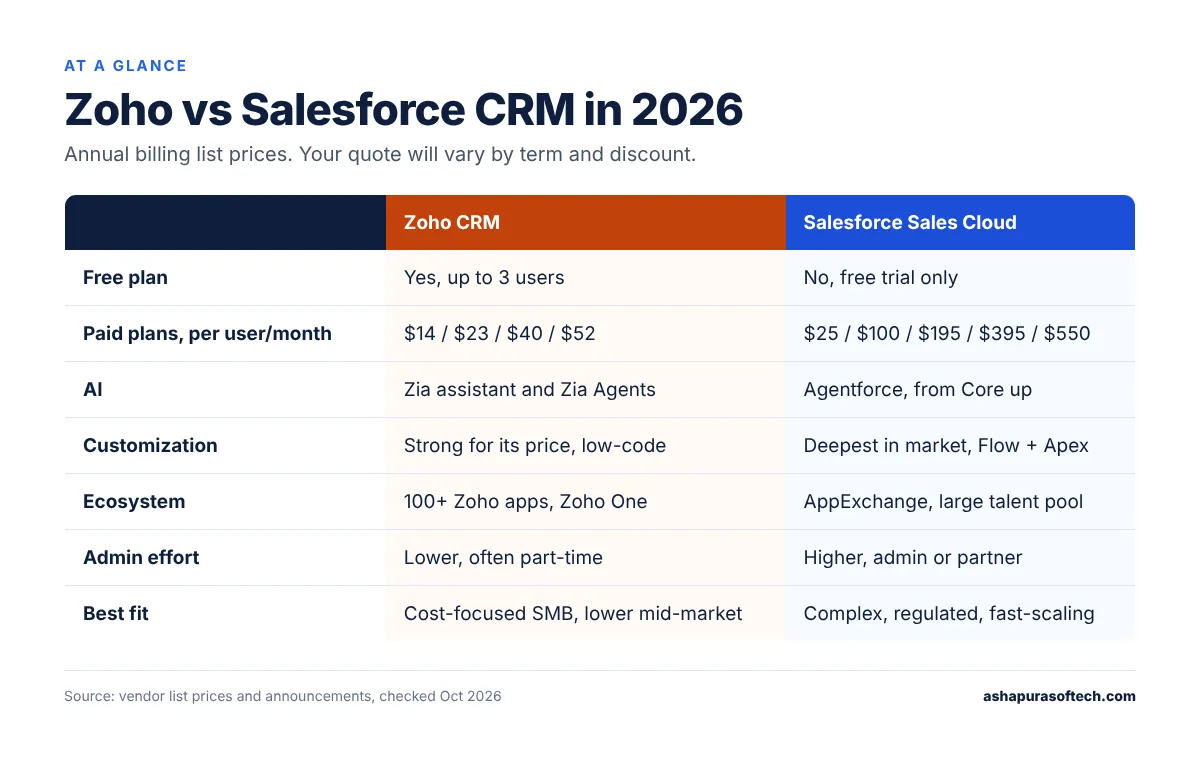
Zoho vs Salesforce CRM at a glance

Zoho CRMSalesforce Sales Cloud
Free planYes, up to 3 usersNo (free trial only)
Paid plans (per user/month, annual)Standard $14, Professional $23, Enterprise $40, Ultimate $52Starter Suite $25, Pro Suite $100, Core $195, Advanced $395, Max $550
AIZia assistant and Zia AgentsAgentforce, included from Core up with Flex Credits
CustomizationStrong for its price, low-code with Zoho CreatorDeepest in the market, Flow plus Apex code
Ecosystem100+ Zoho apps, Zoho One suiteAppExchange, large partner and admin talent pool
Admin effortLower, often a part-time adminHigher, most mid-market orgs need an admin or partner
Best fitCost-focused SMB and lower mid-market teamsComplex sales processes, regulated or fast-scaling teams
Zoho vs Salesforce CRM at a glance comparison table for 2026
Zoho vs Salesforce CRM at a glance, using October 2026 list prices.

These are list prices, checked in October 2026 on each vendor’s pricing pages and recent pricing guides. Your quote will depend on region, contract length and discounts.

Zoho vs Salesforce CRM pricing in 2026

Zoho CRM

Zoho gives you a free edition for up to three users. After that you pick from four paid editions. On annual billing, Standard is $14, Professional $23, Enterprise $40 and Ultimate $52 per user per month. Paying month to month costs more ($20, $35 and $50 for the first three).

Once you have picked a platform, the next question is budget. Our guide to CRM implementation services for Salesforce or Zoho breaks down scope, cost and timeline.

There are two other ways to buy it. Bigin is a stripped-down pipeline tool for very small teams, from $7 a user. Zoho One bundles the CRM with dozens of other Zoho apps and is priced per employee. It’s worth pricing only if you’d actually use several of those apps; otherwise it’s a bundle you pay for and ignore.

Salesforce

Salesforce changed Sales Cloud in September 2026. Starter Suite ($25) and Pro Suite ($100) are still there at the bottom. Above them are three new editions: Core at $195, Advanced at $395 and Max at $550 per user per month, billed annually. All three include Agentforce plus a yearly pool of Flex Credits for AI work: 500,000 on Core, 1 million on Advanced and 2.75 million on Max. That pool is per org, not per seat.

Enterprise and Unlimited are now “legacy” editions. If you’re on one today, Salesforce says your current pricing stays the same. We cover the new tiers in more detail in our guide to Salesforce Core, Advanced and Max editions.

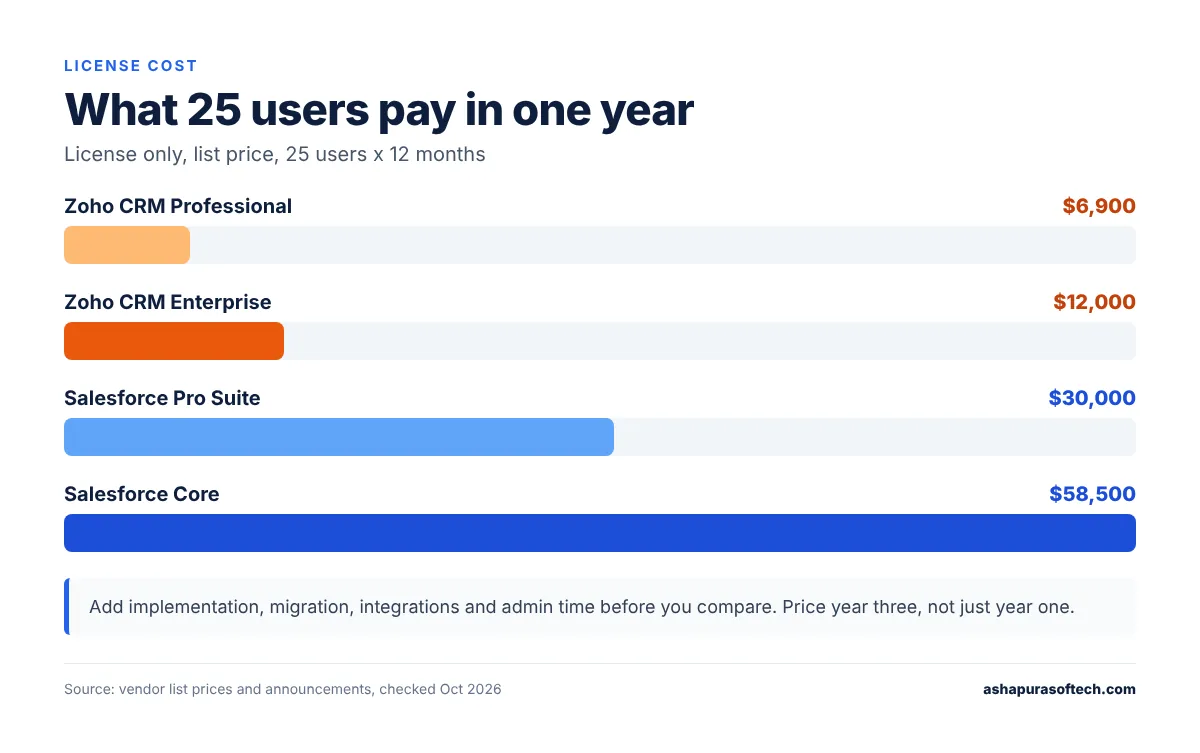
What 25 users pay for a year

License only, list price:

OptionPer user/month25 users, 12 months
Zoho CRM Professional$23$6,900
Zoho CRM Enterprise$40$12,000
Salesforce Pro Suite$100$30,000
Salesforce Core$195$58,500
Zoho vs Salesforce CRM yearly license cost for a 25-user sales team in 2026
Zoho vs Salesforce CRM license cost for 25 users over one year, list price only.

That’s the number most Zoho vs Salesforce CRM comparisons stop at. It shouldn’t be. Implementation, data migration, integrations and the person who keeps the system clean all cost money too. On Salesforce, admin time often ends up bigger than the license difference. On Zoho, the surprise usually shows up later, when the team starts adding Desk, Analytics and Campaigns one app at a time. Our Zoho CRM implementation cost guide has typical project ranges if you want the full picture.

Customization: the real dividing line

If you only read one section of this Zoho vs Salesforce CRM guide, read this one.

Zoho CRM handles more than people expect. You get custom modules and fields, Blueprint for guided sales steps, and Deluge scripting when point-and-click isn’t enough. Zoho Creator covers the odd internal app. For a standard B2B pipeline, that’s plenty.

Salesforce is in a different league. Flow takes care of most automation without code, Apex handles what’s left, and the data model, sharing rules and approval chains can bend to almost any process. That flexibility is exactly why large and regulated companies choose it. It’s also why so many Salesforce orgs turn messy after a few years when nobody really owns them.

Here’s a quick gut check. Can you sketch your sales process on one page, and does it change maybe once a year? Zoho will cover it. Do you have several product lines, regional approvals, partner deals or tricky quoting? That’s what Salesforce was built for.

Picture a 30-person distributor with one sales team and one price list. Zoho Enterprise handles that comfortably. Now give the same company a dealer channel, three levels of regional discount approval and quotes that pull live stock from an ERP. That’s usually the point where Zoho needs a lot of custom Deluge code, and Salesforce starts to look cheaper than the workarounds.

AI: Zia Agents vs Agentforce

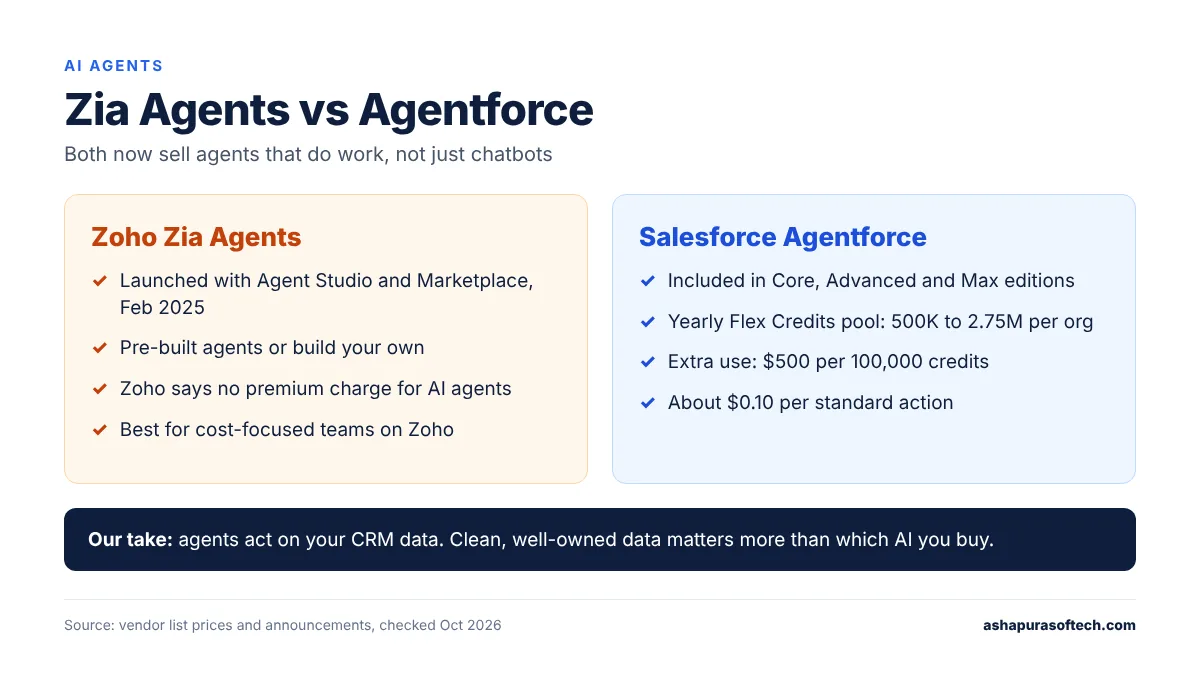
AI is the newest front in the Zoho vs Salesforce CRM race. Both vendors now sell AI agents that do work, not just chatbots that answer questions.

Zoho launched Zia Agents, an Agent Studio and an Agent Marketplace in February 2025. You can use pre-built agents or build your own. Zoho has also said publicly that it doesn’t plan to charge a premium for AI agents, which matters if budget is the reason you’re looking at Zoho in the first place.

Agentforce is further along for large-scale use. It now comes bundled with Core, Advanced and Max, and anything beyond your included credits is billed in Flex Credits at $500 per 100,000. A standard agent action uses 20 credits, roughly ten cents. Well-designed agents stay cheap. Agents working on messy data take extra steps, and every step costs. Our Agentforce pricing and Flex Credits breakdown walks through real numbers.

Zoho Zia Agents vs Salesforce Agentforce AI agents compared
How AI agents compare in Zoho vs Salesforce CRM today.

Honestly, we wouldn’t let AI decide this on its own. Agents on either platform act on whatever is in your CRM. Clean, well-owned data will get you more from a cheaper AI tool than a messy org will get from an expensive one.

Integrations and ecosystem

Integrations are where a Zoho vs Salesforce CRM comparison often gets decided late. Zoho’s strength is its own suite. Already on Zoho Books, Desk, Campaigns or Analytics? The CRM plugs into them with almost no setup and your data stays in one place.

Salesforce’s strength is everything outside it. AppExchange has thousands of apps, most US SaaS vendors build their Salesforce connector first, and hiring a Salesforce admin or developer in the US is simply easier than finding a Zoho specialist. Both platforms have solid APIs for ERP, finance and data warehouse links, but Salesforce usually has more ready-made connectors. If you’re planning to connect Zoho to a lot of outside tools, our guide to Zoho integration with third-party apps covers what tends to work.

Day-to-day use and admin effort

Ask any sales team that has lived through a Zoho vs Salesforce CRM switch and they’ll mention the learning curve first. Most reps get comfortable in Zoho CRM within a day or two, and plenty of small teams run it with a part-time admin.

Salesforce takes longer to learn and needs someone who owns it. Lightning is a good interface once it’s set up properly. Set up badly, it confuses people fast. Either way, budget for training and for an admin, in-house or through a partner.

Reporting and forecasting

Both cover the basics: pipeline reports, dashboards, forecasts. Salesforce goes deeper with collaborative forecasting and territory views, and from Core up it includes Tableau Next. Zoho adds forecasting from Professional up, and Ultimate brings in Zoho Analytics for heavier BI. If your leadership team runs on dashboards, rebuild your three most important reports in each trial before you decide. It tells you more about the Zoho vs Salesforce CRM question than any feature grid.

Zoho vs Salesforce CRM: which one fits your team?

Zoho CRM is likely the better fit if:

  • You have fewer than about 50 sellers and a fairly standard sales process.
  • License cost is a deciding factor, and you’d like AI without a premium price tag.
  • You already use other Zoho apps, or Zoho One would replace tools you’re paying for today.
  • You don’t have, or don’t want, a full-time CRM admin.

Salesforce is likely the better fit if:

  • You deal with complex quoting, approvals, territories or partner channels.
  • You expect fast growth, acquisitions or a move into a regulated industry.
  • You need a wide integration ecosystem and an easy talent pool to hire from.
  • You plan to run AI agents across both sales and service.

Can Zoho replace Salesforce? For a lot of small and lower mid-market teams, yes. We see companies make the switch when they realise they’re paying for a big Salesforce org but using a small slice of it. It rarely makes sense if you depend on heavy customization, complex sharing rules or a stack of AppExchange apps.

Switching from one to the other

Whichever way your Zoho vs Salesforce CRM decision goes, moving between them is a data and process project, not an export button. Map your fields first. Clean up duplicates before the move, not after. Then run both systems side by side for one team before everyone cuts over. Our checklist on preparing Salesforce data for a Zoho CRM migration goes step by step, and our Zoho migration services page covers moves in both directions.

The mistake we’d warn you about first: moving records before you’ve agreed who owns each account. Duplicates and orphaned deals follow you into the new system, and cleaning them up afterwards takes far longer than doing it before the move.

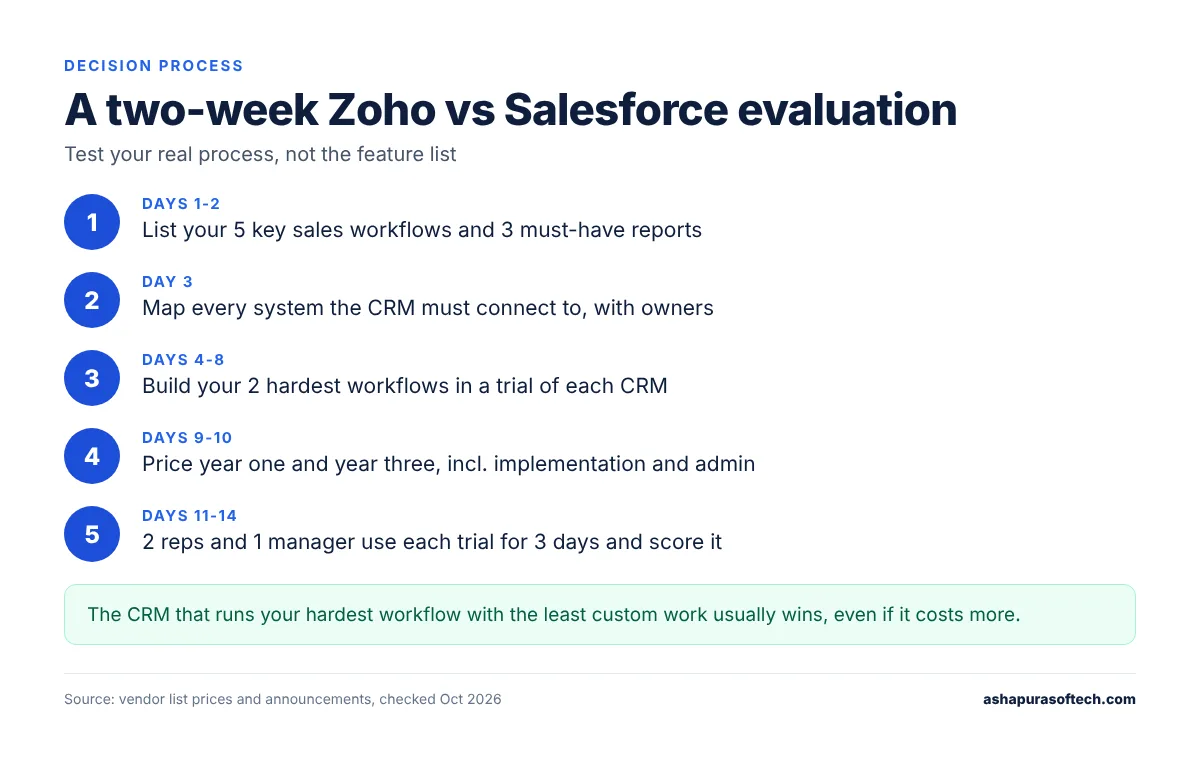
How we’d run a two-week Zoho vs Salesforce CRM evaluation

When clients ask us to compare the two, we skip the feature lists and test the real process:

Two-week Zoho vs Salesforce CRM evaluation process in five steps
A simple two-week plan to settle the Zoho vs Salesforce CRM choice.
  1. Write down your five most important sales workflows and the three reports you can’t live without.
  2. List every system the CRM has to connect to, and who owns each one.
  3. Build your two hardest workflows in a trial of each CRM.
  4. Price year one and year three for your real user count, including implementation, admin and add-ons.
  5. Hand each trial to two reps and one manager for three days, then ask them to score it.

In a Zoho vs Salesforce CRM trial, whichever CRM handles your hardest workflow with the least custom work is usually the right call, even when it isn’t the cheapest. If you’d like a second opinion on your shortlist, our team does CRM software development and implementation on both platforms.

Frequently asked questions

Is Zoho CRM cheaper than Salesforce?
Yes, by a wide margin at list price. Zoho CRM paid plans cost $14 to $52 per user per month on annual billing, while Salesforce Sales Cloud runs from $25 to $550. For a 25-user team, Zoho Enterprise costs about $12,000 a year in licenses, compared with $30,000 for Salesforce Pro Suite.

Can Zoho replace Salesforce?
For many small and lower mid-market teams, yes, especially if they use only basic Salesforce features. It is a poor swap for companies that depend on heavy customization, complex sharing rules or many AppExchange apps.

Which is better for a mid-market company, Zoho or Salesforce?
It depends on process complexity, not company size alone. A mid-market team with a standard sales process and tight budget often does well on Zoho CRM Enterprise. Teams with complex quoting, approvals or several sales channels usually get more from Salesforce.

Does Zoho CRM have AI agents like Agentforce?
Yes. Zoho launched Zia Agents, Agent Studio and an Agent Marketplace in 2025. Agentforce is more established for large-scale use and is included in Salesforce’s Core, Advanced and Max editions with a yearly Flex Credits allowance.

How long does it take to migrate from Salesforce to Zoho CRM?
A simple migration for a small team can take a few weeks. Larger orgs with custom objects, automation and integrations usually need two to three months, including testing and a period of running both systems.

About the author

Ankur Pandey is Marketing Manager at Ashapura Softech, a Salesforce and Odoo consulting partner based in Irving, Texas, that also builds on Zoho. He works with the delivery team on CRM selection, pricing and migration questions from US companies, and writes about what those projects teach, including the Zoho vs Salesforce CRM question US teams ask most often.

Sources