Categories
Salesforce Agentforce

Salesforce Winter ’27 Release: 15 Critical Changes to Test

Last updated: 15 October 2026

Short answer

Salesforce Winter ’27 is now live in every production org. Salesforce upgraded production instances in waves on 4 September, 2 October and 9 October 2026, and the release reached general availability on 12 October. If you have not tested yet, start with the changes that can stop integrations: the new API permission for SOAP login(), the retirement of the OAuth username-password flow on 20 February 2027, and the end of standard-volume platform events in Summer ’27.

The Salesforce Winter ’27 release went generally available on October 12, 2026, and it is not a quiet one. Alongside the usual Flow and admin improvements, it carries security changes that can stop integrations from logging in, a platform events retirement with a real deadline, and a large set of Agentforce updates that change how agents are built and measured.

This guide lists the 15 Salesforce Winter ’27 release changes we think Salesforce admins, architects and IT leads should actually test, in order of risk. It is written for teams running a live production org who want to know what to check now that their org is on Winter ’27, not for people who want to read every line of the release notes. For each item you will find what changed, who it affects and the specific test to run.

We work on Salesforce orgs every week as an implementation partner, so the list leans towards what tends to break in real orgs rather than what looks best in a keynote.

Related: Salesforce also had a major outage on 16 September 2026. See what happened in the Salesforce outage and what admins should check.

Salesforce Winter ’27 release dates at a glance

Running an Einstein Bot? Read our guide to converting Einstein Bots to Agentforce agents, which Salesforce announced at Dreamforce 2026.

Planning to adopt new releases? Our guide to CRM implementation services covers what a rollout usually costs and how long it takes.

Salesforce rolls a major release out in waves, so your production org may upgrade on a different weekend from someone else’s. The dates below are the ones that matter for planning. Always confirm your own maintenance window on the Salesforce Trust status site for your instance.
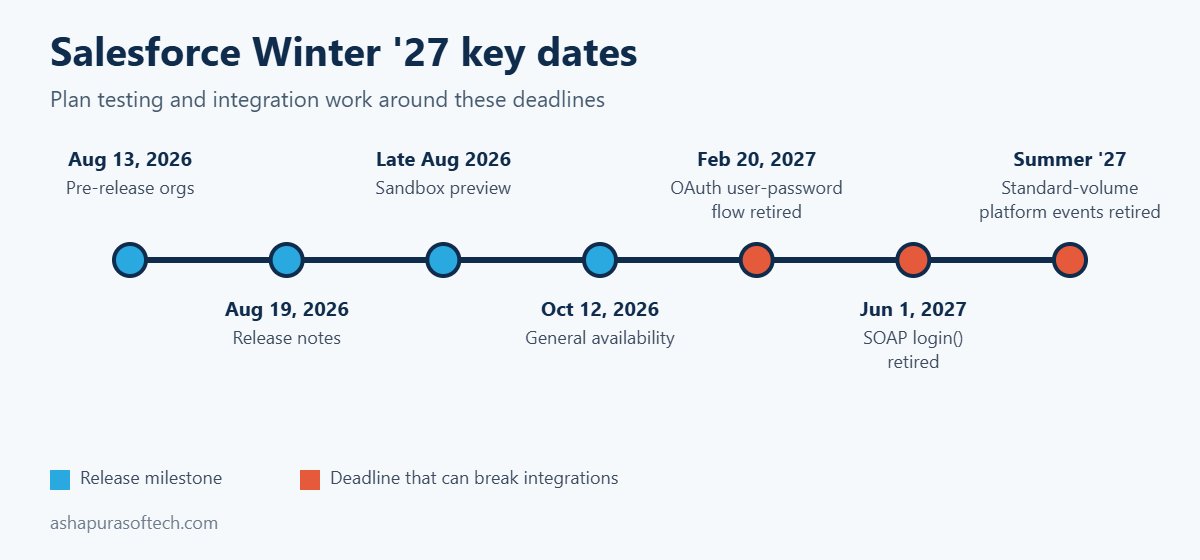
Salesforce Winter '27 release dates timeline with GA on October 12, 2026 and 2027 retirement deadlines
MilestoneDateWhat it means for you
Pre-release orgs openAugust 13, 2026Free trial orgs with Winter ’27 features, but none of your own configuration
Release notes publishedAugust 19, 2026Full list of features and release updates available to read
Sandbox previewLate August 2026Preview sandboxes upgraded early, the best place to test your own setup
Production upgrades4 September, 2 October and 9 October 2026Your date depends on your instance, check Trust status
General availabilityOctober 12, 2026All production orgs on Winter ’27
OAuth username-password flow retiredFebruary 20, 2027Integrations using grant_type=password stop getting tokens
SOAP login() call retiredJune 1, 2027Integrations that log in through SOAP must move to OAuth
Standard-volume platform events retiredSummer ’27Events must be migrated to high-volume before then

Free CRM health check: 30 checks in 5 pages

Score your CRM in about an hour across data quality, pipeline, adoption, automation, reporting and security. Free PDF, no signup.

Download the free CRM health check

Planning Agentforce? Start with our free Agentforce readiness checklist, or book a free 30-minute consultation.

Already on Winter ’27? Your first-week checks

If your org upgraded in one of the October waves and nothing has broken yet, that is a good sign, but several of the riskiest changes only bite later or only on specific integrations. These are the checks we run first for clients after a major release lands:

  1. Integration users that call SOAP login(). Confirm each one has the new API permission described in change 1 below. A failed nightly sync is often the first sign this was missed.
  2. Anything using the OAuth username-password flow. List every connected app and middleware job that still sends a username and password for a token. They keep working until 20 February 2027, then stop. Moving them to a supported OAuth flow is a project, not a setting, so plan it now.
  3. Standard-volume platform events. Pull a list of the events your org publishes and subscribes to, and mark which are standard-volume. They have to move to high-volume before Summer ’27.
  4. Your three most important flows. Re-run them in the new Flow Test Mode (change 6) with real-looking records, so you know they behave the same after the upgrade.
  5. Agents in production. Check that existing Agentforce agents still pick the right actions after the skills and plugins registry changes (change 11).

Looking further ahead, Salesforce has said its CRM reasoning model, Koa, should reach general availability in winter 2026 in US regions. Our guide to Salesforce Koa explains what it is and how to get your agents ready.

Salesforce Winter ’27 known issues: what admins are running into

Most of the problems we have seen since the October upgrade weekends are not bugs. They come from features that changed during the release, beta features that were switched off, and behaviour that only shows up with real users. Before you raise a case, check these first.

  • Check the official Known Issues site. Search issues.salesforce.com for the feature name and subscribe to any issue that matches. Salesforce posts workarounds there before it posts fixes.
  • Features that changed mid-release. Flow tags were removed the week of 14 September (see below). Reactive formulas in conditional visibility rules were pulled on 14 September and then added back to the notes in early October. If a feature you read about in a preview blog is missing, check the release notes change log before you assume your org is broken.
  • Flow record-lock retry is narrower than it sounds. The automatic retry on locked records applies only to schedule-triggered flows on run-time API version 62.0 or lower, with one retry after 10 seconds. It is not a general fix for lock errors in record-triggered flows (release note).
  • Retired betas. Teams that relied on beta features have reported that some, such as Work Summaries for Case and the Experience Builder agent, no longer work. Move users to the generally available alternative rather than waiting for the beta to return (Maintask summary).
  • Agentforce appearing in Setup. Partners report that eligible orgs are having Agentforce enabled at no extra cost. Enabled is not the same as deployed: no agent runs until someone builds and activates it, so review who has the Manage AI Agents permission (CETDIGIT).
  • “It works for me” reports. Profile Filtering and the 200% zoom changes only show up for non-admin users. Always reproduce a reported issue while logged in as the affected user.

How this Salesforce Winter ’27 release list is organised

The 15 Salesforce Winter ’27 release changes fall into three groups: five that can break things, five Flow and admin wins and five Agentforce updates. The first five can break something that works today, so they come first and deserve testing time before your upgrade weekend. The next five are Flow and admin improvements that are worth adopting because they save time or reduce risk. The last five are Agentforce and cloud updates that mostly affect planning and budgets rather than day to day stability.

If you only have one afternoon, test group one. If you have a week, work through all three.

Part 1: Five Salesforce Winter ’27 release changes that can break things

1. SOAP login() needs a new API permission

The Salesforce Winter ’27 release enforces a release update titled “Assign Use Any API Auth Permission for SOAP login()”. Users who authenticate through the SOAP API login() call now need that permission assigned, either through a profile or a permission set.

Who it affects: any integration user, middleware tool or older data loader setup that still logs in through SOAP rather than OAuth. These are often integrations nobody has looked at in years.

What to test: in your preview sandbox, list every integration user and check which ones authenticate through SOAP login(). Assign the permission through a permission set rather than editing profiles, then run each integration once end to end. Also note the bigger deadline behind this change: the SOAP login() call itself retires on June 1, 2027, so this is the moment to plan the move to OAuth rather than patching it twice.

2. Profile Filtering is switched on by default

With Profile Filtering enforced by the Salesforce Winter ’27 release, users without the View All Profiles permission can no longer see the names of profiles they are not assigned to. On its own this is a sensible security change. The problem is anything built on the assumption that profile names are visible.

Who it affects: flows, validation rules, formula fields, Apex and reports that read Profile.Name for users who do not hold View All Profiles, plus any custom user management screens.

What to test: search your metadata for references to Profile.Name, run the affected automation as a standard user in the sandbox and confirm it still behaves. Where logic depends on profile, consider switching it to a custom permission, which is the more durable pattern anyway.

3. The OAuth username-password flow is retired on February 20, 2027

This is the change most likely to cause a silent outage. Salesforce is retiring the OAuth 2.0 username-password flow for connected apps, where an integration sends a username, password and security token to get an access token. Enforcement is set for February 20, 2027. When it lands, those integrations simply stop getting tokens, and there is no warning screen for a user to notice.

Who it affects: existing orgs with server to server integrations still using grant_type=password. New orgs already have the flow blocked by default.

What to test: ask every integration owner which OAuth flow they use. Move nightly jobs and middleware to the client credentials flow running as a dedicated integration user, or to the JWT bearer flow for more sensitive connections. Store secrets in Named Credentials, not in code or config files. The Salesforce Winter ’27 release is the moment to do this, because February leaves little room once year end freezes are taken into account.

4. Standard-volume platform events retire in Summer ’27

You can no longer define new standard-volume custom platform events, and new platform events are high-volume by default. Existing standard-volume events are due to retire in Summer ’27, according to the Salesforce Platform Events Developer Guide.

Who it affects: orgs with older event-driven integrations, especially ones built several years ago when standard volume was the default.

What to test: list your custom platform events and check each one’s publish behaviour. For every standard-volume event, plan the migration to high-volume and retest the subscribers, including any Apex triggers, flows and external CometD clients. The migration is not hard, but it touches every subscriber, so it belongs in a planned release rather than a rushed fix.

5. Accessibility updates change layouts above 200% zoom

Three accessibility updates enforced by the Salesforce Winter ’27 release improve how cards, docked containers, menu lists, panels, date pickers, popovers, utility bars, record headers, page headers and modal windows behave at zoom levels above 200%.

Who it affects: most orgs will simply get a better experience. The risk sits with custom Lightning components and CSS overrides that assume a fixed layout.

What to test: open your most used record pages, custom components and utility bar items at 200% and 400% browser zoom in the sandbox. Look for clipped buttons, overlapping text and modals that cannot be closed. Fix those before users who rely on zoom run into them.

Winter ’27 is live

Will Winter ’27 break anything in your org?

We check your org against the release changes most likely to cause problems, so you can fix them before your users notice.

  • Authentication and integration changes that can stop logins or syncs
  • Flows and automations that need re-testing
  • A short, prioritised fix list your admin can act on

Book a Winter ’27 impact check

Certified Salesforce partner · 30-minute call, no obligation
Part 2: Five Flow and admin changes in the Salesforce Winter ’27 release

If your org still runs most of its day-to-day automation by hand, our rundown of the Sales Cloud workflows worth automating first pairs well with this section.

6. Flow Test Mode (beta) replaces Debug Mode

In the Salesforce Winter ’27 release, Test Mode gives Flow Builder a dedicated place to test a flow, combining what debug and flow tests used to do separately. You can save test scenarios with mock inputs and assertions, rerun them after every change and track coverage.

Why it matters: most flow failures in production come from a change to one branch breaking another branch nobody retested. Saved, repeatable tests are the cheapest protection against that.

What to do: pick your three most important record-triggered flows and build saved tests for them in the sandbox. Because Test Mode is still beta, keep your existing testing process running alongside it for now.

7. Screen flows can run on many records at once

After the Salesforce Winter ’27 release, a screen flow can run as a mass quick action from a list view or a related list, receiving the selected records as a collection of IDs. Screen flow quick actions also get custom modal sizing.

Why it matters: bulk updates that used to need a data loader job, a custom Lightning component or a developer can now be built by an admin.

What to do: look for requests your team handles with spreadsheets and data loader, such as reassigning a batch of cases or updating stages on selected opportunities. Those are good first candidates.

8. Flow Builder catches more mistakes at save time

With the Salesforce Winter ’27 release, Flow Builder warns when a Create Records element is missing required field assignments and catches field length violations when you save, instead of failing at runtime. There is also a new run option that makes a flow respect the running user’s permissions, plus an edit history panel and better version comparison.

Why it matters: fewer broken flows reach production, and you can see who changed which element and restore an older version.

What to do: open your largest flows in the sandbox after the upgrade and fix any new warnings. Then review which flows run in system context by default and decide whether they should run in user context instead. For guidance on getting an org ready for automation at this level, our Agentforce readiness checklist covers the permission and data clean up that makes this safer.

9. Apex heap limits go up

The Salesforce Winter ’27 release raises the Apex heap size limit from 6MB to 10MB for synchronous transactions and from 12MB to 25MB for asynchronous transactions. Developers can also test External Services and HTTP callouts in Apex integration tests (developer preview), and a new Apex Symbol API (beta) exposes Apex type metadata.

Why it matters: heap limit errors are a common cause of failed batch jobs and integrations that process large payloads. Some of those will now simply work.

What to do: check your logs for recent heap limit exceptions. Rerun those jobs in the sandbox, but do not treat the higher limit as permission to skip optimisation. Code that barely fitted in 6MB will not stay comfortable for long.

10. Reports get record preview and a home on LWR sites

The Salesforce Winter ’27 release lets you preview records straight from Lightning reports without leaving the report (beta), and Lightning reports and dashboards can now be embedded in Lightning Web Runtime Experience Cloud sites (beta).

Why it matters: partners and customers on an LWR portal can finally see real reports and charts, and internal users lose fewer clicks moving between a report and the records behind it.

What to do: if you run a partner or customer portal, check which reports your external users currently receive by email or export. Those are candidates for embedding once the feature leaves beta.

Part 3: Five Agentforce updates in the Salesforce Winter ’27 release

11. Agent Skills and Plugins get a unified registry

Salesforce’s Winter ’27 announcement introduces a unified registry for Agent Skills and Plugins with more than 100 prebuilt skills. Developers can create reusable, governed capabilities that work across surfaces instead of rebuilding the same action for each agent.

Why it matters: the cost of an Agentforce rollout is often in building and maintaining actions. A shared, governed library changes that equation, and it follows the same direction as the seven Agentforce named agents announced in September.

What to plan: list the actions your agents use today and check which ones now exist as prebuilt skills. Retiring custom actions you no longer need is also a maintenance saving.

12. Custom Scorers (beta) for agent quality

The Salesforce Winter ’27 release adds Agentforce Custom Scorers in beta, letting you define your own evaluation logic for agent sessions on top of the built-in quality metrics.

Why it matters: a generic quality score cannot tell you whether an agent followed your refund policy or escalated at the right point. Custom scoring lets you measure the rules that matter to your business.

What to plan: write down three or four rules every agent conversation must follow, and turn those into scorers in a sandbox. This is also the evidence a steering committee will ask for before approving wider rollout.

13. Adaptive Experiences and Dynamic Plans in service

Adaptive Experiences and Dynamic Plans listen to service conversations in real time and generate and update a resolution plan as the issue evolves. Salesforce says four customers are live, including PowerSchool with more than 550 users.

Why it matters: this moves AI from summarising after the call to guiding the agent during it, which is where handle time actually drops.

What to plan: this depends heavily on clean case data and well structured knowledge. If your knowledge base is out of date, fix that first. For consumption-based costs, our explainer on Agentforce pricing and Flex Credits shows how usage is billed.

14. Agentforce Contact Center expands, with autonomous scheduling

In the Salesforce Winter ’27 release, Agentforce Contact Center expands to more than 30 countries, bringing voice, digital channels and CRM together. Autonomous scheduling with Agentforce Voice lets an agent check availability and book or dispatch technicians around the clock, turning a booking call that used to take around 15 minutes into seconds.

Why it matters: field service and appointment-heavy businesses get a practical use case with a clear return, rather than a general chatbot.

What to plan: map your current booking calls. If most follow the same pattern of checking availability and confirming a slot, they are good candidates. Check your edition too, because what is included changed with the new Salesforce Core, Advanced and Max editions.

15. Agentforce orchestrates third-party agents

With the Salesforce Winter ’27 release, Agentforce can orchestrate agents running on AWS, Azure and Google through A2A-compliant ecosystems. In other words, a Salesforce agent can hand work to an agent built elsewhere and receive the result back.

Why it matters: few large companies will run every agent on one platform. Orchestration across vendors is what keeps a multi-vendor setup from turning into disconnected bots.

What to plan: if you already run agents outside Salesforce, list them and the data each one needs. Governance, logging and permissions across vendors will need an owner before this goes live. If you are weighing Salesforce’s own agents against Claude inside Salesforce, our comparison of Claudeforce vs Agentforce covers the trade-offs.

Smaller Sales and Service changes in the Salesforce Winter ’27 release

A few smaller Salesforce Winter ’27 release updates will not break anything but are worth showing users. In Sales, Einstein Conversation Insights suggests follow-up actions after meetings, reps can capture voice notes after a meeting in the Salesforce mobile app, and Pipeline Forecasting shows deal risks, methodology scores and contact insights. In Service, agents can view original case attachments inline in case details, delete outdated milestones from the case timeline, and use a revamped Enhanced Case Merge interface (beta).

What was pulled from the Salesforce Winter ’27 release: Flow Tags

Flow Tags, which would have let admins label and group flows by category, was removed from the Winter ’27 release during the week of September 14, 2026. The release notes change log records the removal, and Salesforce said only that the feature is not quite ready yet.

The practical lesson is simple. Plan and budget on what is generally available, not on what appeared in a preview, a keynote or an early version of the release notes. Keep using naming conventions and descriptions to organise flows until Flow Tags returns.

Salesforce Winter ’27 release testing checklist

Every Salesforce Winter ’27 release test needs an owner: integration leads cover authentication, admins cover Flow and profiles, and developers cover Apex and platform events. The table maps each change to its test and usual owner.

#AreaWhat to testUsual owner
1SOAP login()Assign the new API auth permission, run each SOAP integration end to endIntegration lead
2Profile FilteringFind Profile.Name references, run them as a standard userAdmin
3OAuth flowsList integrations on grant_type=password, plan client credentials or JWTIntegration lead
4Platform eventsList standard-volume events, plan migration to high-volumeDeveloper
5AccessibilityCheck key pages and custom components at 200% and 400% zoomAdmin, UX
6Flow Test ModeBuild saved tests for the three most important flowsAdmin
7Bulk screen flowsReplace one data loader task with a mass quick actionAdmin
8Flow save checksOpen large flows, clear new warnings, review run contextAdmin
9Apex heapRerun jobs that hit heap limits recentlyDeveloper
10ReportsIdentify portal reports suited to LWR embeddingAdmin
11 to 15AgentforceMap actions to prebuilt skills, draft custom scorers, list external agentsProduct owner

Testing Winter ’27? Check the rest of your org too

Release week is a good time to find what else is broken. Our free 30-point CRM health check covers data, automation, reporting and access.

Download the free CRM health check

How to run the Salesforce Winter ’27 release upgrade in your org

  1. Confirm your date. Look up your production instance on Salesforce Trust status and put the maintenance window in the team calendar.
  2. Test in a preview sandbox, not a pre-release org. Pre-release orgs have the new features but none of your configuration, so they cannot tell you what breaks.
  3. Start with the release updates. Open Setup, then Release Updates, and work through anything marked for enforcement before touching new features.
  4. Run your regression tests. Apex tests, key flows, integrations and the top ten record pages your users open every day.
  5. Tell users what changes for them. A short note on the few visible changes saves a week of support tickets.
  6. Book the follow-up work. The OAuth, SOAP and platform event deadlines fall in 2027, but the migrations need a slot in your plan now.

Teams without the capacity to test every release properly often hand this recurring work to Salesforce managed services.

Frequently asked questions about the Salesforce Winter ’27 release

When is the Salesforce Winter ’27 release date?

Salesforce announced general availability of the Salesforce Winter ’27 release on October 12, 2026. Production orgs upgrade in waves before that date, and the exact weekend depends on your instance, which you can check on Salesforce Trust status.

What breaks in Salesforce Winter ’27?

The Salesforce Winter ’27 release changes most likely to cause problems are the SOAP login() permission requirement, Profile Filtering being on by default and accessibility changes affecting custom components. Two later deadlines matter just as much: the OAuth username-password flow retires on February 20, 2027 and standard-volume platform events retire in Summer ’27.

Is Flow Test Mode generally available in Winter ’27?

No. Flow Test Mode is in beta in the Salesforce Winter ’27 release. It is safe to use in a sandbox for building saved flow tests, but keep your existing testing process alongside it until it reaches general availability.

Did Salesforce remove Flow Tags from Winter ’27?

Yes. Flow Tags was removed from the Salesforce Winter ’27 release in September 2026, with the change recorded in the release notes change log. Salesforce has not given a new date.

What should Salesforce admins test first in Winter ’27?

Test the enforced release updates first: SOAP login() authentication, Profile Filtering and the accessibility changes. Then check which integrations still use the OAuth username-password flow, because those will stop working on February 20, 2027.

Do Winter ’27 Agentforce features cost extra?

It depends on the feature and your edition. Check the availability section of each feature in the Salesforce Winter ’27 release notes before planning a rollout. Many Agentforce capabilities consume Flex Credits, and edition packaging changed in September 2026 with Core, Advanced and Max.

Getting help with the Salesforce Winter ’27 release

Ashapura Softech is a Salesforce implementation partner working with US businesses on Salesforce CRM development, Salesforce cloud services and CRM software development, and builds the custom middleware behind many Salesforce integrations through our enterprise software development team. If you want a second pair of eyes on your release updates, your integration authentication or an Agentforce rollout, we are happy to help, and you can see how we approach delivery in our Agentforce implementation partner guide.

Winter ’27 is live

Will Winter ’27 break anything in your org?

We check your org against the release changes most likely to cause problems, so you can fix them before your users notice.

  • Authentication and integration changes that can stop logins or syncs
  • Flows and automations that need re-testing
  • A short, prioritised fix list your admin can act on

Book a Winter ’27 impact check

Certified Salesforce partner · 30-minute call, no obligation
Categories
eCommerce Salesforce

Salesforce Ecommerce Integrations: Shopify, Magento, BigCommerce, and Adobe Commerce

“Salesforce ecommerce integration” usually means connecting a separate storefront platform, Shopify, Magento/Adobe Commerce, or BigCommerce, to Salesforce CRM (or Salesforce Commerce Cloud, if that’s the storefront itself) so that order, customer and product data flow into the systems your sales, service and marketing teams actually work in.

Why Integrate a Storefront Platform With Salesforce

Most organizations running Shopify, Magento or BigCommerce aren’t looking to replace their storefront with Salesforce Commerce Cloud. They’re looking to stop re-keying order and customer data by hand between the storefront and Salesforce CRM (Sales Cloud, Service Cloud, or Marketing Cloud). Without integration, a support rep working a case in Service Cloud has no visibility into the customer’s order history sitting in Shopify. A sales rep can’t see ecommerce purchase behavior when working an account. Marketing can’t segment or trigger journeys off real purchase data without exporting and re-importing it manually.

The Four Integration Approaches

Pre-built connector apps. AppExchange listings (for example eShopSync and similar Shopify connectors, or Mageplaza/DCKAP-style apps for Magento and BigCommerce) sync core objects, orders, customers, products, inventory, out of the box with minimal setup. Fastest to deploy, least customizable. A reasonable fit when your data mapping needs are standard and you don’t need custom business logic in the sync itself.

Middleware / iPaaS platforms. Tools like MuleSoft (Salesforce’s own integration platform) or lighter options like Zapier sit between the storefront and Salesforce and let you define field mapping, filtering rules, and when syncs fire (real-time trigger vs scheduled batch). This is the middle ground: more flexible than a pre-built app, far less build effort than custom API work. MuleSoft is the standard choice once you’re connecting more than two systems or need enterprise-grade orchestration and error handling.

Custom API integration. Built directly against the storefront’s REST/GraphQL API (Shopify, Magento, BigCommerce all expose one) and Salesforce’s REST API. Maximum control over exactly what syncs, when, and how conflicts are resolved, but it’s a real engineering commitment to build and maintain, not a weekend project.

Low-code/no-code platforms. Zapier and similar tools work for simple, low-volume automations, a new order creates a lead, a new customer creates a contact, but tend to get expensive and brittle at real ecommerce volume or when the logic gets more complex than a single trigger-action pair.

What Actually Syncs

Regardless of method, the data that typically flows between a storefront and Salesforce includes: customer profiles and contact details, order details (line items, totals, payment and fulfillment status), product catalog and inventory levels, returns/refunds and shipping tracking, and abandoned cart data for marketing follow-up. Where each of these lands in Salesforce depends on your object model, orders might map to Opportunities, to a custom Order object, or to Service Cloud cases for support context, and getting that mapping right up front is most of the actual integration work.

Platform-Specific Notes

Shopify. Shopify’s REST and GraphQL APIs are well documented and widely supported by both AppExchange connectors and MuleSoft connectors, making it generally the most straightforward of the three to integrate.

Magento / Adobe Commerce. As a self-hosted or cloud-hosted platform with deep customization potential, Magento integrations are more often custom or semi-custom, especially where the storefront itself has been heavily modified. Budget more discovery time here to map what’s actually been built on top of the base platform.

BigCommerce. Positioned similarly to Shopify as a SaaS platform with a documented API, BigCommerce integrations follow the same connector-or-middleware pattern, with the specific app ecosystem being smaller than Shopify’s.

Where Integrations Commonly Go Wrong

The recurring failure pattern isn’t the initial sync, it’s what happens after: no clear ownership of which system is the source of truth for a given field, sync errors that fail silently instead of alerting anyone, and object mapping decisions made without input from the teams (sales, service, marketing) who’ll actually use the resulting data. Getting the data model and error-handling plan right before building beats getting the connector working fast.

Salesforce Magento (Adobe Commerce) Integration

Magento, now branded Adobe Commerce, is the most common storefront to find heavily customized in the wild. Because it’s self-hosted (or Adobe Commerce Cloud-hosted) and open at the code level, organizations tend to have built custom modules, non-standard checkout flows, and bespoke product attribute sets on top of the base platform over several years. That has one direct consequence for a Salesforce integration: discovery takes longer here than on Shopify or BigCommerce, because “what does this store actually do” isn’t fully answered by reading Magento’s standard documentation.

Technically, Magento exposes both a REST and a GraphQL API, and the integration methods are the same four covered above, pre-built connectors (Mageplaza and similar are common names in this space), MuleSoft or another middleware layer, or a custom build against the API. For a heavily customized Magento instance, a semi-custom approach, middleware plus some custom mapping logic, is usually the realistic middle ground: a pure pre-built connector often can’t account for custom attributes or a non-standard checkout, and a fully custom build is more engineering than most catalogs justify.

What to check before scoping a Magento-Salesforce integration: which Magento version (the API surface and supported connectors differ between Magento 1 legacy installs, which are end-of-life, and Magento 2/Adobe Commerce), whether the storefront is self-hosted or Adobe-hosted, and an honest inventory of custom modules touching order, customer or product data.

Salesforce BigCommerce Integration

BigCommerce sits closer to Shopify than to Magento in how a Salesforce integration typically plays out: it’s a SaaS platform with a documented, well-maintained REST API, so most integrations don’t need to reverse-engineer custom store logic the way a heavily modified Magento build does. The gap versus Shopify is ecosystem size, BigCommerce’s pre-built connector and app marketplace for Salesforce specifically is smaller, so a standard mapping (orders, customers, inventory, products) is more likely to need a middleware layer like MuleSoft or a thin custom build rather than a single-click AppExchange install.

BigCommerce’s multi-storefront capability (one catalog serving several branded storefronts) is worth flagging early if it applies, since it changes how order and customer data should map into Salesforce: decide up front whether each storefront maps to a separate business unit or account segment in Salesforce, or whether they roll up into one view, before building the sync, not after.

Salesforce for Retail and Ecommerce: Where This Fits

“Salesforce for ecommerce” covers more ground than just connecting a storefront. For a retail or DTC brand, Salesforce usually shows up in one of three shapes: Salesforce Commerce Cloud as the storefront itself (a replacement for Shopify/Magento/BigCommerce, not an integration with them), Salesforce CRM (Sales Cloud, Service Cloud, Marketing Cloud) connected to an existing storefront (the integration work this page covers), or a hybrid where Commerce Cloud runs alongside CRM for a unified retail stack.

Which shape makes sense depends mostly on where the pain actually is. If the storefront itself is working fine but customer service, sales visibility, or marketing segmentation are the gap, integrating your existing Shopify/Magento/BigCommerce store with Salesforce CRM (as covered above) solves that without a storefront migration. If the storefront platform itself is the limiting factor, headless commerce needs, complex B2B/B2C hybrid catalogs, deep personalization, that’s a Salesforce Commerce Cloud conversation, and a materially bigger project than an integration.

How Ashapura Softech Helps With Salesforce Ecommerce Integration

Ashapura Softech is a certified Salesforce partner with a team that builds both the storefront and the CRM side. Depending on where you are starting, we can help with:

For further reading, see what AI commerce agents need from your ERP and CRM, how the Salesforce editions compare, how shipment tracking improves the customer experience, starting an ecommerce business and choosing a Salesforce managed services provider.

If you plan to add AI agents to your store later, our guide to Agentforce use cases covers shopping assistants, order tracking and merchant agents.

FAQs

Do I need Salesforce Commerce Cloud to integrate Shopify or Magento with Salesforce?

No. Salesforce Commerce Cloud is a separate, competing storefront product. Shopify, Magento and BigCommerce all integrate with Salesforce CRM (Sales Cloud, Service Cloud, Marketing Cloud) independently of Commerce Cloud.

What’s the fastest way to get started?

A pre-built AppExchange connector for your specific storefront platform, if your data mapping needs are standard. Move to middleware (MuleSoft) or custom API work only once you hit a mapping or logic requirement the connector app can’t handle.

Is real-time sync necessary?

Depends on the use case. Order and inventory data usually benefits from real-time or near-real-time sync to avoid overselling and give support reps current information. Less time-sensitive data (historical reporting, batch segment updates) can run on a scheduled sync without issue.

Categories
Agentforce

Claude Commerce Agents: ERP and CRM Readiness Checklist

Update (14 Sep 2026): On 11 Sep 2026 Salesforce announced a new portfolio of named, job-ready Agentforce agents built for specific high-value work: Casey (customer service), Paige (IT and HR service), Carter (shopper agent for e-commerce), Marshall (supply chain orchestration), Piper (inbound lead generation) and Fin (complex customer experience), all generally available now, plus Hunter (outbound sales), in pilot with general availability expected November 2026. The release also adds long-horizon runtime so agents can pursue goals over days or weeks rather than single interactions, AI Skills for teaching agents new tasks (pilot now, GA October 2026), multi-agent orchestration across workflows, and an Agent Optimizer for continuous performance tuning (GA October 2026). This sits on top of the Core, Advanced and Max editions Salesforce introduced in early September.

Claude Commerce Agents is the open blueprint Anthropic released on 2 September 2026: a working shopping agent and a working merchant agent, forkable, Apache 2.0. Almost every write up since has covered the storefront half. This article covers the half the blueprint deliberately leaves to you, which is what your ERP, your CRM and your permission model actually have to provide before either agent can answer a real customer question.

If your commerce runs on a CRM, an ERP and a warehouse system that disagree with each other on a good day, this is the work that decides whether a Claude Commerce Agents project ships or stalls. What follows is the requirement list we walk clients through, in the order it tends to bite.

There’s a specific moment in these projects that I’ve come to expect.

You demo the agent to the client. It’s fast, it understands a messy question, it builds a sensible cart, everyone in the room is pleased. Then somebody from operations asks what happens when a customer asks about an order that was partially returned, and the room goes quiet, because the answer is that nobody has decided which of the three systems holding pieces of that order is allowed to be the one the agent believes.

That question has nothing to do with the AI. It’s an integration question, and it was there before anyone mentioned agents.

Almost all the coverage in the days since has been about the storefront: what the agent can do for a shopper, what it means for product data, how it fits Shopify. Reasonable, as far as it goes. But it skips the part that decides whether the thing works, which is what happens behind the tool call.

What Anthropic released, briefly

Claude Commerce Agents is an Apache 2.0 reference blueprint, published 2 September 2026. Two agents. The shopping agent lives in your app or storefront and handles search, comparison, multi-item requests, cart building, and customer-service questions like order status and returns. The merchant agent faces your own staff and covers sales analysis, inventory monitoring, pricing and promotion recommendations, and campaign drafting.

Four runnable examples ship with it (retail, travel, telecom and ticketing) plus a Claude Code plugin that will scaffold an agent against your systems or review one you’ve already built.

The line I’d point any client to isn’t on the announcement page, though. It’s at the bottom of the repository README, where Anthropic states plainly that this is a reference implementation, that it is not maintained, and that it does not accept contributions.

That’s not a criticism. It’s a scoping fact, and it’s the most important one in the whole release. You are not adopting a product with a roadmap. You are forking a set of patterns that become your code, your maintenance burden and your security surface from the moment you clone it. Budget accordingly, and don’t let anyone put “Anthropic supports it” in a slide deck.

The blueprint deliberately stops at your systems

Here’s the part I think most readers have glossed over.

The repository ships no MCP connectors. If you have been following the agentic CRM architecture debate, this is the same boundary we described in What Is Salesforce Headless 360. None. Both agents reach the outside world through two Python interfaces, StorefrontBackend on the shopping side and MerchantBackend on the merchant side. Every method on those interfaces is a function your team writes, calling your service, server-side, with a credential your host application holds for the session. The model never sees the credential. It only sees what your method returns.

That design decision carries a commercial consequence that is easy to read past: every capability the agent appears to have is a method your team has to build, own and maintain.

The agent needs, at minimum: catalog search, product detail, cart operations, order lookup, returns and policy answers, customer preferences, sales analytics, inventory positions, pricing rules, promotion state and campaign data. On a mid-market stack, look at where those actually live. Order history is in the CRM. Inventory and cost are in the ERP. Contract pricing is in the ERP or a CPQ layer. Campaign state is in the marketing platform. Product attributes are wherever your PIM is, assuming you have one, which about half the businesses we talk to don’t.

Almost none of it is in the storefront.

So the honest name for a commerce agent project is systems integration project with a conversational front end. That’s a different budget line, a different team and a different risk register than “add an AI assistant to the website,” and if the proposal your client is looking at doesn’t say so, the proposal is wrong.

Claude Commerce Agents shopping agent answering a product question on a storefront with add to cart

The ERP and CRM readiness checklist for Claude Commerce Agents

Before any of the agent code matters, twelve things have to be true of your systems. Nine of the twelve are data and process questions that have nothing to do with AI. This is the list we work through with a client before we quote anything.

What your CRM has to give it

  • Session identity resolved by your host application. The agent inherits an authenticated shopper; it never decides who the user is. Guest checkout, duplicate email addresses on one account and B2B users buying for several ship-to locations all have to resolve to one answer.
  • Order and returns state readable live. Not last night’s extract. Partial returns, exchanges and in-flight refunds included, because those are the questions customers actually ask.
  • Account and contract pricing resolvable per customer. If the agent can only see list price, it will quote list price to a customer on a negotiated rate.
  • Memory scoped, with a written retention rule. What the agent is allowed to remember between sessions, for how long, and how a customer gets it deleted.

What your ERP has to give it

  • Revenue, margin and returns defined the same way everywhere. Two systems that disagree on margin will produce an agent that confidently reports the wrong number.
  • On-hand and committed stock, current. Committed matters as much as on-hand; an agent that only sees on-hand will promise stock that is already allocated.
  • Cost data to reason against, and price floors it cannot cross. The floor belongs in your system, enforced server-side, not in a prompt.
  • Product attributes as structured fields. Size, material, compatibility and voltage as fields, not buried in a paragraph of marketing prose.
  • A campaign calendar queryable by product. Otherwise the agent will recommend a discount on something already promoted.

What has to be true across both

  • Every merchant write staged for human approval. The blueprint is built this way; keep it that way when you extend it.
  • Credentials held server-side in the host application. The agent calls your backend methods, it does not hold keys to your ERP.
  • A test set of real edge cases before pilot. Partial returns, price exceptions, shared logins, discontinued SKUs. This is the part that gets cut, and it is the part that decides whether the pilot survives.

If you cannot tick nine of these twelve today, the honest answer is that the first phase of a Claude Commerce Agents project is a data and integration project, not an AI project.

Which ERPs and CRMs best connect with Claude in 2026

The readiness checklist above assumes a connection exists. That assumption is worth testing, because the connector estate is uneven, and the gaps are not where most buyers expect them. We checked Anthropic’s own connector directory on 10 September 2026, which lists 796 connectors in total. Here is what it actually holds for the systems commerce teams run.

SystemIn Anthropic’s connector directoryWhat that means in practice
SalesforceYes, listed as Salesforce, BetaFirst party listing, still marked beta, so treat scope and limits as moving
ZohoYes, the widest coverage of any vendor with nine listings including Zoho CRM, Books, Desk, Projects and AnalyticsThe most complete suite level coverage on the directory today
HubSpotYes, one listingStraightforward CRM connection
Oracle NetSuiteYes, one listingThe only mainstream ERP with a first party listing
MicrosoftMicrosoft 365 and Microsoft Dataverse are listed, Dynamics 365 is not listed by nameDynamics data is reachable through Dataverse rather than a Dynamics connector
ShopifyYesStorefront and order data on the commerce side
QuickBooksYes, two listingsCovers the finance side for smaller operations
SAPFour listings, but all four are developer tooling for SAPUI5, Fiori, MDK and CAPNothing here reads business data. An SAP commerce agent needs a custom MCP server or middleware
OdooNo listingCustom MCP server, community module or middleware
Sage, Acumatica, PipedriveNo listingMiddleware or custom build

Two things in that table are easy to misread, so we will say them plainly.

The SAP row is the one that trips people. Search the directory for SAP and four results come back, which looks like coverage. Open them and they are tooling for people building SAP front ends, not connectors that read orders, stock or pricing. If your commerce data lives in SAP, budget for a custom MCP server or an integration layer, and do not let a screenshot of four search results become a line in a project plan.

The Zoho row is the surprise in the other direction. Nine listings across CRM, Books, Desk, Projects and Analytics is broader than any other vendor on the directory, including Salesforce. For a mid market retailer already on Zoho One, that is a shorter path to a working agent than the platform’s reputation would suggest.

A missing listing is not a blocker either. The Model Context Protocol is open, so any system with a decent API can be exposed to Claude through a custom MCP server. It is a build, not a purchase, and it belongs in the project estimate as one.

What we would check before trusting any connector

A listing tells you a connection exists. It does not tell you the connection is enough for a commerce agent. Four questions settle that:

  • Read or write. A read only connector supports a shopping agent answering questions. A merchant agent that updates orders or stock needs write access, and write access needs a permission model behind it.
  • Which objects. Access to accounts and contacts is not access to orders, entitlements, price books and stock positions. Ask for the object list before the demo.
  • Rate limits. An agent asks more questions than a human does. Connector limits that never mattered for reporting start mattering here.
  • Beta status. The Salesforce listing is marked beta. Beta is fine for a pilot and a poor foundation for a customer facing commitment.

What each agent needs, by system

The two agents in the blueprint pull on different systems. Splitting the requirement this way makes the scoping conversation faster.

RequirementShopping agentMerchant agent
Primary systemCRM and catalogueERP and order management
Access neededMostly readRead and write
Data that decides successProduct attributes, availability, customer historyStock positions, order status, pricing rules, fulfilment
The usual blockerCatalogue attributes are marketing copy, not structured dataNobody owns the rule for when the agent may change an order
Cheapest honest startRead only answers on a narrow product setDraft actions that a human approves before they commit

What the Claude shopping agent wants from your CRM

Four things. Most mid-market CRMs supply two of them cleanly and struggle with the other two.

Identity, resolved per session. Before the agent can say anything account-specific it has to know who’s asking. Your host application authenticates the shopper and the agent inherits that context; it doesn’t get to decide who the user is. Straightforward in principle, and in practice this is where guest checkout, multiple email addresses on one account, and B2B users buying on behalf of three different ship-to locations all come and find you.

Order and returns state. Anthropic’s shopping agent is designed to answer service questions inside the same conversation as shopping ones (where the order is, how to return something, what the refund policy actually says) rather than dumping the customer on a support page. That’s genuinely the best feature in the release, and it’s also the one that exposes your data model fastest. Full orders are easy. Partial returns, split shipments, exchanges against a replacement SKU, and anything involving a third-party fulfilment partner are where teams discover their order record was never designed to answer a question in natural language.

Account and contract pricing. The repository’s guidance is that the price quoted is the session account’s price. If you sell B2B at all, that single sentence routes your pricing call out of the catalog and into the ERP or CPQ system, and it has to return within a latency budget a person will tolerate mid-conversation.

Memory that survives the session, and doesn’t become a liability. The agent is designed to remember what a customer tells it. Anthropic’s engineering guide treats this as a data-handling problem rather than a storage one, and the recommendations are worth reading in full, but the four that matter: decide up front which categories of fact you’re willing to hold and enforce that with a validator on the write path rather than an instruction in the prompt; give users a way to see, correct and delete what’s stored; wire that deletion into your existing account-deletion and data-request flows; and set a retention period, because a preference from two years ago is probably wrong now.

There’s a fifth recommendation in there that I’d have missed if I hadn’t read the guide carefully, and it applies to the merchant side. Merchant logins get shared between operators constantly: one account, four people on the floor. So memory should be keyed to the person, not the login, and reads have to respect that person’s permissions. A store manager’s agent shouldn’t be able to recall something a district manager said. That’s a small design decision that becomes an expensive retrofit.

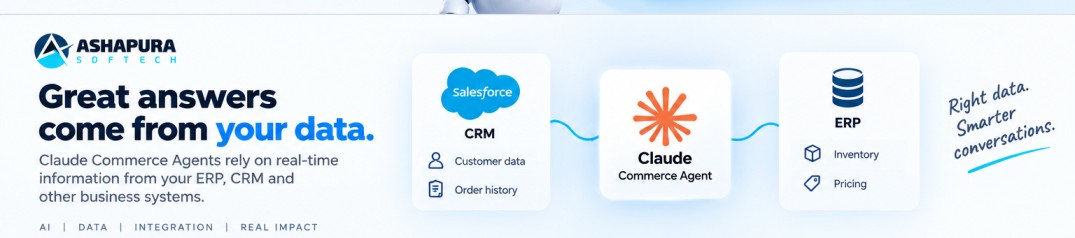
Claude Commerce Agent reading customer data and order history from CRM and inventory and pricing from ERP

What the Claude merchant agent wants from your ERP

The merchant agent’s capabilities ship as five named skills: performance-insights, catalog-listings, inventory-operations, pricing-promotions and marketing-campaigns. Each maps onto a back-office system, and each has a precondition that isn’t about AI at all.

CapabilitySystem that answersWhat has to be true
Sales performance questionsERP or warehouseRevenue, margin and returns defined the same way everywhere
Inventory alertsERP or WMSOn-hand and committed stock, current, not last night’s extract
Pricing and promotion recommendationsERP, CPQ or pricing engineCost data to reason against and floors it cannot cross
Campaign draftingMarketing platformCampaign calendar queryable by product
Listing maintenancePIM or catalogAttributes as structured fields, not prose

If your ERP cannot answer these questions cleanly today, that is usually a data and integration problem rather than an AI one. Our custom ERP development page covers what fixing it typically costs and how the work runs.

Now the design detail that has the biggest operational consequence, and I don’t think anyone has written about it yet.

No merchant write goes live directly in the reference implementation. Every write produces a staged change with a server-generated ID, and applying it requires that ID to have been approved through a real surface, a button in the operator’s portal, a confirmation in the CLI. Fine, that’s the sensible pattern. But the guardrails are re-checked at apply time, against the limits in force then, not the limits that applied when the change was staged.

Think about what that requires of your ERP. Not “can you produce a report.” It’s: can you answer what is true right now, on demand, in the second the approver clicks the button. If your inventory or pricing data lands in the reporting layer on a nightly batch, you cannot support that, and closing the gap is your first sprint, before a single prompt gets written.

I’d rate that as the most common blocker we’ll see in mid-market Odoo and Dynamics estates over the next year. It isn’t glamorous and it doesn’t demo well, but it’s the thing.

The failure nobody plans for

This one I’d put money on.

The shopping agent reads availability from the storefront. The merchant agent reads availability from the ERP. A customer is told an item is in stock. The operations team, looking at the same SKU, sees that stock committed against a wholesale order. Both agents are behaving correctly. They’re reading two systems that have never agreed on what “available” means, and nobody noticed, because until now no two consumers of that number were ever quoted in the same conversation.

The agent didn’t create that contradiction. It made it legible.

That’s why I’d argue hard against building both agents at once, even when the budget exists and the client is enthusiastic. Two conversational surfaces reading through separate data logic will contradict each other in front of a customer within weeks, and when they do, the blame lands on “the AI” rather than on a definition mismatch that predates it by five years. The project gets cancelled for the wrong reason.

Before funding both, five things need one owner and one definition each: product and catalog data, customer identity, commercial rules, action authority, and how you’ll evaluate correctness. If your team can’t name the system of record for all five inside an hour, that reconciliation is the project. The agent comes after.

A trap for integrators specifically

There’s a warning in Anthropic’s engineering guide that I think is aimed squarely at people who do the kind of work we do, and it’s easy to walk straight into.

The rule is that the agent’s tools should call the systems you already run, not reimplement their logic. Your search ranking, your promotion engine, your inventory allocation, those encode years of tuning and see signals a model never will. The tool is where their logic ends and the model’s judgment starts. When the agent calls search_products, results should arrive already ranked; the agent’s job is deciding which of them serve the goal and how to present them.

Where it goes wrong is subtle. The guide describes an availability check that calls the catalog for the SKU, then the inventory service per store, then fulfilment for cutoffs, then applies substitution rules and pickup eligibility, all inside the tool’s own code. Every one of those steps looks reasonable while you’re writing it. What you’ve actually built is a tool carrying domain knowledge that belongs upstream, which will drift out of correctness the moment the business changes a rule, and which nobody will think to update because it doesn’t look like a business system.

The fix is boring and correct: one backend endpoint that answers the question, called by one agent tool.

I’m flagging this because the pressure to stitch missing logic into the tool layer is enormous on integration projects. It’s always the fastest path in the sprint you’re in. It’s also how you end up owning a shadow pricing engine written in a tool wrapper.

A related, smaller point from the same guide: tool results are context, so return the fields the model reasons with and drop the rest. Image URLs on every search row are named as the usual offender. That’s a token cost on every single turn for data the model does nothing with.

Claude Commerce Agents, Agentforce, Claudeforce

Clients ask this as though it’s a choice between three products. It mostly isn’t, and framing it that way leads to bad scoping.

Agentforce is native. Agents run inside Salesforce, on Salesforce data, under Salesforce permissions and governance, and the readiness questions there are different again, which we set out in our guide to choosing an Agentforce implementation partner. If your commerce operation genuinely lives in Salesforce Commerce Cloud end to end, most of the integration work described in this article is already done for you, and the trade is that you work within that ecosystem’s boundaries and its pricing model.

Claudeforce, the expanded Salesforce, Anthropic partnership announced in August 2026, is a different shape again: Claude supplies reasoning, Salesforce supplies the business context and governs the action. We wrote about the distinction separately in Claudeforce vs Agentforce, and it’s worth reading before you assume one replaces the other, because they don’t.

Claude Commerce Agents sits at the far end of that spectrum. You get the harness, the prompts, the skills, the tool contracts and the safety gates; you supply every connection to every system. Maximum control, maximum integration work, no platform lock-in. The same code runs on the Claude API, Amazon Bedrock, Microsoft Foundry or Google Cloud Vertex AI, which matters more than it sounds if you have a cloud commitment or a data-residency requirement.

My honest read: if you’re Salesforce end-to-end, look hard at the native options first and only fork the blueprint if you hit a wall. If you’re running Odoo for ERP and Zoho for CRM behind a custom storefront, which describes a lot of the North American mid-market we work with, there is no native path, and the backend-interface model is genuinely the shorter route, not just the more flexible one.

Where the safety design actually is

Worth understanding before you promise a client this is safe, because the guarantees are real but specific.

Enforcement lives in the harness, in code, not in the prompt. Anthropic’s reasoning is that in commerce the failures are financial and often irreversible, and a prompt rule is one injection away from being skipped. Three mechanisms do most of the work:

Server-issued IDs only. The harness keeps a per-session record of every ID it has handed the model, and that record is the only key any write or render will accept. The cart takes only product IDs the server returned in this session. An ID that arrived any other way, hallucinated, pasted in by a user, planted inside a product review, is refused before your backend ever sees it.

Caps enforced on the resulting state. Limits are checked against what the state would be after the write, so a shopper saying “add two more” three times can’t stack past a per-customer cap, and cart writes within a session are serialised so parallel tool calls can’t combine to exceed it. Merchant changes are checked the same way against caps on price movement, discount depth, restock size and campaign budget, plus a list of protected fields that no change may touch.

Third-party text is sanitised and fenced. In commerce most of your context is written by people who aren’t you, sellers, reviewers, competitors. Every backend read authored by a third party goes through one sanitiser before the model sees it, wrapped in a fence with a fixed label, with control and bidirectional characters stripped and anything imitating a conversation turn or a tool call defused. The prompt carries the other half of the contract: fenced text is material to report on, never to act on.

If you’re presenting this internally to a security or risk function, those three are the answer to “what stops the AI from doing something stupid with money.” The answer is that structurally it can’t, because the checkout interface has no charge method and the write path only accepts approved IDs.

What Claude Commerce Agents cost to run

The code is free. The inference isn’t, and it’s billed however you access Claude. If you are comparing this against a Salesforce-native route, the Agentforce Flex Credits pricing model works on a completely different unit and the two numbers are not directly comparable.

Two things from Anthropic’s engineering guidance belong in front of whoever signs the budget.

First: prompt caching is the dominant cost variable, not model choice. The guide reports that the strongest commerce deployments run at 90, 99% cache hit rates and that this is the range to design for from the start. Cached input reads cost roughly a tenth of fresh ones; cache writes carry about a 1.25x premium, so a cached prefix pays for itself on its second use.

Caching is prefix-based, which means order matters as much as content. Structure the request in three segments by how often they change: global (system prompt, tool definitions, identical every session, your warmest cache), then session (user context and conversation history), then volatile (current time, current page) at the very end. The most common mistake named in the guide is putting a timestamp or the current page at the top of the system prompt, which silently breaks the cache on every single request.

That is a fifteen-minute architecture decision in week one with an order-of-magnitude cost consequence in month six. It’s also invisible in testing, because with low volume nobody looks at the bill.

Second: measure cost per completed task, not per model call. A cheaper model that needs more turns, or fails more often, isn’t cheaper. Anthropic’s starting point is Opus-class for merchant agents, where the work is analysis-heavy, and Sonnet-class for consumer-facing agents, where latency weighs more, then run your eval suite across every model and effort level you’d consider and let the numbers decide. Current rates are at claude.com/pricing.

Testing Claude Commerce Agents, the part that gets cut

Every agent project I’ve seen under time pressure cuts evaluation first, and it’s the wrong cut.

The useful shift in Anthropic’s approach is to evaluate snapshots, not conversations. The API is stateless, so any state a conversation can reach can be constructed directly: build the test state, append the test message, let the agent run, then grade the final state and the rendered response, including the arguments of the last write. They explicitly recommend against grading the path the agent took, because those tests are brittle and over-constraining.

Two things I’d hold teams to:

Most suites are far too heavy on clean-state cases. If a bug only appears after a busy first turn or a contradiction earlier in the session, a test starting from a blank state will pass on every configuration and tell you nothing. Some meaningful share of your cases should start from long, messy, contradictory histories.

And write the negative for every positive. A “should refuse” for every “should serve,” a “should just do it” for every “should ask.” Missing negatives are named as the most common gap in real suites, and it matches what we see, teams test that the agent does the thing, never that it declines to do the thing it shouldn’t.

Fifty to a hundred cases per user flow is the suggested starting point. That sounds like a lot until the first regression ships.

Building the agent takes days while integrating your ERP and CRM data takes weeks

How I’d actually start

Read-only, one workflow, one real system boundary.

The repository supports this directly and it’s the most underrated thing in it. A shopping pilot can implement search and product detail and stub everything else, a stubbed method returns unavailable and changes no prompt bytes. A merchant pilot can implement the read methods and have every write refuse, so digests and analysis run with no write path in existence. And any capability your business simply doesn’t have gets switched off through an enable_* flag, which strips its tools, prompt lines and grounding rules rather than leaving the agent to reason about a system you don’t operate.

That’s enough to answer the only question a first pilot needs to answer, which is whether your data, permissions and definitions can support the workflow at all.


Questions we’re getting

Which ERPs and CRMs connect to Claude today?

On Anthropic’s connector directory, checked 10 September 2026, Salesforce (beta), HubSpot, Oracle NetSuite, Shopify, QuickBooks, Microsoft 365 and Microsoft Dataverse are listed, and Zoho has the widest coverage with nine listings. Dynamics 365 is not listed by name and is reached through Dataverse. Odoo, Sage, Acumatica and Pipedrive have no first party listing, so they need a custom MCP server or middleware.

Does SAP work with Claude Commerce Agents?

Not through the directory as it stands. Searching SAP returns four listings and all four are developer tooling for SAPUI5, Fiori, MDK and CAP rather than connectors that read orders, stock or pricing. An SAP based commerce agent needs a custom MCP server or an integration layer, and that is a build to budget for.

Can I connect a system that has no Claude connector?

Yes. The Model Context Protocol is open, so any system with a usable API can be exposed to Claude through a custom MCP server. Treat it as development work with its own scope, security review and maintenance, not as configuration.

Is it free?

The repository is, under Apache 2.0. Running the agents consumes Claude model usage, billed through whichever platform you access Claude on, the Claude API, Amazon Bedrock, Microsoft Foundry or Google Cloud Vertex AI. Free code, metered inference.

Does it work with Salesforce Commerce Cloud?

Yes, but not out of the box, no platform connectors ship. Commerce Cloud connects through the backend interfaces the same way any other catalog, order or pricing system does, with credentials held server-side by your host application.

Can the agent place an order or charge a card?

No, and not by policy, by structure. In the reference implementation the checkout tool renders the cart for your own checkout to complete, and the backend interface the agent calls has no charge method at all. Every merchant write is staged until a person approves it. Payment is left entirely to your existing checkout or an agentic payments provider.

Do we need Shopify?

No. Shopify announced a reference storefront connecting the blueprint to Shopify stores through Catalog, the Universal Commerce Protocol and Shop Sign-in, but the blueprint itself is platform-agnostic.

Odoo, Zoho, Dynamics?

No prebuilt connector for any of them, and none needed. Each backend method is code your team writes that calls your service server-side, so they integrate exactly like any other system of record.

How long does it take?

The demo runs in an afternoon. A narrow read-only pilot against real systems is weeks, and the timeline is set almost entirely by the state of your product, inventory and customer data, not by the agent code. I’d be sceptical of any estimate that doesn’t start with a data assessment.

What about the results Anthropic published?

Anthropic reports that retailers running shopping agents on Claude have seen carts up to 35% larger and shoppers 60% more likely to complete a purchase. Those are Anthropic’s own figures. The announcement doesn’t publish sample size, test design, retailer mix or attribution method, so treat them as directional vendor evidence and build your own baseline before you commit to a number internally.


Ashapura Softech is a certified Salesforce, Zoho, Microsoft and Odoo implementation partner, based in Irving, Texas with a development centre in Ahmedabad. We’ve been doing CRM and ERP integration work for North American businesses since 2012. If you’re scoping a commerce agent and want a straight answer on whether your data is ready for one, talk to us, the assessment is usually a short conversation.

For a wider view beyond commerce, see our Salesforce Agentforce use cases guide and our post on Salesforce ecommerce integrations.