
The Salesforce Winter ’27 release goes generally available on October 12, 2026, and it is not a quiet one. Alongside the usual Flow and admin improvements, it carries security changes that can stop integrations from logging in, a platform events retirement with a real deadline, and a large set of Agentforce updates that change how agents are built and measured.
This guide lists the 15 Salesforce Winter ’27 release changes we think Salesforce admins, architects and IT leads should actually test, in order of risk. It is written for teams running a live production org who want to know what to check before their instance upgrades, not for people who want to read every line of the release notes. For each item you will find what changed, who it affects and the specific test to run.
We work on Salesforce orgs every week as an implementation partner, so the list leans towards what tends to break in real orgs rather than what looks best in a keynote.
Salesforce Winter ’27 release dates at a glance
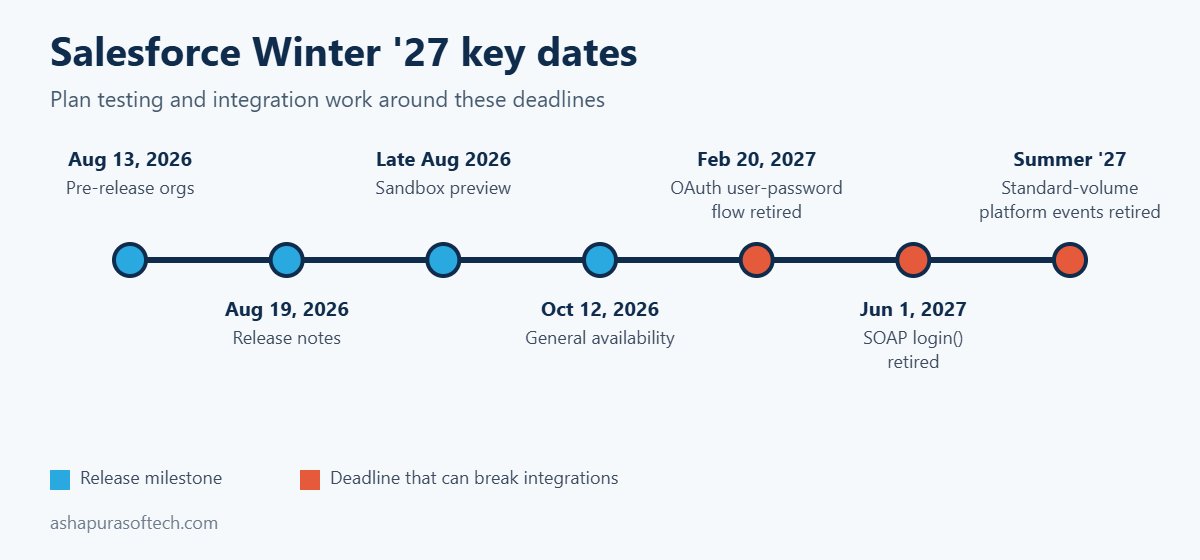
Salesforce rolls a major release out in waves, so your production org may upgrade on a different weekend from someone else’s. The dates below are the ones that matter for planning. Always confirm your own maintenance window on the Salesforce Trust status site for your instance.
| Milestone | Date | What it means for you |
|---|---|---|
| Pre-release orgs open | August 13, 2026 | Free trial orgs with Winter ’27 features, but none of your own configuration |
| Release notes published | August 19, 2026 | Full list of features and release updates available to read |
| Sandbox preview | Late August 2026 | Preview sandboxes upgraded early, the best place to test your own setup |
| Production upgrades | Waves through early October 2026 | Your date depends on your instance, check Trust status |
| General availability | October 12, 2026 | All production orgs on Winter ’27 |
| OAuth username-password flow retired | February 20, 2027 | Integrations using grant_type=password stop getting tokens |
| SOAP login() call retired | June 1, 2027 | Integrations that log in through SOAP must move to OAuth |
| Standard-volume platform events retired | Summer ’27 | Events must be migrated to high-volume before then |
How this Salesforce Winter ’27 release list is organised
The 15 Salesforce Winter ’27 release changes fall into three groups: five that can break things, five Flow and admin wins and five Agentforce updates. The first five can break something that works today, so they come first and deserve testing time before your upgrade weekend. The next five are Flow and admin improvements that are worth adopting because they save time or reduce risk. The last five are Agentforce and cloud updates that mostly affect planning and budgets rather than day to day stability.
If you only have one afternoon, test group one. If you have a week, work through all three.
Part 1: Five Salesforce Winter ’27 release changes that can break things
1. SOAP login() needs a new API permission
The Salesforce Winter ’27 release enforces a release update titled “Assign Use Any API Auth Permission for SOAP login()”. Users who authenticate through the SOAP API login() call now need that permission assigned, either through a profile or a permission set.
Who it affects: any integration user, middleware tool or older data loader setup that still logs in through SOAP rather than OAuth. These are often integrations nobody has looked at in years.
What to test: in your preview sandbox, list every integration user and check which ones authenticate through SOAP login(). Assign the permission through a permission set rather than editing profiles, then run each integration once end to end. Also note the bigger deadline behind this change: the SOAP login() call itself retires on June 1, 2027, so this is the moment to plan the move to OAuth rather than patching it twice.
2. Profile Filtering is switched on by default
With Profile Filtering enforced by the Salesforce Winter ’27 release, users without the View All Profiles permission can no longer see the names of profiles they are not assigned to. On its own this is a sensible security change. The problem is anything built on the assumption that profile names are visible.
Who it affects: flows, validation rules, formula fields, Apex and reports that read Profile.Name for users who do not hold View All Profiles, plus any custom user management screens.
What to test: search your metadata for references to Profile.Name, run the affected automation as a standard user in the sandbox and confirm it still behaves. Where logic depends on profile, consider switching it to a custom permission, which is the more durable pattern anyway.
3. The OAuth username-password flow is retired on February 20, 2027
This is the change most likely to cause a silent outage. Salesforce is retiring the OAuth 2.0 username-password flow for connected apps, where an integration sends a username, password and security token to get an access token. Enforcement is set for February 20, 2027. When it lands, those integrations simply stop getting tokens, and there is no warning screen for a user to notice.
Who it affects: existing orgs with server to server integrations still using grant_type=password. New orgs already have the flow blocked by default.
What to test: ask every integration owner which OAuth flow they use. Move nightly jobs and middleware to the client credentials flow running as a dedicated integration user, or to the JWT bearer flow for more sensitive connections. Store secrets in Named Credentials, not in code or config files. The Salesforce Winter ’27 release is the moment to do this, because February leaves little room once year end freezes are taken into account.
4. Standard-volume platform events retire in Summer ’27
You can no longer define new standard-volume custom platform events, and new platform events are high-volume by default. Existing standard-volume events are due to retire in Summer ’27, according to the Salesforce Platform Events Developer Guide.
Who it affects: orgs with older event-driven integrations, especially ones built several years ago when standard volume was the default.
What to test: list your custom platform events and check each one’s publish behaviour. For every standard-volume event, plan the migration to high-volume and retest the subscribers, including any Apex triggers, flows and external CometD clients. The migration is not hard, but it touches every subscriber, so it belongs in a planned release rather than a rushed fix.
5. Accessibility updates change layouts above 200% zoom
Three accessibility updates enforced by the Salesforce Winter ’27 release improve how cards, docked containers, menu lists, panels, date pickers, popovers, utility bars, record headers, page headers and modal windows behave at zoom levels above 200%.
Who it affects: most orgs will simply get a better experience. The risk sits with custom Lightning components and CSS overrides that assume a fixed layout.
What to test: open your most used record pages, custom components and utility bar items at 200% and 400% browser zoom in the sandbox. Look for clipped buttons, overlapping text and modals that cannot be closed. Fix those before users who rely on zoom run into them.
Part 2: Five Flow and admin changes in the Salesforce Winter ’27 release
6. Flow Test Mode (beta) replaces Debug Mode
In the Salesforce Winter ’27 release, Test Mode gives Flow Builder a dedicated place to test a flow, combining what debug and flow tests used to do separately. You can save test scenarios with mock inputs and assertions, rerun them after every change and track coverage.
Why it matters: most flow failures in production come from a change to one branch breaking another branch nobody retested. Saved, repeatable tests are the cheapest protection against that.
What to do: pick your three most important record-triggered flows and build saved tests for them in the sandbox. Because Test Mode is still beta, keep your existing testing process running alongside it for now.
7. Screen flows can run on many records at once
After the Salesforce Winter ’27 release, a screen flow can run as a mass quick action from a list view or a related list, receiving the selected records as a collection of IDs. Screen flow quick actions also get custom modal sizing.
Why it matters: bulk updates that used to need a data loader job, a custom Lightning component or a developer can now be built by an admin.
What to do: look for requests your team handles with spreadsheets and data loader, such as reassigning a batch of cases or updating stages on selected opportunities. Those are good first candidates.
8. Flow Builder catches more mistakes at save time
With the Salesforce Winter ’27 release, Flow Builder warns when a Create Records element is missing required field assignments and catches field length violations when you save, instead of failing at runtime. There is also a new run option that makes a flow respect the running user’s permissions, plus an edit history panel and better version comparison.
Why it matters: fewer broken flows reach production, and you can see who changed which element and restore an older version.
What to do: open your largest flows in the sandbox after the upgrade and fix any new warnings. Then review which flows run in system context by default and decide whether they should run in user context instead. For guidance on getting an org ready for automation at this level, our Agentforce readiness checklist covers the permission and data clean up that makes this safer.
9. Apex heap limits go up
The Salesforce Winter ’27 release raises the Apex heap size limit from 6MB to 10MB for synchronous transactions and from 12MB to 25MB for asynchronous transactions. Developers can also test External Services and HTTP callouts in Apex integration tests (developer preview), and a new Apex Symbol API (beta) exposes Apex type metadata.
Why it matters: heap limit errors are a common cause of failed batch jobs and integrations that process large payloads. Some of those will now simply work.
What to do: check your logs for recent heap limit exceptions. Rerun those jobs in the sandbox, but do not treat the higher limit as permission to skip optimisation. Code that barely fitted in 6MB will not stay comfortable for long.
10. Reports get record preview and a home on LWR sites
The Salesforce Winter ’27 release lets you preview records straight from Lightning reports without leaving the report (beta), and Lightning reports and dashboards can now be embedded in Lightning Web Runtime Experience Cloud sites (beta).
Why it matters: partners and customers on an LWR portal can finally see real reports and charts, and internal users lose fewer clicks moving between a report and the records behind it.
What to do: if you run a partner or customer portal, check which reports your external users currently receive by email or export. Those are candidates for embedding once the feature leaves beta.
Part 3: Five Agentforce updates in the Salesforce Winter ’27 release
11. Agent Skills and Plugins get a unified registry
Salesforce’s Winter ’27 announcement introduces a unified registry for Agent Skills and Plugins with more than 100 prebuilt skills. Developers can create reusable, governed capabilities that work across surfaces instead of rebuilding the same action for each agent.
Why it matters: the cost of an Agentforce rollout is often in building and maintaining actions. A shared, governed library changes that equation, and it follows the same direction as the seven Agentforce named agents announced in September.
What to plan: list the actions your agents use today and check which ones now exist as prebuilt skills. Retiring custom actions you no longer need is also a maintenance saving.
12. Custom Scorers (beta) for agent quality
The Salesforce Winter ’27 release adds Agentforce Custom Scorers in beta, letting you define your own evaluation logic for agent sessions on top of the built-in quality metrics.
Why it matters: a generic quality score cannot tell you whether an agent followed your refund policy or escalated at the right point. Custom scoring lets you measure the rules that matter to your business.
What to plan: write down three or four rules every agent conversation must follow, and turn those into scorers in a sandbox. This is also the evidence a steering committee will ask for before approving wider rollout.
13. Adaptive Experiences and Dynamic Plans in service
Adaptive Experiences and Dynamic Plans listen to service conversations in real time and generate and update a resolution plan as the issue evolves. Salesforce says four customers are live, including PowerSchool with more than 550 users.
Why it matters: this moves AI from summarising after the call to guiding the agent during it, which is where handle time actually drops.
What to plan: this depends heavily on clean case data and well structured knowledge. If your knowledge base is out of date, fix that first. For consumption-based costs, our explainer on Agentforce pricing and Flex Credits shows how usage is billed.
14. Agentforce Contact Center expands, with autonomous scheduling
In the Salesforce Winter ’27 release, Agentforce Contact Center expands to more than 30 countries, bringing voice, digital channels and CRM together. Autonomous scheduling with Agentforce Voice lets an agent check availability and book or dispatch technicians around the clock, turning a booking call that used to take around 15 minutes into seconds.
Why it matters: field service and appointment-heavy businesses get a practical use case with a clear return, rather than a general chatbot.
What to plan: map your current booking calls. If most follow the same pattern of checking availability and confirming a slot, they are good candidates. Check your edition too, because what is included changed with the new Salesforce Core, Advanced and Max editions.
15. Agentforce orchestrates third-party agents
With the Salesforce Winter ’27 release, Agentforce can orchestrate agents running on AWS, Azure and Google through A2A-compliant ecosystems. In other words, a Salesforce agent can hand work to an agent built elsewhere and receive the result back.
Why it matters: few large companies will run every agent on one platform. Orchestration across vendors is what keeps a multi-vendor setup from turning into disconnected bots.
What to plan: if you already run agents outside Salesforce, list them and the data each one needs. Governance, logging and permissions across vendors will need an owner before this goes live. If you are weighing Salesforce’s own agents against Claude inside Salesforce, our comparison of Claudeforce vs Agentforce covers the trade-offs.
Smaller Sales and Service changes in the Salesforce Winter ’27 release
A few smaller Salesforce Winter ’27 release updates will not break anything but are worth showing users. In Sales, Einstein Conversation Insights suggests follow-up actions after meetings, reps can capture voice notes after a meeting in the Salesforce mobile app, and Pipeline Forecasting shows deal risks, methodology scores and contact insights. In Service, agents can view original case attachments inline in case details, delete outdated milestones from the case timeline, and use a revamped Enhanced Case Merge interface (beta).
What was pulled from the Salesforce Winter ’27 release: Flow Tags
Flow Tags, which would have let admins label and group flows by category, was removed from the Winter ’27 release during the week of September 14, 2026. The release notes change log records the removal, and Salesforce said only that the feature is not quite ready yet.
The practical lesson is simple. Plan and budget on what is generally available, not on what appeared in a preview, a keynote or an early version of the release notes. Keep using naming conventions and descriptions to organise flows until Flow Tags returns.
Salesforce Winter ’27 release testing checklist
Every Salesforce Winter ’27 release test needs an owner: integration leads cover authentication, admins cover Flow and profiles, and developers cover Apex and platform events. The table maps each change to its test and usual owner.
| # | Area | What to test | Usual owner |
|---|---|---|---|
| 1 | SOAP login() | Assign the new API auth permission, run each SOAP integration end to end | Integration lead |
| 2 | Profile Filtering | Find Profile.Name references, run them as a standard user | Admin |
| 3 | OAuth flows | List integrations on grant_type=password, plan client credentials or JWT | Integration lead |
| 4 | Platform events | List standard-volume events, plan migration to high-volume | Developer |
| 5 | Accessibility | Check key pages and custom components at 200% and 400% zoom | Admin, UX |
| 6 | Flow Test Mode | Build saved tests for the three most important flows | Admin |
| 7 | Bulk screen flows | Replace one data loader task with a mass quick action | Admin |
| 8 | Flow save checks | Open large flows, clear new warnings, review run context | Admin |
| 9 | Apex heap | Rerun jobs that hit heap limits recently | Developer |
| 10 | Reports | Identify portal reports suited to LWR embedding | Admin |
| 11 to 15 | Agentforce | Map actions to prebuilt skills, draft custom scorers, list external agents | Product owner |
How to run the Salesforce Winter ’27 release upgrade in your org
- Confirm your date. Look up your production instance on Salesforce Trust status and put the maintenance window in the team calendar.
- Test in a preview sandbox, not a pre-release org. Pre-release orgs have the new features but none of your configuration, so they cannot tell you what breaks.
- Start with the release updates. Open Setup, then Release Updates, and work through anything marked for enforcement before touching new features.
- Run your regression tests. Apex tests, key flows, integrations and the top ten record pages your users open every day.
- Tell users what changes for them. A short note on the few visible changes saves a week of support tickets.
- Book the follow-up work. The OAuth, SOAP and platform event deadlines fall in 2027, but the migrations need a slot in your plan now.
Teams without the capacity to test every release properly often hand this recurring work to Salesforce managed services.
Frequently asked questions about the Salesforce Winter ’27 release
When is the Salesforce Winter ’27 release date?
Salesforce announced general availability of the Salesforce Winter ’27 release on October 12, 2026. Production orgs upgrade in waves before that date, and the exact weekend depends on your instance, which you can check on Salesforce Trust status.
What breaks in Salesforce Winter ’27?
The Salesforce Winter ’27 release changes most likely to cause problems are the SOAP login() permission requirement, Profile Filtering being on by default and accessibility changes affecting custom components. Two later deadlines matter just as much: the OAuth username-password flow retires on February 20, 2027 and standard-volume platform events retire in Summer ’27.
Is Flow Test Mode generally available in Winter ’27?
No. Flow Test Mode is in beta in the Salesforce Winter ’27 release. It is safe to use in a sandbox for building saved flow tests, but keep your existing testing process alongside it until it reaches general availability.
Did Salesforce remove Flow Tags from Winter ’27?
Yes. Flow Tags was removed from the Salesforce Winter ’27 release in September 2026, with the change recorded in the release notes change log. Salesforce has not given a new date.
What should Salesforce admins test first in Winter ’27?
Test the enforced release updates first: SOAP login() authentication, Profile Filtering and the accessibility changes. Then check which integrations still use the OAuth username-password flow, because those will stop working on February 20, 2027.
Do Winter ’27 Agentforce features cost extra?
It depends on the feature and your edition. Check the availability section of each feature in the Salesforce Winter ’27 release notes before planning a rollout. Many Agentforce capabilities consume Flex Credits, and edition packaging changed in September 2026 with Core, Advanced and Max.
Getting help with the Salesforce Winter ’27 release
Ashapura Softech is a Salesforce implementation partner working with US businesses on Salesforce CRM development, Salesforce cloud services and CRM software development, and builds the custom middleware behind many Salesforce integrations through our enterprise software development team. If you want a second pair of eyes on your release updates, your integration authentication or an Agentforce rollout, we are happy to help, and you can see how we approach delivery in our Agentforce implementation partner guide.