Of everything Salesforce announced under AIforce at Dreamforce 2026, Agentforce Coworker is the piece most admins will meet first. It is not a pilot you apply for. In many orgs it is already switched on, because Salesforce began turning it on automatically from 10 August 2026. This guide explains what Agentforce Coworker is, what it can and cannot touch, what it costs, how to turn it on or keep it off, and how to fix the errors admins run into during setup.
Agentforce Coworker at a glance
| Question | Short answer |
|---|---|
| What it is | An AI assistant in the Salesforce search bar that answers questions in plain language and can act on CRM records |
| Where it works | Salesforce, Slack, Microsoft Teams, Claude, ChatGPT and mobile |
| What it reads | Salesforce CRM, Slack and connected Data 360 sources |
| Editions | Enterprise, Unlimited and Agentforce 1 |
| Cost | No extra fee for CRM and Slack search on eligible Unmetered seats; Data 360 answers use credits |
| Status | Announced May 2026, automatic enablement from 10 August 2026, part of AIforce since 15 September 2026 |
What is Agentforce Coworker?
Agentforce Coworker is an AI assistant that sits in the Salesforce search bar inside Lightning. A user types a question in plain language, and instead of a list of matching records they get one written answer built from the data they are allowed to see. Salesforce’s own Coworker FAQ describes it as a teammate that can reason over complex requests, build a multi step plan and call backend tools to finish the task.
The simplest way to think about it: Coworker replaces “search, open five records, read, piece it together” with “ask once, get the summary”. It does not replace your agents, your flows or your reports. It sits in front of them and becomes the single entry point to them.
Agentforce Coworker timeline
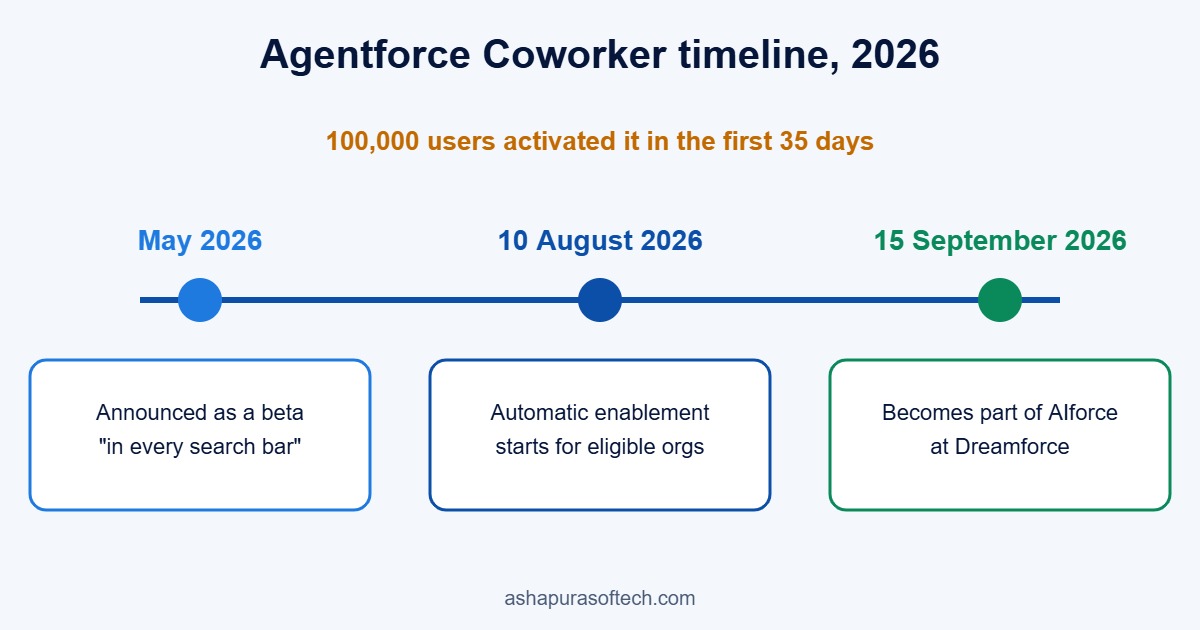
- May 2026: Marc Benioff announced Coworker as an AI teammate “inside every Salesforce search bar”, and it opened as a beta for Agentforce customers.
- 10 August 2026: Salesforce started enabling it automatically for eligible orgs, on a rolling basis.
- 15 September 2026: At Dreamforce it became one of the three products inside AIforce, next to Claudeforce and Slackforce. Salesforce said 100,000 users activated it in the first 35 days.
Agentforce Coworker vs traditional Salesforce search
Classic global search is good at one thing: finding a record when you already know roughly what it is called. Coworker is built for the questions that sit between records.
| Traditional Salesforce search | Agentforce Coworker | |
|---|---|---|
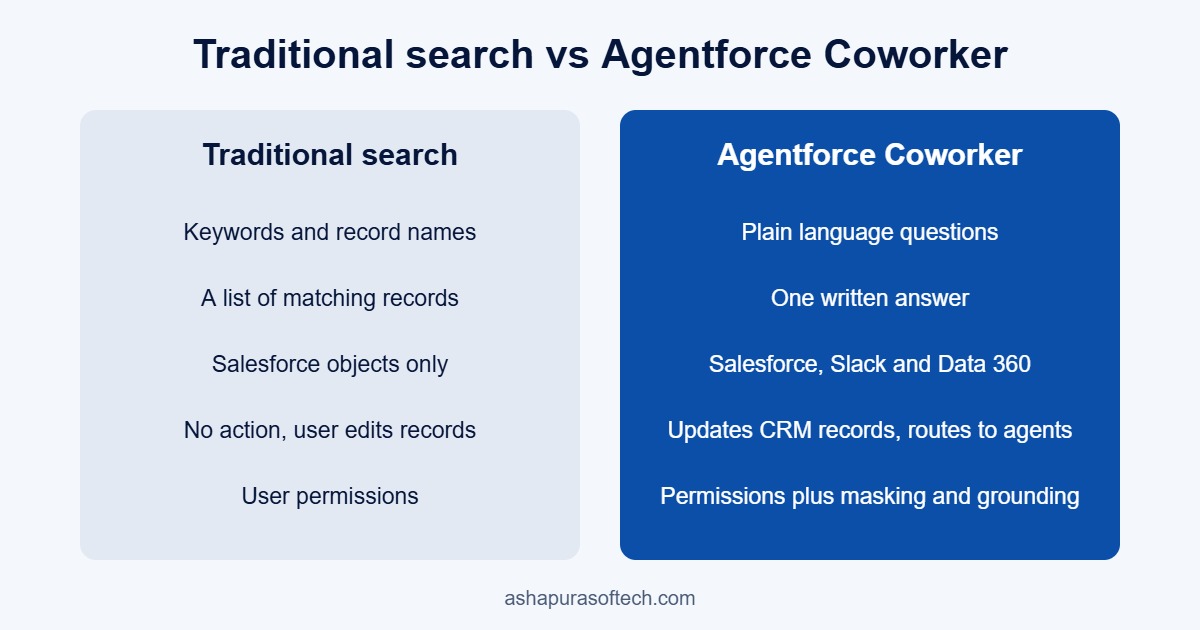
| Input | Keywords and record names | Plain language questions |
| Output | A list of matching records | One written answer with the records behind it |
| Sources | Salesforce objects | Salesforce, Slack and Data 360 sources |
| Action | None, the user opens and edits records | Creates or updates CRM records after confirmation, routes work to agents |
| Security | User permissions | User permissions plus Data 360 governance, masking and grounding |
Where Agentforce Coworker works
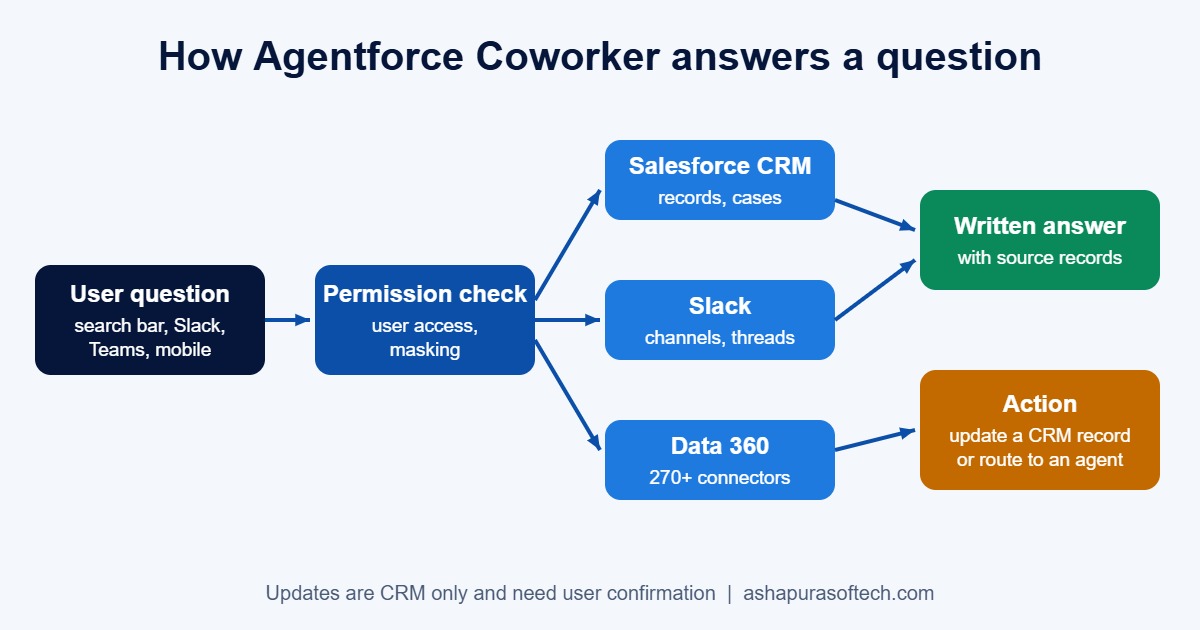
The Lightning search bar is where most users first see it, but Salesforce’s Agentforce Coworker page lists more surfaces: Slack, Microsoft Teams, Claude, ChatGPT and mobile. The point is that the same assistant, with the same permissions, follows the user into whichever tool they already have open. That is the idea behind AIforce as a whole, and it is why Coworker pairs naturally with Claudeforce for teams that already work in Claude.
What Agentforce Coworker can search and do
According to the Salesforce developer guide and the help FAQ, Coworker reads across three kinds of source:
- Salesforce CRM data: accounts, contacts, opportunities, cases, custom objects, knowledge articles and past case history.
- Slack: messages, channels and conversations the user can already access.
- Data 360 sources: Salesforce says more than 270 external sources connect through Data 360 connectors, including data lakes, knowledge bases and enterprise apps such as Jira.
On top of search, it does three things that matter in daily work:
- Create or update records. It checks permissions and validation first, and asks the user to confirm before it saves anything. Today this works only on Salesforce CRM records, not on Slack or external data.
- Route the request. If a question belongs to a specialised agent, for example a service agent or one of the named agents like Casey or Piper, Coworker hands it over rather than guessing.
- Summarise across sources. A sales rep can ask what is putting a deal at risk and get the open cases, the Slack thread about pricing and the stalled approval in one answer.
Agentforce Coworker use cases and example prompts
The value shows up when people ask the questions they currently answer by opening several tabs. These are the kinds of prompts that fit each team.
Sales
- “What should I know before my call with this account tomorrow?”
- “Which of my opportunities closing this quarter have had no activity in two weeks?”
- “Log a note on this opportunity: pricing approved, legal review next week.”
Service
- “Has this customer reported this issue before, and how was it fixed?”
- “Why are cases about login errors spiking this week?”
- “Find the knowledge article that answers this case.”
Customer success and leadership
- “Summarise open cases, renewal date and recent Slack discussion for this account.”
- “Which strategic accounts have an open escalation and a renewal in the next 90 days?”
For the wider picture of where agents earn their keep, see our Agentforce use cases guide.
How it handles security and permissions
Salesforce says Coworker “fully honors the existing Salesforce access model”. It runs with the permissions of the person using it, so if a user cannot open a record, Coworker cannot read it for them. Behind that sit attribute based access control, PII masking, toxicity detection and result grounding through Data 360, and the AIforce announcement repeats the zero data retention model for the underlying language models.
External sources need more thought. Permission aware sources carry their access rules across automatically, and federated sources enforce permissions in real time at the source. For other connectors, an admin has to create governance policies in Data 360 by hand. Data from sources that are not zero copy is ingested and stored in Data 360, which matters for data residency reviews.
The practical catch is that “respects your permissions” is only as good as the permissions themselves. Many orgs have years of broad sharing rules, public read on objects that should be private, and profiles that were cloned instead of designed. Search used to hide that problem because nobody scrolled through everything. A good AI answer surfaces it in seconds. If you have not reviewed sharing in a while, do that before you roll Coworker out widely. Our Agentforce readiness checklist covers the same ground.
Automatic enablement: is Coworker already on in your org?
Salesforce’s automatic enablement FAQ says the rollout began on 10 August 2026 on a rolling basis. Your org is in scope if it has Unmetered User Based AI seats and Einstein is active.
Some orgs are left out of automatic enablement:
- Orgs that have opted out of generative AI.
- Multi dataspace or multi org setups.
- HIPAA, health and life sciences, and government orgs.
- Flex Foundation seats without Unmetered entitlements.
If your org is in scope and you would rather roll it out on your own schedule, there are two ways to opt out: the link in the notification email Salesforce sends, or Setup > Agentforce Coworker > Opt Out of Auto Activation. Users who gain an eligible seat after the automatic switch on still need an admin to give them access by hand.
Agentforce Coworker pricing: what does it cost?
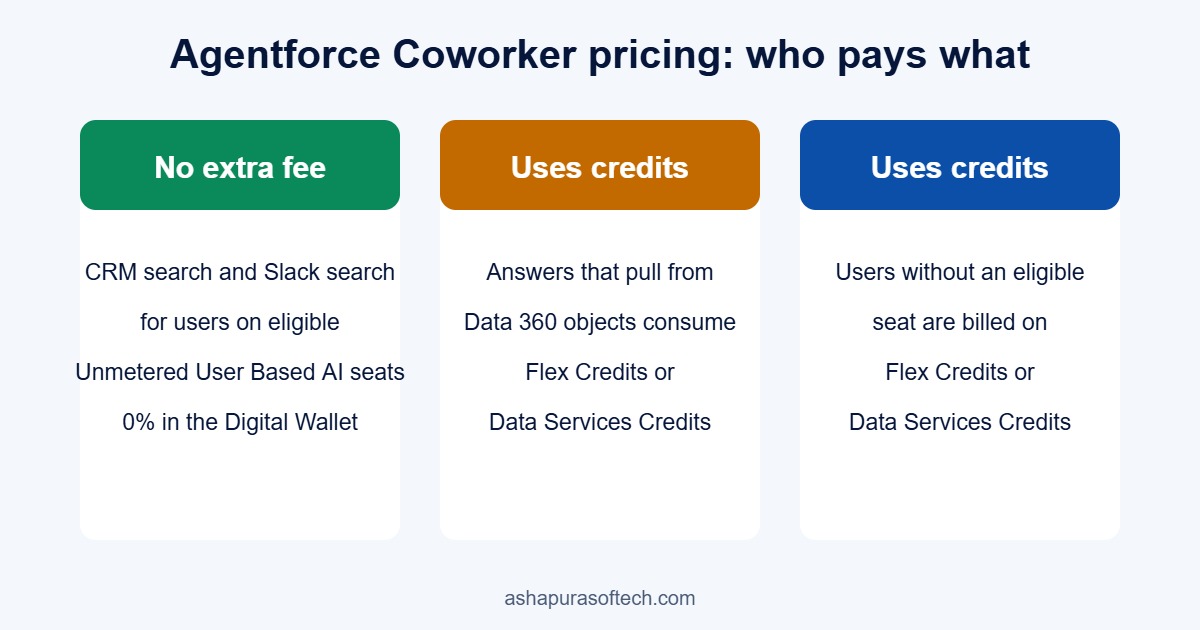
For most seat based customers, the search itself is included. Salesforce states that searching CRM data and Slack carries no extra fee for users on eligible Unmetered seats, and that their usage shows as zero consumption in the Digital Wallet.
Costs appear in two places:
- Data 360 objects. Answers that pull from connected Data 360 objects consume Flex Credits or Data Services Credits.
- Users without an eligible seat. Anyone who loses an Unmetered seat moves back to normal Flex Credit or Data Services Credit billing.
So the budget question is not “what does Coworker cost” but “which users are on metered seats, and how much Data 360 do we plan to expose”. If you are still working out how Flex Credits are counted, start with our Flex Credits explainer, and read the Core, Advanced and Max editions change alongside it, since the new editions bundle credits differently.
Requirements to turn on Agentforce Coworker
If your org was not switched on automatically, you can turn it on yourself. The setup guide and the help FAQ list these requirements.
| Requirement | What you need |
|---|---|
| Edition | Enterprise, Unlimited or Agentforce 1 |
| Usage based licensing | Data Cloud or Data 360, a Foundations or Flex Foundations licence, and Flex Credits |
| Seat based licensing | Data Cloud or Data 360, plus Agentforce 1 Edition or Agentforce for Sales, Service and Industries |
| Admin access | Salesforce admin role, the Agentforce Coworker Admin permission set and the AI Search Setup permission set licence |
| User access | The Access_Ai_Search permission set group |
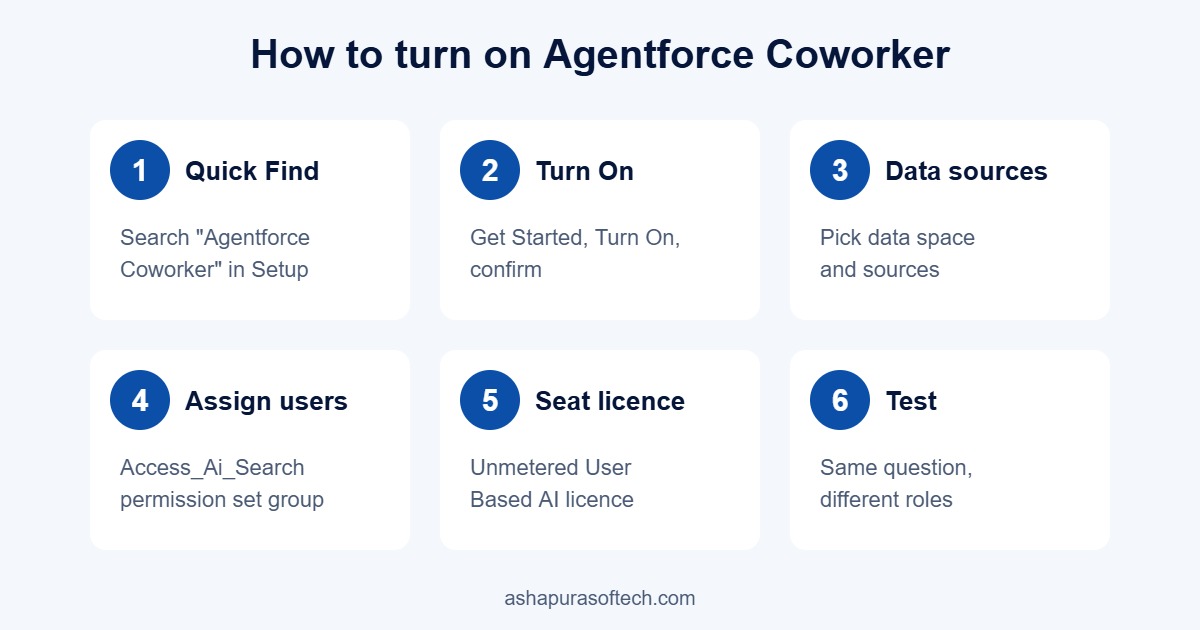
How to turn on Agentforce Coworker, step by step
- In Setup, type Agentforce Coworker in the Quick Find box.
- Select Get Started with Agentforce Coworker, click Turn On and confirm. Einstein turns on automatically at this point. Setup takes a few minutes, and Salesforce shows a warning if any prerequisite is missing.
- If your org has more than one data space, choose the data space, then select the data sources Coworker should use.
- In the Manage Users section, click Manage and assign the Access_Ai_Search permission set group to the users who should have it.
- For seat based access, open each user in Setup, go to Permission Set License Assignments, tick Unmetered User-Based AI and save.
- Test with two or three users from different roles before you widen access. Ask each the same question and check that the answers differ in the way their permissions say they should.
Troubleshooting common Agentforce Coworker errors
These are the errors Salesforce lists in its troubleshooting FAQ, with the fix for each.
| Error | Likely cause | Fix |
|---|---|---|
| Coworker does not appear, or “Not Enabled” | User is missing the licence or the Access_Ai_Search group | Check the permission set licence and group assignment for that user |
| 401 Unauthorized | Connected App or OrgJWT set up incorrectly | Confirm the Connected App definitions and OrgJWT certificates match |
| 400 Invalid ID | Agent ID is truncated or in the wrong format | Copy the full 18 character Agent ID from the setup URL |
| 500 Server Error or engine lookup failure | Backend or model gateway interruption | Hard refresh the browser, then turn Coworker off and on again |
| Invalid Token | The session failed OAuth or JWT validation | Check client credentials and the gateway network path |
Limits worth knowing before rollout
- 30 language model calls per minute per user. Salesforce notes this is not technically enforced yet, but one question can trigger several calls, so heavy users will reach it sooner than the number suggests.
- Record updates are CRM only. Coworker can read Slack and Data 360, but it can only write to Salesforce records.
- Files over 75 MB are not indexed, so very large documents will never show up in answers.
- English only during the beta. Salesforce says other languages follow at general availability.
- Not yet available in GovCloud. It does work for authenticated Experience Cloud users.
- Answers are only as good as the data. Duplicate accounts, empty close dates and stale opportunity stages all show up in the answer. An AI summary of messy data is still messy data, just faster.
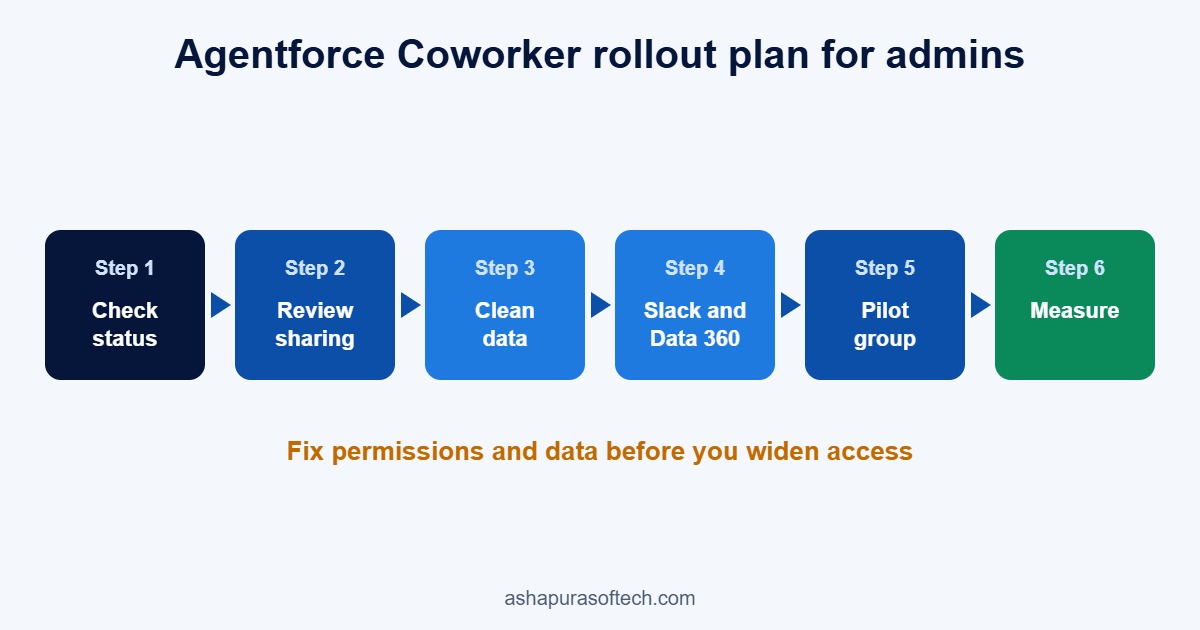
A sensible Agentforce Coworker rollout plan for admins
Whether Coworker is already on or you are about to switch it on, the order of work is the same:
- Check the status. Open Setup and see whether Coworker is active and who has the Access_Ai_Search group.
- Review sharing. Look at organisation wide defaults, sharing rules and the objects with public read. Fix what you would not want a quick question to reveal.
- Clean the high use objects. Merge duplicate accounts and contacts and fill the fields reps rely on, such as stage, close date and next step.
- Decide on Slack and Data 360. Connect Slack if your teams live there. Connect Data 360 sources only where the value is clear, set governance policies for any source that is not permission aware, and remember those answers consume credits.
- Start with a pilot group. Pick one sales team and one service team, collect the questions they actually ask, and write short guidance on what Coworker is good at.
- Measure. Track adoption, the questions that return weak answers and credit consumption for the first month before you expand.
If you need help with the sharing review, the data clean up or the Data 360 connections, our Salesforce managed services and Data Cloud consulting teams work on exactly these steps.
Frequently asked questions about Agentforce Coworker
Is Agentforce Coworker part of AIforce?
Yes. At Dreamforce 2026 Salesforce grouped Agentforce Coworker, Claudeforce and Slackforce under AIforce, its new interface layer for reaching Salesforce data from any screen.
Is Agentforce Coworker free?
Searching CRM data and Slack carries no extra fee for users on eligible Unmetered User Based AI seats. Answers that use Data 360 objects consume Flex Credits or Data Services Credits, and users without an eligible seat are billed on credits.
Was Agentforce Coworker turned on automatically?
Possibly. Salesforce began automatic enablement on 10 August 2026 for orgs with Unmetered User Based AI seats and Einstein active. HIPAA, health, government and multi org setups were excluded.
How do I opt out of automatic activation?
Use the opt out link in the Salesforce notification email, or go to Setup, Agentforce Coworker, and turn on Opt Out of Auto Activation.
Can Agentforce Coworker see data a user cannot see?
No. It runs with the permissions of the person using it, so it can only read and change what that user can already read and change.
Does Agentforce Coworker work in Slack and Microsoft Teams?
Yes. Salesforce lists Slack, Microsoft Teams, Claude, ChatGPT and mobile as surfaces alongside the Salesforce search bar.
Which editions support Agentforce Coworker?
Enterprise, Unlimited and Agentforce 1 editions, with Data Cloud or Data 360 in place.
Why can’t I see Agentforce Coworker in my org?
Usually the user is missing the required permission set licence or the Access_Ai_Search permission set group. Check both in Setup before looking for anything else.
The bottom line
Agentforce Coworker is the most visible part of AIforce because it lives where every user already clicks: the search bar. It costs little or nothing for most seat based orgs, and it may already be running in yours. The real work is not switching it on. It is making sure your permissions and data are in a state where a fast, confident answer is also a correct one. Start there, pilot small, and expand once the answers hold up.