Categories
Agentforce Salesforce

What Is Salesforce Headless 360? The Architecture Behind Agentic CRM

Quick answer

Headless 360 is the API driven layer Salesforce announced at TDX 2026 that lets AI agents read, write and reason over Salesforce data without opening the Salesforce interface. It does not replace your org. It exposes the same data, workflows and business rules to an agent through MCP servers, under the permissions that user already has. It is also the foundation the Claudeforce partnership is built on.

Update (14 Sep 2026): On 11 Sep 2026 Salesforce announced a new portfolio of named, job-ready Agentforce agents built for specific high-value work: Casey (customer service), Paige (IT and HR service), Carter (shopper agent for e-commerce), Marshall (supply chain orchestration), Piper (inbound lead generation) and Fin (complex customer experience), all generally available now, plus Hunter (outbound sales), in pilot with general availability expected November 2026. The release also adds long-horizon runtime so agents can pursue goals over days or weeks rather than single interactions, AI Skills for teaching agents new tasks (pilot now, GA October 2026), multi-agent orchestration across workflows, and an Agent Optimizer for continuous performance tuning (GA October 2026). This sits on top of the Core, Advanced and Max editions Salesforce introduced in early September.

When Salesforce put its CRM inside Claude in August 2026, the reaction focused on the plugin. The more interesting question is why it was possible at all. The answer is a piece of architecture Salesforce announced four months earlier, and it deserves more attention than it got.

Headless 360 is the reason an external AI agent can read your pipeline, update an opportunity and respect your sharing rules without anyone opening a Salesforce tab.

What Headless 360 actually is

Salesforce’s own definition: “an architectural transformation that exposes every capability Salesforce has built over 25 years directly as an API, a Model Context Protocol (MCP) tool, or a CLI command.”

It was announced on 15 April 2026 at TDX 2026 in San Francisco, under the headline “No Browser Required.”

The framing from the announcement is the clearest statement of intent Salesforce has made about where the platform is going:

In the agentic enterprise, humans aren’t the only ones navigating. Agents are too, and they don’t go to a browser or click through UIs.

The scale involved: 4,000+ existing APIs, 220+ CLI commands, 60+ MCP tools and 30+ prebuilt coding skills, all reachable by an agent that has never rendered a Salesforce page.

One thing it is not, in Salesforce’s own words: “Headless 360 does not replace the Salesforce interface you work in every day.” The panic in some admin communities after the “no browser required” headline was understandable and misplaced.

The four pillars

PillarWhat it provides
Skills30+ prebuilt skills giving coding agents such as Claude Code, Cursor and Windsurf the knowledge to discover, understand and act on Salesforce natively
MCP and APIs60+ MCP tools plus the full suite of Salesforce APIs
MetadataOrg-aware grounding, so an agent understands your objects, fields and configuration rather than guessing
Headless Experience LayerA rendering layer that surfaces Salesforce experiences into Slack, Teams, WhatsApp and voice

The metadata pillar is the one that separates this from a generic API integration. An agent hitting a REST endpoint knows the schema. An agent grounded in org metadata knows that your Stage picklist has a value called “Verbal Commit” that means something specific in your business.

The MCP servers Salesforce has shipped

Salesforce’s hosted MCP servers reached general availability on 29 April 2026. The current catalogue:

ServerStatusWhat it exposes
SObject AllGAFull CRUD plus query and search across all Salesforce objects
SObject ReadsGARead and query only, no mutations
SObject MutationsGACreate and update, no delete
SObject DeletesGADelete only
Data 360GAQuery unified customer data, roughly 200 Data 360 APIs
Headless 360BetaSalesforce Setup and platform capabilities via Discover, Describe and Dispatch
Tableau NextGASemantic models, KPI queries, analytics execution
Marketing EngagementGAJourneys, campaigns, data extensions, content
Slackbot MCP ClientGAConnects Slackbot to Salesforce and 20+ partner apps

The separation of reads, mutations and deletes into distinct servers is a deliberate governance decision, and a sensible one. Activating SObject Reads alone lets an agent answer questions without ever being able to change anything.

The Headless 360 MCP server itself

Still in beta as of July 2026, and narrower than the name suggests. It exposes exactly four tools:

  • discover – semantic search across a vector index of APIs and skills, returning ranked candidates
  • describe – returns the technical contract: APIs, parameters, dependencies and the ordered steps
  • dispatch – invokes the skill, routes to the endpoint and enforces user access guards
  • dispatch_readonly – the same, restricted to GET operations

Roughly 100 skills at launch, focused on Setup tasks for admins: user management, password operations, permission assignment, Apex trigger management, platform events, Change Data Capture, event relays and named credential configuration. Salesforce says thousands more are in development.

Worth being clear about the beta status. This is a Beta Service under Salesforce’s beta terms, and the skill library is thin relative to the ambition of the announcement.

How your permissions survive the trip

This is the part that determines whether Headless 360 is a governance breakthrough or a security incident waiting to happen.

Salesforce’s clearest statement, from the beta announcement:

If you can’t do it in Salesforce, your agent can’t do it through the MCP server.

Every transaction runs as the authenticated user, scoped through an external client app holding the mcp_api scope. Authentication is per-user OAuth 2.0 with PKCE.

Salesforce describes four enforcement layers on every call:

  1. Identity – the agent acts as a specific user, not an anonymous service account
  2. Access – sharing rules, field-level security and permission sets apply
  3. Invocation scope – only explicitly exposed tools and actions are available
  4. Governance – validation rules, triggers, approval chains and governor limits all fire

Patrick Stokes, Salesforce’s president of applications and marketing, put it bluntly when describing the Claude plugin: if you don’t own a record or have permission to see it, the MCP server doesn’t either.

The sentence every admin should read twice

From Salesforce’s own admin blog:

When an agent acts on behalf of a user, it can do anything that user is permitted to do.

That is the whole risk model in one line. Permission inheritance is only a safety feature if the permissions are correct. Every over-provisioned profile in your org – the one that got view-all on a standard object during go-live because it was the fastest fix – has just become an agent-reachable surface.

It was survivable when exploiting it required someone to log in and know where to look. It is materially less survivable when a colleague can ask a question in plain English and an agent will go and find the answer.

This is why a permission-model audit is no longer housekeeping. It is a security control, and it belongs before the pilot rather than after it. Our Agentforce readiness checklist covers exactly what that audit should look for, and our Claudeforce breakdown explains why it became urgent this quarter.

Salesforce also documents a client-side control worth using: MCP clients support tool-level restrictions that require human approval before an agent action executes. Salesforce’s own recommendation is to configure these before allowing configuration changes or data modification, and to test in a sandbox first.

What it actually takes to switch on

Standard MCP servers are inactive by default. Four steps to get an external agent connected:

1. Activate the server. Setup, search for “MCP Servers,” open the Salesforce Servers tab, select the server and click Activate. Copy the API name (drop the platform prefix) and the server URL.

2. Create an External Client App. Setup, External Client App Manager, New External Client App. Then:

  • Enable OAuth
  • Set the callback URL your client expects
  • Add exactly two scopes: “Perform requests at any time” (refresh_token, offline_access) and “Access Salesforce Hosted MCP Servers” (mcp_api)
  • Uncheck “Require secret for Web Server Flow” and “Require secret for Refresh Token Flow”
  • Check “Require Proof Key for Code Exchange (PKCE)” and “Issue JWT-based access tokens for named users”
  • Collect the consumer key and secret from OAuth Settings

3. Connect the client using its MCP add command with the server URL, consumer key and callback port, then authenticate and grant access.

4. Test before you trust it. Salesforce recommends Postman for a smoke test.

Server URLs follow the pattern https://api.salesforce.com/platform/mcp/v1/<SERVER-NAME> for production, with /sandbox/ inserted for sandbox and scratch orgs. API version 67.0 or later is required.

Two gotchas practitioners report that Salesforce’s guide does not mention: PKCE may need enabling globally first under Setup, OAuth and OpenID Connect Settings, and a newly created External Client App can take up to 30 minutes to become usable.

Where the gaps are

Headless 360 is a genuine engineering achievement with three honest weaknesses worth knowing before you plan around it.

Salesforce built the access layer, not the governance layer. There are no quality checks on agent-generated code, no technical-debt assessment, no naming-convention enforcement, no automation-chain validation. Salesforce shipped Testing Center, Custom Scoring Evals, Observability and Session Tracing, which help, but observation is not the same as control. General-purpose code scanners cannot see Salesforce-native concerns such as governor limits, Flow complexity or metadata dependencies.

The builder gap is real. Vernon Keenan’s TDX coverage made the sharpest version of this argument: pro-code developers gained a substantial agentic toolkit while admins and Flow builders got very little, with no visible bridge programme to retool the existing ecosystem. If your Salesforce capability sits mostly with admins rather than developers, Headless 360 does not currently meet you where you are.

Testing headless agents is harder than testing Flows. The debugging habits built around Flow and Apex do not transfer cleanly, which is precisely why Salesforce had to build separate evaluation tooling. Budget for the learning curve.

Bulk operations deserve specific attention. A user with delete rights can, in principle, instruct an agent to delete records at scale. Mitigate with Transaction Security Policies, or by activating SObject Reads rather than SObject All, or by blocking delete tools client-side.

What it costs

Salesforce has published no Headless 360 rate card, and this is the single least documented part of the story.

What is officially stated: MCP access “is included with Enterprise Edition and above – there’s no separate SKU required,” the MCP server “will use your existing API limits,” and “Flex Credits apply when you invoke Agentforce actions, run Data 360 queries, or use Prompt Builder.”

What is not stated: any per-API-call or per-MCP-call price. When CIO asked how API and MCP interactions under Headless 360 are currently billed, Salesforce declined to comment. Salesforce’s CRO said publicly that the company will work with customers “to find the right ways in a fair way to monetize those new interactions.”

The practical read: assume existing API-limit accounting plus Flex Credits on downstream agent work, and get whatever you are told in writing before you scale. Our Agentforce pricing breakdown covers the credit rate card in detail.

How this connects to the rest of the platform

Headless 360 sits inside the wider architecture Salesforce now describes as five systems: Agentforce as the system of agency, Slack as the system of engagement, Tableau as the system of insight, Customer 360 as the system of record, and Data 360 as the system of context.

Two clarifications worth making because commentary keeps blurring them:

Agentforce and MCP are complementary, not competing. Agentforce is where you choose the model and build the agent. MCP is what exposes skills and knowledge to an agent, wherever that agent lives.

Salesforce has not published a link between Headless 360 and the Atlas Reasoning Engine. No primary source connects the two, and Salesforce’s Atlas documentation does not mention Headless 360. The honest framing is that Headless 360 is the access and invocation layer while Atlas is the reasoning layer inside Agentforce. How, or whether, Atlas plans over Headless 360 skills is not documented.

There is also a naming inconsistency worth noting. The Claudeforce press release attributes the plugin’s foundation to AIforce, described as “Salesforce’s enterprise harness that connects business data and workflows to agents through MCP servers, APIs, and CLI tools” – which is Headless 360’s description in substance, under a different name. Salesforce has not published a statement equating them.

What to do about it

If you are an admin: audit your permission model before anything else. Profiles and permission sets with broader access than anyone remembers granting are now the highest-priority item on your list. Then activate the narrowest server that does the job – SObject Reads before SObject All.

If you are a developer: start with the Salesforce DX MCP Server locally and the hosted servers in a scratch org. The Trailhead module and the developer workshop are both current and worth the hour.

If you own the platform: the questions to get answered before a production rollout are what gets logged, what gets retained, where, and how consumption will be billed as volume grows.

If you are a partner or SI: the governance layer between Salesforce’s access layer and a production deployment is not built. That gap is billable work – permission architecture, MCP scoping, agent testing strategy and consumption forecasting. Firms with offshore delivery capacity to staff it have more addressable scope than they did a quarter ago.

Frequently asked questions

What is Salesforce Headless 360?

Headless 360 is a Salesforce architecture that exposes the platform’s capabilities as APIs, Model Context Protocol tools and CLI commands, so AI agents can use Salesforce data, workflows and governance rules without a user interface. It was announced on 15 April 2026 at TDX 2026.

Does Headless 360 replace the Salesforce UI?

No. Salesforce states directly that Headless 360 does not replace the Salesforce interface, which is not going away. It adds a second way in for agents.

How does Headless 360 handle permissions?

Every call runs as the authenticated user via OAuth 2.0 with PKCE. Sharing rules, field-level security, permission sets, validation rules, triggers, approval chains and governor limits all apply. Salesforce’s summary is that if you cannot do it in Salesforce, your agent cannot do it through the MCP server.

What MCP servers does Salesforce offer?

SObject All, SObject Reads, SObject Mutations, SObject Deletes, Data 360, Tableau Next and Marketing Engagement are generally available. The Headless 360 MCP server is in beta. A Slackbot MCP Client is generally available and requires Enterprise Edition or above.

What does Headless 360 cost?

Salesforce has published no separate rate card. MCP access is included on Enterprise Edition and above, calls use existing API limits, and Flex Credits apply when an Agentforce action, Data 360 query or prompt runs. Salesforce declined to comment when asked how API and MCP interactions are currently billed.

Is Headless 360 what powers Salesforce in Claude?

Reporting on the Claudeforce launch says the plugin is built on Headless 360. Salesforce’s own press release attributes it to “AIforce,” described in almost identical terms. The two are very likely the same substrate under different names, but Salesforce has not published a statement equating them.

Sources

If you are looking at the non Salesforce route, the same permission and data questions come up in what your ERP and CRM must provide before you build a Claude commerce agent.

Ashapura Softech is a certified Salesforce implementation partner. If you want your org’s permission model audited before you expose it to agents, book a CRM health check. See also our Salesforce DevOps services and Salesforce cloud services.
Categories
Agentforce Salesforce

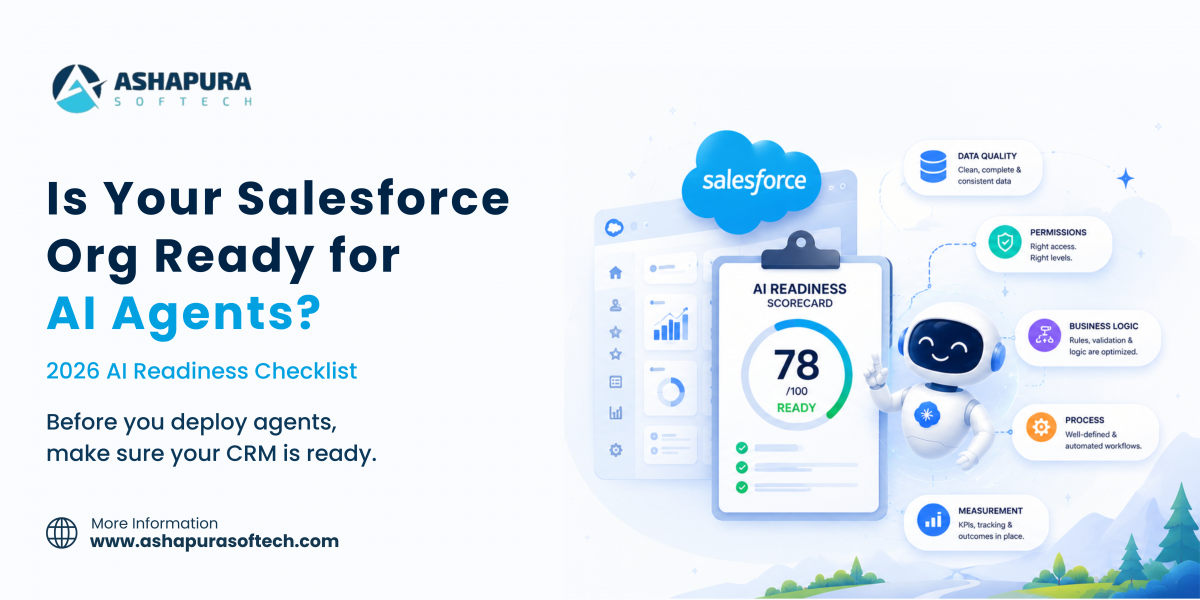
Is Your Salesforce Org Ready for AI Agents? A 2026 Readiness Checklist

Update (14 Sep 2026): On 11 Sep 2026 Salesforce announced a new portfolio of named, job-ready Agentforce agents built for specific high-value work: Casey (customer service), Paige (IT and HR service), Carter (shopper agent for e-commerce), Marshall (supply chain orchestration), Piper (inbound lead generation) and Fin (complex customer experience), all generally available now, plus Hunter (outbound sales), in pilot with general availability expected November 2026. The release also adds long-horizon runtime so agents can pursue goals over days or weeks rather than single interactions, AI Skills for teaching agents new tasks (pilot now, GA October 2026), multi-agent orchestration across workflows, and an Agent Optimizer for continuous performance tuning (GA October 2026). This sits on top of the Core, Advanced and Max editions Salesforce introduced in early September.

Most Agentforce pilots do not fail because the model is not good enough. They fail because the org underneath it was never built for something that reads everything, believes what it reads, and acts on it in seconds.

This is the assessment we run before any agentic rollout. It takes about a week for a mid-sized org, it is mostly reporting rather than development, and it will tell you whether you are eight weeks from a pilot or eight months.

Why readiness got harder in 2026

Two things changed this year, and both raise the cost of a messy org.

Salesforce shipped Headless 360 in April, exposing the platform as APIs and MCP tools that external agents can call without a browser. Then in August, Claudeforce put a Salesforce plugin inside Claude with 37 prebuilt sales skills.

Both inherit each user’s existing Salesforce permissions. Salesforce presents that as the security story, and it is a good one – but read the sentence from Salesforce’s own admin blog carefully:

When an agent acts on behalf of a user, it can do anything that user is permitted to do.

Permission inheritance is only a safety feature if the permissions are correct. That is the whole readiness argument in one line.

Pillar 1: Data quality

An agent cannot tell the difference between a stale record and a current one. It will read your pipeline exactly as it stands and produce a confident, fluent, wrong answer.

Run these five reports before anything else. All are standard reporting, none require development.

CheckWhat good looks likeWhat it breaks
Duplicate account and contact rateUnder 2%Account planning, customer health, stakeholder mapping
Open opportunities with a close date in the pastUnder 5%Every forecast narrative the agent produces
Open opportunities with no activity in 30 daysUnder 15%Deal health scoring, pipeline review
Opportunities with an empty next stepUnder 10%Close planning, daily briefings
Contacts with no role on the opportunityUnder 20%Stakeholder mapping, meeting prep

If 30% of your open opportunities have a close date in the past, a forecast narrative generated from that pipeline does active harm. It reads as authoritative, and someone will act on it.

The fix is rarely a data cleanse. It is usually a validation rule and a process change, because the same conditions will regenerate within two quarters otherwise. Clean once, then enforce.

The field that lies

Every org has fields that are mandatory in process but optional in the schema. A rep is told to fill in Competitor and Loss Reason, nobody enforces it, and 60% are blank.

A human reading the record knows to discount the field. An agent asked “why are we losing to competitor X” will answer from the 40% that is populated and present it as the picture. Selection bias, delivered with total confidence.

List every field your business treats as required and check whether the schema agrees. Where it does not, either enforce it or stop treating the field as a source of truth.

Pillar 2: Permissions

This is the pillar that moved from housekeeping to security control, and it is where we find the most serious findings in almost every assessment.

What to pull:

  • Every profile and permission set with View All or Modify All on a standard object
  • Every profile with Export Reports
  • Sharing rules granting broader access than the role hierarchy implies
  • Integration users with elevated permissions and no owner
  • Users with permissions inherited from a role they no longer hold

What you will find, in our experience of running this: at least one profile that got View All on a standard object during the original go-live because it was the fastest way to unblock a deadline, and which nobody has revisited since.

That was survivable when exploiting it required logging in and knowing exactly where to look. It is much less survivable when any user with that profile can ask a plain-English question and have an agent go and find the answer across every record they technically can see.

The remediation sequence:

  1. Inventory the over-provisioned profiles
  2. Find out who actually uses the access, from login and report-export history
  3. Move genuine needs into a narrow permission set
  4. Remove the blanket grant
  5. Retest the affected workflows before you go near an agent

Budget three to four weeks for a mid-sized org. This is the item that most often turns an “eight week” pilot into a quarter, and skipping it is not an option once agents are reading on a user’s behalf.

Pillar 3: Business logic

When work starts in Claude or Slack and finishes in Salesforce, your page layouts stop being where behaviour is governed.

Anything you enforced through interface design – a field that only appears at a certain stage, a button that only some users see, a required field on a specific record type – has to be re-enforced somewhere an agent will encounter it. That means validation rules, flows and the sharing model.

The audit:

  • List every business rule currently enforced only by a page layout or a Lightning component
  • Check each one has an equivalent validation rule or flow
  • Identify flows that assume a human is present – screen flows, confirmation prompts, anything waiting on input
  • Find automations that fire on field update and could loop when an agent writes at speed

That last one matters more than it sounds. Automation chains built for human-paced data entry behave differently when something writes forty records in a minute. Governor limits do fire on agent traffic, which is a protection, but hitting them mid-workflow produces partial states nobody designed for.

If your business logic lives in a mix of Apex, flows and process builders accumulated over years, this is the right moment to consolidate it. That is Salesforce DevOps work – version control, a release process, a test suite – and it is the difference between a platform an agent can be trusted with and one it cannot.

Pillar 4: Process

Two questions decide whether a pilot produces a budget line or an anecdote.

Which single workflow are you piloting? Not which platform. One skill, with a measurable before-and-after. Meeting prep and pipeline review are the strongest candidates because both have a time cost you can measure this week without instrumentation.

How will you know it worked? Establish the baseline before you turn anything on:

  • Minutes per rep per week on the task today, from a sample of five reps over one week
  • The same measurement after four weeks of agent use
  • An accuracy check by a sales manager on a sample of twenty outputs
  • Whether reps still do the task manually as well, which is the failure mode nobody reports

Resist enabling everything at once. A pilot proving one workflow converts into a budget. A pilot enabling 37 skills produces enthusiasm that evaporates at the next quarterly review. The same principle applies to Sales Cloud ROI work: one workflow, one baseline, one number.

Pillar 5: Measurement and governance

Adoption metrics change meaning. If sellers begin their day in Claude or Slack, Salesforce login counts stop being a proxy for usage. Decide now what replaces them, or you will spend Q1 arguing about a metric that no longer measures anything.

Training changes shape. You are teaching prompting and verification rather than navigation. The most important skill you can build in a sales team is the habit of checking an agent’s output against the record before acting on it. That habit is easy to build in week one and nearly impossible to retrofit after someone has been burned.

Consumption needs an owner. Agentforce meters on Flex Credits, and credits expire at the order end date with no rollover. Somebody has to watch the burn rate monthly. Our Agentforce pricing breakdown covers the rate card and where budgets typically go wrong.

The regulated-industry additions

If you are in financial services, healthcare or life sciences, three more items apply, and they should start before procurement rather than after.

Get the data flow diagram for each deployment path. A single request may touch the model provider, Amazon Bedrock and Salesforce. Ask where data rests and where it is processed at each hop. Salesforce’s Trust Boundary answers this for the Agentforce path by running inference inside its own virtual private cloud. It does not obviously answer it for an external plugin path.

Ask what is logged and retained, and for how long. Then check that answer against your own retention policy rather than assuming they align.

Reuse your existing review template. If you have integrated an EHR or a core banking system, you already have the muscle for this. Teams running Salesforce Health Cloud under HIPAA will recognise most of the questions.

The checklist, condensed

Print this. It is the whole assessment on one page.

Data

  • Duplicate account and contact rate measured
  • Open opportunities with past close dates measured
  • Open opportunities with no 30-day activity measured
  • Empty next-step fields measured
  • Process-required but schema-optional fields listed
  • Validation rules added so the same problems do not regenerate

Permissions

  • All View All and Modify All grants inventoried
  • Report-export permissions reviewed
  • Sharing rules checked against the role hierarchy
  • Integration users audited and given owners
  • Over-provisioned access narrowed into permission sets
  • Affected workflows retested after remediation

Business logic

  • Rules enforced only by page layouts identified
  • Equivalent validation rules or flows in place
  • Human-dependent flows flagged
  • Automation loops on rapid writes tested
  • Business logic under version control

Process

  • One pilot workflow chosen
  • Baseline measured before enabling anything
  • Accuracy review assigned to a named manager
  • Success threshold agreed in advance

Measurement

  • Replacement adoption metric agreed
  • Prompting and verification training planned
  • Consumption owner named
  • Monthly credit burn review scheduled

Regulated industries

  • Data flow diagram obtained for each deployment path
  • Logging and retention confirmed against your own policy
  • Security review completed pre-purchase

How long this actually takes

For a mid-sized org with a Salesforce implementation more than three years old:

PhaseDurationWho
Data quality assessment3-5 daysAdmin or analyst, reporting only
Permission audit1 week to assess, 3-4 weeks to remediateAdmin plus security review
Business logic review1-2 weeksDeveloper or architect
Pilot design and baseline1 weekRevOps
Pilot run4 weeksOne team

Roughly eight to ten weeks from start to a pilot with a defensible number attached. Orgs that have kept their permission model tight can do it in five.

The permission remediation is the long pole, and it is also the item most likely to be skipped under deadline pressure. Do not skip it. It is the one whose failure mode is a data exposure rather than a disappointing demo.
Once your org is ready, the next question is where to start. Our guide to Salesforce Agentforce use cases shows what companies have put live in sales, service, marketing, commerce and the contact center.

This checklist matters even if you never build a custom agent. Agentforce Coworker, the AI assistant in the Salesforce search bar, has been switched on automatically in many orgs since August 2026, and it answers questions from whatever your sharing rules allow. See our Agentforce Coworker guide for eligibility, cost and the opt out setting.

Readiness also depends on the release you are on. Our guide to the Salesforce Winter ’27 release lists the 15 changes to test before GA, including Flow Test Mode and new Agentforce quality scoring.

Frequently asked questions

What is an Agentforce readiness assessment?

A structured review of whether a Salesforce org can support AI agents safely and usefully. It covers data quality, permission architecture, business logic placement, pilot design and consumption governance. It is mostly reporting and analysis rather than development work.

How clean does CRM data need to be for Agentforce?

Cleaner than most orgs are. As practical thresholds: duplicates under 2%, open opportunities with past close dates under 5%, and open opportunities with no 30-day activity under 15%. Beyond those levels, agent output degrades in ways that are hard to spot because it still reads fluently.

Why does the permission model matter more with AI agents?

Because agents inherit each user’s existing Salesforce permissions. Salesforce’s own admin guidance states that an agent acting on a user’s behalf can do anything that user is permitted to do. Over-provisioned access that was survivable when it required manual effort becomes reachable through a plain-English question.

How long does it take to get ready for Agentforce?

Eight to ten weeks for a typical mid-sized org, of which permission remediation is three to four. Orgs with a well-maintained permission model can be ready in about five weeks.

Should we pilot every Agentforce skill at once?

No. Pick one workflow with a measurable time cost, baseline it before you enable anything, and have a sales manager review a sample of outputs for accuracy. One proven workflow converts into budget. Thirty-seven enabled at once produces anecdotes.

What changes for Salesforce admins when agents arrive?

The interface stops being the control surface. Anything enforced through page layouts or component visibility has to move into validation rules, flows and the sharing model. That is more admin work, not less, and it is harder to skip.

Sources

Ashapura Softech is a certified Salesforce implementation partner. Once the readiness gaps are clear the next step is vetting the vendor, and our list of nine questions to ask an Agentforce partner covers what to put in front of them. We run this assessment as a fixed-scope CRM health check covering data quality, permission architecture and automation debt – book one here. See also our CRM software development and Salesforce cloud services, or the delivery work in our case studies.

Editions note, September 2026: Agentforce now ships inside every tier of Salesforce’s new Core, Advanced and Max editions rather than as an add on, which changes what a readiness conversation has to cover. See what replaced Enterprise and Unlimited.

Related reading: readiness is not only an org question, it is a systems question. See the ERP and CRM readiness checklist for Claude Commerce Agents, including which platforms have connectors today.

Categories
Agentforce Salesforce

Agentforce Pricing Explained (2026): Flex Credits, Conversations and Pay-Per-Resolution

Quick answer

There is no single Agentforce price. Flex Credits are sold at $500 per 100,000 credits, which works out to $0.10 for a standard agent action and $0.15 for a voice action on the Salesforce rate card effective 21 April 2026. The older $2 per conversation model is still live, applies only to customer facing agents, and cannot run in the same org as Flex Credits. Sandbox usage is discounted by 20%, and Data 360 usage is metered separately.

Update (14 Sep 2026): On 11 Sep 2026 Salesforce announced a new portfolio of named, job-ready Agentforce agents built for specific high-value work: Casey (customer service), Paige (IT and HR service), Carter (shopper agent for e-commerce), Marshall (supply chain orchestration), Piper (inbound lead generation) and Fin (complex customer experience), all generally available now, plus Hunter (outbound sales), in pilot with general availability expected November 2026. The release also adds long-horizon runtime so agents can pursue goals over days or weeks rather than single interactions, AI Skills for teaching agents new tasks (pilot now, GA October 2026), multi-agent orchestration across workflows, and an Agent Optimizer for continuous performance tuning (GA October 2026). This sits on top of the Core, Advanced and Max editions Salesforce introduced in early September.

Update, September 2026: Core, Advanced and Max replaced these editions

On 3 September 2026 Salesforce replaced Enterprise, Unlimited and Agentforce 1 with three new editions: Core at $195 per user per month with 500,000 Flex Credits, Advanced at $395 with 1 million, and Max at $550 with 2.75 million. Agentforce 1 customers can move to Max at no extra cost, and existing customer pricing on legacy editions is unchanged. The credit mechanics described below still apply, but the edition names and allocations above are the current ones. Full breakdown in our guide to the Core, Advanced and Max editions.

Agentforce pricing has changed three times in eighteen months, and most of the guides available online are describing a version of it that no longer applies. Some are also repeating a metering rule that Salesforce’s own documentation contradicts.

This is the current picture as of August 2026, with every figure taken from Salesforce’s published pricing page, rate cards and help documentation. Where something is not disclosed, we say so rather than estimating.

The four ways Salesforce charges for Agentforce

There is no single Agentforce price. There are four billing mechanisms, and most customers end up on two or three of them at once.

ModelWhat triggers a chargeList priceBest fit
Flex CreditsEach action, prompt, query or voice minute an agent consumes$500 per 100,000 creditsVariable volume, employee-facing agents, voice
ConversationsEach customer-facing conversation session$2 per conversationHigh-action conversations where a flat session price wins
Pay-per-resolutionOnly when the Help Agent resolves an issue end to end$2 per resolutionCustomer self-service where deflection is the goal
Per-user add-onsNamed user, flat monthly$125/user/month, $150 for IndustriesPredictable internal use by a defined team

The first thing to understand is that Flex Credits did not replace the $2 conversation model. Both are live on Salesforce’s pricing page today and the buyer chooses. Conversations are restricted to customer-facing agents; Flex Credits cover customer-facing, employee-facing and voice.

Agentic Work Units are not a price

This is worth stating plainly because a large amount of commentary has it wrong, including some that quotes executives loosely.

Salesforce’s own definition: an Agentic Work Unit is “a platform-level metric that captures the breadth of activity happening across the Agentic Enterprise, from Agentforce to Slack.” It counts “one discrete task accomplished by an AI agent” – a prompt processed, a reasoning chain completed, or a tool invoked.

It is a disclosure metric, used in earnings reporting and marketing. Salesforce has published no price per AWU, and no conversion between AWUs and Flex Credits. If you see a blog quoting a dollar figure per Agentic Work Unit, it is somebody’s arithmetic, not Salesforce’s price.

The nearest billable analogue to “one discrete task” is a Flex Credit action at 20 credits, but Salesforce has never equated the two, and neither should you when building a budget.

The Flex Credits rate card, in full

Flex Credits launched in May 2025 at $500 per 100,000 credits – half a cent per credit. Salesforce’s published rate card, effective 21 April 2026:

Usage typeProductionSandbox
Standard action20 credits16
Custom action20 credits16
Standard voice action30 credits24
Custom voice action30 credits24
Starter prompt2 creditsn/a
Basic prompt2 creditsn/a
Standard prompt4 creditsn/a
Advanced prompt16 creditsn/a
Speech-to-text150 credits per hour transcribedn/a
Text-to-speech6,000 credits per 1M charactersn/a
Translation4,000 credits per 1M charactersn/a
Voice minutes60 credits per minute48

At $0.005 a credit, that makes a standard agent action 10 cents, a voice action 15 cents, and a minute of Agentforce Voice 30 cents, rounded up to the next full minute.

Sandbox usage runs at a 20% discount, and Salesforce confirms the sandbox multiplier “applies to pre-production environments, which include sandboxes as well as scratch orgs.”

Data 360 usage is metered separately on a tiered multiplier that resets on the first day of each calendar month, so heavy query volume gets progressively cheaper per row. Queries start at 3 credits per million rows at the base tier and fall to 0.6 at the top tier. Unification is far more expensive at 75,000 credits per million rows. Sandbox Data 360 does not use the tiers.

Two rules that cost people money

Credits expire. Salesforce’s terms are explicit: Flex Credits “must be used before the Order End Date set forth in the Usage Details table on the Order Form, and no rollover will be permitted.” Buying a large pre-purchase block against optimistic adoption forecasts means paying for capacity you then forfeit.

Prompts are chunked, actions are not. Prompt usage is counted in 2,000-token chunks, rounded up – Salesforce’s own worked example is that 6,500 tokens counts as four prompts. Verbose system prompts and over-retrieved knowledge chunks therefore cost real money.

Actions work differently, and this is where a widely repeated claim goes wrong.

The 10,000-token myth

Several well-circulated pricing guides state that an agent action exceeding 10,000 tokens is billed as multiple actions – 15,000 tokens as two actions, 20,001 as three – and attribute this to Salesforce documentation.

Salesforce’s current help documentation on Flex Credits billable usage types says the opposite:

Currently, every standard action called by the agent is metered as one standard action, irrespective of the number of tokens processed.

The 2,000-token chunking rule applies to prompts, not actions. The most likely explanation is that the two rules got conflated, or that those guides are citing a superseded version of the page – note Salesforce’s own hedge in the word “currently.”

Either way, if you have modelled your Agentforce budget on token-multiplied action costs, your forecast is wrong in a direction that will surprise your finance team pleasantly, and you should redo it against the actual rate card before your next renewal conversation.

What you need before you can buy anything

ItemRequirement
Salesforce FoundationsFree, on Enterprise Edition and above. Includes Agentforce Builder, Prompt Builder, Agent Script, Agentforce Coworker and Agentforce Vibes at no cost
Free creditsEnterprise Edition and above get 100,000 Flex Credits free
Agentforce User Licence$5 per user per month, requires Flex Credits, limited CRM object access
Agentforce add-ons$125 per user per month for Sales, Service or Field Service; unmetered employee usage
Agentforce Industries$150 per user per month
Agentforce 1 EditionFrom $550 per user per month, includes an add-on plus 2.5 million Flex Credits per org per year

The practical floor is Enterprise Edition. Below that, the conversation does not start.

Note the internal inconsistency in Salesforce’s own help documentation about the minimum edition for Service Agent specifically – some pages say Enterprise and above, an older page says Performance, Unlimited and Developer. Confirm your exact entitlement with your account executive rather than with a documentation page.

Pay-per-resolution: the model that actually changes the risk

Announced in June 2026 and generally available from July, the Agentforce Help Agent charges $2 per resolution, and only when the agent resolves the issue autonomously from start to finish.

Salesforce’s stated terms: “If a customer gives negative feedback or asks for human escalation, there is no charge.” Both Data 360 and Agentforce actions are unmetered during the interaction.

The headline number is the same $2 as the conversation model, but the risk transfer is completely different. Under conversations you pay whether or not the agent helped. Under pay-per-resolution, a failed interaction costs you nothing.

What counts as one resolution, per Salesforce’s metering definitions:

  • Email – one resolved interaction
  • Enhanced chat and portal – up to two hours of interaction
  • Third-party messaging – up to two hours of interaction
  • Voice – a ten-minute duration limit per resolution

For a service organisation with a well-maintained knowledge base, this is the most defensible Agentforce commercial model available right now, because the vendor carries the quality risk rather than the customer.

Flex Credits or conversations? Do the arithmetic

At 20 credits per action and $0.005 per credit, an action costs 10 cents. A flat conversation costs $2. The break-even therefore sits around twenty actions per conversation.

  • Below twenty actions per conversation, Flex Credits are cheaper
  • Above twenty, the flat conversation price wins

That is straightforward arithmetic on Salesforce’s published rates, not a Salesforce recommendation, and it is worth running against your own transcript data before you sign. Pull a sample of a hundred real service conversations, count the discrete tool calls each would require, and you will know which model to negotiate.

Where budgets actually go wrong

Salesforce publishes rates. It does not publish the behaviour that generates them. Five patterns account for most overruns:

Voice is a different economy. A voice action costs 30 credits rather than 20, and Agentforce Voice also meters at 60 credits per minute, rounded up. A three-minute call is 180 credits before any actions are counted. Agentforce Voice also sits on top of Service Cloud Voice licensing, which is easy to leave out of a business case entirely.

Sandbox iteration compounds. Sandbox is 20% cheaper per action, but a hundred test scenarios at five actions each is 8,000 credits a pass, and nobody tests once. Budget for the build as well as the run.

Guardrail failures burn credits with nothing to show. Every off-topic request that slips through and triggers an action is 20 credits spent on a non-answer.

Retrieval bloat inflates prompt costs. Prompts bill in 2,000-token chunks. An over-eager knowledge retrieval that stuffs eight chunks into context where two would do is a permanent tax on every single interaction.

Nobody has modelled agent-to-agent traffic. Salesforce has not documented how agent-to-agent invocations meter, and we could find no substantive practitioner reporting on it either. If your architecture involves agents calling agents, treat this as an open question to raise in your contract negotiation rather than an assumption to build on.

Headless 360 and Salesforce in Claude: what is and is not priced

With Claudeforce announced in August 2026, the pricing question extends beyond the Salesforce UI.

Headless 360 has no published rate card. Salesforce states that MCP access “is included with Enterprise Edition and above – there’s no separate SKU required,” that the MCP server “will use your existing API limits,” and that “Flex Credits apply when you invoke Agentforce actions, run Data 360 queries, or use Prompt Builder.”

So officially there is no new meter. API calls draw on existing entitlements, and downstream agent work consumes Flex Credits at the standard rate. There is no published per-API-call or per-MCP-call price, and Salesforce declined to comment when CIO asked how these interactions are currently billed. The full architecture is covered in our guide to what Salesforce Headless 360 is.

Salesforce in Claude pricing is not disclosed. The announcement carries only the standard line that “pricing and packaging are subject to change.” Whether it is bundled into an existing entitlement, sold as an add-on, or metered per action has not been stated. Anyone building a business case on it today is guessing.

How to negotiate this properly

Three buying models are available: Pre-Purchase (pay upfront for a fixed block), Pre-Commit (commit to a baseline, billed monthly in arrears) and PayGo (no commitment, monthly in arrears).

The order in which you negotiate matters more than which one you pick.

  1. Model your traffic in credits before you build anything. Estimate actions per interaction, prompt sizes, voice minutes and Data 360 query volume. A spreadsheet built on the rate card above takes an afternoon and changes the shape of the deal.
  2. Negotiate consumption before seats. Seat counts are the easy part of the conversation. Consumption rates and caps are where the money moves.
  3. Get a capped unit rate written into the order form, for the contract term, not the current quarter.
  4. Scope per-user charges to actual users. The $125 add-on is unmetered for that user, which is excellent value for heavy users and pure waste for occasional ones.
  5. Ask what happens to unused credits. They expire at the order end date with no rollover, so the pre-purchase block should be sized to a realistic ramp, not an optimistic one.

If you are running this alongside a broader platform programme, the same discipline that keeps a Salesforce CRM development project on budget applies here: forecast the consumption, then instrument it, then review it monthly. It is also the first thing we check in an Agentforce readiness assessment.

The numbers Salesforce is reporting

For context on how fast this is moving, from Salesforce’s own earnings releases:

MetricQ1 FY27Q2 FY27
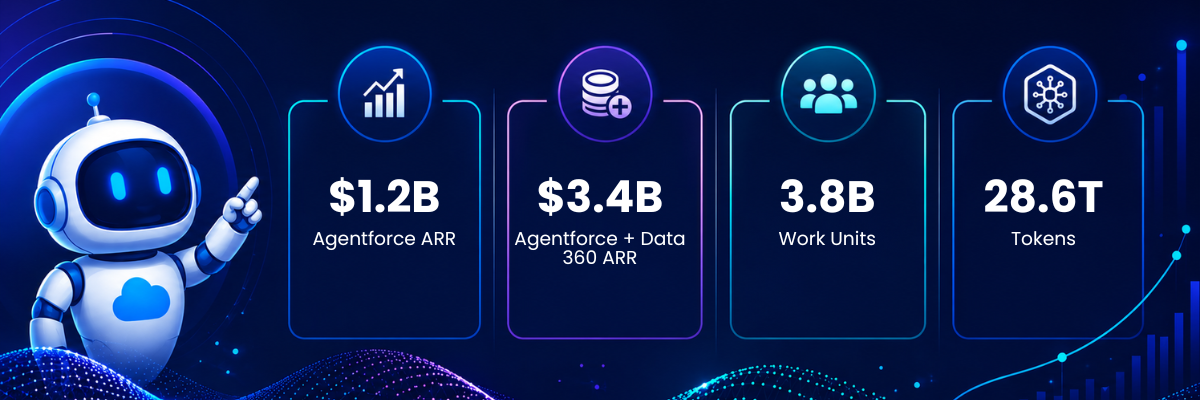
Agentforce ARR$1.2B, +205% YoYOver $1.5B, +240% YoY
Agentforce + Data 360 ARRNearly $3.4BNearly $3.9B, +210% YoY
Agentic Work Units (cumulative)3.8B7.0B
Agentic Work Units (in quarter)+111% QoQ3.2B, +97% QoQ

One caveat Salesforce discloses and most coverage omits: “Effective Q2 FY27, Agentforce ARR includes our AI offerings, Slackbot and Headless 360.” The Q1 to Q2 jump is therefore partly demand and partly a definitional change, and Salesforce has not published the split.

One Agentforce feature that often costs nothing extra is Agentforce Coworker: searching CRM data and Slack is included for users on eligible Unmetered seats, while Data 360 answers consume credits. The details are in our Agentforce Coworker guide.

Frequently asked questions

How much does Agentforce cost?

There is no single price. Flex Credits cost $500 per 100,000 credits, which makes a standard agent action about 10 cents. Customer-facing conversations can instead be bought at $2 each. The Agentforce Help Agent charges $2 per autonomously resolved issue. Per-user add-ons are $125 per user per month, or $150 for Industries editions.

What is a Flex Credit worth?

Half a cent. Salesforce sells them at $500 per 100,000 credits. A standard or custom agent action consumes 20 credits, a voice action 30, and a minute of Agentforce Voice 60.

Do Flex Credits expire?

Yes. They must be used before the order end date, and Salesforce permits no rollover.

Is Agentforce free on any edition?

Salesforce Foundations is free on Enterprise Edition and above, and includes Agentforce Builder, Prompt Builder, Agent Script, Agentforce Coworker and Agentforce Vibes. Enterprise Edition and above also receive 100,000 Flex Credits at no cost.

What is an Agentic Work Unit worth in dollars?

Nothing, because it is not a billing unit. Agentic Work Units are a platform-level disclosure metric Salesforce uses in earnings reporting. No price per AWU and no AWU-to-credit conversion has been published.

Is an agent action billed more if it uses more tokens?

No. Salesforce’s documentation states that every standard action is metered as one standard action regardless of tokens processed. The token-chunking rule applies to prompts, which bill in 2,000-token chunks rounded up.

What does Headless 360 cost?

Salesforce has published no separate price. MCP access is included on Enterprise Edition and above, calls draw on existing API limits, and Flex Credits apply when an Agentforce action, Data 360 query or prompt runs.

How much does Salesforce in Claude cost?

Not disclosed. Salesforce has said only that pricing and packaging are subject to change.

Sources

Ashapura Softech is a certified Salesforce implementation partner. If you are budgeting an Agentforce rollout and want the consumption modelled before you sign, book a CRM health check. We cover data quality, permission architecture and consumption forecasting. If you have not shortlisted a vendor yet, start with how to choose an Agentforce implementation partner. You can also browse our Salesforce cloud services.
Connector note: before budgeting agent work, check whether your CRM or ERP actually has a Claude connector. We listed what is and is not on the directory in what your ERP and CRM have to give a Claude commerce agent.

Flex Credits did not stay a standalone line item. At Dreamforce in September 2026 Salesforce folded the credit allowances into its new Core, Advanced and Max editions, so an org pricing Agentforce today is really pricing an edition. Our breakdown of what AIforce actually changed sets out which allowance comes with which tier.

If you are building the business case, our Agentforce implementation partner team can model credit consumption against your real case volumes before you sign.

Categories
Agentforce Salesforce

What Is Claudeforce? Salesforce and Anthropic’s 2026 Partnership Explained

Quick answer

Claudeforce is the expanded Salesforce and Anthropic partnership announced on 26 August 2026. Its first product, Salesforce in Claude, is a Claude plugin with 37 prebuilt sales skills covering meeting preparation, deal health reviews and pipeline reviews, running inside the Salesforce permissions a user already has. It was with pilot customers at announcement, with open beta planned for September 2026.

Update (18 Sep 2026): At Dreamforce on 15 Sep 2026 Salesforce gave this whole direction a name, AIforce, and put Claudeforce inside it alongside Slackforce and Agentforce Coworker. Salesforce also repackaged its editions into Core, Advanced and Max, at 195, 395 and 550 dollars per user per month, each bundling Flex Credits. Full breakdown in What is AIforce.

Update (14 Sep 2026): On 11 Sep 2026 Salesforce announced a new portfolio of named, job-ready Agentforce agents built for specific high-value work: Casey (customer service), Paige (IT and HR service), Carter (shopper agent for e-commerce), Marshall (supply chain orchestration), Piper (inbound lead generation) and Fin (complex customer experience), all generally available now, plus Hunter (outbound sales), in pilot with general availability expected November 2026. The release also adds long-horizon runtime so agents can pursue goals over days or weeks rather than single interactions, AI Skills for teaching agents new tasks (pilot now, GA October 2026), multi-agent orchestration across workflows, and an Agent Optimizer for continuous performance tuning (GA October 2026). This sits on top of the Core, Advanced and Max editions Salesforce introduced in early September.

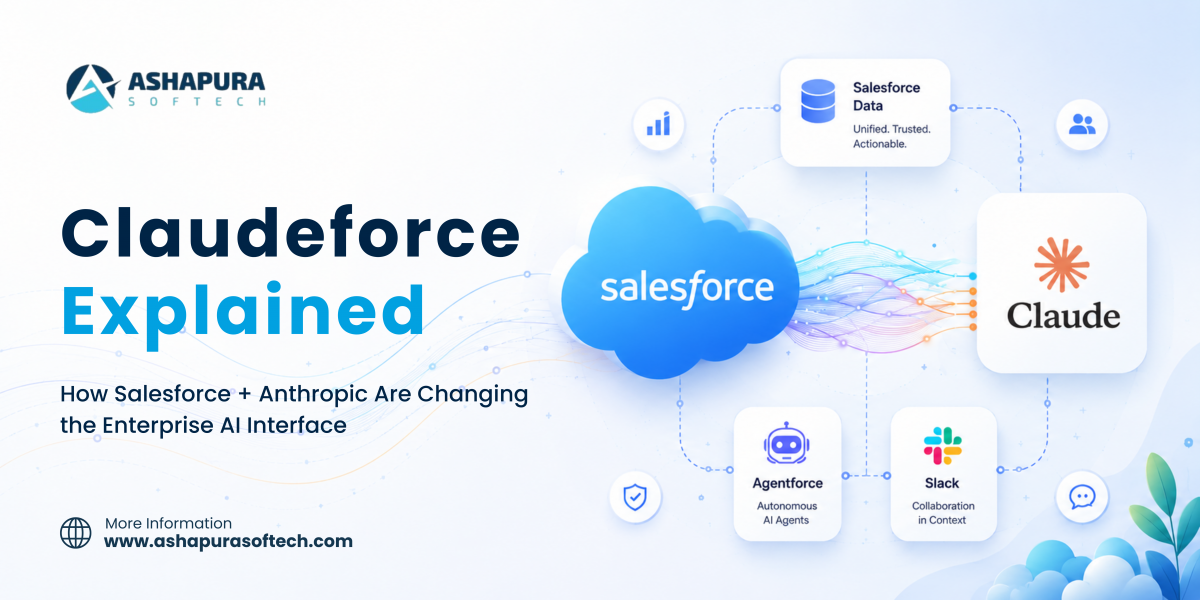
On 26 August 2026, alongside its Q2 FY27 earnings, Salesforce announced Claudeforce, an expanded partnership with Anthropic that puts Salesforce data inside Claude and puts Claude inside Salesforce. The headline Salesforce chose for the official press release was “The #1 AI Meets the #1 AI CRM.” Marc Benioff’s framing around the launch was blunter: “The UI is the AI.”

Dario Amodei, Anthropic’s CEO and co-founder, described the value differently, and his version is the more useful one for anyone evaluating this: “Through this partnership, companies can point Claude at the customer information and business context that they’ve been building in Salesforce for decades.” The asset is the decades of context. The model is the new way to reach it.

Most coverage so far has re-typed the press release. This piece does something different. We break down what is actually shipping, what is still a slide, how Claudeforce differs from the Anthropic partnership Salesforce announced in October 2025, what it does to your licensing, and what a Salesforce customer should do about it in the next 90 days.

If you have been following the platform’s direction through 2026, this will slot straight onto what we covered in our Dreamforce 2026 breakdown of what Salesforce actually shipped. Claudeforce is the next move in the same strategy, not a departure from it.

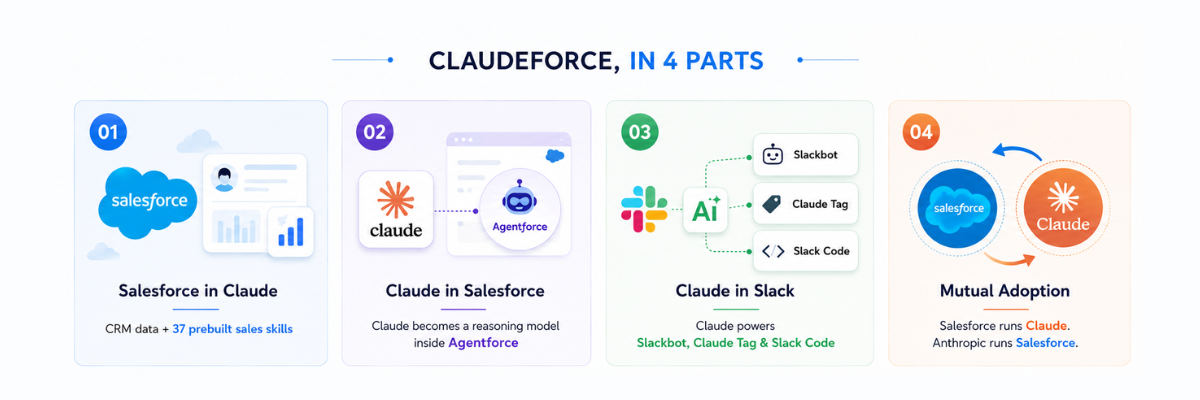
Claudeforce in four parts: Salesforce in Claude, Claude in Salesforce, Claude in Slack, and mutual adoption
The four components of Claudeforce, announced 26 August 2026.

What is Claudeforce, in one paragraph

Claudeforce is the brand name for an expanded Salesforce and Anthropic partnership announced on 26 August 2026. It has four parts: a Salesforce plugin inside Claude with 37 prebuilt sales skills, Claude as the reasoning model inside Agentforce, Claude as the default model across Slack, and a mutual customer arrangement where Salesforce runs on Claude and Anthropic runs on Salesforce. The plugin is in pilot now, with an open beta expected in September 2026.

Part 1: The four components of Claudeforce, decoded

ComponentWhat it means in practiceStatus as of 27 Aug 2026
Salesforce in ClaudeA plugin that exposes CRM data, workflows and governance rules inside the Claude interface. Ships with 37 prebuilt sales skills.Select pilot customers. Open beta expected September 2026.
Claude in SalesforceClaude serves as a reasoning model for the Atlas Reasoning Engine, powers Agentforce Vibes and Agentforce Coworker by default, and is selectable in Agent Builder via Amazon Bedrock inside the Salesforce Trust Boundary.Shipping.
Claude in SlackClaude becomes the default model for Slack, powering Slackbot, Claude Tag and Slack Code.Shipping.
Mutual adoptionSalesforce adopts Claude as its preferred AI assistant; Anthropic adopts Salesforce as its preferred CRM.In force.

1. Salesforce in Claude, and the 37 sales skills

This is the piece that got the attention, and it deserves it. Instead of asking a seller to open Salesforce, Salesforce is handing the seller’s workflow to Claude and keeping the data, permissions and audit trail on its own side.

The 37 skills are not features in the CRM sense. They are prewritten instructions that tell Claude how a competent seller handles a specific job, and Salesforce describes them as grounded in 27 years of its own sales experience. On the Claudeforce product page they group into five families:

  • Daily planning: daily briefing, pipeline review, forecast narrative
  • Deal strategy: stakeholder mapping, close planning, objection handling
  • Account growth: account planning, lead triage, customer health
  • Meeting preparation: call prep, conversation summaries, scheduling
  • Action and governance: win-loss review, activity logging, data hygiene

Anyone who has run a Salesforce Sales Cloud rollout will recognise that list. It is the same set of jobs that dashboards, list views and reports were built to serve, delivered through conversation instead of navigation.

Two design decisions matter more than the skill list itself.

One admin connects it, once. Salesforce’s framing is that an admin connects Salesforce in Claude a single time and the whole team has it from day one. Anyone who has tried to roll out per-user MCP server configuration across a 200-seat sales org will recognise why that sentence exists. Setup friction is what killed most 2025-era agent pilots before they reached a second sprint.

There is no new permissions model. The connection inherits each user’s existing Salesforce permissions. A rep who cannot see an account in Salesforce cannot see it through Claude either, and every write action routes back through Salesforce so validation rules, approvals and field history still apply. This is the single most important technical claim in the announcement, and it is the one to test hardest during beta.

Here is why that claim carries so much weight. In a traditional integration, the connecting application holds its own service account and its own idea of who may see what. That is how CRM data leaks: not through the model, but through an over-permissioned integration user. By routing every read and write back through Salesforce’s own sharing engine, Claudeforce keeps a single source of truth for authorisation. Your org’s sharing model becomes the security boundary, which is excellent news if that model is deliberate and a serious problem if it is fifteen years of accumulated exceptions.

2. Claude inside Salesforce

The second component is less visible but has wider blast radius. Claude is now a reasoning model for the Atlas Reasoning Engine, the planning layer under Agentforce, and it is the default model behind Agentforce Vibes (the natural-language build tool) and Agentforce Coworker (the assistant Salesforce put into the search bar across its apps, and into Slack, Teams and ChatGPT, earlier in 2026).

For regulated customers, the deployment path is the part worth reading twice: Claude is available through Amazon Bedrock inside the Salesforce Trust Boundary. That means inference runs inside Salesforce’s virtual private cloud rather than sending records to a public model endpoint. Financial services, healthcare and life sciences customers have been blocked on exactly this question since 2023. If you run Salesforce Health Cloud under HIPAA obligations, the Trust Boundary is the difference between a compliance conversation you can win and one you cannot start.

This component also changes what Agentforce is. Until now, a customer building an agent chose a model and accepted the reasoning quality that came with it. Making Claude the default reasoning model for Atlas raises the floor for every agent built on the platform, including ones already in production. We covered how these agents are assembled in our guide to setting up agentic AI in Sales Cloud, and the build process does not change. The quality of the planning step does.

3. Slack becomes the front door

Claude is now the default model for Slack, powering Slackbot, the Claude Tag and Slack Code. Combined with the MCP servers Salesforce shipped for Slack this quarter, which connect Headless 360 to Slackbot, the practical effect is that a CRM update can begin and end in a Slack thread.

Salesforce is using itself as the proof point. It says Slackbot has driven 8.1 million hours of annualised productivity gains for its own employees, up more than 2x quarter over quarter. Treat that as a vendor-reported internal figure rather than an audited number, but the direction is real and the internal adoption is unusually deep for a first-party claim.

The strategic point is easy to miss. Slack was acquired in 2021 and spent four years as a collaboration product attached to a CRM company. Under Claudeforce it becomes the conversational surface where CRM work happens, which is a far more defensible position than competing with Teams on channels and huddles.

4. Mutual adoption

Salesforce runs Claude. Anthropic runs Salesforce. This is partly commercial theatre, and partly a genuine signal: Salesforce Ventures has invested in Anthropic across multiple rounds, and reporting in mid-2026 put the value of that stake at roughly $5 billion. Salesforce’s Q2 FY27 GAAP EPS came in at $4.29, up 119% year over year, and coverage of the quarter attributed part of that jump to gains on the Anthropic investment. When you read Salesforce’s enthusiasm for Anthropic, read the balance sheet alongside it.

Part 2: Claudeforce is not the October 2025 partnership. Here is what changed.

A lot of the confusion in the last 24 hours comes from people conflating this with the earlier deal. Salesforce and Anthropic have announced three separate things in eleven months, and each one goes further than the last.

DateAnnouncementThe actual scope
14 Oct 2025Anthropic and Salesforce expanded partnershipClaude available inside Agentforce for regulated industries, deployed via Amazon Bedrock in the Salesforce Trust Boundary. Slack MCP server. Salesforce adopts Claude Code internally. Named customers included CrowdStrike and RBC Wealth Management.
15 Apr 2026Headless 360, announced at TDX 2026The plumbing. APIs, MCP servers and CLI tools that let any external agent call Salesforce data, workflows and governance rules with no Salesforce UI involved.
26 Aug 2026ClaudeforceClaude becomes the default reasoning model across Agentforce and Slack, and Salesforce ships a first-party plugin that runs the seller’s day inside Claude.
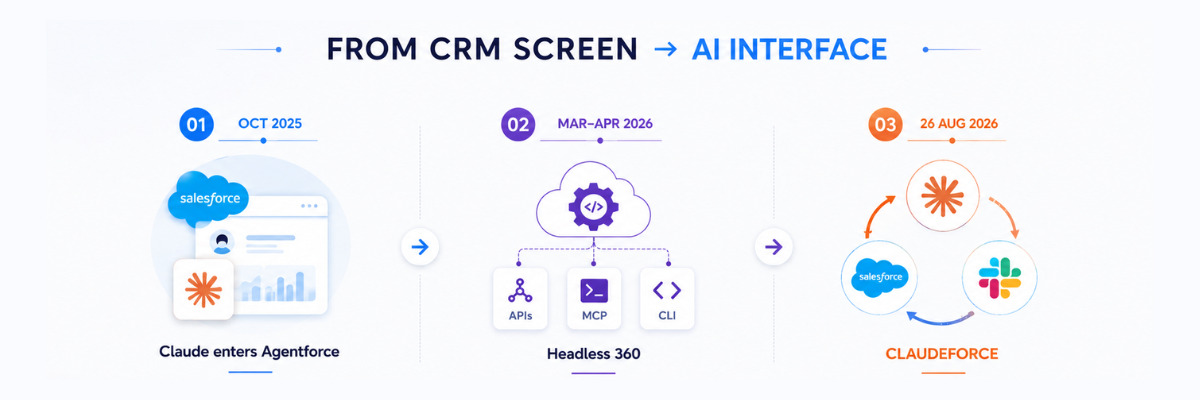
Claudeforce timeline: Claude enters Agentforce in October 2025, Headless 360 in 2026, Claudeforce on 26 August 2026
How Salesforce got from the October 2025 partnership to Claudeforce.

Read in sequence, the story is clear. October 2025 made Claude available in Salesforce. TDX 2026 removed the requirement for a Salesforce interface at all. Claudeforce is what those two decisions were building toward.

Headless 360 is the part practitioners keep underrating. It is not a product you buy. It is a consumption architecture, and it is why the Claude plugin could be built in the first place. We have written a separate guide to what Salesforce Headless 360 is and how it enforces permissions. Without an API-and-MCP layer that carries permissions and business rules with it, “Salesforce inside another vendor’s chat window” would have been a security review that never ended.

How Agentforce, Agentforce Coworker and Salesforce in Claude differ

These three names are being used interchangeably in a lot of commentary, and they are not the same thing.

What it doesWho it servesWhere it runs
AgentforceAutonomous agents that complete work end to end, including work that touches your customersExternal customers, and internal processesSalesforce platform
Agentforce CoworkerAn assistant embedded in the search bar of Salesforce and other apps, for asking and acting on CRM dataInternal employeesSalesforce, Slack, Teams, ChatGPT
Salesforce in ClaudeA plugin with prebuilt skills that runs a seller’s daily workflow from inside ClaudeInternal knowledge workers, sellers firstClaude

Salesforce’s own positioning is that Agentforce handles autonomous work touching end customers, while Salesforce in Claude handles knowledge-worker assistance for internal teams. In practice these overlap, and the boundary will move. Treat the table as today’s positioning rather than a permanent architecture.

That table covers the three names inside the Salesforce and Anthropic announcement. If what you want is Claudeforce set against Agentforce and Einstein, including where each one runs, what it costs and how you build on it, we have put the full side by side into its own guide: Claudeforce vs Agentforce vs Einstein.

Part 3: What “the UI is the AI” does to your Salesforce licence

Salesforce President Patrick Stokes framed the strategy plainly in interviews around the launch, reported in detail by VentureBeat: the value of Salesforce sits in the data and the metadata, not in the interface. That is a defensible position, and it is also an admission that the interface is no longer where the money is.

Follow the consequences.

Access shifts from seats to consumption. Salesforce says MCP access needs no separate SKU on Enterprise Edition and above, that calls draw on your existing API limits, and that Flex Credits are consumed when an agent action, a Data 360 query or a prompt actually runs. The meter is on actions, not on named users.

Agentforce consumption is priced in Flex Credits at $500 per 100,000 credits, with a standard agent action costing 20 credits, or roughly 10 cents. Our full Agentforce pricing breakdown covers the whole rate card.

Separately, Salesforce reports platform activity in Agentic Work Units. This one is worth getting right, because a lot of commentary has it wrong. An AWU is a disclosure metric, not a billing unit. Salesforce has published no price per AWU and no AWU-to-credit conversion. Its Q2 FY27 results reported 3.2 billion work units delivered in Q2 alone, up 97% quarter over quarter, on a cumulative 7.0 billion. The company also acquired m3ter, a metering and usage-based pricing platform, in the same quarter. Nobody buys a metering company unless they intend to meter a great deal more.

You will likely have two bills. Salesforce charges for platform access and actions. Anthropic charges for inference. Coverage of the launch indicated customers contract separately with each, which changes both procurement and forecasting. If your finance team currently models Salesforce as a fixed annual seat cost, that model is about to stop describing reality.

No public pricing exists for Salesforce in Claude yet. This is the biggest unanswered commercial question of the announcement. Whether it is bundled into an existing Agentforce entitlement, sold as an add-on, or metered per action has not been disclosed. Do not build a business case on assumed pricing until beta terms are published.

For teams renewing in the next two quarters, the practical advice is unglamorous: model your expected agent traffic in units before you build anything, and negotiate consumption rates and caps in the same conversation as seats, not after it. Agent-to-agent calls, retries and voice actions are the line items that blow up forecasts, because they are invisible in a seat-based mental model. This is the same discipline that separates a controlled Salesforce CRM development programme from one that overruns, applied to a new cost driver.

There is a second-order effect worth naming. If interface access stops being the unit of value, the internal case for buying seats for occasional users weakens. Finance teams will notice. Expect a wave of licence rationalisation conversations in 2027 renewals, and expect Salesforce to have priced consumption on the assumption that those conversations happen.

Part 4: The numbers behind the Claudeforce announcement

Claudeforce landed on earnings day, which was not an accident. The Q2 FY27 results gave it a strong backdrop.

MetricQ2 FY27Change
Total revenue$11.3B+11% YoY
Subscription & support revenue$10.8B+12% YoY
cRPO$33.5B+14% YoY in constant currency
Agentforce ARROver $1.5B+240% YoY
Agentforce + Data 360 ARR~$3.9B+210% YoY
Agentic Work Units (Q2)3.2B+97% QoQ
Data 360 records ingested104 trillion+355% YoY
Non-GAAP operating margin34.1%Not comparable
FY27 revenue guidance$46.1B to $46.4BRaised

One caveat that most write-ups skipped. The Agentforce ARR definition has expanded over the past year to take in Slackbot and Headless 360 consumption. A 240% growth rate on a broadening definition is partly demand and partly accounting, and Salesforce has not published the split. The growth is real; the multiple is not directly comparable to last year’s figure.

The number that deserves more attention than ARR is the work-unit count. Agentic Work Units are the closest public proxy for actual agent usage rather than agent purchasing, and 3.2 billion in a quarter, nearly doubling sequentially, says agents are running in production rather than sitting in sandboxes. That is the metric to watch next quarter, because it is much harder to inflate through repackaging than an ARR definition is.

Part 5: Five things we still do not know about Claudeforce

Any vendor announcement is worth judging by the questions it leaves open. These are the five that will decide whether Claudeforce becomes standard practice or a well-received demo.

  1. Pricing and packaging for Salesforce in Claude. Undisclosed. Everything downstream of this is guesswork until beta terms land.
  2. Data residency across three boundaries. A single request may touch Claude, Amazon Bedrock and Salesforce. EU, UK, India and Gulf customers need a documented map of where data rests and where it is processed at each hop. The Trust Boundary answers this for the Agentforce path; it does not obviously answer it for the plugin path.
  3. Model opt-out. If Claude is the default model for Slackbot and Agentforce Coworker, what is the mechanism for a customer with an existing standard on a different model, and what does opting out cost in capability?
  4. Skill customisation and governance. The 37 skills encode Salesforce’s view of good selling. Enterprises with their own methodology will want to edit them, version them and audit changes. How that works has not been detailed.
  5. What happens to the admin’s control surface. When work starts in Claude and finishes in Salesforce, page layouts and Lightning components stop being the place behaviour is governed. Validation rules, the sharing model and flows become far more load-bearing than they already are.

Part 6: What to do about Claudeforce in the next 90 days

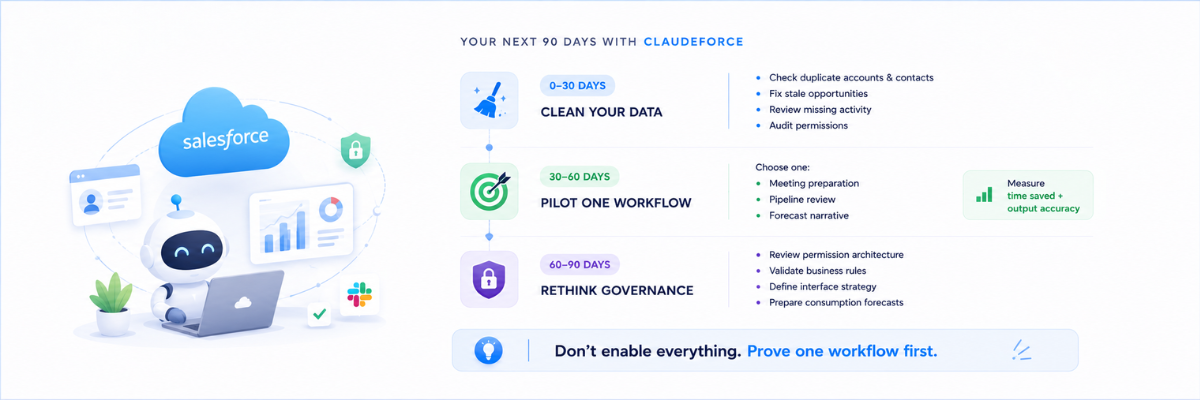
Claudeforce 90 day plan: clean your data, pilot one workflow, then rethink governance
A realistic 90 day sequence for most Salesforce customers.

The mistake to avoid is treating this as a September to-do. The mistake on the other side is buying anything before beta terms are public. Here is a sequence that works for most Salesforce customers.

Next 30 days: get honest about your data

Every agentic feature Salesforce has shipped since 2024 fails the same way, and it is never the model’s fault. It is duplicate accounts, stale opportunity stages, empty next-step fields and a sharing model nobody has audited since the original implementation. Claude reasoning over a pipeline where 30% of open opportunities have a close date in the past will produce a confident, useless forecast narrative.

Before any pilot, run a specific check:

  • Duplicate account and contact rate
  • Percentage of open opportunities with a past close date
  • Percentage of open opportunities with no activity in 30 days
  • Fields that are mandatory in process but optional in the schema
  • Profiles and permission sets with broader access than anyone remembers granting

That last item becomes materially more important under Claudeforce. Permission inheritance is a feature only if the permissions are correct. Our Agentforce readiness checklist sets out the full assessment, including the thresholds to measure against. Most orgs we assess through CRM data and platform work have at least one profile that grants view-all on a standard object because it was the fastest fix during go-live years ago. That was survivable when access required logging in and knowing where to look. It is less survivable when a model can be asked a question in plain English.

Days 30 to 60: pick one workflow, not a platform

Choose a single skill with a measurable before-and-after. Meeting prep and pipeline review are the obvious candidates because both have an existing time cost you can measure this week. Instrument it: minutes per rep per week before, minutes after, and an accuracy check by a sales manager on a sample of outputs.

Resist the urge to enable everything in beta. A pilot that proves one workflow converts into a budget line. A pilot that enables 37 skills at once produces anecdotes. We have written before about where the measurable returns sit in Sales Cloud ROI work, and the discipline is identical here: one workflow, one baseline, one number.

Days 60 to 90: decide your interface posture

This is the strategic question, and it belongs to the RevOps or CRM owner rather than to IT. If sellers begin their day in Claude or Slack rather than in Salesforce, three things follow:

  • Adoption metrics change meaning. Salesforce login counts stop being a proxy for usage.
  • Training changes shape. You are teaching prompting and verification, not navigation.
  • Governance moves down the stack. Anything you enforced through UI design has to be re-enforced in validation rules, flows and the sharing model. That is Salesforce DevOps territory, and it needs version control and a release process rather than ad-hoc changes in production.

If you are in a regulated industry

Get your security and compliance teams into the Trust Boundary architecture now, while you are pre-purchase and have leverage. Ask for the data flow diagram for each of the three deployment paths (Agentforce via Bedrock, the Claude plugin, Slack), and ask what is logged, retained and where. Teams running Salesforce Health Cloud or a financial services org already have this muscle from EHR and core banking integrations. Use the same review template.

If you are a Salesforce partner or implementation firm

The delivery mix shifts. Less time building interfaces, more time on data readiness, permission architecture, MCP and API design, and consumption forecasting. Firms whose value proposition was “we build the screens” have a repositioning problem within 18 months. Firms that can do data engineering and governance have a larger addressable scope than they did last week, and the constraint becomes delivery capacity rather than demand, which is where offshore delivery capacity starts to matter.

The evidence for this is already visible in delivery work. In our Salesforce CPQ and Agentforce rollout for a custom furniture retailer, the agent configuration was the fast part. Product data, pricing rules and approval logic were where the schedule went. Claudeforce does not change that ratio. It raises the cost of getting it wrong, because a clean interface no longer hides a messy model.

Claudeforce brings Salesforce into Claude. Inside Salesforce itself, the matching piece of AIforce is Agentforce Coworker in the search bar, which also reaches Slack, Teams and ChatGPT. Our Agentforce Coworker guide covers what it can access, what it costs and how to turn it on.

Frequently asked questions about Claudeforce

What is Claudeforce?

Claudeforce is the name of the expanded partnership between Salesforce and Anthropic announced on 26 August 2026. It covers a Salesforce plugin inside Claude with 37 prebuilt sales skills, Claude as a reasoning model inside Agentforce, Claude as the default model for Slack, and mutual adoption of each other’s products.

When will Salesforce in Claude be available?

It is available to select pilot customers now. Salesforce expects an open beta in September 2026, with additional prebuilt skills for other departments in late 2026.

How much does Claudeforce cost?

Salesforce has not published pricing for Salesforce in Claude. Reporting around the launch indicates customers contract separately with Salesforce for platform access and with Anthropic for model usage.

Is my CRM data safe if it is accessed through Claude?

The plugin inherits each user’s existing Salesforce permissions and routes actions back through Salesforce, so sharing rules, validation and audit trails still apply. For Agentforce, Claude runs through Amazon Bedrock inside the Salesforce Trust Boundary, meaning inference happens within Salesforce’s cloud rather than at a public endpoint. Confirm the specific data flow for your region before rollout.

What are the 37 sales skills in Salesforce in Claude?

They are prebuilt instruction sets covering daily planning, deal strategy, account growth, meeting preparation, and action and governance. Named examples include daily briefing, pipeline review, forecast narrative, stakeholder mapping, close planning, objection handling, account planning, lead triage, call prep, win-loss review and data hygiene.

How is Claudeforce different from the Anthropic partnership announced in 2025?

The October 2025 partnership made Claude available inside Agentforce for regulated industries and added a Slack MCP server. Claudeforce goes further: Claude becomes the default reasoning model across Agentforce and Slack, and Salesforce ships a first-party plugin that runs a seller’s daily work inside Claude.

What is Headless 360 and why does it matter for Claudeforce?

Headless 360, announced on 15 April 2026 at TDX 2026, is the set of APIs, MCP servers and CLI tools that let external agents call Salesforce data, workflows and governance rules without a Salesforce interface. It is the architecture that makes the Claude plugin possible. Salesforce says MCP access requires no separate SKU on Enterprise Edition and above; calls use your existing API limits, and Flex Credits apply when an Agentforce action, a Data 360 query or a prompt runs.

Does Claudeforce replace Agentforce?

No. Salesforce positions Agentforce as autonomous work that touches end customers, and Salesforce in Claude as knowledge-worker assistance for internal teams such as sellers. In practice the two will overlap, and the boundary is likely to move.

Will Salesforce still need admins after Claudeforce?

More than before, and in a different way. When the interface stops being the control surface, correctness has to live in the data model, the sharing model, validation rules and flows. That is admin work, and it becomes harder to skip.

Where Claudeforce actually lands

Salesforce has made a defensible bet. Its moat was never the screen. It was 27 years of data model, permissions, business logic and audit trail, and none of that is reproduced by pointing a model at a database. Letting Claude be the interface while keeping governance on the Salesforce side is a reasonable way to stay essential in an agentic world.

The risk is equally clear. If the interface commoditises, pricing power tends to move to whoever owns the intelligence. Salesforce is betting it can hold the data and governance layer while the reasoning layer belongs to someone else. That is a bet on the durability of enterprise plumbing, and it is not an obviously wrong one.

For customers, none of that changes the near-term work. The organisations that will get value from Claudeforce in the first year are the ones whose CRM data is clean, whose permission model is deliberate, and whose business logic sits in the platform rather than in the habits of the people using it. That work was worth doing before this announcement. It is now worth doing on a deadline.

Sources and further reading

Ashapura Softech is a certified Salesforce implementation partner. If you are evaluating vendors for agentic work, see what to ask an Agentforce implementation partner before the commercial conversation starts. If you want a read on whether your org is ready for agentic workflows, book a CRM health check covering data quality, permission architecture and automation debt. You can also browse our full range of Salesforce cloud services or see the delivery work in our case studies.

If you are planning agents on top of this, our Agentforce consulting team can scope the first use case and the data work it depends on.

Categories
Salesforce

Dreamforce 2025 to Dreamforce 2026: What Salesforce Promised, What Actually Shipped, and What’s Coming in September

Every enterprise software conference makes promises. The interesting question is never what got announced. It’s what survived contact with a real customer’s data model eleven months later.

At Dreamforce 2025, Salesforce stood on stage at Moscone Center and told 50,000 people that the Agentic Enterprise had arrived. Agentforce 360 launched, voice agents shipped, Slack got repositioned as an operating system, and every major cloud in the portfolio was renamed around the word “agent.” It was the most aggressive repositioning the company has attempted since the Lightning migration.

Dreamforce 2026 runs 15-17 September, and it lands in a very different room. The vision has already been sold. This year Salesforce has to show receipts: production deployments, governance models, and numbers that hold up when a CFO asks what the agent actually did.

Below is the full record. Everything announced in October 2025, everything that has shipped since, and a grounded view of what to expect in September. If you run Salesforce, sell Salesforce services, or are deciding whether Agentforce deserves a budget line, this is the context to have before the keynote.

Quick answers

When is Dreamforce 2026?

15-17 September 2026, Moscone Center, San Francisco. Virtual attendance via Salesforce+ is free.

What was the biggest Dreamforce 2025 announcement?

Agentforce 360, a four-layer platform combining the Agentforce Platform, Data 360 (formerly Data Cloud), Customer 360 apps, and Slack. It went generally available worldwide on 14 October 2025.

Has Agentforce actually sold?

Yes. In Q1 FY27, the quarter ended 30 April 2026, Agentforce and Data 360 reached a combined $3.4 billion ARR, up more than 200% year on year. Agentforce alone hit $1.2 billion ARR.

What is Dreamforce 2026’s theme?

The Agentic Enterprise again, but the framing has moved from vision to production accountability.

What will Salesforce announce?

Nothing is confirmed beyond product areas. Expect proof-of-deployment case studies, agent governance tooling, Headless 360 expansion, and the Fin acquisition story.

Dreamforce 2026 dates, pricing and session details
Dreamforce 2026 runs 15-17 September at Moscone Center, San Francisco.

Part 1: What Salesforce announced at Dreamforce 2025

Dreamforce 2025 ran 14-16 October at Moscone Center in San Francisco. Roughly 45,000 to 50,000 people attended in person, with Salesforce claiming more than 180,000 including the Salesforce+ virtual audience. The speaker list mixed enterprise and entertainment: Marc Benioff, Sundar Pichai, Andrew Ng, Starbucks CEO Brian Niccol, Matthew McConaughey, Ellen Pompeo, America Ferrera. Metallica and Benson Boone headlined Dreamfest.

The product news mattered more than the celebrity list, and there was a lot of it.

Agentforce 360, the flagship launch

Agentforce 360 four-layer platform: Agentforce Platform, Data 360, Customer 360 Apps and Slack
The four layers of Agentforce 360, generally available since 14 October 2025.

Agentforce 360 became generally available on 14 October 2025. Salesforce said it was built on lessons from more than 12,000 Agentforce implementations, which is a useful detail. It means this was a v2 shaped by real deployment failures rather than a greenfield product.

It has four layers:

LayerWhat it does
Agentforce 360 PlatformAgent build and runtime, hybrid reasoning, voice
Data 360Rebrand of Data Cloud. Turns structured and unstructured data into context an agent can reason over
Customer 360 AppsAgents embedded directly into sales, service, marketing and commerce workflows
SlackThe conversational surface where humans and agents actually meet

The architectural argument behind this explains most of what followed. Salesforce’s position is that agents fail for one of three reasons: they can’t see the right data, they behave unpredictably, or nobody knows where to talk to them. Data 360 addresses the first problem, Agent Script the second, and Slack the third.

Agentforce Voice

Voice agents were the most demo-able launch of the event. Agentforce Voice handles inbound and outbound calls with low enough latency to feel conversational, transcribes in real time, and lets a human take over mid-call with full visibility of what the agent has already said and done.

It integrates with Amazon Connect, Five9, NiCE and Vonage, which was a deliberate choice. Salesforce didn’t try to replace the contact center infrastructure enterprises already own. It layered on top of it, and that is a far shorter sales cycle than a rip-and-replace.

The developer and admin stack

Four launches here, and together they are the most consequential part of Dreamforce 2025 for anyone who actually builds on the platform.

Agent Script is a new agent-definition language written in human-readable JSON. It lets a developer specify exactly when an agent should follow deterministic logic and when it’s allowed to use LLM reasoning. This is Salesforce’s answer to the biggest enterprise objection to agents: you cannot put something non-deterministic in front of a customer and a compliance team at the same time.

Agentforce Builder was rebuilt around conversation. Instead of the old topic-action-instruction workflow, you describe what you want and refine it in three views: a natural-language editor, a low-code canvas, and a script view. A live simulator explains why the agent behaved the way it did.

Agentforce Vibes is a conversational coding assistant that generates Lightning Web Components and Apex logic, running inside VS Code and Code Builder, with 50 premium calls per day per org.

Setup Powered by Agentforce entered pilot. It brings natural-language administration to creating custom objects, building record-triggered and schedule-triggered flows, fixing permissions, and summarizing existing flows. If you have ever inherited an org with 400 undocumented flows, the summarization feature alone is worth the attention.

Data 360 and the context problem

The Data Cloud rename to Data 360 was not cosmetic. Two capabilities came with it. Intelligent Context lets agents reason over unstructured content such as PDFs, call transcripts and knowledge articles, rather than only structured records. Tableau Semantics enforces one consistent business vocabulary across the platform, so “active customer” means the same thing to an agent that it means in a Tableau dashboard.

Anyone who has run a data migration knows why this matters. An agent that pulls the wrong definition of “churned” doesn’t produce a slightly worse answer. It produces a confidently wrong one.

Slack as the agentic operating system

Slack was repositioned as the place work happens, with a reimagined Slackbot and, more importantly, support for Model Context Protocol (MCP). MCP support means third-party AI tools and agents from outside the Salesforce ecosystem can interoperate inside Slack. That is an unusually open move for Salesforce, and a clear signal that they would rather own the interface layer than fight every other agent vendor for it.

The great rebrand

Salesforce renamed its core product line around agents:

BeforeAfter
Sales CloudAgentforce Sales
Service CloudAgentforce Service
Marketing CloudAgentforce Marketing
Data CloudData 360

Renaming products your customers have said out loud for fifteen years is not a decision anyone makes lightly. It tells you how completely Salesforce has bet the company on this positioning.

Acquisitions and partnerships

Apromore was acquired, a process intelligence company. The logic is straightforward. Before you can automate a workflow with an agent, you need to know what the workflow actually is, as opposed to what the process documentation claims it is. Apromore maps that gap.

OpenAI expanded its partnership. GPT-5 became available inside the Salesforce platform, Agentforce 360 data became queryable from ChatGPT, and Agentforce Commerce landed inside ChatGPT using the Agentic Commerce Protocol, enabling checkout without leaving the chat. A ChatGPT app for Slack and Codex access came with it.

Anthropic signed a new strategic partnership making Claude the preferred model for regulated industries including financial services, healthcare and life sciences, with bi-directional Claude and Slack integration. Running two frontier model partnerships in parallel, positioned at different industries, is a hedge against betting the platform on any single vendor. That hedge tilted in August 2026, when the two companies announced Claudeforce, making Claude the default reasoning model across Agentforce and Slack.

PwC launched an agentic contact center built on Agentforce Service.

Away from product, Salesforce announced a $15 billion, five-year investment in San Francisco.

Part 2: The audit, or what actually shipped

Salesforce Agentforce timeline from Dreamforce 2025 through GA, TDX 2026 and the Fin acquisition to Dreamforce 2026
From announcement to shipped product: the Agentforce timeline across four events.

This is the section most Dreamforce coverage skips, and it’s the one that should inform your budget decisions.

The revenue evidence

Agent products either sell or they don’t, and the filings are unambiguous.

MetricQ4 FY26 (ended Jan 2026)Q1 FY27 (ended 30 Apr 2026)
Total revenue$11.2B$11.1B (+13% YoY)
Agentforce ARR~$800M$1.2B (+205% YoY)
Agentforce + Data 360 ARRnot disclosed$3.4B (+200%+ YoY)
Informatica Cloud ARRnot disclosed$1.1B
Agentic work units deliverednot disclosed3.8B (+111% QoQ)
Tokens processed (cumulative)not disclosed28.6 trillion (+152% QoQ)
Salesforce Q1 FY27 results: $1.2B Agentforce ARR, $3.4B including Data 360, 3.8B agentic work units and 28.6 trillion tokens processed
The four numbers that matter from Q1 FY27, ended 30 April 2026.

Salesforce guided FY27 revenue to $45.9 to $46.2 billion and authorized a $50 billion buyback. Benioff’s framing on the Q1 call: “Agentic AI is the biggest growth opportunity for our customers, and for Salesforce.”

Two of those metrics deserve a closer look. Agentic work units and tokens processed are not standard SaaS disclosures. They are consumption metrics, and Salesforce putting them into quarterly reporting is a strong hint about where pricing is heading. If your Agentforce contract is currently seat-based, it is worth modeling what a consumption-based renewal would cost at your actual volumes.

TDX 2026 proved the developer story was real

Salesforce’s developer conference in March 2026 shipped the follow-through on the Dreamforce 2025 developer promises, which is the clearest available signal that the platform work wasn’t just keynote material.

Agent Script was open-sourced and published to GitHub. Announced in October, in public hands by March.

Agentforce Vibes 2.0 reads enterprise metadata through the Unified Catalog and supports both Claude Sonnet and GPT-5.

Agentforce Experience Layer (AXL) lets you define an interactive component once and deploy it to web, mobile, Slack and voice.

Agent Script for Voice extends the same deterministic control to voice channels.

Agentforce Mobile SDK brings native iOS and Android with push-to-talk voice.

Headless 360 runs Salesforce as an agent backend behind someone else’s front end.

Agentforce Labs and the Agent Development Life Cycle (ADLC) added safety reviews, deployment tooling and production observability.

AgentExchange grew to 10,000 Salesforce apps, 2,600+ Slack apps and 1,000+ agents.

Session Trace OTel API entered beta, returning full agent session traces as OpenTelemetry spans. The A/B Testing API entered pilot, and Testing Center enhancements went GA in May.

The ADLC and observability work is the tell. You don’t build production tracing and safety review tooling for a product still living in demos. You build it because customers have agents in production and are asking hard questions about what those agents did at 3am.

The Fin acquisition

In June 2026, Salesforce signed a definitive agreement to acquire Fin, formerly Intercom, for approximately $3.6 billion, expected to close in Q4 FY27. Fin’s proprietary Apex model reportedly resolves around 76% of support volume without human involvement.

The positioning is an admission about Agentforce’s weakness. Agentforce is a platform for enterprise-scale custom transformation, and platforms take months to deploy. Fin is packaged and fast. Salesforce buying it says plainly that the mid-market was never going to wait through a six-month implementation, and that plenty of buyers want an agent that works on Thursday rather than one perfectly modeled on their data by Q3.

What’s still thin

An honest audit has to include the parts that haven’t landed.

Adoption remains harder than the headline ARR suggests. The deployments most often cited as successes, including PenFed’s 76-agent system and UCLA Health, involved substantial data cleanup, integration work, process redesign and testing before any agent went live. That work is not optional and it is not fast.

Setup Powered by Agentforce was announced as a pilot in October 2025 and has not made a loud arrival since. Governance frameworks for agent accountability are still largely something each customer builds for themselves. And the honest answer to “which workflows are safe to hand to an autonomous agent” is still a shorter list than most vendor decks imply.

None of that makes Agentforce a bad bet. It makes it a project rather than a purchase.

Part 3: Dreamforce 2026, the confirmed facts

  • Dates: 15-17 September 2026
  • Venue: Moscone Center, San Francisco
  • Theme: “Where every business becomes an Agentic Enterprise”
  • Virtual: Free via Salesforce+, with 400+ sessions and 72 hours of programming

Scale

  • 1,600+ expert-led breakout sessions
  • 50+ visionary and product keynotes
  • 150+ hands-on training sessions
  • 240+ community roundtables
  • Live product demos across Slack, Agentforce, Data 360, Tableau, Customer 360 and Headless 360

Speakers confirmed so far

Marc Benioff delivers the opening keynote. The name that matters most this year is Dario Amodei, co-founder and CEO of Anthropic.

The rest of the confirmed list mixes enterprise and entertainment: Roland Busch, President and CEO of Siemens AG; H.E. Omar Sultan Al Olama, the UAE Minister of State for AI; Linda A. Hill of Harvard Business School; Alessandra Sala of UNESCO’s Women for Ethical AI; Allie K. Miller; Travis Kalanick; the All-In hosts Chamath Palihapitiya, Jason Calacanis and Dave Friedberg; and on the entertainment side Sterling K. Brown, Sheryl Lee Ralph and Reese Witherspoon. Salesforce is still adding names.

Dreamfest now has its headliners too: Usher and Gwen Stefani, playing the ballpark in support of UCSF Benioff Children’s Hospitals.

Amodei on a Salesforce main stage is the detail worth reading into. Less than three weeks before the conference, Salesforce made Claude the default reasoning model behind Agentforce. Putting Anthropic’s CEO on the keynote stage turns that from a press release into a position. If you are weighing up Agentforce, watch closely what these two say about who owns the interface.

Registration and pricing

PassPriceStatusLaunch Special$999ExpiredEarly Bird$1,499ExpiredLast Chance$1,899Through 20 August 2026Full Price$2,299After 20 August

Group registration of three or more brings it to $999 per pass, which is the cheapest route available by a wide margin and cheaper than the original launch special. The Trailblazer Bootcamp on 12-14 September can be added for $1,499 against a $2,299 list price. Discounted hotel blocks close on 21 August 2026.

One free certification exam is included per attendee. Registration requires a free Trailblazer account, attendees must be 18 or over, and Agenda Builder opens in August for session reservations.

Part 4: What to expect at Dreamforce 2026

Salesforce has confirmed dates, theme, session counts and product areas. Everything below is informed expectation based on the shipping pattern since October 2025, not company commitments.

  1. Proof replaces vision. The 2025 keynote sold a concept. The 2026 keynote has to defend an $11 billion quarter and a product line renamed around a promise. Expect named customers with hard before-and-after numbers rather than staged demos.
  2. Governance becomes a product, not a slide. The ADLC and observability work from TDX points toward a packaged agent governance layer covering testing, monitoring, escalation paths and audit trails. The market question has moved from “can an agent do this” to “who is accountable when it does it wrong,” and that is a gap Salesforce needs to close before regulated buyers commit.
  3. Agentic work units get formalized. Once a metric appears in quarterly earnings, it usually appears on a pricing page within a year. Watch for consumption-based packaging.
  4. Headless 360 expands. Salesforce as an agent backend behind a customer’s own interface is a real strategic shift. It means Salesforce is willing to give up the UI to keep the data and the logic.
  5. The Fin story gets told properly. The deal is expected to close in Q4 FY27, so it will likely still be pending during the event. Expect a clean split: Fin for fast-deployment SMB service, Agentforce for enterprise custom builds.
  6. Industry clouds get an agent layer. Financial services, healthcare, retail and manufacturing, with the Anthropic partnership doing visible work in the regulated verticals.
  7. Multi-model positioning gets louder. Claude for regulated industries, OpenAI for commerce and code. Salesforce has spent a year avoiding single-vendor dependency and will want credit for it.

Part 5: What this means for you

The right response to Dreamforce depends entirely on where you’re standing.

If you already run Salesforce

Your immediate concern isn’t the keynote. It’s the rebrand and the pricing signal. Sales Cloud is now Agentforce Sales. Service Cloud is now Agentforce Service. That renaming will eventually show up in your renewal paperwork, your admin training, and your internal documentation.

Three things to get clear before September.

  • Your data readiness. Data 360 is the dependency for everything else. If your org has duplicate accounts, inconsistent picklists and eight definitions of “active customer,” an agent will surface that problem faster and more publicly than any dashboard ever did.
  • Your consumption exposure. Work out what agentic work units mean at your transaction volumes before a consumption-based renewal arrives.
  • One workflow worth testing. Not your most important one. Pick something high volume, low risk and well documented, such as order status lookups, tier-one password resets, or lead qualification. Prove the model where a mistake is recoverable.

If you’re a Salesforce partner or consultancy

The demand signal is real and the capacity problem is worse. Agentforce implementations need data engineering, integration work, process mapping and test design. That is a wider skill mix than a standard Sales Cloud rollout, and one most boutique consultancies don’t have sitting idle.

The three weeks after Dreamforce are historically the heaviest inbound period of the year, because clients return from the keynote with a list of things they now want built. If your delivery capacity is already committed through Q4, that is a decision to make in August, not on 18 September.

If you haven’t started

Ignore the ARR numbers. They describe Salesforce’s business, not yours.

The useful benchmark is the deployment pattern. Organizations getting value spent significant time on data quality and process definition before they built anything. The ones that didn’t ended up with an agent confidently giving customers wrong answers from bad records.

Start with an honest assessment of what is actually in your CRM. It is less exciting than an agent pilot, and it is the reason the agent pilot will or won’t work.

Pre-Dreamforce readiness checklist

Work through this before 15 September and the sessions will be considerably more useful.

  • Audit data quality in the objects an agent would touch first: accounts, contacts, cases, orders
  • Document your top five customer-facing workflows as they actually run, not as the process doc describes them
  • Identify one candidate workflow that is high volume, low risk and clearly documented
  • Review your current Salesforce contract for renewal dates and consumption clauses
  • Confirm who in your organization owns agent governance, including testing, monitoring and escalation
  • Register for Salesforce+ even if you’re not travelling, and reserve sessions once Agenda Builder opens
  • Map your existing integrations. Agentforce is only as capable as the systems it can reach

Frequently asked questions

When and where is Dreamforce 2026?

15-17 September 2026 at Moscone Center in San Francisco. Free virtual attendance is available through Salesforce+ with 400+ sessions across 72 hours of programming.

How much does a Dreamforce 2026 ticket cost?

$1,899 through 20 August 2026, rising to $2,299 after that. Groups of three or more pay $999 per pass. Virtual attendance is free.

What was announced at Dreamforce 2025?

Agentforce 360 was the headline launch, alongside Agentforce Voice, Agent Script, Agentforce Builder, Agentforce Vibes, and the Data Cloud rebrand to Data 360. Salesforce also acquired Apromore, expanded its OpenAI partnership, signed a new partnership with Anthropic, and renamed Sales Cloud, Service Cloud and Marketing Cloud around Agentforce.

What is Agentforce 360?

A four-layer agent platform combining the Agentforce 360 Platform, Data 360, Customer 360 apps and Slack. It became generally available on 14 October 2025 and was built on learnings from more than 12,000 prior Agentforce implementations.

What is the difference between Data Cloud and Data 360?

Data 360 is the renamed Data Cloud, with two additions. Intelligent Context lets agents reason over unstructured data, and Tableau Semantics enforces consistent business definitions across the platform.

Is Agentforce actually being adopted?

Yes, at scale. Agentforce reached $1.2 billion ARR in the quarter ended 30 April 2026, up 205% year on year, with 3.8 billion agentic work units delivered that quarter. Adoption still requires meaningful data and process work before deployment.

What is Salesforce likely to announce at Dreamforce 2026?

Salesforce has not confirmed specific announcements. Based on the shipping pattern since October 2025, expect production case studies, agent governance tooling, Headless 360 expansion, consumption-based pricing signals, and integration positioning around the pending Fin acquisition.

Do I need to attend in person to see the announcements?

No. Salesforce+ streams the keynotes and 400+ sessions free. In-person value is concentrated in hands-on training, certification and networking rather than the announcements themselves.

Where to go from here

The pattern across the last eleven months is consistent. Agentforce works when the underlying data and processes are in order, and produces expensive disappointment when they aren’t. The technology is no longer the constraint. Implementation readiness is.

If you’re weighing an Agentforce project, or you’re already mid-implementation and the data layer is proving harder than the pitch suggested, a structured assessment before September is a cheap way to avoid an expensive detour.

Ashapura Softech offers a free 30-minute CRM health check. You get a written one-page findings document covering your data readiness, integration gaps, and the workflows most likely to succeed as a first agent deployment. There is no pitch deck and no obligation.

Book your CRM health check

Categories
Salesforce

Salesforce CPQ + Agentforce for Custom Furniture Retail: A 120K-Contact Migration Case Study

Custom furniture retail has a math problem most CRM templates are not built for, and it is exactly the problem Salesforce CPQ exists to solve. Every order is a unique combination of dimensions, fabric grade, finish, and lead time. Every customer expects a delivery date they can plan a renovation around. Standard CRM quoting assumes a fixed catalog with a handful of SKUs – custom furniture doesn’t work that way, and treating it like it does is where most of these projects go wrong.

The retailer in this case study was running the entire process through spreadsheets stitched together with HubSpot. Quotes took roughly 45 minutes to build by hand, and configuration mistakes – a fabric grade paired with a dimension it wasn’t rated for – surfaced often enough that post-confirmation rework had become routine, not exceptional. There was no live connection to the Odoo ERP running production, so delivery commitments were educated guesses.

On the B2B side, interior designers, architects, and hospitality procurement teams sat in a spreadsheet disconnected from consumer order history, so the same designer could appear as two unrelated contacts depending on the channel they used.

Ashapura Softech replaced HubSpot, a bespoke order-management tool, and the spreadsheet layer with a unified Salesforce platform: Salesforce CPQ at the core of quoting, an Agentforce agent embedded in that workflow for design consultation and production-timeline checks, and Data Cloud turning room-planner behavior into Marketing Cloud-ready segments.

Agentforce has moved on considerably since this build. For what changed in August 2026, see our full Claudeforce breakdown.

A note on timing, for anyone planning a similar project: Salesforce moved Salesforce CPQ to End-of-Sale status in March 2025 and has since concentrated product investment in Revenue Cloud Advanced (also marketed as Agentforce Revenue Management), which runs natively on Salesforce’s core object model rather than as a managed package on top of it.

This implementation was scoped on CPQ. Existing CPQ orgs still get support and renewals, and Salesforce hasn’t published an end-of-support date — but a retailer scoping a new build today should put Revenue Cloud Advanced on the table first. More on this trade-off below.

Key stats: 120K+ contacts migrated · 85K+ custom orders unified · 78% faster quote build time · B2B trade accounts unified · zero data loss

Salesforce CPQ configuration for custom furniture retail quoting
Salesforce CPQ replaced spreadsheet quoting for a custom furniture retailer.

Why Spreadsheet Quoting Fails Custom Furniture Retailers

Custom furniture catalogs – where a single sofa might have twelve dimension options, six fabric grades, four finish selections, and three lead-time tiers – make spreadsheet quoting genuinely dangerous. A spreadsheet has no way to enforce that an oversized frame can only pair with certain fabric grades. Nothing catches an invalid combination until the order reaches the warehouse floor, by which point the cost of rework – including the trust cost – falls entirely on the retailer.

This isn’t unique to one retailer. Industry research on quote-to-cash workflows consistently finds reps lose a large share of their week to exactly this kind of overhead rather than selling – one 2026 analysis of quote-to-cash automation put actual selling time at roughly 28–30% of a rep’s week, with the rest absorbed by manual quote-building, price checking, and approvals. Custom, made-to-order categories like furniture tend to sit at the worse end of that range.

Symptoms specific to this retailer:

  1. Custom quotes built manually – 45-minute average per quote, frequent configuration errors requiring post-confirmation rework.
  2. No visibility into production status – reps emailed the warehouse separately; delivery commitments were guesses.
  3. B2B trade accounts in isolation – designers/architects tracked separately, fragmenting relationship visibility.
  4. Marketing without room-planner insights – no tracking of inspiration-board or planner activity; every promo email went to the full list.

What Was Built with Salesforce CPQ: The Four Pillars

Pillar 1 – Sales Cloud + CPQ + Agentforce Design Consultation. Each configurable furniture line was modeled as a CPQ bundle: a parent product with child options grouped into features (e.g., “Fabric Grade,” “Finish”), using Min/Max selection limits so a rep can’t leave a required choice blank or pick two mutually exclusive finishes. Two rule types do the enforcement work spreadsheets couldn’t: product/configuration rules that block invalid combinations, and pricing rules that calculate upgrade costs the instant an option is selected.

An Agentforce agent embedded in the quote workflow – scoped to defined topics and actions, not open-ended org access – draws on Data Cloud’s unified customer profile to recommend complementary pieces, surface wish-list/room-inspiration saves, check live Odoo production timelines, and flag configs pushing into longer lead-time tiers before the quote goes out. Einstein Lead Scoring ranks inbound B2B trade inquiries by conversion probability.

Pillar 2 – Adobe Commerce + Data Cloud (Room Inspiration Tracking). Storefront behavioral events (board saves, wish lists, planner sessions, abandoned designs) stream into Data Cloud in real time, building behavioral segments Marketing Cloud uses for personalized journeys – abandoned-design re-engagement emails, price-drop alerts, style-matched suggestions – with English/Spanish delivery based on language preference.

Pillar 3 – Service Cloud Omnichannel (Damage Claims + Assembly Support). WhatsApp, email, and SMS route into one queue. Damage claims via WhatsApp (with photos) auto-route to the claims team, pre-linked to the order, SLA clock starting at submission. Delivery tracking surfaces inside the case. Dashboards show open claims by product line and resolution time.

Pillar 4 – B2B Trade Pipeline + Channel Engine. Designers/architects/hospitality accounts managed with full firm hierarchies. Trade pipeline runs on Sales Cloud + Salesforce CPQ. Channel Engine syncs Amazon Home and Wayfair orders near-real-time. Odoo manufacturing schedules surface inside trade opportunity records.

“Our reps were spending 45 minutes building a single custom quote in a spreadsheet — and still getting dimensions or lead times wrong. Now the same quote takes under 10 minutes, and Agentforce checks the production schedule from Odoo in real time so we can actually commit to a delivery date.” – VP of Sales, Home Furnishings & Interior Décor Retailer

The Migration Challenge: 120K Contacts, 85K Custom Orders, No Shortcuts

Scope: 120K contacts, 85K custom orders, 200K+ email activities, 40K support tickets.

1. BOM-to-CPQ Bundle Mapping – Catalog First, Always. The Salesforce CPQ catalog (bundles, option groups, rules) had to be fully built before any historical order import, since it’s the schema everything maps to.

2. Salesforce CPQ Price Engine Recalculation – Batch Control at Scale. CPQ recalculates pricing on every quote-line save — fine for one live quote at a time. Bulk-importing 85,000 multi-line orders is a different problem: if every inserted line triggers the same recalculation logic, a single import job can burn through a Salesforce org’s daily API limit before it finishes. The fix: disable the calculation engine during initial import, then re-enable it and recalculate in controlled daily batches of 1,000–2,000 orders over several weeks, with each batch verified before the next.

3. HubSpot Email Activity Migration – Two-Pass Python Script. Salesforce’s bulk loader can’t import email body content alongside header records in one pass. A custom two-pass script first imported headers/timestamps/relationships, then attached body content while preserving original send dates.

Key lessons:

  • Build CPQ bundles before importing any historical order data – no shortcuts.
  • An Agentforce agent referencing room-planner behavior turns generic suggestions into contextual design guidance.
  • Data Cloud behavioral segments outperform standard list-based segmentation because interest is demonstrated through design behavior, not purchase history alone.
  • B2B trade accounts should never sit in a separate, disconnected pipeline.

What Changed After Go-Live

  • Quote time: 45 minutes → under 10 minutes
  • Delivery commitments: backed by live Odoo ERP data via Agentforce
  • B2B trade accounts: unified pipeline with full order history and hierarchies
  • Damage claims: tracked end-to-end from WhatsApp submission to resolution
  • Marketing: segmented by room style and engagement, not full-list blasts
  • AOV: Agentforce’s complementary-piece recommendations naturally surface upsells

Should You Build This on CPQ or Revenue Cloud Advanced in 2026?

Worth answering directly. Salesforce put legacy Salesforce CPQ into End-of-Sale on March 27, 2025: no new licenses, no further feature investment, roadmap moved to Revenue Cloud Advanced. CPQ isn’t shut off – existing customers keep support and renewals – but new capability, including deeper native Agentforce integration, is landing on Revenue Cloud Advanced, not the CPQ managed package.

The distinction is mechanical, not just commercial. Legacy Salesforce CPQ is a managed package sitting on top of core Salesforce objects – part of why it needs calculation-engine workarounds at high volume. Revenue Cloud Advanced runs on Salesforce’s core-native object model – the same Quote, Order, and Contract objects Agentforce agents are built to read/write natively.

For this retailer, Salesforce CPQ was the right call when scoped, and remains fully supported. For a retailer starting a comparable build now, our honest read: evaluate Revenue Cloud Advanced first, especially if deep Agentforce automation is part of the roadmap. If your catalog is well understood and you need a proven data model fast, CPQ is still defensible – just know every customization is something you’ll eventually carry into a migration.

FAQs

How does Salesforce CPQ handle custom furniture configurations?
Via bundles with option groups (dimensions, fabric, finish, lead time) governed by configuration rules that block invalid combos and pricing rules that auto-calculate upgrade costs.

What is Agentforce and how does it help home furnishings sales teams?
An AI agent embedded in the Salesforce CPQ quote screen, grounded in Data Cloud, that recommends complementary pieces, surfaces saved inspiration/wish-list items, checks live Odoo timelines, and flags long lead-time configs.

How does Data Cloud integrate with Adobe Commerce for room-planner tracking?
Real-time event streaming captures board saves, wish lists, planner sessions, and abandoned designs, which Data Cloud turns into behavioral segments for Marketing Cloud journeys.

How do you migrate complex custom order/BOM data into Salesforce CPQ?
Build the full catalog first (bundles, options, Min/Max features, rules), then import and map orders; disable the price engine during import and recalculate in controlled daily batches to stay within API limits.

How does Service Cloud manage delivery damage claims?
Omnichannel routing auto-links WhatsApp photo claims to the order, starts the SLA clock at submission, surfaces delivery tracking in the case, and gives dashboards by product line.

Is Salesforce CPQ still the right choice for a furniture retailer starting a project in 2026?
CPQ went End-of-Sale in March 2025; Salesforce’s investment has shifted to Revenue Cloud Advanced, which is core-native and integrates natively with Agentforce. New builds should evaluate Revenue Cloud Advanced first. Existing CPQ orgs don’t need to migrate immediately but should plan customizations with that eventual move in mind.

Conclusion

Custom furniture retail is one of the most demanding Salesforce use cases because every order is essentially unique. Salesforce CPQ handles that complexity when configured correctly. Agentforce turns it from a quoting tool into a design consultation system – referencing room-inspiration behavior, checking live production data, and surfacing complementary pieces at the moment a rep is building a quote. A build of this shape lives or dies on delivery, which is why picking the right Agentforce partner matters more than the feature list.

The CPQ configuration, pricing rules and approval design behind a build like this are covered under our Salesforce CPQ implementation services.

Categories
Salesforce

Optimizing Salesforce Implementation with Real-Time Customer Data Analytics

Introduction

In an increasingly data-driven world, leveraging real-time customer insights is no longer optional—it’s a competitive advantage. While Salesforce is widely recognized as a leading CRM platform for managing sales, marketing, and service workflows, its true power is unlocked when integrated with real-time data analytics.

Implementing Salesforce without real-time data may result in missed opportunities or delayed reactions to customer needs. On the other hand, real-time analytics enhances your Salesforce implementation by providing up-to-the-minute insights into customer behavior, engagement patterns, and buying signals. This enables teams to act swiftly—whether it’s personalizing a sales pitch, resolving a service issue proactively, or launching timely marketing campaigns.

With real-time dashboards and automated data flows, decision-makers gain a 360-degree view of the customer journey. Marketing teams can optimize campaign performance on the fly, while sales teams can prioritize high-value leads with greater accuracy. Additionally, service teams can identify issues before they escalate, improving customer satisfaction and loyalty.

To effectively combine Salesforce and real-time analytics, organizations should focus on integration platforms and tools that support seamless data syncing—such as MuleSoft or Tableau (both Salesforce-owned). These tools help bridge the gap between raw data and actionable insights.

What Is Salesforce Implementation and Why Real-Time Analytics Matters

Salesforce CRM implementation is the strategic process of deploying and customizing Salesforce to meet a company’s unique operational goals. This process includes gathering business requirements, configuring the system, migrating data, integrating third-party applications, training users, and providing ongoing support. When done effectively, Salesforce CRM implementation empowers organizations to streamline sales, service, and marketing processes—driving productivity and return on investment.

However, choosing the right Salesforce implementation services is critical. Many businesses struggle when implementations focus only on setup, overlooking the importance of data-driven decision-making. Without meaningful insights, even the most well-designed CRM system can fall short of delivering long-term value.

That’s where real-time customer data analytics comes in. By integrating live analytics into your Salesforce environment, your teams gain instant visibility into customer behavior, engagement patterns, and key performance metrics. This allows for faster, more personalized responses across departments, whether it’s prioritizing high-value leads, optimizing campaigns on the fly, or proactively resolving service issues.

In short, a successful Salesforce CRM implementation goes beyond basic configuration. It’s about creating a dynamic ecosystem that adapts to user needs and customer behaviors in real time.

Why Real-Time Data Matters in Salesforce Implementation

In today’s fast-paced business environment, reacting to customer needs in real time is no longer optional—it’s expected. Traditional CRM systems often depend on outdated or historical data, leading to delayed decision-making and missed opportunities. This is where real-time analytics becomes essential, especially during a Salesforce implementation.

By integrating real-time data insights, companies can transform their CRM into a proactive engine for customer engagement. Through effective Salesforce analytics integration, you gain the ability to monitor live customer interactions, buying signals, and service requests as they happen—empowering teams to act immediately.

Here’s how real-time data enhances your data-driven Salesforce strategy:

  • Predictive analytics and automation: Real-time data feeds intelligent automation tools, helping forecast outcomes and trigger relevant workflows instantly.
  • Customer journey alignment: Sales, marketing, and service teams stay on the same page with synchronized visibility into the customer lifecycle.
  • Smarter segmentation and lead scoring: Dynamic data updates allow for more accurate lead qualification and targeted messaging.
  • Instant sales opportunity detection: Teams can identify and engage high-value prospects at the exact moment of interest.

Whether you’re launching Salesforce for the first time or optimizing an existing setup, leveraging expert Salesforce implementation services with a focus on real-time analytics ensures your CRM investment delivers maximum value and measurable outcomes.

Key Benefits of Combining Salesforce with Real-Time Analytics

Incorporating real-time analytics into your Salesforce environment brings transformative benefits that help businesses stay agile and customer-focused. Leveraging Salesforce data analytics enables teams to move beyond static reports and historical trends, delivering insights that drive immediate action and long-term growth.

Here are the key advantages of combining Salesforce with real-time analytics for effective CRM optimization:

Faster Decision-Making
Real-time dashboards and automated alerts enable managers and sales representatives to make informed, timely decisions. Instead of waiting for end-of-day reports, teams can respond instantly to shifting customer needs or market changes.

Improved Personalization
Access to live customer behavior data means campaigns and product recommendations can be tailored precisely to each user’s current preferences and actions. This level of personalization enhances engagement and boosts conversion rates.

Predictive Sales & Marketing
By analyzing real-time patterns, your Salesforce platform can anticipate what customers are likely to want next. This predictive capability allows sales and marketing teams to proactively reach out with relevant offers or messages, increasing success rates.

Enhanced Customer Experience (CX)
Real-time analytics helps identify potential issues before they escalate, enabling customer service teams to intervene quickly. Proactive problem-solving creates smoother, more satisfying experiences for your customers.

Performance Monitoring
Instant access to key performance indicators allows teams to fine-tune campaigns and workflows on the fly, maximizing impact and driving continuous improvement.

Integrating real-time customer insights with Salesforce transforms your CRM from a passive data repository into a dynamic tool for growth and customer-centricity.

Salesforce Tools for Real-Time Analytics

Salesforce Customer Data Platform (CDP) / Data Cloud

The Salesforce Customer Data Platform, also known as Salesforce Data Cloud, is a powerful solution for unifying customer information from multiple sources. It creates a single, dynamic customer profile updated in real time. This 360° view empowers marketing, sales, and service teams to deliver more personalized and timely interactions across all touchpoints.

Tableau CRM (formerly Einstein Analytics)

Tableau CRM is one of the most advanced Salesforce analytics tools, designed to provide predictive insights, customizable dashboards, and automation capabilities—all directly within your Salesforce environment. It enables users to analyze data on the fly, discover patterns, and make smarter decisions without switching platforms.

Marketing Cloud Intelligence 

Marketing Cloud Intelligence connects data from all marketing platforms and gives marketers real-time insights into campaign performance, engagement metrics, and ROI. This tool helps marketing teams act quickly, optimize spend, and maximize results through unified data visibility.

Unified Power of Salesforce Analytics Tools

When integrated, these Salesforce analytics tools enable organizations to capture, process, and act on real-time data seamlessly. From personalized campaigns to predictive sales insights and proactive service, businesses can fully optimize their Salesforce customer data platform to drive growth and elevate the customer experience.

Best Practices for Implementing Real-Time Analytics in Salesforce

Implementing real-time analytics within your Salesforce environment requires more than just plugging in tools—it demands a thoughtful, strategic approach. To ensure long-term success and ROI, follow these best practices grounded in a solid Salesforce implementation strategy.

Plan from the start

Real-time analytics should not be an afterthought. Include data integration and reporting objectives in the initial implementation roadmap. define what success looks like, which KPIs matter most, and how your teams will use the data.

Choose scalable tools

All analytics tools are not created equal. select platforms that integrate natively with Salesforce, such as Tableau CRM or Marketing Cloud Intelligence. These tools are built for growth, allowing you to scale your analytics without needing major reconfiguration later.

Ensure data quality

Real-time insights are only as valuable as the data feeding them. Invest in data hygiene processes, governance frameworks, and automated validation to maintain clean, consistent, and accessible datasets across systems.

Train users to act on insights

Empower your teams with training that goes beyond reading dashboards. Help them interpret trends, respond to alerts, and align actions with business objectives.

When executed well, Salesforce analytics integration enhances visibility, speeds decision-making, and transforms CRM into a dynamic, intelligent platform.

Step-by-Step Guide to Integrate

Integrating real-time analytics into your Salesforce ecosystem doesn’t just enhance visibility—it transforms how your teams make decisions. A strong Salesforce implementation strategy should prioritize data-driven workflows from the start. Here’s a practical, step-by-step guide to help you embed real-time analytics into your CRM:

Define Your Business Objectives

Start by identifying your key goals. whether it’s increasing your conversion rate, improving Net Promoter Score (NPS), or boosting retention, setting clear KPIs ensures your analytics efforts stay aligned with strategic outcomes.

Select the Right Tools

Choose analytics tools that fit your Salesforce environment. Consider native tools like Tableau CRM, Data Cloud, or integrate with platforms such as Google Analytics, Segment, or Mixpanel for broader data coverage.

Map Data Sources

Integrate data from websites, email marketing, customer service platforms, and external databases. This step ensures real-time tracking across every customer touchpoint.

Configure Real-Time Dashboards

Use Salesforce analytics integration tools like Tableau CRM or the Salesforce Customer Data Platform to build real-time dashboards. Visualizing KPIs helps teams stay on track and proactive.

Train Teams

Ensure users know how to read dashboards, interpret alerts, and act quickly. Without training, even the best analytics setup may go underutilized.

Monitor and Optimize Continuously

Analytics isn’t a one-time setup. Review your dashboards regularly, gather feedback from users, and tweak configurations to meet evolving business needs.

Choosing the Right Salesforce Consulting Partner in the USA, UK, Spain & Europe

Selecting the right Salesforce consulting partner is crucial to the success of your CRM implementation or optimization project. whether you’re based in the USA, UK, Spain, or elsewhere in Europe, choosing a partner that understands your local market and business challenges can significantly improve project outcomes.

When evaluating Salesforce consulting companies in Europe or globally, consider the following key criteria:

  • Salesforce certifications and partner status
  • Industry-specific expertise
  • Proven track record with real-world case studies
  • Scalability and post-implementation support
  • Cultural fit and clear communication

Working with regional experts has added advantages. For instance, Salesforce consulting services in the USA often focus on scaling and enterprise-level agility, while Salesforce partners in the UK and Spain may offer deep regulatory and multilingual expertise and especially valuable for financial services, healthcare, and public sector clients.

One trusted consulting provider serving businesses across these regions is Ashapura Softech. With a proven track record in delivering tailored Salesforce solutions, Ashapura Softech combines deep platform knowledge with localized strategy to ensure measurable results.

Whether you’re launching Salesforce for the first time or optimizing a complex multi-cloud environment, choosing a reliable partner like Ashapura Softech can drive digital transformation with speed, confidence, and real impact.

FAQs

1. How does real-time analytics improve Salesforce CRM performance?

A: Real-time analytics empowers Salesforce users to make faster, data-driven decisions. By analyzing customer interactions as they happen, sales, marketing, and support teams can respond immediately—improving conversion rates, lead scoring, and customer satisfaction.

2. What industries benefit most from Salesforce analytics integration?

A: Industries like SaaS, Healthcare, Financial Services, and Manufacturing see strong ROI from real-time Salesforce analytics. These sectors rely heavily on timely data to manage customer journeys, compliance, and operational efficiency.

3. Can I use third-party analytics tools with Salesforce?

A: Yes. While native tools like Tableau CRM and Marketing Cloud Intelligence are powerful, you can also integrate third-party platforms like Google Analytics, Mixpanel, and Segment for broader insights—depending on your architecture and strategy.

4. What is the Salesforce Customer Data Platform (CDP)?

A: Now called Salesforce Data Cloud, the CDP unifies customer data from multiple sources into a single real-time view. This enables personalized, omnichannel engagement and better data-driven decisions across your organization.

5. Why partner with a certified Salesforce consulting company?

A: Certified Salesforce consultants bring specialized expertise, faster implementation, and scalable solutions. Trusted partners like Ashapura Softech deliver region-specific support in the USA, UK, Spain, and Europe, ensuring localized compliance and performance.

Who builds it matters as much as what gets built. We compare onshore, nearshore and offshore delivery, and what each costs in response time, in Salesforce consulting for US enterprises.

Conclusion

In a data-driven world, real-time analytics is no longer a luxury—it’s a necessity. When integrated with Salesforce, it transforms your CRM into a powerful, intelligent platform that drives growth, sharpens decision-making, and puts your customer at the center of every move. Whether you’re aiming to boost conversions, personalize experiences, or accelerate your sales cycle, real-time insights make it possible. Don’t let your CRM operate in the dark. Harness the full potential of Salesforce Data Cloud, Tableau CRM, and more—paired with expert guidance tailored to your industry. Ready to future-proof your Salesforce strategy? Contact us for our certified consultants at [email protected] and take your CRM to the next level.

Categories
Salesforce

Salesforce AI for Startups: Gain a Competitive Edge without Enterprise Budget

Introduction

In today’s fast-paced digital economy, artificial intelligence (AI) is no longer a futuristic concept reserved for billion-dollar enterprises. Startups and small businesses are increasingly tapping into AI’s potential to unlock new levels of growth, agility, and customer satisfaction. From predictive analytics to AI-powered chatbots, this technology is revolutionizing how lean teams operate and scale efficiently.

One of the most impactful tools driving this transformation is Salesforce AI, commonly known as Salesforce Einstein. Integrated deeply within the Salesforce CRM ecosystem, Einstein—and its latest innovation, Agentforce—offers startups the ability to automate daily tasks, derive intelligent insights, and personalize customer experiences at scale. What’s even more empowering? It delivers all this without the need for massive infrastructure or a large IT team.

With AI embedded directly into CRM workflows, startups can:

  • Prioritize leads using predictive scoring
  • Automate repetitive sales tasks
  • Deliver real-time customer support through Einstein Bots
  • Forecast trends using intelligent analytics
  • Personalize marketing with dynamic content recommendations

Whether you’re a B2B SaaS startup or a D2C brand, Salesforce AI provides the tools to grow smarter—not just faster. This article explores how startups can implement Salesforce AI solutions affordably, use real-time insights to outperform competitors, and build stronger customer relationships.

What is Salesforce Einstein?

Salesforce AI, branded as Salesforce Einstein, is an advanced set of artificial intelligence features embedded directly into the Salesforce CRM platform. Rather than requiring developers to build AI models from scratch, Einstein enables startups to harness the power of machine learning, natural language processing, and predictive analytics right out of the box.

Einstein acts as a virtual data scientist—analyzing your CRM data to identify trends, score leads, forecast sales outcomes, recommend next-best actions, and personalize customer interactions in real time. And with the emergence of Einstein GPT and Agentforce, startups now have access to generative AI tools that automate everything from email drafts to customer service responses.

Why It Matters for Startups

Startups typically operate with lean teams and limited resources. By leveraging Salesforce AI:

  • Sales reps can prioritize leads based on engagement potential using Einstein Lead Scoring
  • Marketing teams can automate campaign segmentation and content recommendations
  • Support agents can resolve issues faster with Einstein Bots and Agentforce’s smart suggestions
  • Founders and managers can make smarter decisions using AI-driven analytics dashboards

What makes Salesforce Einstein a game-changer is its native integration within the Salesforce ecosystem—no third-party tools, no complex coding. This enables startups to stay agile, reduce manual workloads, and scale smarter without investing in a large AI infrastructure.

Whether you’re building your first product or scaling up to reach new markets, Salesforce for startups levels the playing field by offering enterprise-grade intelligence at a startup-friendly cost.

Top AI-Powered Use Cases for Startups Using Salesforce

One of the biggest reasons startups turn to Salesforce AI is its real-world impact across marketing, sales, service, and operations. Instead of investing in multiple tools and complex data science resources, startups can access powerful AI features baked directly into their Salesforce CRM—with no additional integration or engineering required.

Let’s explore the most impactful AI-powered use cases that are helping startups scale faster and smarter.

1. Automating Lead Scoring and Qualification

Every startup struggles with lead prioritization. Salesforce Einstein solves this with predictive lead scoring, automatically ranking leads based on historical conversion data. Your sales team gets a clear picture of which prospects are most likely to convert—helping them focus on high-value opportunities and close deals faster. Einstein continuously learns from your data, so your scoring model improves as your pipeline grows.

2. Predictive Sales Forecasting

Forecasting used to be a guessing game for early-stage startups. With Einstein Forecasting, startups can now generate AI-driven revenue predictions that are far more accurate than spreadsheets or manual estimates. The system identifies trends, seasonality, and deal risks—giving founders and investors clearer insight into upcoming cash flow.

3. Smart Chatbots & AI-Powered Customer Support

Startups often have limited resources to handle customer inquiries. Einstein Bots allow you to automate common support queries on web and mobile channels. These bots can handle order tracking, FAQs, appointment scheduling, and more—freeing up your small support team for complex issues.

As your startup grows, these bots can evolve to handle more advanced conversations using natural language understanding (NLU).

4. AI Dashboards & Real-Time Analytics

Salesforce’s Einstein Analytics (now known as Tableau CRM) gives startups access to interactive, visual dashboards powered by AI. You can uncover trends in lead sources, customer behavior, churn risk, and campaign performance—all without writing a single SQL query.

This helps teams make real-time, data-informed decisions—whether it’s tweaking a marketing campaign or reallocating sales efforts.

5. Campaign Optimization and Customer Segmentation

Einstein automatically segments your contacts based on behavior, demographics, and interactions. You can then tailor marketing messages and campaigns to each audience—increasing engagement and conversions without extra manual work.

For example, Einstein can suggest the best send times for emails or identify customer segments with high lifetime value, allowing for hyper-personalized outreach.

Affordable CRM Solutions with Salesforce AI

For most startups, the thought of implementing Salesforce AI may feel intimidating—especially when working with limited capital. However, Salesforce has strategically introduced cost-effective CRM plans that make powerful AI tools accessible, even for bootstrapped or early-stage startups.

Let’s break down how startups can get started with AI-enhanced CRM without stretching their budget.

1. Salesforce Essentials & Starter Suite: Big Tools, Small Price

Salesforce offers a Starter Suite and Essentials Plan tailored specifically for small businesses and startups.

  • Starter Suite: Begins at $25/user/month, combining Sales, Service, and Marketing capabilities into one simplified platform. It’s perfect for startups that need an all-in-one CRM to manage customer relationships from Day 1.
  • Salesforce Essentials: Offers basic CRM functionalities at an affordable entry point. Though it doesn’t include full AI features, it can be easily upgraded as your team grows.

These editions are bundled with productivity tools like email integration, contact tracking, custom dashboards, and mobile access—providing real business value without enterprise complexity.

2. Bundling AI with Core CRM Tools

What makes Salesforce unique is its ability to integrate AI functionality directly within the CRM—without needing separate add-ons or complex integration. For example:

  • Einstein Activity Capture automatically logs emails and calendar events.
  • Einstein Lead & Opportunity Scoring is available in higher-tier plans but can be tested early through trials and startup programs.
  • Einstein GPT & Agentforce offer advanced generative AI capabilities to automate workflows, generate insights, and enhance customer interactions.

These AI features are embedded right into Salesforce workflows, helping small teams deliver big results—with no need to hire data scientists or developers.

3. AI CRM Software Pricing: Competitive and Scalable

Compared to standalone AI CRMs or tools like HubSpot, Freshsales, and Zoho, Salesforce holds its own by offering scalable plans and AI innovations under one roof.

While some platforms may appear cheaper on the surface, they often charge separately for automation, analytics, or integrations. Salesforce, on the other hand, delivers a robust, extensible platform from Day 1—with room to grow as your business scales.

4. Built for Growing Startups

Startups don’t need a million-dollar budget to benefit from Salesforce AI. With smart pricing, built-in scalability, and low learning curves, it’s now easier than ever to gain enterprise-level functionality at startup-friendly pricing.

Best AI CRM Tools for Startups in 2025

As startups look to scale in 2025, the demand for AI-powered CRM solutions continues to rise. These tools help streamline operations, improve customer experience, and make data-driven decisions in real time. Here’s a closer look at ten of the best AI CRM tools for startups, with a focus on affordability, functionality, and scalability.

1. Salesforce CRM – Best for Scalable AI-Powered Growth

Salesforce remains the top choice for AI-driven CRM, especially for startups planning to scale rapidly. With embedded tools like Einstein AI and the newly introduced Agentforce, Salesforce offers predictive lead scoring, AI forecasting, next-best-action suggestions, and chatbot capabilities. It starts at just $25/user/month with the Starter Suite, making it more accessible than ever.

2. HubSpot CRM – Great for Early-Stage Startups

HubSpot’s intuitive CRM offers basic AI capabilities like predictive lead scoring and smart content suggestions. The free version makes it ideal for startups in the idea or MVP phase. However, key AI features are locked behind higher-tier paid plans.

3. Zoho CRM – AI Assistant Zia for Budget-Conscious Startups

Zoho’s AI engine, Zia, provides lead prediction, deal insights, and workflow suggestions. It’s a solid choice for startups looking for an affordable yet customizable CRM, though its AI isn’t as advanced as Salesforce’s.

4. Freshsales – Built-in AI with Sales-Centric Features

Powered by Freddy AI, Freshsales is designed to optimize sales cycles with AI-assisted lead capture, email tracking, and behavior-based scoring. Pricing starts at $15/user/month, making it appealing for small teams.

5. Pipedrive – Lightweight CRM with Smart Contact Data

While Pipedrive’s AI tools are minimal compared to others, it’s perfect for sales-driven startups that want a clean, easy-to-use interface with simple automation tools.

6. Monday CRM, Copper, Insightly, Nimble, and Keap

These platforms offer various degrees of AI capabilities such as automated workflows, smart email suggestions, and social listening. However, many require add-ons or come with higher pricing tiers as your team scales.

Future of CRM: Salesforce Agentforce vs Microsoft Copilot vs Google Gemini

The CRM landscape is evolving faster than ever, thanks to the rise of agentic AI—intelligent systems that don’t just assist users but act autonomously to complete tasks. In 2025, three major players dominate this space: Salesforce Agentforce, Microsoft Copilot, and Google Gemini. Each brings powerful features to the table, but not all are equally suited for startups and small businesses.

1. Salesforce Agentforce: AI That Works For You

Launched as part of the Einstein 1 platform, Salesforce Agentforce is an evolution of CRM AI. Unlike earlier AI tools that simply offered predictions or suggestions, Agentforce can autonomously execute actions like sending emails, updating records, or escalating issues based on dynamic rules.

  • Native CRM integration—no external tool setup needed
  • Enterprise-grade trust layer—controls over AI behavior and data privacy
  • Unified AI models trained on CRM, service, marketing, and sales data

This means Agentforce can operate across departments, providing cohesive automation without added software complexity.

2. Microsoft Copilot: Productivity Powerhouse, Less CRM-Focused

Microsoft Copilot, embedded in tools like Teams, Outlook, and Dynamics 365, is geared more toward productivity enhancement. While it’s a strong AI assistant for emails, meeting summaries, and document drafting, its CRM automation is tightly tied to Dynamics 365, which may not be as startup-friendly in terms of pricing or flexibility.

3. Google Gemini: Versatile, But Still Emerging in CRM

Google Gemini 2.0 excels in natural language understanding and data retrieval, but its CRM capabilities are still developing. While it’s great for AI chat and search integrations, it lacks the robust CRM workflows, security, and automation that Salesforce and Microsoft provide out of the box.

Roadmap – How Startups Can Get Started with Salesforce AI

Salesforce AI is no longer just for the enterprise. Startups can now leverage its powerful features to scale faster, optimize customer journeys, and automate core functions—without hiring large teams or burning through capital. But like any tool, success depends on how you implement it.

Here’s a step-by-step roadmap for startups to get started with Salesforce AI the smart way:

Step 1: Choose the Right CRM Edition

Begin with Salesforce Starter Suite or Essentials if you’re early-stage. As your team grows and use cases expand, you can graduate to Sales Cloud Professional or Enterprise Edition, which includes Einstein AI features.

Step 2: Define Your Business Use Case

Before implementing AI, define your primary goals:

  • Want to boost lead conversions? Focus on Einstein Lead Scoring.
  • Need to streamline customer support? Use Einstein Bots.
  • Looking to optimize campaigns? Try Einstein Campaign Insights.

Step 3: Configure Salesforce Einstein Tools

Depending on your edition, enable and customize Einstein features such as:

  • Einstein Activity Capture (auto-logging emails, calendar sync)

  • Einstein Forecasting (predicting sales outcomes)

  • Einstein Next Best Action (smart recommendations for sales/service reps)

Step 4: Run Pilots & Measure Impact

Start with a small team or department. Monitor:

  • Lead-to-close rates
  • Customer response time
  • Agent productivity

Step 5: Scale Gradually with a Plan

Once results are promising, expand AI features across teams. Train users on what AI is doing and how it helps. Education is critical to get team buy-in and avoid resistance.

FAQs

Q1. Is Salesforce AI too complex for a small startup team?
No. Salesforce offers user-friendly tools and starter plans designed for small teams. Einstein AI tools are easy to set up and customize without coding.

Q2. What are the most useful AI features for startups?
Lead scoring, email insights, chatbots, forecasting, and personalized recommendations top the list.

Q3. Can I integrate Salesforce AI with tools like Slack or Gmail?
Yes, Salesforce integrates seamlessly with Slack, Gmail, marketing platforms, and more—making it easy to stay productive across your toolset.

Conclusion

Salesforce AI helps startups compete at an enterprise level—without the enterprise cost. With tools like Einstein for lead scoring, forecasting, and chatbot automation, even small teams can achieve smarter workflows and faster growth. Its affordable plans, like Salesforce Starter Suite, make it the perfect CRM for small businesses looking to scale intelligently. Whether you’re just starting out or preparing for your next growth phase, Salesforce offers the AI-driven support startups need to thrive. Partner with Ashapura Softech to implement Salesforce AI tailored to your business goals. Contact us at [email protected] for expert, budget-friendly solutions.


Categories
Salesforce

Why Top U.S. Enterprises Choose Salesforce Consulting for Growth

Introduction

In today’s hyper-competitive business landscape, customer relationship management (CRM) has become the backbone of enterprise success. Salesforce, the world’s leading CRM platform, has revolutionized how businesses manage customer interactions, sales pipelines, and marketing automation.

For U.S. enterprises, Salesforce consulting has emerged as a game-changer, helping organizations optimize their CRM strategies, streamline operations, and accelerate digital transformation. This comprehensive guide explores why Salesforce consulting is crucial, its benefits, real-world success stories, and how to choose the right consulting partner.

Overview of Salesforce Consulting

Salesforce Consulting involves the strategic planning, implementation, and customization of Salesforce CRM by certified professionals. These experts help businesses align their Salesforce investment with specific organizational goals. Services include data migration, integration with legacy systems, automation of business processes, custom app development, and ongoing support.

With the help of a Salesforce consulting partner, enterprises can:

  • Implementation & Configuration – Setting up Salesforce according to business workflows.
  • Customization & Development – Tailoring Salesforce with custom apps, fields, and automation.
  • Integration – Connecting Salesforce with ERP, marketing tools, and other business systems.
  • Training & Support – Ensuring teams maximize Salesforce’s potential.

Salesforce consulting firms bridge the gap between technology and business strategy, ensuring enterprises extract maximum value from their CRM investment.

Importance of CRM in Modern Business

A robust CRM system is no longer optional—it’s a necessity. Here’s why:

  • Centralized Customer Data – Eliminates silos, providing a 360-degree customer view.
  • Improved Sales & Marketing Alignment – Enhances lead management and campaign tracking.
  • Automation of Repetitive Tasks – Frees up teams to focus on high-value activities.
  • Enhanced Customer Retention – Personalized engagement drives loyalty.

Without an effective CRM, businesses risk inefficiencies, lost opportunities, and poor customer experiences.

The Rise of Salesforce in the U.S. Market

Salesforce holds a dominant position in the U.S. CRM market. According to industry reports, Salesforce captured over 23% of the global CRM market in 2023, with U.S. enterprises contributing a substantial share. Its cloud-first approach, user-friendly interface, and scalability make it the preferred choice across industries.

From startups to Fortune 500 companies, organizations are adopting Salesforce to centralize operations, manage customer relationships, and drive innovation.

Adoption Trends Across Industries

Salesforce’s adaptability allows it to serve diverse sectors, including:

  • Healthcare: Patient engagement, data security, and compliance
  • Finance: Risk management, client onboarding, and account tracking
  • Retail & E-commerce: Personalized shopping experiences and inventory management
  • Manufacturing: Supply chain visibility and partner collaboration

Industry-specific Salesforce Clouds (such as Financial Services Cloud, Health Cloud, and Manufacturing Cloud) make it easier for enterprises to tailor the CRM to their needs.

Key Statistics & Market Share

  • Salesforce holds 19.8% of the global CRM market.
  • Over  150,000  companies in the U.S. use Salesforce (Salesforce Annual Report).
  • 90% of Fortune 500 companies leverage Salesforce solutions.
  • Companies using Salesforce report a 30–40% boost in productivity
  • Businesses using Marketing Cloud enjoy up to a 27% increase in lead conversion

These statistics highlight the strong value proposition Salesforce brings to the enterprise landscape.

Why U.S. Enterprises Prefer Salesforce Consulting

Customization and Scalability

One-size-fits-all solutions no longer work. Salesforce consultants ensure that the CRM is tailored to meet unique business needs. Custom objects, workflows, and dashboards help organizations maintain flexibility as they grow.

Faster Digital Transformation

Speed is everything. With expert consulting, implementation timelines are shortened, and enterprises can go live faster, accelerating their digital transformation journey.

Seamless Integration with Existing Systems

Whether it’s ERP platforms like SAP or e-commerce solutions like Shopify, Salesforce can be integrated effortlessly. Consulting partners help ensure data flows seamlessly across systems.

Onshore, nearshore and offshore Salesforce consulting: what the difference actually costs

Most US enterprises comparing Salesforce consultancies are really comparing three delivery models. The trade off is the same in each case: cost against how many hours of the day the team overlaps with yours.

OnshoreNearshoreOffshore
Where the team sitsUnited StatesCanada, Mexico, Latin AmericaIndia and similar
Overlap with US hoursFull working dayMost of the working dayA few hours, and it has to be arranged
CostHighestMiddleLowest
Best suited toShort, high urgency work needing constant contactOngoing work where same day response matters more than costLarger builds and long term support with well defined scope
Main riskBudget runs out before the scope doesSmaller talent pool for niche Salesforce skillsDecisions waiting overnight if the working pattern is not set up properly

Where Ashapura Softech sits, plainly

We are an offshore delivery model with a US presence. The company is headquartered in Irving, Texas, and delivery runs from our team in India. We say that directly because the label is not what decides whether an engagement works. What decides it is whether the working pattern is set up so decisions are not sitting overnight.

In practice that means US business hours coverage for planning, review and escalation, a named point of contact rather than a ticket queue, and decisions written down so work does not stall while a time zone catches up. If your project needs somebody in the room the same afternoon, an onshore firm is the honest answer, and we will tell you so rather than take the work.

Key Benefits of Salesforce Consulting

Enhanced Customer Experience

Salesforce enables a 360-degree view of the customer journey. Consultants help design seamless experiences by integrating data across marketing, sales, and service departments.

Increased Operational Efficiency

With automation, standardized workflows, and real-time reporting, teams spend less time on manual tasks and more on strategic activities.

Data-Driven Decision-Making

Consultants assist in implementing robust analytics tools like Tableau and Salesforce Einstein, empowering leadership to make decisions based on real-time insights.

Boost in ROI and Business Agility

Optimized Salesforce systems reduce waste, improve campaign performance, and enable businesses to adapt quickly to market changes.

Real-World Case Studies

Success Stories from U.S. Enterprises

Case 1: Retail Chain Transformation
A nationwide retail chain partnered with a Salesforce consultant to implement Sales Cloud and integrate it with their inventory system. Result: 25% boost in conversion rates and 20% reduction in stockouts.

Case 2: Healthcare Company Efficiency
A healthcare provider utilized Health Cloud to streamline patient communication and improve compliance. Consultant-led setup led to 40% faster patient onboarding.

Before and After Salesforce Implementation

Before:

  • Disconnected systems
  • Manual data entry
  • Poor customer tracking

After:

  • Unified CRM environment
  • Automated workflows
  • Real-time customer insights.

How to Choose the Right Salesforce Consulting Partner

1. Industry Expertise

  • Do they have experience in your sector (e.g., healthcare, finance, retail)?
  • Can they provide case studies or client testimonials?

2. Salesforce Certifications

  • Look for Salesforce Certified consultants (especially Platinum Partners).
  • Check if they specialize in the Salesforce products you need (e.g., Sales Cloud, Marketing Cloud).

3. Customization & Scalability

  • Can they tailor Salesforce to your unique business needs?
  • Will the solution grow with your company?

4. Post-Implementation Support

  • Do they offer training and ongoing optimization?
  • How do they handle system updates and troubleshooting?

5. ROI-Driven Approach

  • Do they focus on measurable business outcomes (e.g., sales growth, efficiency gains)?

Future Trends in Salesforce Consulting

AI, Automation, and Einstein Analytics

Salesforce Einstein is revolutionizing CRM with predictive analytics, natural language processing, and intelligent automation. Consultants help businesses harness AI for forecasting, lead scoring, and customer service.

Industry-Specific Solutions on the Rise

Salesforce is investing in vertical-specific products, allowing consultants to offer deeper customization. Expect more growth in Financial Cloud, Health Cloud, and Manufacturing Cloud deployments.

Why Choose Ashapura Softech as Your Salesforce Consulting Partner?

At Ashapura Softech, we don’t just implement Salesforce—we transform businesses. Here’s why top enterprises trust us:

Proven Industry Experience

  • Worked with B2B, B2C, healthcare, and financial services clients.
  • Delivered 30 %+ efficiency gains for clients through automation.

Salesforce-Certified Experts

  • Our team holds Salesforce Administrator, Developer, and Architect certifications.
  • Specializing in Sales Cloud, Service Cloud, and Marketing Cloud.

Tailored Solutions for Your Business

  • We don’t believe in one-size-fits-all—every solution is custom-built for your workflows.
  • Example: Built a custom lead scoring system for a SaaS client, boosting conversions by 25%.

End-to-End Support

  • From strategy & implementation to training & long-term optimization, we’ve got you covered.
  • 24/7 support for critical issues.

Transparent & ROI-Focused

  • Clear pricing with no hidden costs.
  • We measure success by your business growth, not just software deployment.

FAQs

1. What does a Salesforce consultant do?
A Salesforce consultant helps businesses implement, customize, and optimize their Salesforce CRM to meet unique goals.

2. How do I know if I need Salesforce consulting services?
If your team struggles with CRM adoption, integration, or customization, consulting can offer expert guidance and solutions.

3. Is Salesforce consulting expensive?
Costs vary, but the right consulting partner ensures high ROI by avoiding mistakes and maximizing platform usage.

4. How long does Salesforce implementation take?
It depends on project complexity, but a professional consultant helps streamline the process and reduce timelines.

5. Why should I choose a certified Salesforce partner?
Certified partners follow best practices, provide expert knowledge, and ensure you’re using Salesforce effectively and securely.

6. What is the difference between nearshore and offshore Salesforce consulting?
Nearshore means a delivery team in a nearby country with most of the working day overlapping yours, typically Canada, Mexico or Latin America for a US business. Offshore means a team much further away, usually at lower cost with only a few hours of natural overlap. The difference is mostly about how quickly a question gets answered, and how much you pay for that speed.

7. Does offshore Salesforce consulting work for US companies?
It works when the scope is well defined and the working pattern is deliberately set up: fixed overlap hours, decisions written down rather than left in calls, and a named contact rather than a queue. It works badly when the project needs constant improvisation and every question waits a day for an answer.

Conclusion

Salesforce Consulting is not just a service; it’s a strategic enabler of growth. With the right partner, U.S. enterprises can unlock tailored solutions, drive innovation, and outperform competitors. As industries evolve, consulting support will be key to maximizing the value of Salesforce technology. Looking for the right Salesforce consulting partner to fuel your business growth? Contact us, Ashapura Softech, at [email protected] for expert CRM solutions tailored to your goals.