

Introduction
Zoho Flow at a glance
| Question | Short answer |
|---|---|
| What is it? | Zoho’s no-code integration platform for connecting apps and automating workflows |
| How many apps? | 1,000+ cloud and on-prem apps, according to Zoho |
| How does a flow work? | A trigger starts it, then conditions and actions run in order |
| Is there a free plan? | Yes: 100 tasks a month, 5 flows and 30 days of flow history |
| Paid plans | Standard and Professional, priced by monthly task volume |
| Best for | Event-driven workflows between Zoho apps and third-party tools |
| Not ideal for | Large scheduled batch syncs or two-way master data sync |
What Is Workflow Automation?
Workflow automation is the process of streamlining repetitive, manual tasks by using smart software tools. For startups and agencies juggling multiple projects, clients, or tight deadlines, automation becomes a game-changer. It reduces human errors, speeds up work, and helps teams stay focused on what really moves the needle, growing the business and delivering exceptional client results.
Why Automate Business Processes?
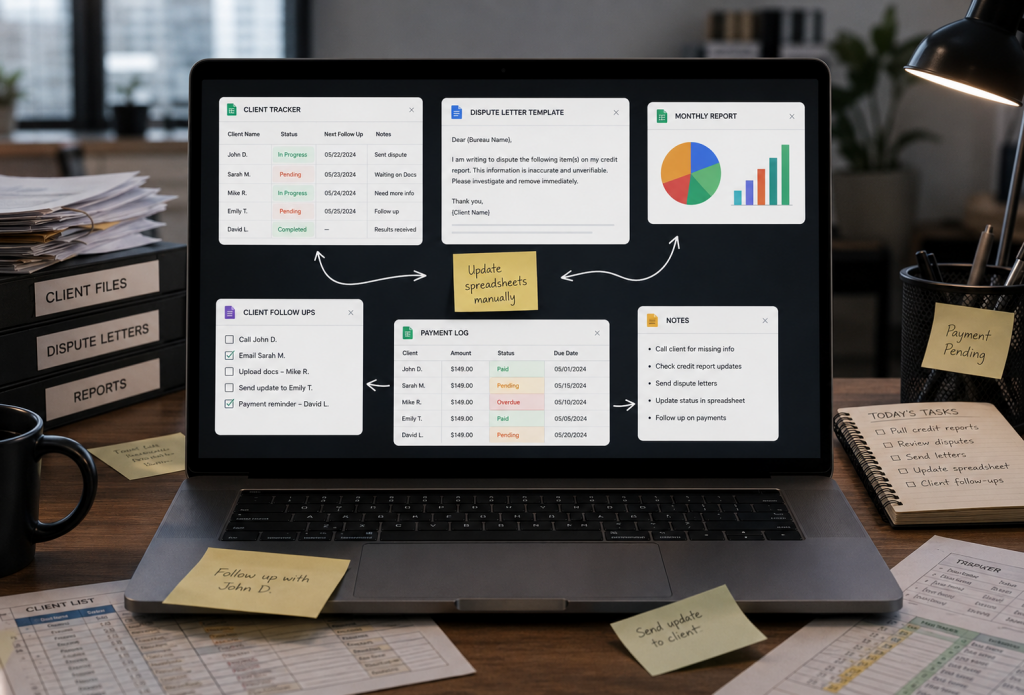
Startups and agencies often have lean teams wearing many hats. Instead of wasting time on tasks like updating spreadsheets, sending repetitive emails, or chasing approvals, workflow automation handles these routine jobs in the background. This frees up time and energy for creative problem-solving, strategic planning, and nurturing client relationships, all of which drive long-term success.
Flow is one of four ways to connect Zoho to other systems; our Zoho integration guide compares all four.
Benefits of Automation for Startups and Agencies
Faster task execution, approvals, and client updates
Fewer manual mistakes that could cost time or reputation
Smoother collaboration between teams and departments
Scalable processes that grow with your client base
Lower operational overheads and better use of resources
What Is Zoho Flow?
Zoho Flow is a powerful, cloud-based automation tool that helps startups and agencies connect all their favorite apps and automate workflows with zero coding. Part of the trusted Zoho suite, it’s designed for growing teams that need affordable, easy-to-use automation that scales with their business. Whether you’re managing marketing campaigns, sales pipelines, or client onboarding, Zoho Flow keeps things running smoothly.
Key Features of Zoho Flow
Drag-and-drop flow builds workflows visually, no coding is needed
1,000+ app integrations, including popular tools for CRM, marketing, and finance
Multi-step workflows with conditions, triggers, and custom logic
Webhook support for real-time data exchange
Automatic notifications and detailed logs so you always know what’s happening
Why Startups and Agencies Choose Zoho Flow
For startups and agencies that rely on Zoho CRM, Zoho Projects, or Zoho Books, Zoho Flow is a natural fit. It’s more cost-effective than many competitors like Zapier while offering deep, seamless integration with the rest of the Zoho ecosystem. Its user-friendly interface means your team can build and tweak automation quickly, saving time and driving growth without needing dedicated developers.
Zoho Flow vs. Competitors: Which Automation Tool Is Best for You?
When it comes to automating workflows, the right tool can save your business countless hours and resources. But with options like Zoho Flow, Zapier, Make (Integromat), and Power Automate, it can be tricky to decide which one fits your unique needs, especially if you’re a growing startup or agency.
Here’s a quick breakdown to help you choose wisely:
Zoho Flow vs. Zapier
Zapier is one of the most popular automation tools out there, known for its huge range of app integrations. However, if your business is already invested in Zoho apps like Zoho CRM, Zoho Books, or Zoho Projects, Zoho Flow offers much deeper, more seamless integration, and you’ll likely get more value for your money.
Zoho Flow vs. Make (Integromat)
Make (formerly Integromat) is loved for its powerful visual scripting and ability to handle complex, multi-step workflows. But it does have a steeper learning curve. Zoho Flow, on the other hand, keeps things simple with an intuitive drag-and-drop builder, making it a smart choice for small businesses and agencies that want to automate fast, without needing advanced technical skills.
Zoho Flow vs. Power Automate
Power Automate is an excellent solution for companies deeply embedded in Microsoft’s ecosystem. It’s robust but can feel overwhelming for lean teams. If your business primarily uses Zoho’s suite, Zoho Flow will feel far more straightforward and budget-friendly.
Zoho Flow vs. Competitors: Quick Feature Comparison
Here’s a snapshot to help you compare these tools at a glance:
| Feature | Zoho Flow | Zapier | Make (Integromat) | Power Automate |
|---|---|---|---|---|
| Ease of Use | Very user-friendly | Easy | Moderate learning | Moderate to complex |
| Best For | Zoho app users | Wide app range | Complex workflows | Microsoft users |
| Visual Flow Builder | Drag & Drop | Limited | Advanced visual editor | Visual builder |
| Cost-Effective | Affordable | Moderate | Moderate | Higher for SMEs |
| Zoho Integration | Deep integration | Basic | Basic | None |
Which Automation Tool Should You Choose?
If your startup or agency relies on Zoho apps and wants a simple, affordable way to automate repetitive tasks and scale processes, Zoho Flow is a clear winner. You’ll get tighter integration, an easier learning curve, and pricing that makes sense for small, growing teams.
Getting Started with Zoho Flow
If you’re new to workflow automation, getting up and running with Zoho Flow is refreshingly simple, even for startups and agencies with small teams.
Setting Up Your Zoho Flow Account
First, sign up or log in using your existing Zoho account credentials. Once you’re inside the Zoho Flow dashboard, you’ll find a library of ready-made templates to help you hit the ground running. Prefer to build your own? Use the intuitive drag-and-drop builder to customize flows that perfectly match your business needs, no coding required.
Understanding Triggers and Actions
At its core, every workflow is built around Triggers and Actions:
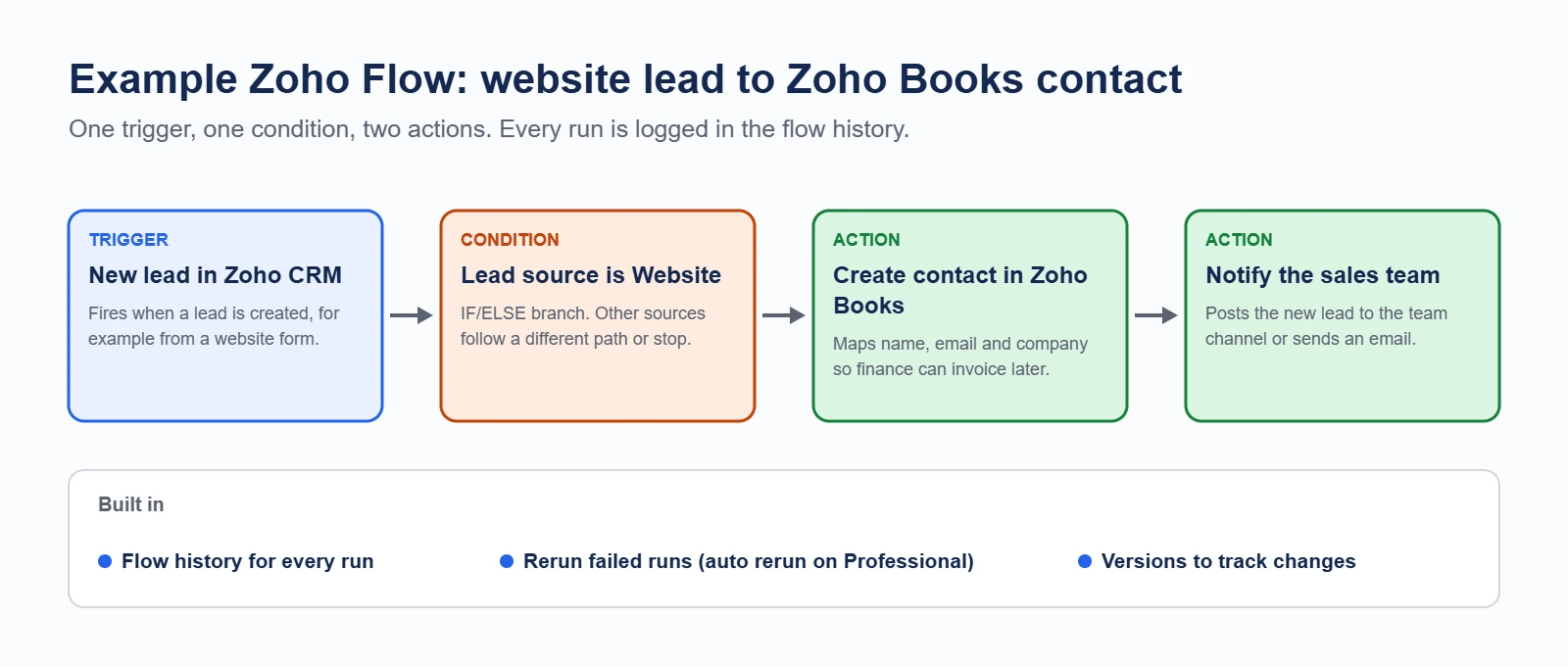
Trigger: This is the event that starts your workflow, like a new lead added to Zoho CRM or a new form submission on your website.
Action: This is what happens next, for example, sending an automated welcome email, updating a record, or creating a task in your project management tool.
Pre-Built vs. Custom Flows
Zoho Flow’s ready-made templates are perfect for automating common tasks quickly. However, you can also design powerful custom workflows that handle multiple conditions, branches, and complex scenarios using the visual editor, giving your business maximum flexibility.
Top Business Processes You Can Automate with Zoho Flow
Zoho Flow makes it easy for startups and growing agencies to automate routine business tasks and improve efficiency.
- Lead Management: Capture leads automatically from web forms, ads, or chatbots and sync them instantly with Zoho CRM; no manual data entry is needed.
- Marketing Automation: Use Zoho Campaigns or Mailchimp to trigger personalized email sequences when new leads come in or meet certain conditions.
- Customer Support: Automatically create support tickets in Zoho Desk and send real-time alerts to your team on Slack or Microsoft Teams, ensuring faster resolutions.
- Invoicing & Payments: Generating invoices with Zoho Books and send payment receipts after transactions through Stripe or PayPal is completely hands-free.
- HR Automation: Simplify onboarding with Zoho People by sending welcome emails, scheduling interviews, and updating employee records automatically.
- Project Management: Connect Zoho Projects, Trello, or Asana to assign tasks, track updates, and keep your entire team aligned without manual follow-ups.
Step-by-Step Guide: Creating Your First Zoho Flow
- Choosing the Right Trigger
Every workflow starts with a trigger, an event that kicks off your automation. For example, you might choose a new form submission, a lead added in Zoho CRM, or a payment received in Zoho Books. Selecting the right trigger ensures your process starts exactly when you need it to. - Adding App Connections
Next, connect the apps involved in your flow. Zoho Flow offers built-in connectors for 1,000+ popular apps, like Zoho CRM, Gmail, Slack, Trello, and more. This allows your apps to communicate without manual data entry. - Setting Conditions and Delays
Use conditional logic to create smarter workflows. For instance, add rules like, “If the lead source is Facebook, assign it to a social media sales rep.” You can also add delay blocks to space out tasks, great for scheduling follow-ups or avoiding back-to-back actions. - Testing the Flow
Before going live, always test your flow to ensure every step works as expected. Zoho Flow’s test mode helps you catch errors early, saving time and preventing workflow failures later. - Troubleshooting Errors
If something goes wrong, use Zoho Flow’s flow logs to trace each step, identify errors, and make quick fixes. This built-in troubleshooting saves hours of guesswork.
Advanced Zoho Flow Tips and Best Practices
- Using Conditional Logic
Take your automations further with IF/ELSE conditions. This makes your workflows dynamic, handling multiple scenarios in one flow. - Working with Webhooks & Custom Functions
Need to connect an external app not in Zoho Flow? Use webhooks to push or pull data. For specialized tasks, write custom functions to handle calculations or unique data formatting. - Error Handling and Versioning
Use Zoho Flow’s error handling to automatically retry failed steps. Keep different versions of your flows so you can roll back if you ever need to restore a previous setup. - Monitoring and Reporting Flows
Check performance in real-time. The dashboard shows flow runs, success rates, and any failed tasks so you can optimize workflows and scale confidently.
Popular Zoho Flow Integrations
Zoho Flow makes connecting your favorite business apps simple and powerful. For example:
- Zoho CRM + Gmail/Outlook: Keep your sales pipeline updated by syncing new leads and sending automated email alerts to your team, so no opportunity slips through the cracks.
- Zoho Books + Stripe: Automate billing and payment workflows. Generate invoices, confirm payments, and update records in Zoho Books automatically after successful transactions through Stripe.
- Zoho Forms + Google Sheets: Store form submissions directly in Google Sheets for easier data analysis and reporting, saving your team hours of manual data entry.
- Shopify + Zoho Inventory: Keep product information and stock levels synchronized in real-time, so your online store always displays accurate inventory data.
- Facebook Leads + Zoho CRM: Instantly capture Facebook lead ads data into Zoho CRM and trigger follow-up actions automatically to close deals faster.
Zoho Flow app integration recipes worth building first
Every Zoho Flow app integration is the same three parts: a trigger app, the event that fires it, and one or more actions in another app. The recipes below are the ones that remove the most re-keying in a typical small or mid sized US business.
| Trigger app and event | Action app and result | Manual work it removes |
|---|---|---|
| Shopify, new paid order | Zoho Books creates the invoice, Zoho Inventory decrements stock | Re-typing every order into accounting and stock |
| Stripe, payment succeeded | Zoho Books marks the invoice paid and posts the payment | Daily reconciliation against the payment gateway |
| Zoho Forms, new submission | Zoho CRM creates the lead, assigns the owner, sends the alert | Copying enquiries out of a form inbox |
| Facebook or LinkedIn lead ad, new lead | Zoho CRM creates the lead and starts the follow up sequence | Exporting lead CSVs from the ad platform |
| Zoho CRM, deal moved to Closed Won | Zoho Books raises the invoice, Zoho Projects opens the delivery project, Slack notifies the team | Three separate handovers done by hand after every sale |
| Zoho Desk, ticket breaches SLA | Slack or Microsoft Teams alerts the owner, CRM logs the escalation on the account | Someone watching a queue and chasing manually |
| Gmail or Outlook, email with a label | Zoho CRM logs the activity against the matching contact | Sales reps forwarding email into the CRM |
| Zoho People, new hire record | Accounts requested across the tool stack, onboarding checklist created | An IT onboarding email thread per joiner |
When a Zoho Flow app integration is the wrong tool
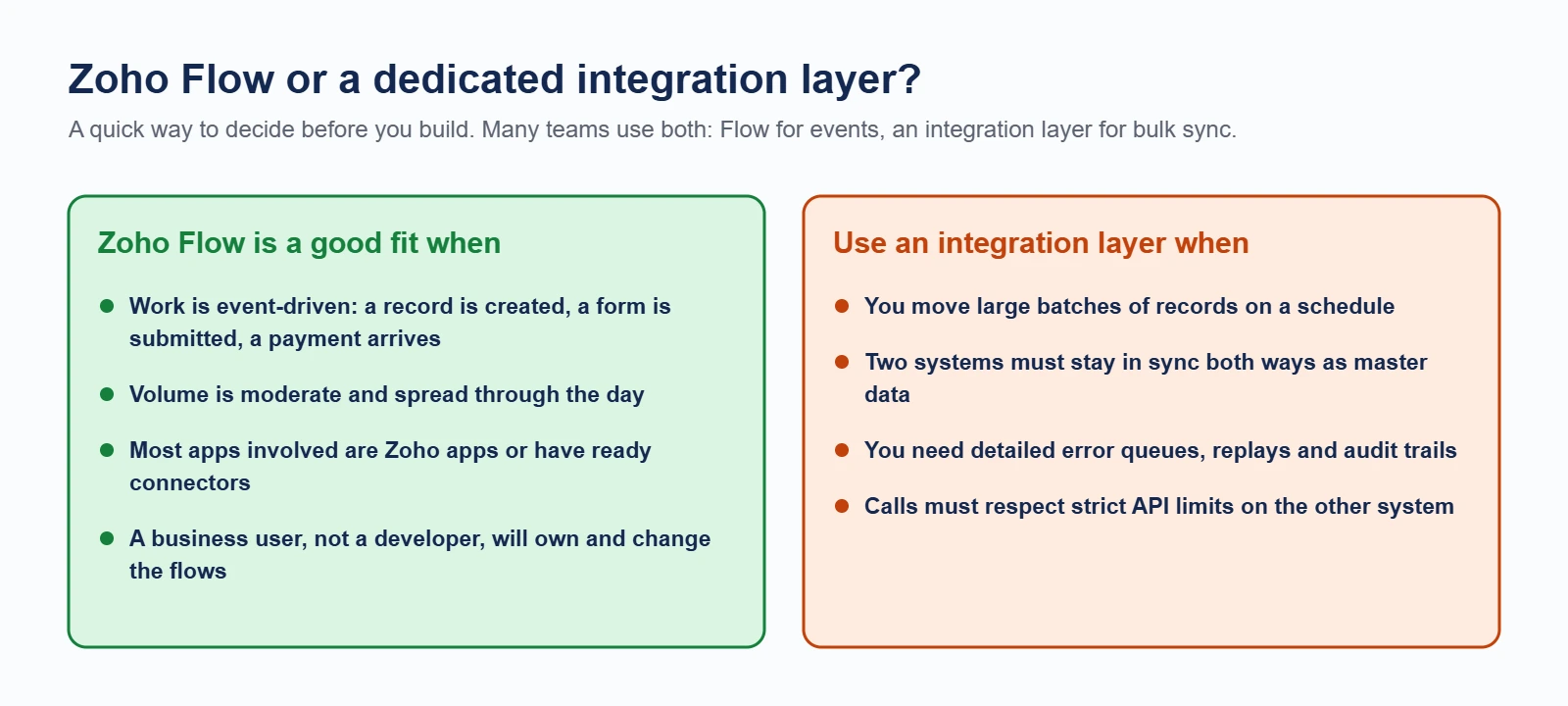
Zoho Flow is built for event driven work: something happens, a few things follow. It is not a data migration tool and not a batch sync engine. Three cases where it will disappoint you:
- High volume record sync. Moving thousands of records on a schedule belongs in a proper integration or a direct API job, not in a flow that fires per record.
- Complex conditional logic. Once a flow has more than a handful of branches it becomes hard to test and harder to hand over. A Deluge function inside Zoho CRM is usually cleaner.
- Two way sync with conflict rules. If both systems can edit the same field, you need an agreed source of truth and conflict handling, which a one directional flow does not give you.
Zoho Flow Pricing and Plans
- Free vs. Paid Plans:
Zoho Flow’s free plan is great for testing simple workflows but has limited flows and app connections. Paid plans unlock advanced features, multi-step workflows, premium integrations, and higher usage limits. - Which Plan Should You Choose?
For small businesses or freelancers, the Standard Plan is ideal. Growing startups and agencies often choose the Professional Plan for greater flexibility. Large enterprises can opt for Custom Plans to handle complex, high-volume automation. - ROI of Automation:
Companies using Zoho Flow often save up to 30% of their time by cutting repetitive tasks, reducing human error, and improving overall operational efficiency.
Zoho Ecosystem: Extend Automation Beyond Flow
- Zoho One: Manage Everything in One Place
One of the biggest strengths of Zoho Flow is how naturally it integrates with the entire Zoho One suite. Zoho One acts as your all-in-one business operating system, bringing together CRM, Books, Projects, People, and more under a single login. This means you can automate tasks across every department, saving time and boosting productivity without juggling multiple platforms. - Zoho Creator: Build Custom Apps Easily
When your business needs to go beyond ready-made apps, Zoho Creator lets you build custom applications with low-code tools. You can automate unique processes, collect specific data, and create workflows tailored to your exact needs, all while seamlessly connecting these apps to Zoho Flow for end-to-end automation. - Zoho Analytics: Make Data-Driven Decisions
Once your workflows are humming, Zoho Analytics helps you turn all that automated data into actionable insights. Build powerful reports and interactive dashboards to monitor workflows, spot inefficiencies, and track KPIs in real time. This synergy ensures you’re not just automating, you’re optimizing every process with clear, data-backed decisions.
Together, Zoho Flow, Zoho One, Creator, and Analytics empower startups, agencies, and growing businesses to scale smarter with a truly connected automation ecosystem.
FAQs
Is Zoho Flow free to use?
Yes, there’s a free plan that’s perfect for getting started, but it includes a limited number of flows and tasks per month.
Can I integrate non-Zoho apps?
Absolutely! Zoho Flow connects with 1,000+ third-party apps like Slack, Gmail, Stripe, Shopify, and many more.
How secure is Zoho Flow?
Zoho maintains enterprise-grade security standards, ensuring your data and workflows remain secure and compliant.
Are there limits on the number of flows I can run?
Yes, flow and task limits depend on your plan. Paid plans offer higher usage thresholds and advanced features for growing teams.
What is a Zoho Flow app integration?
It is a connection built in Zoho Flow between two or more applications, made up of a trigger event in one app and one or more actions in the others. No code is written. The connection is configured by choosing the apps, authorising them, and mapping the fields that should carry across.
Which apps can Zoho Flow integrate with?
Zoho Flow ships with 1,000+ prebuilt app connectors covering the Zoho suite plus common outside tools such as Shopify, Stripe, Slack, Google Workspace, Microsoft 365, Mailchimp and QuickBooks. Anything without a connector can still be reached through the generic webhook and custom function steps, provided that app exposes an API.
How long does it take to build a Zoho Flow app integration?
A single trigger with two or three actions is usually a morning of work including testing. Most of the time goes into agreeing the field mapping and deciding what should happen when a record does not match, not into building the flow itself.
Conclusion
In today’s competitive market, workflow automation isn’t just about saving time; it’s about staying ahead. With Zoho Flow, your business can automate repetitive tasks, reduce manual errors, and improve team collaboration effortlessly. When you combine Zoho Flow with the wider Zoho ecosystem, including Zoho One, Zoho Creator, and Zoho Analytics- you unlock a connected automation powerhouse that helps your business scale faster and operate smarter. Whether you’re a startup, agency, or a growing enterprise, investing in the right automation tools will free up your team to focus on growth and innovation instead of mundane admin work. Ready to streamline your workflows with Zoho Flow? Ashapura Softech is here to help you implement, customize, and get the most out of your Zoho apps. Contact us today at [email protected] and let’s build a smarter, automated future for your business together.